Inexplicable Cocoa Ligature Problem Solved
Dan Knight - 2006.05.09 - Tip Jar
Low End Mac Reader Specials
Download Typestyler, still the Ultimate Styling Tool for Internet, Print and Video Graphics. Works great in Classic with a Native OS X Version on the way. Free Tryout: www.typestyler.com
LA Computer Company: LA Computer Company: Specials on AppleCare, Apple Displays, MacBooks, iMac's, MacBook Pros, Laptop and iPod accessories and more. Apple A/C Adapters for laptops starting at $25.00 Call 1-800-941-7654 or Click Here.
OWC: Mercury Elite FW800/FW400/USB2/eSATA up to 2.0TB TOP-RATED Solutions offer High Performance, Reliable storage for all your data storage needs. 500GB $159.99, 750GB $199.99, 1.0TB from $299.99
Mac users can finally play Party Poker for Mac. Not only that, they can also learn how to play PokerStars for Mac.
Laptop Hardware Provided by TechRestore - Overnight Mac & iPod Repairs.
Compare products like desktop computers, laptops, and LCD TVs side by side! All the information and reviews to make the best purchasing decision for a new cell phone GPS products or MP3 players. The Ciao network makes searching products easy for you.
New iMac 800Mhz Memory 4GB $98, 2GB $50. Click to Maximize your Macs...
Last week I explained a problem I was having with GyazMail and a few other Cocoa apps. I would type "f" followed by "i" or "l", and my eMac would automatically replace "fi" with fi and "fl" with fl. It would also use smart quotes.
This had been going on for months, and I couldn't find any way of changing this behavior. It didn't impact my classic apps or Carbon programs, only software that used Cocoa.
I received dozens of emails in response to Cocoa Ligature Behavior Can Drive You Crazy, and most of them made the same two suggestions:
- Use a different font - one that doesn't support ligatures.
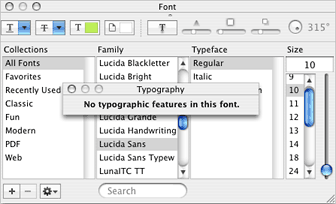
- Open the Font Panel (cmd-T, shown below), select my font, click on the gear, choose Typography (second image below), and turn off Common Ligatures.
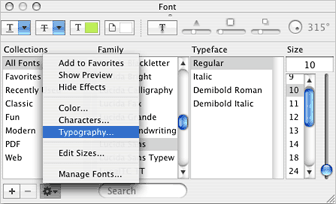
The problem with the first suggestion is that the font I was using, Lucida Sans, says it doesn't support typographic features such as ligatures. And the problem with the second suggestion is that because GyazMail is a plain text only email program, its author has no need to support the Font Panel.
I was stymied - and then I received an email from Lyle Eslinger that simply stated, "You have probably run across this post, but in case not: http://lists.apple.com/archives/Cocoa-dev/2005/Apr/msg02212.html"
That article, Re: 'fi' ligatures [solved], pointed me to the solution. Ricky Sharp wrote:
"Thanks to an off-list tip that I may be using a different font than others, I tracked the problem down to having two sets of Courier and Monaco in my Font Book. Specifically, I saw two entries for Regular and two for Bold. Deleting one of them removed the problem; I was able to view all my mail messages as they should be (i.e. 'f' and 'i' never combined anymore)."
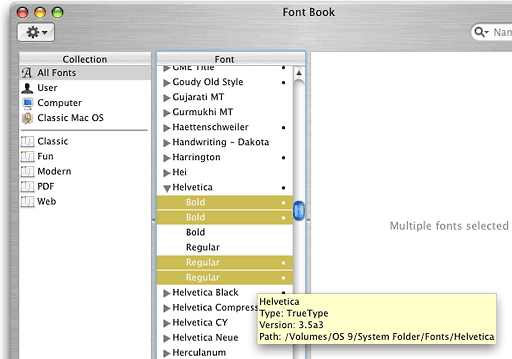
I went to Font Book and discovered that I also had two (and rarely three) versions of the same font, one on my OS X partition and another one being accessed from my OS 9 partition. Disabling the pre-OS X versions of these fonts immediately solved my problem.
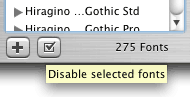
If you open Font Book, you'll see fonts with multiple
copies marked with a dot (see above). If you open the marked fonts,
you'll see the older versions of these fonts also marked with a
dot. Select them (opt-click) and then click the disable button (a
boxed check mark, see image on right). Confirm this, and problem
solved.
I later discovered an even easier way to disable duplicates. Select a bunch of the font names with a dot behind them (option-click them), open the Edit menu, and select Resolve Duplicates. It's a lot faster.
No explanation as to why OS X is doing this weird stuff, but at least there's a way to fix the problem.
If you're running into weird type problems, like the ones I was
seeing with ligatures, give the Font Book a try. Apple's free tool
just might do the job.
Dan Knight has been using Macs since 1986, sold Macs for several years, supported them for many more years, and has been publishing Low End Mac since April 1997. If you find Dan's articles helpful, please consider making a donation to his tip jar.
Recent Mac Musings
- PowerPC's last chance: The Mac's history with the G5 CPU, 06.24. The introduction of the G5 Power Mac in June 2003 promised a bright 3 GHz future, and failure to achieve that paved the way to today's Intel Macs.
- 16:9 computer displays: Let's not go there, 06.17. "...there's no reason our computer displays should match the proportions of our television displays."
- Left behind by Mac OS X or up to date with Linux?, 06.04. If you wanted up-to-date software, you may need to run the latest version of Mac OS X. But what if it won't run on your hardware?
- More in the Mac Musings index.
Recent Content on Low End Mac
- Mac Pro overclocking, Windependence with Darwine, Blu-ray for Macs, and more, Mac News Review, 07.04. Also more on running Leopard on non-Apple hardware, Ubuntu on a Mac mini, the first autofocus webcam with Zeiss optics for Macs, and more.
- Wouldn't life be great with an iSlate?, John Hatchett, Recycled Computing, 07.04. PDAs and smartphones are too small for some tasks, full-fledged Tablet PCs are overkill, and ebook readers are too limited. Apple has the tech to own this niche.
- Mac of the Day: Original iMac G3/233, Aug. 98 - The Bondi blue wonder that bounced Apple back to profitability and into the public eye.
- List of the Day: Mac Pro List is for those using a Mac Pro.
- July 5 in LEM history: 98: The iMac: First of a family? - iMac Perfect for schools - 00: Apple is not your friend - 01: 75 Mac Advantages - Do you trust me? - 02: The joy of X with Classic - The good, the bad, and the intrusive - 05: No Quartz Extreme for Pismo - A brief history of NeXT - 06: Education iMac - iTunes and the French interoperability law - TopXNotes - Apple's secret battery reset utility - Misleading hard drive capacity
- The Macintosh Portable started a notebook revolution, Carl Nygren, Classic Macs in the Intel Age, 07.03. Before Apple introduced the Mac Portable, notebook computers were text-based and ran MS-DOS. Ever since, graphical interfaces have been the norm for laptops.
- More links in our archive.
About LEM | Support | Usage | Privacy | Contacts


