Mac Musings
The Intel Mac mini Value Equation
Daniel Knight - 2006.03.01
It's hard to say which was the bigger surprise - Apple announcing the Intel-based Mac mini with immediate availability, Apple adding Bonjour support to Front Row, or Apple raising the price of the Mac mini by US$100.
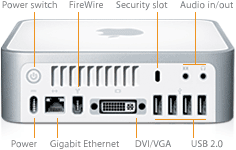
The new Mac mini looks like the old one, but it's a whole new computer inside. The 1.5 GHz Intel Core Solo and 1.66 GHz Core Duo replace the G4 CPUs found in the 2005 Mac minis. Bluetooth 2.0 and AirPort Extreme are now standard on both models, and the new model sports four USB 2.0 ports.
When 512 MB Is Less than 512 MB
The faster model has a dual-layer SuperDrive, and both models support up to 2 GB of RAM and use an Intel graphics processor. The Intel GPU doesn't have dedicated video memory. Instead, in a trick common on the low end of the Windows world, the GPU uses system memory, stealing 80 MB from what would be available to your applications.
In other words, video is going to consume 1/8 of your Mac mini's memory, leaving you with just 432 MB for the operating system and your programs. Then bear in mind that Rosetta is a memory hog, and a 512 MB configuration is going to be further limited.
 Based on abstract
integer and floating point benchmarks, Apple continues to claim
huge speed improvements that can't be substantiated in the real
world. Regardless, the new Intel-based Mac mini will be faster than
the old Mac mini as long as its running "universal binary"
software. But it will be slower when using Rosetta to run older
PowerPC software.
Based on abstract
integer and floating point benchmarks, Apple continues to claim
huge speed improvements that can't be substantiated in the real
world. Regardless, the new Intel-based Mac mini will be faster than
the old Mac mini as long as its running "universal binary"
software. But it will be slower when using Rosetta to run older
PowerPC software.
No Easy Answers
The switch to Intel CPUs changes the entire value equation. Yes, the new CPUs are quite a bit more powerful, but that doesn't necessarily mean the new Macs will be faster than the old ones. That depends on whether you're running software designed for the new Intel processors or the old PowerPC ones.
Rule of thumb: Universal binary applications - those compiled to run on both PowerPC and Intel CPUs - will run faster on Intel Macs. PowerPC software will run faster on PowerPC Macs. Which will be faster overall depends on your own software mix and will lean further toward the Intel Macs over time as more and more programs are rewritten or recompiled as universal binaries.
If you need Classic mode, however, the value of PowerPC Macs is clear. The new Intel-based Macs have no official Classic mode support. If you depend on one or more Classic apps - as we do at Low End Mac - it's not time to go Intel.
Mac mini vs. iMac
We can compare the value of the Mac mini to that of the iMac Core Duo. The US$799 Mac mini has 512 MB of RAM, a 1.66 GHz Core Duo CPU, and a dual-layer SuperDrive. The US$1,299 iMac is a bit faster (1.83 GHz) and includes a keyboard, a mouse, a built-in 17" 1440 x 900 display, and an internal iSight webcam.
The iMac uses a 3.5" hard drive, which is going to be more responsive than the 2.5" notebook drive in the Mac mini, and it has dedicated video memory, so you don't lose 80 MB of system RAM for video.
If you shop around, you can get a nice flat panel display for about US$300-350. The rest of the difference in price is for a slightly faster CPU, integral iSight, a "free" mouse and keyboard, and the convenience of an all-in-one design.
Unless portability was a concern, I'd say the iMac is worth the extra money. But if you want a Mac you can tote between home, work, and school, the Mac mini merits consideration.
Intel vs. G4
There are tradeoffs in comparing the PowerPC Mac mini and the new Intel model. The Mac mini used to have an internal modem and dedicated video memory. The Intel Mac mini has no internal modem (Apple sells a $49 external USB modem separately) and steals 80 MB of RAM from main memory, both of which should help reduce costs.
Yet the new Mac mini retails for US$100 more than the old one. What you get that the old US$499 Mac mini didn't have: AirPort Extreme, Bluetooth 2.0, two more USB 2.0 ports, a wireless remote control, one more RAM slot, and a higher capacity hard drive.
I'd just as soon Apple had left AirPort and Bluetooth out so they could keep the price at US$499.
The faster Mac mini is also US$100 more than the model it replaces - or maybe we should say it's the same price as the old SuperDrive model. In this case the previous model already included AirPort Express and Bluetooth 2.0, and the stock 80 GB hard drive is the same size as before. You do gain the ability to burn dual-layer DVDs.
Performance Estimates
It's safe to say that the 1.5 GHz Mac mini Core Solo will be slower than the 1.66 GHz Mac mini Core Duo across the board. The question is how much faster will the dual-core CPU be than the single-core one.
That's not a stupid question. Although two CPUs or two cores can potentially run twice as fast on specific tasks, in the real world the gain is reduced by the work done to synchronize the work of two or more CPUs.
In comparing dual CPU Power Macs to single CPU ones, for instance, a dual 533 MHz G4 will tend to offer more power and smoother performance than a single 733 MHz G4. But go to 800-867 MHz, and that faster CPU may outperform a pair of slower ones.
Two cores doesn't just mean more raw power. As anyone who has used a dual CPU or dual-core Power Mac with OS X will tell you, the whole system feels more responsive when a single core doesn't have to do all the work. In that respect, the 1.5 GHz Core Solo Mac mini may seem a lot slower than the 1.66 GHz Core Duo model. This will probably be a significant factor with Rosetta.
With a faster CPU and dual cores, the 1.66 GHz Mac mini should benchmark anywhere from 10% to 122% faster than the single-core 1.5 GHz model.
Update: Primate Labs reports the overall performancs of the Mac mini CPU and memory system using Geekbench:
- 1.25 GHz G4, 727
- 1.5 GHz G4, 802
- 1.5 GHz Core Solo, 1459
- 1.66 GHz Core Duo, 2157
We can readily see that the 1.5 GHz Core Solo model is nearly twice as powerful as the 1.5 GHz G4, but the 1.66 GHz Core Duo Mac mini has nearly 50% more processing power than the 1.5 GHz Core Solo. The CPU clock speed only acccounts for 11% of the difference, the second core for the rest.
Value
There are two significant differences between the Mac mini Core Solo and the Mac mini Core Duo: the CPU and the SuperDrive. You can upgrade the Core Solo model to a SuperDrive for US$50 extra, bringing the price difference to US$150.
Apple also charges US$50 more for the 80 GB hard drive than the stock 60 GB one in the Core Solo, but we'll ignore that for now. Let's peg the essential difference as being the CPU. For US$150 more you get an 11% higher clock speed and double the number of cores. That's 23% more money for 122% more raw power. (Or 23% more money for 48% more horsepower based on the Geekbench results noted above.) Kind of a no-brainer!
If you're ready for the Intel transition - that is, if you don't depend on any Classic apps and won't be too bogged down running older PowerPC software under Rosetta - expect the Mac mini Core Duo to offer at least 80% more real world power on average than the Core Solo model. (According to Geekbench, it's more like 48%.) That's where the value is.
So who should buy the Core Solo model? People who don't do a lot of "heavy lifting" with their computers. If you're browsing the Web, reading email, using Apple's iApps, and don't need to edit video or rip your CDs in iTunes at maximum speed, you'll probably be very happy with the US$599 Core Solo model. It's probably more than enough for the classroom and use with your television.
That said, if you want to record TV off the air (there are several good devices for adding the capability to the Mac) and may want to edit out the ads and burn those files to DVD or convert them for use on a video iPod, you'll probably be a lot happier with the Core Duo model.
If only Apple offered these for US$100 less without wireless (Bluetooth 2.0 and AirPort Extreme) for those who don't need or want them, I'd be really tempted to connect one to the TV.