
A few weeks ago, a kind reader asked if I’d be interested in his old PowerBook 1400, a 1997 laptop that he didn’t use any longer. As the publisher of Low End Mac and someone who remembers the 1400 fondly, I couldn’t resist.
For newcomers, a word of introduction. The PowerBook 1400 has a 9″ deep, 11″ wide footprint – just a bit larger than a standard 8-1/2″ x 11″ sheet of paper here in the US. It i 2″ thick, has an 800 x 600 pixel display (big in that era), and one of the nicest keyboards you’ll find in a laptop.
The 1400 only had a few drawbacks. Battery life was about two hours, something you’d expect of a Windows laptop but not a PowerBook. There was no built-in modem or ethernet. Memory topped out at 64 MB, which wasn’t a big deal under the classic Mac OS. Finally, the entry-level 117 MHz model didn’t have a level 2 cache, so performance was fairly lackluster.
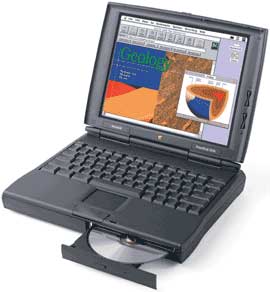 The 133 MHz and 166 MHz versions offered respectable performance with Mac OS 7.6 through 8.6, but even with 64 MB of RAM, they’re pretty sluggish under OS 9.x.
Yes, I said “they” – as much fun as I was having with the PB 1400cs/133, it didn’t have a floppy, so I had no way to install RAM Doubler (RAM Doubler 8 can triple memory!) or the Eaglefeather font. I found a 1400c/166 offered on the LEM Swap list that included 3 CD-ROM drives, 2 floppy drives, several batteries, a PowerBook Duo AC adapter, and the Mac OS 7.6 CD that shipped with the 1400.
I thought the 1400cs was nice. Performance was decent, although the ancient hard drive is poky, and the screen was nice. This one had been tricked out with 64 MB of RAM (the most it allows) and an internal NewerTech ethernet card. It also has a PCMCIA modem that I’ll probably never use.
The 1400c has an active matrix display, and setting the two machines side-by-side made it obvious how much better the active matrix screen was. Where the 1400cs screen kind of shimmered and didn’t have especially intense color, the 1400c’s active matrix display provides pure, rich colors with no shimmering whatsoever.
The downside is that the 1400c, while faster and having the better display, only has 48 MB of RAM and doesn’t have ethernet. Future project: Disassemble both and max out the 1400c.
I did a fair bit of online research. I learned that there are 802.11b PCMCIA cards available that will let you connect to an AirPort network and most other modern WiFi networks. I found out that 1400s may sometimes have problems with hard drives over 8 GB. But most of all I found that a lot of people still love their 1400s because they have a great keyboard, a very nice screen, decent performance under the classic Mac OS, and all this in a fairly compact package. (The 12″ iBook has a slightly larger footprint, but it’s only 1.35″ thick.)
Flash Me
One topic that kept popping up was running the 1400 from flash memory instead of a hard drive, so I decided to do some experimenting using 4 different Compact Flash (CF) cards, two different CF/PCMCIA adapters, the 1400cs/133, and three different versions of the Mac OS.
The first thing you notice when booting from flash memory is the silence. It’s quiet, and startup time is comparable to using a hard drive. I also learned that while a 128 MB CF card is plenty big for storing Mac OS 7.6.1, there isn’t enough free RAM for you to use flash memory for virtual memory. If you want to do that, you’ll need a bigger flash card or have to use the hard drive.
Mac OS 8.6 fits very comfortably on a 256 MB card with plenty of room for a virtual memory (VM) swap file, some applications, and some work files. Mac OS 9.1, which is what came installed on the 1400cs, pretty much requires a 512 MB card if you want room for VM, apps, and work files.
I ran a lot of different benchmark tests on an old 8 MB CF card as well as the 128, 256, and 512 MB ones. One thing I discovered is that smaller cards score better on drive benchmarks, so for best performance don’t use a higher capacity card than you need.
I also found that in some benchmarks, CF performance matched hard drive performance. The numbers were almost identical using SpeedRun, but quite different using Speedometer 4.02. Speedometer rated the internal hard drive 1.49, the 8 MB CF card 0.94-0.96, 128 MB 0.84, and 256 MB 0.74-0.75. There were slight variances depending on which PCMCIA adapter I used and HFS vs. HFS+ formatting.
The only standout was a 512 MB SanDisk Ultra II card, which turned in an impressive 1.31 drive rating – nearly as fast as the 1400’s lackluster hard drive. This was the only “high speed” CF card I had to test, and it scored almost twice as high as the unaccelerated 256 MB card.
My conclusion is that the PCMCIA bus is the limiting factor, since the SanDisk Ultra II is rated as being several times faster than my older CF cards. In other words, an accelerated card is an improvement over a “plain Jane” Compact Flash card, but you won’t benefit from excessive memory speed because the PCMCIA bus can only move data so fast.
Operating Systems
I’d hoped to be able to test the 1400 with System 7.5.3 (which requires the PowerBook 1400 Enabler) and Mac OS 8.1 in addition to the operating systems I did test, but I have been unable to locate the 1400 Enabler or my OS 8.1 install CD.
Mac OS 7.6 is very stable and quite responsive. Its biggest drawback is that it doesn’t support HFS+ volumes, something Apple introduced with OS 8.1. OS 7.6 feels a bit old but works quite nicely, and it requires a lot less storage space than newer versions.
Mac OS 8.6 is also quite stable and feels about as responsive as 7.6. You gain HFS+ support, and there are some more modern Mac programs that won’t run on 7.6. I’m going to suggest that Mac OS 8.6 is probably the ideal OS for the PowerBook 1400.
Mac OS 9.1 is big and bloated and sluggish on the 1400. If you have an application that requires Mac OS 9 or later, that would be the only reason I would see for using it.
CyberDog
Anyone remember CyberDog, Apple’s original browser? It came on the OS 7.6 install CD, and I used it for the first time in my life. I discovered that Low End Mac is very usable on CyberDog and an 800 x 600 display.
I also player around with iCab and WannaBe, two other popular browsers for the classic Mac OS. [Publisher’s note: This was written long before Classilla ported Firefox to the Classic Mac OS.]
Conclusion
I haven’t spent as much time with these 1400s as I’d like to, but I’ve enjoyed the trip down memory lane. Yes, 166 MHz feels a bit slow these days. Yes, 64 MB isn’t a whole lot of RAM. But for basic word processing, email, and even Web browsing, it’s quite usable.
I haven’t done any tests of battery life or hard drive vs. CF, but I do like the quiet operation when booting from and saving files to flash memory.
I still need to experiment with RAM Doubler (neither floppy will run the installer), which can emulate up to 192 MB of RAM. And I want to look into faster, higher capacity, low-cost laptop hard drives – at least for the 166 MHz PowerBook.
No, the 1400 won’t be going to Macworld Expo with me, but I think it’s going to make a very nice field computer for times I don’t want to take my 400 MHz PowerBook G4 with me.
Keywords: #powerbook1400
Short link: http://goo.gl/kQF1vu
searchword: powerbook1400
