
eHarmony stands apart from the other online dating services. Not only does it give you an exhaustive personality profile for free, it also guarantees dates if you subscribe for at least three months.
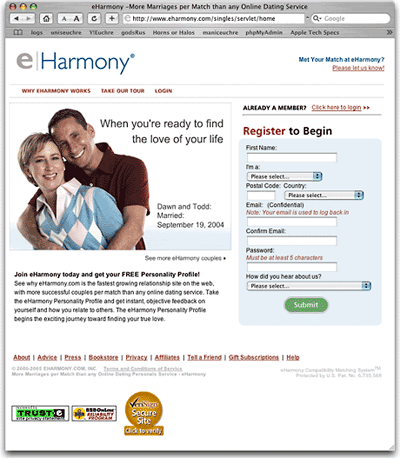
eHarmony’s claim to fame is matching people using 29 different factors, and, based on my use of the service, its personality tests appear to be quite accurate.
If you watch TV, you’ve probably seen eHarmony’s television ads. They don’t make a big deal about how many members eHarmony has. They don’t claim, “Better first dates. More second dates.” Instead, the ads show results. Dawn and Todd, married September 19, 2004.
Nothing speaks like results, and eHarmony has been producing results for over five years.
One big difference between eHarmony and the other online services I’ve look into is that you don’t search for your own matches on eHarmony. The eHarmony staff and its software help manage your searches, pointing you toward people they believe might be a good match for you.
Some people like that, and I’ve talked to others who are leery about it. Based on early results (I’ve been a subscriber for one week), I like what I’m seeing.
The first thing I noticed about eHarmony is the positive spin it puts on things. eHarmony gets right down to who you are, so you’re not spending a lot of time coming up with a clever ID (I’m simply known as Dan there), a catchy headline, and an inviting description.
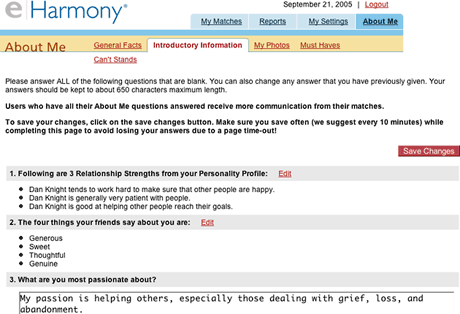
My profile tells readers that I tend to work hard to make sure others are happy, am generally patient, and am good at helping others reach their goals. Others think of me as generous, sweet, thoughtful, and genuine. These aren’t the kind of things I’ve put in my profiles on the other sites; eHarmony identified this through its personality tests.
This is also the kind of information I read about the women eHarmony recommends. As with the other services, I’ve declined some matches because of distance (with eHarmony, a 60 mile search radius can yield matches 90 miles away – on a par with the other services), one for very poor writing, and none because something in their profile raised a huge red flag.
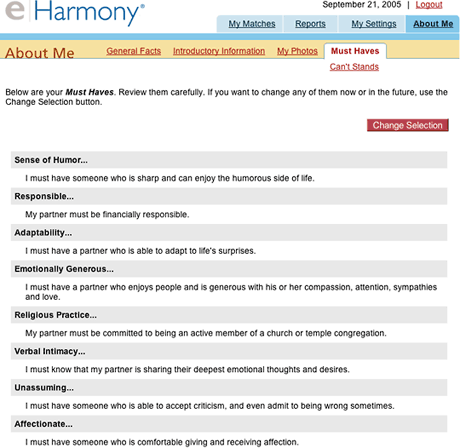
I also like the way eHarmony deals with likes and dislikes. It asks you early in the process to identify ten factors your partner should have (Must Haves) and ten you don’t want (Can’t Stands). If you don’t come up with ten before eHarmony starts making matches, they’ll ask you to complete the process as you work through your first match.
Matches are an involved process at eHarmony. First eHarmony suggests some matches, and then you and your prospective match view each other’s profiles. If one of you likes what you see, you ask five close-ended (multiple choice) questions and wait for a reply. Your match will hopefully answer your questions and ask you five in return.
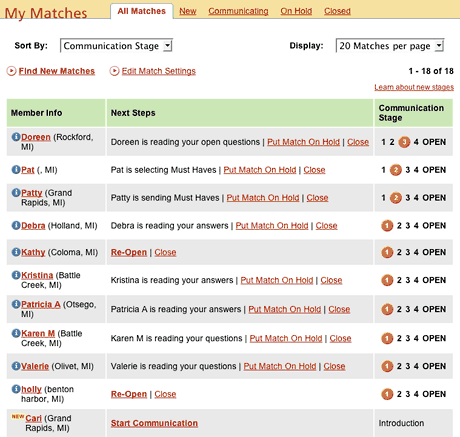
One nice feature at eHarmony is that you’re actually using someone’s name, not a clever ID. I’m Dan. I’ve been matched with Doreen, Pat, Patty, Debra, Kathy, Kristina, and several others. I’ve closed two matches due to distance, have several at Stage 1 and Introduction, and have only closed a few matches (often because she’s just met someone).
eHarmony has a very nice page that reports that status of every current match:
The next step is three open-ended (essay) questions from a big list – or you can make up your own. Here are the questions asked by the first person to reach this stage with me:
- What do you find physically attractive?
- Describe your spirituality.
- How big is your extended family? What are the holidays like for you and your family?
The first one really put me on the spot, but the other two were easy. I have to admit that I’m a big fan of the female form. I like just about every part – legs, posterior, abs, breasts, neck, lips, eyes. And I’m becoming a real fan of the back since I started doing massage therapy.
This is a question I’ve never been asked before, and I had to qualify it. Beauty is in the eye of the beholder, after all, and being in love makes your partner appear more attractive to you than to others. And there’s more to physical attractiveness than looks – there’s also confidence and body language. In the end, however nice the package, it’s the person wearing the skin that counts.
I spent a lot of time on that one. The other two, as I said, were easy to answer.
I answered these and sent three of my own:
- What do you think are the three best traits you have to offer a partner?
- Describe your spirituality.
- What do you find physically attractive? How important is physical attractiveness (vs. physical attraction) in a relationship?
I chose one new question from eHarmony’s list, gave one question back unchanged, and pushed a little further on the question that most challenged me. It was interesting to read her response.
This is Stage 3 of a five stage process. When we finish Stage 4, Dr. Warren emails his communication primer, and we’re able to correspond directly. The matching process is complete when both parties are communicating openly. From that point on, we write what we want, ask what we want, and decide how to proceed.
For those who think things are really going well and want to skip ahead, eHarmony has a FasTrack option that both parties would have to agree to.
eHarmony is different from the other online dating services. It doesn’t give you some tools and send you out on your own. eHarmony invests its own resources in making matches and walks you through a process that should provide a solid foundation for dating.
That comes at a price. eHarmony ain’t cheap. One month costs $50, three is $100, and a year is $250. You might want to search online for coupons – I managed to get six months for the price of three, and this morning they sent an email offer of three months for the price of one.
I created my eHarmony profile a month ago, but I didn’t become a subscriber until last week, since I was away learning massage therapy for a week. I’ve made it to open communication with three women and am at Stage 4 with two more.
I’ve been impressed with the profiles they’ve sent my way, and I met my first eHarmony match Friday evening. I think it went very well – I felt comfortable from the start, enjoyed meeting some of her family and friends, and we spent a lot of time just talking. We’ll see where that goes.
The whole process really makes you think. What do you want and not want in a partner? Which questions do you want to ask this match? How are you going to answer that question? It brings you well beyond the casual level before you reach open communication, and it gives you a lot of good information you can use when you reach that stage.
As I approach the final stage, I go back and print out a dossier for the match, everything from the first questions to the last one. I grab a pen, reread the answers, make some notes, and start the conversation.
If you’re tired of all the matching work you have to do with the other services and want some help in making a better match, eHarmony merits serious consideration.
- Online Personals: Dating for the Internet Generation
- Using Yahoo! Personals
- Working with Match.com
- Tips for Getting the Most Out of Online Personals
Keywords: #onlinepersonals #datingsites
searchword: eharmony
