Low End Mac Reader Specials
TypeStyler For Mac OS X is Now Shipping! Download The Free Fully Functional 60 Day Tryout at www.typestyler.com
Don't install Parallels to play poker online! Poker Mac will show you how
to download and install a native Mac poker application such as Full
Tilt Poker Mac.
Laptop Hardware Provided by TechRestore - Overnight Mac & iPod Repairs.
Compare products like desktop computers, apple laptops, apple macs, and LCD Monitors side by side! All the information and reviews to make the best purchasing decision for new mobile phones, sat nav systems, or MP3 players. The Ciao online shopping community makes searching products easy for you.
Mac Musings
Of Mice and Keyboards
Dan Knight - 2005.05.25 - Tip Jar
One of the best things about the Mac mini is that it doesn't come with a cheap mouse and keyboard - and cheap is what Apple's mouse and keyboard are these days.
In the era of Apple's round mouse and the compact iMac keyboard, the first peripherals we bought for any new Mac - iMac or Power Mac - were a decent mouse and keyboard. If you're going to be spending hours at the computer, you deserve quality input devices.
Keyboard
If you spend a lot of time typing, get a keyboard that has a good feel to it. If you spend a lot of time mousing, find a mouse that feels good in your hand and gives you the buttons you need.
In the old days, Apple made some of the finest keyboards in the industry. The Apple Extended Keyboard is the stuff of legends, and Matias has done a good job resurrecting that quality with their Tactile Pro USB Keyboard (see Has the Best Keyboard Apple Ever Made Been Resurrected?).
I'm not saying Apple or Matias make the best keyboard ever, only that they are among the best. Others can debate that to their heart's content - as they've been doing in The Best Mac Keyboard? I Beg to Differ and other Miscellaneous Ramblings columns.
Whatever the best keyboard for the Mac, it isn't the mushy one Apple shipped with my eMacs. My four-year-old PowerBook G4 has a better keyboard, and I'm none too fond of it.
Keyboard choice is subjective. Perhaps you like a stiff action. Perhaps you like something that only needs a soft touch. Regardless, it's the kind of thing you want to try before you buy.
I never buy a keyboard without going to CompUSA, Office Max, or Office Depot, getting a feel for almost every keyboard in the place, revisiting some favorites, and then settling yet again on the same Logitech keyboard.
It's a personal choice, but I really love the feel of the Logitech Cordless Keyboard. I don't really care one way or the other whether it's wireless. It's nice to be able to sit back with the keyboard in my lap and not have to worry about cables catching, but it's certainly not a make-or-break feature.
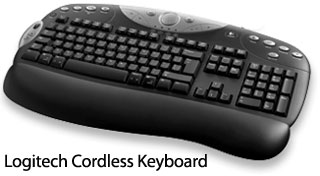
This keyboard has some nice features: a scroll wheel, a volume knob, a dedicated mute button, and a sleep/power button. The pair of AA batteries lasts a long, long time, and the only thing I really don't care for is that it's a black keyboard and hard to read in low light.
The same keyboard is available in a USB version as the Logitech Elite Keyboard.
Mouse
Mice are another subjective area. Some people like trackpads. Some people love trackballs. Most of us prefer mice, and most Mac owners buying a mouse are looking for something with more than Apple's single button.
Again, I go to the
store, grab the mice, move them around, pick them up, get a feel
for them. I've seen some nice new mice with side-scrolling, and
again I settle on a Logitech product. The Cordless MX700 Mouse fits
my hand very nicely, has a scroll wheel, and even has a pair of
thumb buttons. I've got two of them now - one at home, one at the
apartment - as well as one Cordless MouseMan Optical, the model
that preceded it. (Southpaws are already aware that lots of mice
are right-handed. This is one of them.)
One nice feature of the MX700 - it comes with rechargeable batteries and a charger base. I get about a week's use before it dies, and in a pinch I can throw in alkaline or NiMH AA batteries.

Logitech's Control Center software (OS X only) not only lets you program all the special keys on the keyboard and mouse, it also lets you know battery status of both peripherals.
One more nice thing - I can use these with my ancient 450 MHz Dell, which also came with a cheap mouse and keyboard.
It's a shame that this mouse and the Logitech MX Duo (which pairs the mouse and keyboard) are discontinued. That said, there are plenty of other good mice and keyboards to choose from.
There is no right and wrong. It's subjective. There is only what
works well for you and what doesn't. If you spend a lot of time at
the computer, spend a little time finding the right mouse and
keyboard.
Links
- Logitech MX700 Cordless Mouse (discontinued), $49.96 from Amazon.com
- Logitech MX900 Bluetooth Mouse, $84.99 from Amazon.com
- Logitech Elite Keyboard, USB, $29.99 from Amazon.com
- Logitech MX Duo (discontinued), $90.20 from Amazon.com
- Matias Tactile Pro USB keyboard, $89.88 from Amazon.com
Dan Knight has been using Macs since 1986, sold Macs for several years, supported them for many more years, and has been publishing Low End Mac since April 1997. If you find Dan's articles helpful, please consider making a donation to his tip jar.
Recent Mac Musings
- Why Is Apple Ditching Netbook Support Now?, 11.16. Mac OS X 10.6.2 deliberately removes Atom support. What does Apple have to gain by doing so?
- IDE Is Dead; Long Live SATA!, 11.04. SATA has displaced parallel ATA. While IDE hard drives haven't disappeared, the best deals are in SATA hard drives.
- The Future of Personal Computing: Personal Servers and Low Cost Portables, 11.02. With WiFi everywhere, virtual network computing, and remote access, your iPhone, iTouch, iTablet, or MacBook Air becomes a gateway to your home or office computer.
- The Late 2009 Mac mini Value Equation, 10.21. We called the Mac mini 'the best value in desktop Macs' two months ago, and the refreshed Mac mini only improves that value.
- More in the Mac Musings index.
Links for the Day
- Mac of the Day: 17" MacBook Pro Core Duo, Apr. 2006 - The top-end MacBook Pro includes a 1680 x 1050, 2.16 GHz Core Duo CPU, and supports Apple 30" Cinema Display.
- Group of the Day: G4 List is for those using Power Mac G4s or G4 upgrades.
- Support Low End Mac
Recent Content on Low End Mac
- Pismo WiFi Networking Issue Finally Solved?, Charles W. Moore, Miscellaneous Ramblings, 11.24. It turns out the problems wasn't the Pismo, the Buffalo WiFi card, or Mac OS X 10.4. It was the Wireless G router - Linksys to the rescue!
- Mini VGA to S-video Adapter a No Go for eMacs, Dan Bashur, Apple, Tech, and Gaming, 11.24. You might think that Apple's Mini VGA S-video adapter is a cheap way to connect your eMac or G4 iMac to your TV. You would be wrong.
- Google Calendar with iPhone or iTouch Is Great for Scheduling, John Hatchett, Recycled Computing, 11.24. Web-based Google Calendar allows access and updates from any computing platform, including Mac, Windows, Linux, and iPhone OS.
- Why Spaces is My Favorite Leopard (and Snow Leopard) Feature, Charles W. Moore, Miscellaneous Ramblings, 11.23. Spaces, a feature introduced with OS X 10.5, is like having several monitors on your Mac without the cost and space of using multiple displays.
- i5 iMac Benchmarked, Mac mini 'Shouldn't Be Overlooked', Twitter Client for Classic Mac OS, and More, Mac News Review, 11.20. Also why Apple leaves the low end to others, 10.6.2 fixes video playback problem in 27" iMac, 3D Leopard and Snow Leopard performance, and more.
- Apple's Tablet an End Run Beyond Netbooks, Frank Fox, Stop the Noiz, 11.20. Whatever Apple has planned will leverage existing technologies while going beyond what its competitors can offer.
- Apple #4 in Reliability, Apple Tablet a Gadget for All?, HP's i7 Notebook Outdoes Mac Rivals, and More, The 'Book Review, 11.20. Also Flash 10.1 improves video on Hackintosh netbooks, thin-and-light notebooks impress, Windows XP finally on the way out, and more.
- NASA Chemical Sensor for iPhone, Smartphone Death Match, iPhone Earrings, and More, Ian R Campbell, 11.20. Also mobile phone dangers, new apps, GPS solution for iPod touch, new iPod and iPhone cases, and more.
- More links in our archive.
Recent Deals
- Best iPod nano Deals, 11.25. Refurb 8 GB 4G nano, $99; new, $126; refurb 16 GB, $129; new, $150; new 5G/8 GB, $134.60; 16 GB, $161.12. Shipping included.
- Best Classic Mac OS Deals, 11.25. System 6.0.8 floppies, $10; 7.1, $12; 7.5, $20; 7.6 $13; 8.1, $11; 8.5, $20; 8.6, $90; 9.0, $20; 9.2.2, $30.
- Best 15" PowerBook G4 Deals, 11.25. Used 1 GHz Combo, $400; 1.5 GHz SuperDrive, $449; 1.67 GHz hi-res, $600.
- Best G4 iMac Deals, 11.24. Used 15" 700 MHz CD-RW, $150; 800 MHz Combo, $229; 1 GHz, $289; 17" 1.25 GHz, $200; 20" 1.25 GHz, $509.
- Best MacBook Air Deals, 11.24. Used from $899; refurb from $1,099; new 1.6 GHz/120 HD, $1,150 after rebate; 1.8/64 SSD, $1,150 a/r; 1.86/128 SSD, $1,350 a/r; 2.13/128 SSD, $1,694 a/r.
- Best PowerBook G3 Deals, 11.24. Used 233 MHz WallStreet, $75; 266 MHz, $160; 400 MHz Lombard, $199; 400 MHz Pismo, $289; 500 MHz, $350.
- Best 12" PowerBook G4 Deals, 11.23. Used 867 MHz SuperDrive, $348; 1 GHz Combo, $379; SD, $519; 1.33 GHz, $529; 1.5 GHz Combo, $549; SuperDrive, $609.
- Best Mac Pro Deals, 11.23. Used 2.66 GHz 4-core, $1,300; 3.0 4-core. $1,919; refurb 2.66 4-core Nehalem, $2,149; 2.93, $2,549; 2.93 8-core, $4,999; new 2.26 8-core, $2,290.
- Best Time Capsule and AirPort Deals, 11.23. Used 802.11g AirPort Extreme, $49; 500 GB Time Capsule, $150; new, $190; 1 TB dual-band, $280; 2 TB, $469; 802.11n AirPort Extreme, $170.
- More deals in our archive.
About LEM | Support | Usage | Privacy | Contacts
Navigation
Used Mac Dealers
Apple History
Video Cards
Email Lists
Favorite Sites
MacSurfer
MacMinute
MacInTouch
MyAppleMenu
InfoMac
Macs Only!
The Mac Observer
Accelerate Your Mac
RetroMacCast
PB Central
MacWindows
The Vintage Mac
Museum
DealMac
DealsOnTheWeb
Mac2Sell
ramseeker
Mac Driver Museum
JAG's House
System
6 Heaven
System 7 Today
the pickle's Low-End
Mac FAQ
Abandonware
Petition
Mac vs. PC Info
Affiliates
The Apple
Store
Mac
Connection
B&H
MacMall
TechRestore
ExperCom
Crucial
Memory
batteries.com
Advertise
MacMinute
MacInTouch
MyAppleMenu
InfoMac
Macs Only!
The Mac Observer
Accelerate Your Mac
RetroMacCast
PB Central
MacWindows
The Vintage Mac
Museum
DealMac
DealsOnTheWeb
Mac2Sell
ramseeker
Mac Driver Museum
JAG's House
System 6 Heaven
System 7 Today
the pickle's Low-End
Mac FAQ
Abandonware
Petition
Mac vs. PC Info
Mac Connection
B&H
MacMall
TechRestore
ExperCom
Crucial Memory
batteries.com
