Mac Musings
After Seven Years, Is the WallStreet PowerBook Obsolete?
Daniel Knight - 2005.05.04
Seven years ago today, Apple unveiled the first PowerBook G3 designed from the ground up as a G3-based portable. (The earlier PowerBook G3 'Kanga' was just a PowerBook 3400 with a G3 processor instead of a PowerPC 603e.)
The PowerBook G3 Series, often referred to as the WallStreet PowerBook, introduced a new, swoopier case design with a white Apple logo on the lid that really stood out. The WallStreet's look was unique, and the later Lombard and Pismo models were thinner, lighter models with the same appearance.
Desktop Replacement
In May 1998, the fastest Power Mac was the beige Power Mac G3/300. The new PowerBook G3 came in three speeds, ranging from 233 MHz to 292 MHz - just as fast as the desktop Mac for all intents and purposes. The WallStreet was tweaked in September 1998, and the model was replaced by the Lombard in May 1999.
Spec for spec, the PowerBook G3 series held its own. The desktop and portable models were each available in the same speed range, used a 66 MHz system bus, used IDE hard drives, came with 32 MB of RAM (which seemed like a lot in the Mac OS 8 era), and included ATI 3D Rage video. In fact, the faster PowerBooks had twice as much video RAM (4 MB) as the stock Power Mac G3.
That was the era of 17" monitors running at 832 x 624 or 800 x 600 - anything higher tended to be fuzzy unless you were using a top-end CRT. Higher resolution usually meant buying a 19" to 21" monitor.
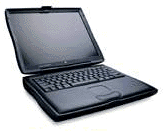 The PowerBook G3 Series offered three
display options. At the low end, the 12" display had 800 x 600
resolution and supported up to 16-bit color on its dual-scan
passive matrix screen. At the top, there was a 14" 1024 x 768
active matrix display with 24-bit color.
The PowerBook G3 Series offered three
display options. At the low end, the 12" display had 800 x 600
resolution and supported up to 16-bit color on its dual-scan
passive matrix screen. At the top, there was a 14" 1024 x 768
active matrix display with 24-bit color.
In between was the problem child, the 13" screen. It had the same resolution as the 14" display, but because of the way the video cable ran from the logic board through the hinge and connected to the screen, this model tended to have display problems. We recommend avoiding any WallStreet with a 13" display since the replacement display cable sells for US$99.
MainStreet
Sometimes Apple makes too many compromises to reach a price point, and the entry-level G3 model was it. Unlike the G3 desktops and the faster G3 PowerBooks, the 233 MHz PowerBook G3 didn't have a level 2 cache. I'm sure that helped keep Apple's costs down, but performance was sluggish by comparison to the 250 MHz and 292 MHz models, which each had a 1 MB L2 cache.
The 250 MHz WallStreet has a MacBench 4 rating of 881, and the 292 MHz model attained a score of 1030. With a level 2 cache, the 233 MHz model would have scored around 821 - without that cache, it had a CPU rating of 445. That's a bit more than half what it should have been.
When the PowerBook G3 Series II was introduced, the 233 MHz PowerBook was given a 512 MB L2 cache, which boosted its MacBench 4 score to 764.
Without the cache, the original 233 MHz offered pedestrian performance. Some felt it didn't deserve the same WallStreet label as the better performing models, so it was sometimes given the MainStreet label. Main Street is okay, but it definitely isn't Wall Street.
With the mix-and-match options of CPU speed and screen size, the model you most want to avoid is the Series I 233 MHz MainStreet with a troublesome 13" screen.
The Hinge
WallStreet's Achilles' heel is the screen hinge. It's not especially well built or well designed, and when the clutch fails, your screen just flops over. There is no cheap fix. The hinges alone sell for US$69-$89, and most users probably won't feel comfortable installing the new hinges themselves.
There is a better deal. PBParts.com makes a replacement hinge mechanism that they sell for US$69 installed. The new hinge is made of steel, not pot metal, and should outlast the rest of the computer.
Power
The final trouble spot for WallStreet is the place where the power adapter plugs into the computer. If that breaks, hope you can find someone handy with a soldering iron - the replacement part sells for US$119.
On top of all this, the M4402 AC adapter was recalled.
Good Stuff
There's a lot to like about WallStreet. It can take two batteries for 5-7 hours of use in the field (with a fresh Apple battery). Want more? NewerTech replacement batteries offer 25% more power, which can put you into the 9 hour range with two batteries, 4-1/2 with one. (Bear in mind that all rechargeable batteries break down chemically and have very little useful life after 2-3 years. Also remember that you actually have to use the batteries - they can degrade faster if you always run from AC instead of running down the batteries once a month or so.)
For the classic Mac OS, WallStreet provides plenty of power. Under OS X, it depends on what you want to do and how much you're willing to invest in memory and a faster hard drive.
Mac OS X
WallStreet is the oldest PowerBook officially supported by Mac OS X. You should be able to install OS X 10.0 through 10.2 right from the OS X CD.
Although Apple has claimed that OS X can run with as little as 128 MB of RAM and on a 4 GB hard drive, you'll obtain much better performance with at least 256 MB (these PowerBooks support as much as 512 MB, which is better yet) and an 8 GB or larger hard drive. There just won't be much room for anything on a 4 GB drive.
Ideally you'd put in a faster, higher capacity, more modern hard drive if you want to use OS X. If you do that, you'll need to partition the hard drive so the first partition is under 8 GB in size. OS X must be installed on the first partition - otherwise it won't boot on WallStreet.
Each version of OS X is faster than its predecessor, and WallStreet runs best with 10.3 (Panther) if you have enough RAM and drive space. You will need to use XPostFacto to install 10.3 on WallStreet, since Apple doesn't support anything higher than 10.2.8 on this hardware.
It's probably not worth buying a WallStreet for OS X unless it's been upgraded to at least 256 MB RAM and has an 8 GB or larger hard drive. The cost of RAM (US$34 and up for a 256 MB module, and you need two to reach maximum RAM capacity) and a hard drive (around US$70 for a 40 GB drive) puts you past the cost of the newer Lombard PowerBook G3, which typically sells for less than the 300 MHz WallStreet models.
At the seven year mark, WallStreet is definitely the low-end of OS X computing. Then again, it's great under OS 8 or 9, and the fact that it can run OS X decently (with sufficient RAM and a big enough, faster hard drive) still makes it a viable computer.
Best of all, they're more affordable than ever. This week we've found 12" 250 MHz and 14" 233 MHz ones for as little as US$249, and 300 MHz WallStreets as low as US$350. (That said, you can buy a Lombard G3/333 for US$299 - a hot deal indeed!)
Dated? Definitely. Obsolete? Far from it. Practical? That's your call, but a lot of people are still happily using their WallStreets.