
Four years after the first PowerBook G4s reached users, Apple announced the fourth generation of aluminum PowerBooks, each model faster, more feature laden, and no more expensive than the one it replaced.
The new models also represent the smallest speed bumps ever offered in PowerBooks. The 1.5 GHz models are just under 13% faster than their predecessors, and the 1.67 GHz machines gain a mere 11% in CPU speed. But there’s more to the upgrades than CPU speed.
Changes
The aluminum PowerBooks remain as small and light as they’ve always been, and almost all of the changes are invisible from the outside. (The exception – the entry-level 15″ PowerBook now has a backlit keyboard.)
Let’s see what Apple has done under the hood.
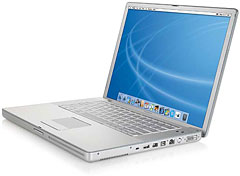 Apple has boosted memory on the 12″ and entry-level 15″ models from 256 MB to 512 MB. On the 12″ ‘Book, there’s still 256 MB on the system board, and the additional 256 MB sits in the expansion slot. On the 15″ and 17″ ‘Books, the 512 MB configuration is done with a single module, whereas a pair of 256 MB chips had been used in the past.
The PowerBooks now come standard with 60, 80, or 100 GB 5400 rpm hard drives, an improvement in both capacity and rotation speed over last year’s models. (100 GB is as big as laptop drives get these days.)
Each of the PowerBooks has the next generation graphics processor, replacing the Nvidia and ATI chips used in the 2004 ‘Books.
Apple now supports Bluetooth 2.0, making the built-in Bluetooth about three times as fast as the earlier Bluetooth standard. 802.11g AirPort Extreme is also standard on the new PowerBooks.
Perhaps the biggest upgrade is an 8x SuperDrive for the top-end models, twice as fast as the 4x drive used in last year’s ‘Books – and in the new Mac mini.
New Stuff
Trackpads now support scrolling, a two-finger procedure. For those who don’t like it, it can be disabled in the Keyboard & Mouse system preference.
The other neat new thing is motion sensors build into the computer (on the logic board, not on the hard drive) that can determine when the PowerBook is being dropped and attempt to protect the hard drive from damage.
The 17″ PowerBook now includes an optical I/O port for digital audio.
Also new to the Mac is Dual Link DVI, which directly supports Apple’s massive and expensive 30″ Cinema Display. Dual Link DVI is standard on the 17″ PowerBook and optional on the 15″ one.
Prices
The 12″ 1.5 GHz PowerBook G4 sells for $1,499 with 512 MB of RAM, a 60 GB 5400 rpm hard drive, and a Combo drive – $100 less than the 1.33 GHz model with 256 MB of RAM and a 60 GB 4200 rpm hard drive. The SuperDrive version retails at $1,699 with 512 MB RAM, a 60 GB hard drive, and an 8x SuperDrive – $100 less than the model it replaces.
The 15″ PowerBook G4 comes in two speeds. The entry-level 1.5 GHz model has 512 MB of RAM, a 60 GB 5400 rpm hard drive, and a Combo drive for $1,999 – the same price as last year’s 1.33 GHz Combo drive model that had 256 MB RAM and a 60 GB 4200 rpm hard drive.
The 15″ 1.67 GHz model includes an 8x SuperDrive while selling for $200 less than the 1.5 GHz model it replaces.
At the top, the 17″ PowerBook G4 runs at 1.67 GHz and sells for $2,699. This includes a 100 GB 5400 rpm hard drive and 8x SuperDrive – and it sells for $100 less than the 1.5 GHz model that had an 80 GB 4200 rpm hard drive and 4x SuperDrive.
Value
Of course, nobody is selling the just-discontinued PowerBooks for the old prices, so we need to compare the new models with the close-out prices on the old ones. Picking MacMall as representative of how Apple’s price protection will impact the 2004 models:
- 12″ PowerBook G4/1.33 GHz, 256/60/Combo, $1,294
- 12″ PowerBook G4/1.33 GHz, 256/60/4x SuperDrive, $1,494
- 15″ PowerBook G4/1.33 GHz, 256/60/Combo, $1,694
- 15″ PowerBook G4/1.5 GHz, 512/80/4x SuperDrive, $2,094
- 17″ PowerBook G4/1.5 GHz, 512/80/4x SuperDrive, $2,294
At the low end, you save $200 with the 1.33 GHz ‘Book. That’s about a 14% difference for a 13% difference in CPU speed. But you also get a faster hard drive and twice as much memory. The additional memory is worth about $40 on the open market, and a 60 GB 5400 rpm Toshiba hard drive sells for about $7 more than a 4200 rpm one (see Other World Computing).
The new model edges out the older one because of the combination of a bit more CPU speed, a somewhat faster hard drive, and twice as much RAM.
A $200 difference is an even smaller part of the equation on a $1,500 or $1,700 computer, where we have the additional CPU speed, faster hard drive, extra RAM, and faster SuperDrive. This makes the new 12″ SuperDrive model the clear winner.
Moving up to the 15″ ‘Books, you save $300 by picking the 2004 1.33 GHz Combo drive model over the new 1.5 GHz one. That’s about a 15% difference in price for a 13% difference in speed – but again we need to factor in the faster hard drive and additional RAM. All things considered, the new 15″ PowerBook offers more value for your computing dollar – and it gives you a backlit keyboard to boot.
A step up the ladder, the 15″ SuperDrive model isn’t even a contest. There’s only a $200 difference in price, and the new 1.67 GHz model runs 11% faster, has a faster hard drive, and includes an 8x SuperDrive. It’s the clear value winner here.
If you need huge, there’s a $400 price difference between last year’s 1.5 GHz and this year’s 1.67 GHz models. You gain a practically unnoticeable 11% in speed along with a faster hard drive, twice as much video memory (important if you use a huge display), and the 8x SuperDrive. The 15% price difference makes things more of a toss-up here.
Then again, you gain motion sensors and a scrollable trackpad with the new ‘Books, which might give them an edge.
Refurbs
It usually happens that Apple has refurbished previous generation PowerBooks available at even better prices immediately after introducing new models, but that hasn’t happened this time. In fact, it seemed that nobody had refurbished inventory as we worked on our weekly PowerBook price tracker earlier today.
Should refurbs become available, they will probably tip the value equation toward refurbished 2004 PowerBooks, but at this point we simply don’t have the data to project what kind of bargains we may see – if any.
The 12″ iBook G4
The final point of comparison is the $999 12″ 1.2 GHz iBook G4, which offers 90% of the power of the just-discontinued 12″ PowerBook G4/1.33 GHz and 80% of the power of the new 1.5 GHz model. The screen and most features are the same as on the aluminum PowerBooks, but the iBook costs $300 to $500 less.
The PowerBooks are a bit lighter, a bit more compact, and may be a bit more durable, but the biggest difference is probably the keyboard. PowerBooks have much better keyboards than iBooks, but if I were shopping for a tiny laptop, I’d probably save my money by choosing the iBook, which is an incredible value in portable computing.
Keywords: #valueequation #powerbookg4value
searchword: early2005powerbook
