
The New Standard Keyboard: What Were They Thinking?
Dan Knight - 2005.01.26 - Tip Jar
Low End Mac Reader Specials
Memory To Go Special: New 2008 iMac 2GB $42 / iMac Intel Core2 DUO & MacBook Pro 2GB $36 - 1GB $20. MacPro 8 Core Memory 8GB kit $286 / 4GB kit $143 / 2GB kit $93 -- Free shipping available. LIfetime warranty.
Download Typestyler, still the Ultimate Styling Tool for Internet, Print and Video Graphics. Works great in Classic with a Native OS X Version on the way. Free Tryout: www.typestyler.com
LA Computer Company: Specials on AppleCare, iMac's, Apple Batteries and Apple A/C Adapters. Also Great prices on Used Apple Computers. Call 1-800-941-7654 Click Here.
OWC: Mercury Elite FW800/FW400/USB2/eSATA up to 2.0TB TOP-RATED Solutions offer High Performance, Reliable storage for all your data storage needs. 500GB $159.99, 750GB $199.99, 1.0TB from $299.99
Mac users can finally play Party Poker for Mac. Not only that, they can also learn how to play PokerStars for Mac.
Laptop Hardware Provided by TechRestore - Overnight Mac & iPod Repairs.
Compare products like desktop computers, laptops, and LCD TVs side by side! All the information and reviews to make the best purchasing decision for a new cell phone GPS products or MP3 players. The Ciao network makes searching products easy for you.
If you know anything at all about the history of keyboards, you probably know that the QWERTY design - so named after the first six alphabetical keys - was deliberately designed to avoid jamming typewriters. Ideal or not, it's been the standard keyboard layout in the English-speaking world for 130 years.
The only alternative layout that has made even a little bit of headway against the QWERTY layout has been one designed by August Dvorak, which was intended to improve typing efficiency. Despite the "improved" design, neither side of the QWERTY-Dvorak debate has been able to conclusively demonstrate any superiority over the other layout.
That's because the QWERTY layout was never intended to slow down typists - a common accusation from Dvorak supporters - but to allow them to type quickly without jamming the keys in their typewriters. In other words, QWERTY was designed to be efficient, too.
Of course, computer users don't have to worry about keys jamming, but there was no reason to change something everyone was used to, so computers used the same key layout as typewriters. (This varies around the world. QWERTY was designed for English, and other layouts work better for other languages. Still, computer keyboards follow the dominant typewriter layout, adding whatever additional keys are deemed important to computer users.)
Perhaps someday we'll have a universal keyboard for languages that use the Western European character set, complete with accents, umlauts, cedillas, and a variety of currency symbols, but I don't expect that to happen any time soon.
Or maybe it will. The New Standard Keyboard addresses the issue of key layout by subsuming ergonomics and typing efficiency for the sake of the hunt-and-peck typist. The New Standard Keyboard puts the text keys on alphabetical order, frustrating QWERTY and Dvorak users alike.
If you think the concept of an alphabetical keyboard is lame, just check out the actual product. It looks like it was designed for preschoolers:
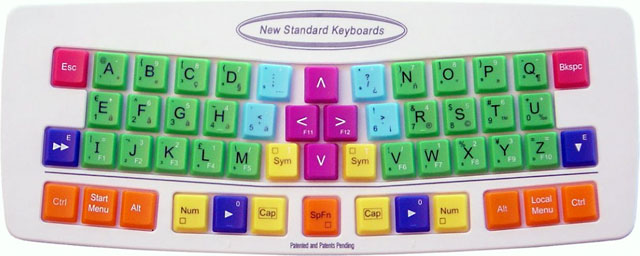
Despite the garish color scheme and the bizarre choice to put keys in alphabetical order, the New Standard Keyboard is innovative. It rethinks almost every aspect of the keyboard, other than the square shape of the keys.
This is a compact keyboard, because there are no function keys, navigation keys, number keys, or a traditionally wide space bar. There's not even a standard numeric keypad. All 26 letters are there, along with punctuation, Shift and other modifier keys, and a centrally located set of arrow keys.
It's obvious that a lot of time, thought, and research went into this project. The keyboard has an ergonomic design without the odd humps and weird shapes seen in too many ergonomic designs. The keys are aligned to match the natural movements of fingers. And each of the modifier keys appears on both sides of the keyboard.
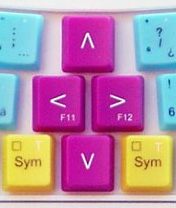
My favorite feature is the location of the
arrow keys between the right and left hands - no more need to move
your right hand to use them. Clever, and both more intuitive and
space-efficient than the inverted T on most extended keyboards.
Still, it's not going to fly simply because it's too different and over-designed. Typists might accept one or two changes in their keyboards, adding others over time, but a new key layout, the lack of number and function keys, no Home or End keys, and the childish color scheme are too much.
There's no way the New Standard Keyboard is going to become the standard anywhere. QWERTY isn't going away any time soon, and if people are going to accept the other improvements this keyboard may offer, they won't consider it worth the time required to learn and entirely new layout.
The keyboard has to function in the real world, where people use numbers, function keys, navigation keys, and even dedicated sleep, email, volume, and other keys. The New Standard Keyboard flies against the wind of more functions on the keyboard.
That said, perhaps others can learn from it. Many long for smaller keyboards, gladly dispensing with numeric keypads and a full complement of navigation keys to keep the mouse closer at hand.
The slightly angled keys make for a more ergonomic design than most of us have, and with the minimal curvature it might even be practical to apply some ergonomic design to laptop keyboards.
Overall, I give the New Standard Keyboard an A for effort, an A
for execution, an F for use of color, and a D for practicality.
I'll be sticking with my unergonomic QWERTY keyboards for a while
longer.
Dan Knight has been using Macs since 1986, sold Macs for several years, supported them for many more years, and has been publishing Low End Mac since April 1997. If you find Dan's articles helpful, please consider making a donation to his tip jar.
Recent Mac Musings
- What Would an $800 MacBook Mean for the Mac mini?, 10.09. If Apple does release an $800 entry-level MacBook next week, the $600 Mac mini is going to look very overpriced.
- Low End Mac Needs Help Moving to Joomla, 10.08. We've settled on Joomla as the content management system that should work very well for Low End Mac, but we're running stuck with templates.
- Mac nano? Brick? How Small Could Apple Make a Mac?, 09.23. The iPhone and iPod touch show how small Apple can make a computer. What if Apple wanted to build a very, very small Macintosh?
- With 10% of the US Notebook Market, Where Will Apple Go Next?, 09.19. Apple increased its share of the North American notebook market by 60% over the past year and moved to fourth place. What can it do for an encore?
- More in the Mac Musings index.
Links for the Day
- Mac of the Day: Motorola StarMax 5000, May 1997 - This second-generation Mac clone offered 603e, 604e processors.
- List of the Day: The iPod List The iPod List is a forum to discuss the iPod, it's accessories, the iTunes Store, iTunes, and related topics.
- October 13 in LEM history: 98: Evidence that Macs last longer - 99: A Mac is like Prozac - From home computers to a real computer - 00: Tradeoffs for OS X beta - 03: iBook failures - 05: The 2005 iMac G5 value equation - Email on your iPod - OS X on 4 dual-core CPUs - 06: The legendary Apple Extended Keyboard - Stinky old iBook smells like sweat - Apple's climb back to success
Recent Content on Low End Mac
- TruePower Battery Can Run WallStreet PowerBook Past the 5 Hour Mark, Tommy Thomas, Welcome to Macintosh, 10.10. If you have a rugged old PowerBook but its battery is losing capacity, TruePower can give you plenty of time in the field.
- nVidia Inside Next MacBook?, Time for a Mac Netbook, Asus Launched MacBook Air Killer, and More, The 'Book Review, 10.10. Also photo reveals more about MacBook Pro, comparing 16:9 and 16:10 displays, Apple settles suit over faulty iBook and PowerBook adapters, bargain 'Books from $150 to $2,699, and more.
- 30% of iPhone 3G Buyers Switched Carriers, EU Battery Rule May Force iPhone Redesign, and More, iNews Review, 10.10. Also iPhone 3G greatest consumer electronics device ever, track presidential polls on your iPhone, Talking English Dictionary, waterproof armbands, several new iPhone apps, and more.
- Economic Crunch May Slow Mac Sales, a Recycled Cube, ToCA Race Driver 3 for Mac, and More, Mac News Review, 10.10. Also don't buy RAM from Apple, customize your Mac's appearance, MacTribe expanding into print, My Apple Space social networking, and more.
- Best Mac Pro Deals, Low End Mac Deals, 10.10. Used 2.66 GHz 4-core, $1,799; new, $1,949 after rebate; 2.8 4-core, $2,099 shipped; 8-core, $2,599 shipped; 3.0 $3,399 shipped; 3.2, $4,099 shipped.
- Best PowerBook G3 Deals, Low End Mac Deals, 10.10. Used 14" WallStreet G3/266 MHz, $90; Lombard G3/400 MHz, $150; Pismo G3/400 MHz, $300; 500 MHz, $350.
- Best Time Capsule and AirPort Deals, Low End Mac Deals, 10.10. Refurb 500 GB Time Capsule, $249; new, $294; refurb 1 TB, $419; new, $462; AirPort Extreme Card, $39; Base Station, $159; Express, $60.
- Modding Your Old Mac to Make It More Useful, Phil Herlihy, The Usefulness Equation, 10.09. If your old Mac is too slow, too noisy, too plain looking, or has too little room for expansion, you might want to mod it.
- Best iMac G4 Deals, Low End Mac Deals, 10.09. Used 15" 700 MHz CD-RW, $269; 800 Combo, $300; 1 GHz, $390; 17" 1.25 GHz SuperDrive, $400; 20", $529.
- Best 15" MacBook Pro Deals, Low End Mac Deals, 10.09. Used 1.83 GHz Core Duo, $995; 2.16, $1,125; new, 2.2, $1,400 after rebate; refurb 2.4, $1,699; 2.5, $1,999; 2.6, $2,299; rebates on new.
- Best Mac OS X 10.4 'Tiger' Deals, Low End Mac Deals, 10.09. DVD upgrade from 10.3, $75; upgrade bundle with 10.3, $118; full version, $129; family pack, $200; 10-user Server, $350; unlimited, $400.
- The Power of Older Macs, Why Vista Only Sees 3 GB of RAM, Wangwriter Supplies, and More, Charles W. Moore, Miscellaneous Ramblings, 10.08. Also the end of an era as MIT HyperArchive shuts down and another suggestion for profiling Windows computers.
- Migrating My Law Office from Windows to Macintosh, Andrew J Fishkin, Best Tools for the Job, 10.08. By switching to Leopard Server, everyone in the office will be able to move to a Mac - but which ones will best meet their needs?
- Will Apple's iPhone/App Store Tornado Blow Away the Competition?, Tim Nash, Taking Back the Market, 10.08. The iPod, iTunes, and the iTunes Store paved the way for the success of the iPhone and the App Store - and nobody can match that.
- More links in our archive.
About LEM | Support | Usage | Privacy | Contacts
