Mac Musings
Apple's $549 eMac
Daniel Knight - 2004.12.08
Think there's no such thing as a $549 Macintosh? Think again!
If you don't need the latest and greatest, you can pick up a factory refurbished 1 GHz eMac from the Apple Online Store for just US$549 shipped (sales tax additional). It's a computer that can hold its own against those $399-599 (after $200 mail-in rebate) computers from Dell, Gateway, HP, and the like.
The eMac
The eMac has almost everything you need built into it: a nice 17" display, stereo speakers, FireWire and USB 2.0 ports, a pretty fast processor, and a very nice onboard graphic processor. Compare that with a cheap PC with a cheap display (which they'll try to get you to upgrade from), cheap external speakers (upgrade temptation again), USB but no FireWire, a pretty fast processor, and a cheap onboard graphics processor that may actually steal RAM from the rest of your computer.
Okay, the eMac's speakers aren't the greatest, and the display doesn't support an resolution past 1280 x 960, but you can't go much higher than that on a 17" CRT without everything turning fuzzy.
Bang for the buck, we love the eMac at Low End Mac, and we're far from alone in that assessment. Sure, CRT technology is so 20th century, but that also keeps the price way down in comparison to the flat-panel iMac.
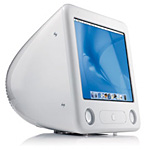 I love my eMacs, a pair of 1.25 GHz white
behemoths I purchased earlier this year. The one at home has
1 GB of RAM, a fast 80 GB hard drive, and an 8x SuperDrive.
The one I use when away from home has 768 MB RAM, a fast 80 GB hard
drive, a Combo drive, and an AirPort Extreme card.
I love my eMacs, a pair of 1.25 GHz white
behemoths I purchased earlier this year. The one at home has
1 GB of RAM, a fast 80 GB hard drive, and an 8x SuperDrive.
The one I use when away from home has 768 MB RAM, a fast 80 GB hard
drive, a Combo drive, and an AirPort Extreme card.
Before moving to the 2004 model, I used a 700 MHz eMac for a year. It has 640 MB RAM, a fast 80 GB hard drive, and a Combo drive. It never let me down, but as we started doing more with video, the extra CPU power and faster DVD burner (vs. an external 4x unit) made the upgrade worthwhile.
Value
How much power you need depends on what you do, and I still work with a 400 MHz PowerBook on a regular basis, so I know from experience that you don't need a 3.4 GHz Pentium 4 to be productive. In fact, for most of the things I do, 700 MHz is plenty fast and 1.25 GHz is downright zippy.
If you're using an older, slower Mac, you'll find the performance of a 1 GHz or faster eMac impressive, and for a lot of computer users, it's really all the speed they're ever going to need.
For those users, Apple has some fantastic deals, although inventory may be limited. You can buy and add your own memory easily for a lot less than Apple charges.
Refurb 1 GHz eMac, 256 MB RAM, 40 GB hard drive, CD-ROM, no modem
- If you don't need to burn CDs, let alone DVDs, and have a
broadband Internet connection, you won't miss the lack of a modem
or burner in this US$549 eMac originally intended for the education
market. The hard drive is a bit slow and small by today's
standards, but it may be adequate. RAM isn't adequate, so plan on
adding a 512 MB module for around US$70 shipped. Total cost: $619
shipped - and no rebates to worry about. Only other drawback: USB
1.1 instead of 2.0. [Update 12.10: The owner of one of these
machines tells me that the current 1 GHz eMacs are exactly the
same as the 1.25 GHz models except for clock speed - same video,
same USB 2.0, same AirPort Extreme support.]
Refurb 1 GHz eMac, 128 MB RAM, 40 GB hard drive, Combo drive
- For US$50 more, you get a Combo drive, which lets you watch
DVDs and burn CDs on your eMac. You also get a modem that you can
use if you don't have broadband Internet - or if your broadband
goes down. Everything else said about the $549 model applies to
this one at US$599. Add 512 MB of RAM (640 MB total), and you have
a net cost of $669.
Refurb 1.25 GHz eMac, 256 MB RAM, 40 GB hard drive, Combo drive
- Here's one of the two models used at Low End Mac. The 1.25 GHz
model is the first eMac to support USB 2.0, which means faster
scanning and printing with USB 2.0 scanners and printers. The
graphics processor is better, and the faster CPU also has a larger
onboard cache, making it a bit more efficient. As above, plan on
adding a 512 MB memory stick to this US$649 computer. Total cost:
$719.
Refurb 1.25 GHz eMac, 256 MB RAM, 80 GB hard drive, 8x SuperDrive
- You get an 8x SuperDrive on the top-end eMac, so if you want to
burn DVDs, this is the one you want, especially at the refurb price
of US$799. The 80 GB drive is bigger than on the other eMacs, but
it's no speed demon. Still, you want that extra space if you're
working with video. Again, plan on boosting memory with an extra
512 MB. End cost: $869.
If you're looking for value, these are the models to compare with those supposedly low-cost Dells, Gateways, and the like. No rebates to mail in. No cheap monitors or speakers. No extra cost for Works or the better version of Windows XP. No viruses, adware, or spyware to worry about. No extra cost for FireWire so you can connect a digital video camcorder. No nest of wires running from your computer to your monitor and speakers.
With these refurbished eMacs, you're getting Apple's full one-year warranty on machines that have been retested to conform to factory spec. We've bought three this way, and they work just like new-in-the-box eMacs.
So the next time someone tells you they want to buy a $399 Dell, surf on over to the Dell website, configure that machine so it pretty much matches the eMac, and see how the pre-rebate price compares with the rebate-free deal on a refurbished eMac.
Then head on over to the Apple Online Store to show them the "special deals" on refurbished eMacs purchased directly from Apple.
Then you can tell them why Macs are a better choice, whether you base that on the vast suite of included software, Apple's reliability and customer support ratings, reduced clutter, or the complete lack of viruses and other malware.
It still won't be an easy sell, since much of the world is convinced that Windows is the only way to go, but thanks to refurbished product, Apple does have computers price-competitive with those people actually configure and buy from Dell and other vendors.
- You get an 8x SuperDrive on the top-end eMac, so if you want to
burn DVDs, this is the one you want, especially at the refurb price
of US$799. The 80 GB drive is bigger than on the other eMacs, but
it's no speed demon. Still, you want that extra space if you're
working with video. Again, plan on boosting memory with an extra
512 MB. End cost: $869.
- Here's one of the two models used at Low End Mac. The 1.25 GHz
model is the first eMac to support USB 2.0, which means faster
scanning and printing with USB 2.0 scanners and printers. The
graphics processor is better, and the faster CPU also has a larger
onboard cache, making it a bit more efficient. As above, plan on
adding a 512 MB memory stick to this US$649 computer. Total cost:
$719.
- For US$50 more, you get a Combo drive, which lets you watch
DVDs and burn CDs on your eMac. You also get a modem that you can
use if you don't have broadband Internet - or if your broadband
goes down. Everything else said about the $549 model applies to
this one at US$599. Add 512 MB of RAM (640 MB total), and you have
a net cost of $669.