Mac Musings
Use a Windows Keyboard on Your Mac with uControl
Daniel Knight - 2004.05.26
Have you ever wanted to plug a low-cost PC keyboard into your Mac's USB port, only to find that a few minutes of trying to type is driving you crazy? Or have you ever wanted to pick up an inexpensive USB keyboard for your 'Book so you can have all those extra keys or be able to sit back from your computer while typing?
If so, uControl makes using a Windows keyboard on your Mac easy.
For the most part, adding in a PC USB keyboard is as simple as plugging it in. Everything works, but the command and option keys aren't where Mac users expect them to be - they're reversed on a Windows keyboard.
Some manufacturers provide software drivers so their keyboards can switch hit between Macs and PCs. That's nice, but the really low-cost USB keyboards don't do that. Therein lies the problem.
While uControl has several features, the reason I have it on my PowerBook is so I can use my ancient Acer Aspire keyboard when writing. I much prefer a full-size keyboard to the one built into older G4 PowerBooks. (The new aluminum ones have fantastic keyboards.)
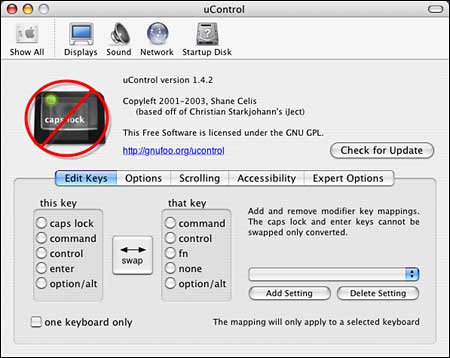
uControl is a System Preference, and when you set it up, you can tell it to work only with a specific USB keyboard. That's great, because it means that in a pinch I could use an Apple, Macally, MacSense, or other keyboard without uControl turning the cmd and opt keys backwards.
After launching uControl and making sure you have a USB keyboard plugged in, click the "one keyboard only" checkbox, swap option/alt for command, click the Add Setting button, and use the PC keyboard to name your preference. Now uControl will only perform its key swap magic for that keyboard.
Although this isn't the kind of program most Mac users will need on a regular basis, it makes it much easier to add a low-cost USB keyboard to any Mac running OS X (uControl is OS X only). Whether you're looking to add an external keyboard to your portable or need to replace a keyboard you've spilled liquids into and can't find a Mac keyboard, this freeware utility is great. You might want to keep a copy on your Mac just in case.
UPDATE: uControl works through OS X 10.3.x, but "breaks" under OS X 10.4.x. That's not a bad thing, as the most needed feature of uControl - being able to use a Windows keyboard transparently - is supported in OS X 10.4.x. uControl is no longer being updated.