Mac Musings
eMacs, 12" 'Books, and the Mac Legacy
Daniel Knight - 2004.05.19
Twenty years ago people started buying that curious new computer from Apple, the one with a mouse, a graphical interface, a built-in screen, and no expansion slots. The Macintosh concept has morphed since then, but today's PowerPC-based OS X-boxes definitely show their genetic heritage.
When Steve Jobs unveiled the iMac six years ago, a lot of us commented on similarities to the original Macintosh. Although the bulk of desktop computers sold today are modular systems (where the display is separate from the rest of the computer), most Macs continue the all-in-one concept of the first Macintosh.
That includes portables, and that got me to thinking - which current Mac is closest to the original Macintosh concept, the eMac or a 12" 'Book?
The Classic Macs
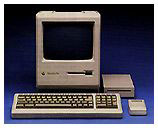 The "classic" Mac was an all-in-one design with a 9"
b&w 512 x 342 display, an external keyboard and mouse, an
internal floppy, SCSI for expansion, and generally limited
expandability.
The "classic" Mac was an all-in-one design with a 9"
b&w 512 x 342 display, an external keyboard and mouse, an
internal floppy, SCSI for expansion, and generally limited
expandability.
In classic Mac evolution, SCSI became standard with the Mac Plus (right) in 1986, and the SE (1987) was the first to support an internal hard drive. It was also one of the few b&w compact Macs with an expansion slot.
The first four Macs shared the same 8 MHz 68000 CPU as the SE, and the Mac Classic (1990-92) was the last of that line. Although the Plus, SE, and Classic were a bit on the slow side running System 7, their ability to support 4 MB of RAM and "big" (back then that meant 40 MB) hard drives made them great low-end Macs.
The ultimate b&w classic Mac was the SE/30 (1989), which put a 16 MHz 68030 CPU inside the SE's case, allowed up to 128 MB of RAM, and could support an external display, ethernet, or a faster processor using its expansion slot. With 4 MB of memory and a decent hard drive, the SE/30 ran very nicely under System 7.x. It's too bad Apple never offered grayscale support or an even faster version of this workhorse.
Apple added color to the classic design with the Color Classic in 1993, but the model was somewhat crippled. The ultimate compact Mac with a color display was the Colour Classic II, which unfortunately was never sold in the States. While both models shared the same 512 x 384 Trinitron display, the CCII had a 32-bit memory bus, a twice-as-fast CPU, and supported up to 36 MB of RAM (vs. 10 MB in the CC).
Hardware hackers have dropped in accelerators, more powerful motherboards, and even modified the display for 640 x 480 video. It's too bad Apple never offered a dual-sync screen or a faster CPU. The Color Classic remains popular with longtime Mac users.
From there Apple moved to the 500 series, which really morphed to classic concept into a much larger package. Gone was the 9.6-9.9" wide, 10.9-12.6" deep footprint, as were the 13.2-14.5" height and 9" display. The new models had a 13" display and room for a CD-ROM drive, which meant a 13.5" x 16.5" footprint, 17.9" height, and 40 pound weight. (The Plus weighed just 16.5 pounds, and the Color Classic was 22.5 lbs.)
The classic Macs were compact, relatively light, had a screen that was just big enough, and could be thrown in a tote for transport.
The eMac
In many ways, the eMac is the successor of the CRT iMac and, by extension, the
all-in-one Macintosh heritage. It has the same integrated design of
the first Macintosh. Like the original Mac, all expansion is done
via serial ports; 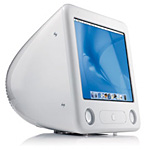 there are no expansion
slots. Like the SE and SE/30, it has an internal hard drive and a
cooling fan. Like the Color Classics, it has a color display. Like
later all-in-one models, it has a multisync screen, stereo
speakers, and an optical drive.
there are no expansion
slots. Like the SE and SE/30, it has an internal hard drive and a
cooling fan. Like the Color Classics, it has a color display. Like
later all-in-one models, it has a multisync screen, stereo
speakers, and an optical drive.
In those ways, the eMac is indeed a descendant of the original Macintosh concept. But there are ways in which it diverges from the original concept as well.
Nice as the eMac is - and we use on here at Low End Mac headquarters - it's one big, heavy computer. It's nearly 16" tall, 16" wide, and just over 17" deep. It's a big white behemoth that weighs 50 pounds, about three times as much as the earliest Macs. This is not a machine you're going to throw in some sort of bag and transport between home and work. And, unlike the slot-loading iMacs or the 'Books, it's not a particularly quiet machine.
The 12" 'Books
There is another legacy, another genetic path descending from the classic Macs - the 'Books. The first Mac Portable weighed almost as much as the Mac Plus, had a b&w (no grayscale) display, and had comparable horsepower to the SE/30. Yeah, it was a heavy beast, but the lead-acid battery could power the Portable for up to ten hours.
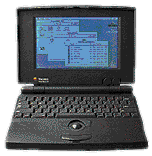 Two years later Apple introduced the first
PowerBooks. The PowerBook 100 was
pretty much the Portable reengineered by Sony for compactness. At
1.8" thick, 11" wide, 8.5" deep, and 5.1 lbs., it was one of the
smallest models Apple ever offered.
Two years later Apple introduced the first
PowerBooks. The PowerBook 100 was
pretty much the Portable reengineered by Sony for compactness. At
1.8" thick, 11" wide, 8.5" deep, and 5.1 lbs., it was one of the
smallest models Apple ever offered.
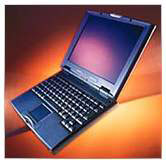 There's something very nice about an
8.5" x 11" footprint. It just feels right, and Apple pretty much
duplicated it with the PowerBook 2400
and 1400. Both models remain popular
on the used market because of their nice mix of features and
size.
There's something very nice about an
8.5" x 11" footprint. It just feels right, and Apple pretty much
duplicated it with the PowerBook 2400
and 1400. Both models remain popular
on the used market because of their nice mix of features and
size.
But Apple abandoned that footprint when the first PowerBook G3 was introduced in 1997. From then until May 2001, big 'Books ruled the roost.
The dual-USB iBook changed all that, and it was a runaway success. It was 11.2" wide and 9.1" deep, offered 500 MHz G3 performance, and just had a "rightness" about it the drew people to it. It was nearly perfect.
Then came the aluminum 12" PowerBook G4 at 10.9" wide and 8.6" deep. Smaller, thinner, lighter, and more rugged than the iBook, the 12" PowerBook has also been a huge success. (The improved keyboard is one more improvement over the 12" iBook.)
At under 5 pounds, the 12" 'Books offer the design integration of the original Macintosh in a far more portable package. They offer everything the eMac has without the bulk. And for those who want larger displays, Apple offers 'Books with 14", 15", and 17" displays, but they are also larger and heavier than the 12-inchers.
The Best Mac
Unlike the modular Power Mac or the display-on-a-stick iMac, the 'Books and eMacs remain close to the heritage of the original Macintosh. Which is more true to that heritage is something we could debate, and I'll admit that I lean toward the portable side.
Regardless, Apple has desktop and portable computers that are not only true to all-in-one heritage, but also great values. If you don't need to burn DVDs, the US$799 1.25 GHz eMac is an incredible machine with a very nice display and plenty of expansion ports. If you don't need portability, it's close to perfect for anyone but power users. No wonder sales of the flat-panel iMac are slow.
If portability is important, the 1 GHz 12" iBook G4 offers plenty of power in a very light, compact package for just US$1,099. The keyboard isn't the best, but it's not horrid, either.
If the keyboard matters, or if you want something even smaller and lighter, the 12" PowerBook G4 is an excellent choice. The current model runs at 1.33 GHz (one-third faster then the 12" iBook), is a bit more compact, and has one of the finest keyboard in portable computing. At US$1,599 with a Combo drive, it's a serious contender.
Of course, you could buy two eMacs for that price. Or you might want a display that shows more than 1024 x 768 pixels. Or you might - well, you get the idea. There are plenty of good options in the Apple line, including the models that diverge a bit more from the original concept.
But in terms of value and that "just right" all-in-one integration that Apple began to perfect with the original Macintosh, it's hard not to find the eMac and 12" 'Books excellent values.