Kissing Internet Explorer for OS X Good-bye
Dan Knight - 2004.04.16 - Tip Jar
I cut my Internet teeth using Netscape Navigator back in the version 3.x era and continued to use it into the 4.0.x period - until one day we had a horrendously slow Internet connection at work.
That was the day I discovered a huge difference between Internet Explorer and Netscape - for some unknown reason Netscape had to reload an entire page from the Internet whenever you printed. IE didn't do that, and at several minutes per page, I began using IE regularly on that fateful day.
Earlier this week I stopped using Internet Explorer for OS X.
With the advent of iCab, then Safari, and more recently Firefox, I've had some good alternatives to IE. Until about a week ago, Safari was my browser of choice, and now I find myself gravitating toward Firefox on both of my Macs and my even lower-end 450 MHz Dell running Windows 98.
WebChecker
Three weeks ago Charles Moore asked, Why Are Mac Users Still Surfing with Internet Explorer? I continued to use IE for one simple reason: It worked with WebChecker, a shareware program I've used for years. WebChecker doesn't just organize your links, it also checks them to see if pages has been modified since the last check. I have it check about three dozen pages at startup, almost all of them Mac-related.
WebChecker means I don't have to visit pages that are unchanged, and it can display the list of pages ordered by whether they have been changed or not. It's not perfect - a lot of pages are listed with "invalid header date" - but it's a big help.
That's great. The problem is that WebChecker is a classic Mac OS application that only supports two browsers: Netscape under classic and Internet Explorer under either Mac OS. If IE for OS X is up and running, WebChecker uses it. If not, WebChecker launches the "classic" IE 5.1.
And it won't work with any newer version of Netscape, so I'm stuck with IE as long as I continue to use WebChecker. (If you're using System 7 through Mac OS 9.2.2 and have a bunch of sites you visit regularly, check it out.)
I've looked at other bookmark managers, but none seem to offer the one thing that sets WebChecker apart - actually checking the pages for changes. If such a program does exist, please let me know, as I'd love to have this capability in a program that can work with Safari and Firefox.
Internet Exploder
Anyhow, back to IE 5.2 on my eMac. Over the past few weeks, it has hung up more and more often, living up to that old nickname "Internet Exploder." Reinstalling it didn't help. Clearing the history and caches didn't fix things. Sometimes I couldn't even force quit the hung application; I was forced to restart the computer, and sometimes I could only do that by using the power button to turn off the eMac instead of using the restart command.
Enough of that. For the first time since I installed OS X 10.1 about two years ago, I no longer have the IE icon in my dock. When I need to use IE, I use version 5.1 in classic mode. It's horribly slow, but at least it works.
I don't know why IE for OS X is being so troublesome, since it's worked fine right up through 10.3.2, but I suspect it's a combination of factors. On the one hand, Apple keeps improving OS X, and that sometimes breaks older apps. On the other hand, Microsoft sees Safari as eliminating any need for future IE development on the Mac, so if something breaks, they won't fix it.
I've been caught between a rock and a hard place. Both WebChecker and Claris Home Page only let me use browsers that exist under classic. Fortunately the same hooks have allowed me to use them with IE for OS X, but neither program will hook into Safari, Camino, Firefox, or even the OS X version of iCab.
Alternatives to WebChecker
We're blessed with a nice selection of modern browsers these days. In addition to those I've already mentioned, there are also Opera and OmniWeb, neither of which I've used recently. But none of the bookmark managers I'd found provided a real alternative to good old WebChecker.
When searching for a bookmark manager, VersionTracker lists iLink, which sounds like a great way to use a single bookmark list with multiple browsers, and Safari Katra appears to do the same thing. URL Manager Pro works with all the browsers and can even handle unique browsing histories for each one. Butler combines a bookmark manager with a file launcher, search utility, and more. DEVONnote looks to be another feature-rich program that goes way beyond bookmark management.
But not a single one will tell me whether the bookmarked pages have been modified since my last visit. There are a few programs that seem to be working on it, but user feedback indicates that two of the three are slow or inaccurate. The most promising of the bunch appears to be Bookmark Tool 1.2 (below).
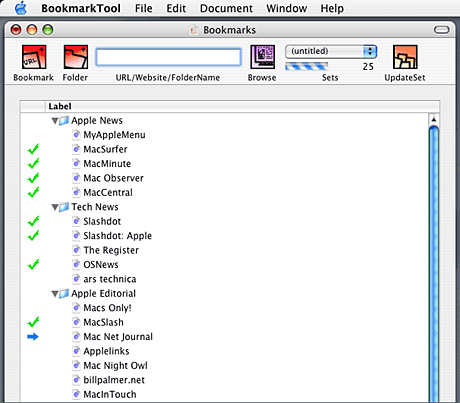
Unlike WebChecker, Bookmark Tool is OS X native, removing one more dependence on classic mode and Internet Explorer in one fell swoop. You can organize your bookmarks using folders and subfolders.
Bookmark Tool isn't a speed demon, but neither is WebChecker. What you save is time downloading unchanged pages. That said, no system of detecting page changes is perfect, but over time you'll learn which sites always appear to be changed even when they haven't. (Joy of Tech, Mac Night Owl, MacCentral, Mr Barrett, and The Register always had that problem in WebChecker.)
I'll be using Bookmark Tool ($15 shareware) to see how I like it, but first impressions are good. I do wish it had some way for the user to select an alternative to the default OS X browser, which would let me spend more time switching between Safari and Firefox, but that's the only significant improvement I can suggest.
Once I find a way to live without Claris Home Page, I can stop
using classic, but that's a pursuit for another time.
Dan Knight has been using Macs since 1986, sold Macs for several years, supported them for many more years, and has been publishing Low End Mac since April 1997. If you find Dan's articles helpful, please consider making a donation to his tip jar.
Recent Mac Musings
- No High Definition iTunes Video for You, 11.19. The October 2008 MacBooks are preventing users from viewing some high-def iTunes content from being viewed on their external displays. Poor form!
- Anticipating Macworld: Nehalem, Snow Leopard, and Updated Desktops, 11.18. Intel's Core i7 CPU has to make it way into the next Mac Pro, nVidia GeForce graphics will drive the iMac and Mac mini, and 'Snow Tiger' will unleash the animal within.
- One Used Mac Can Make a Difference, 11.12. Instead of scrapping out old Macs for raw materials, what if the Mac community worked to restore them and give them away to those with no computers?
- A Brief History of Portable Computing: From Dynabook to Netbooks, 11.06. 40 years ago Alan Kay dreamt of a two pound handheld computer. Portables have made a lot of changes since 1981, but haven't yet matched the Dynabook.
- More in the Mac Musings index.
Links for the Day
- Mac of the Day: 14" iBook G3/600 MHz, Jan. 2002 - The first 14" iBook ran at a comfortable 600 MHz.
- Group of the Day: Mac OS 9 List covers Mac OS 9 as both a freestanding OS and as Classic mode in OS X.
- December 1 in LEM history: 99: Monitor dot pitch - 00: Macs for new users - Everybody wants to use iMacs - Career options - 03: Pfinder: Panther-like Finder for legacy Macs - 04: Why I use an eMac, iBook, and Power Mac - ThinkFree Office - MacLink Plus 15 - 05: PowerBook 190 still a great laptop - Eudora, the Mac's most powerful email client - 06: Core 2 'Books cooler and faster
Recent Content on Low End Mac
- The Very Best Macs: Sometimes Apple Just Nails It, Andrew J Fishkin, Best Tools for the Job, 12.01. Apple has produced lots of good Macs, a few dogs, and some 'best of breed' models that stand apart from the pack.
- Apple Could Buy Dell, and Linux Is No Threat to Mac OS X, Charles W. Moore, Miscellaneous Ramblings, 12.01. Apple has the cash to buy Dell outright, and the idea has some merit. Also, why Linux still isn't ready to displace the Mac OS.
- Will Snow Leopard Support Some PowerPC Macs?, Simon Royal, Mac Spectrum, 11.26. It just doesn't make sense that Apple would ship a new OS that won't support Macs sold less than three years ago.
- From Ubuntu to OS X, Picking the Right Mac, an Aluminum Mouse Pad, and More, Mac News Review, 11.26. Also changes in Apple culture, OWC rebates on Hitachi drives, Clone X clones OS X, and LaCie SilverKeeper updated for OS X 10.5.5.
- Apple Retail Will Break Records This Christmas, Tim Nash, Taking Back the Market, 11.26. "Despite all the economic problems, Apple Retail can look forward to another successful quarter with sales maybe breaking through $2 billion...."
- iPhone 2.2 Software Update Released and Jailbroken, Advent Calendars for Your iPhone, and More, iNews Review, 11.26. Also making Street View work on the iPod touch, BlackBerry Storm questions answered, Microsoft's forthcoming phone, eco-friendly cases, and more.
- MacBook Slowdown without Battery, DisplayLink and DRM, 256 GB SSD, MagSafe Solutions, and More, The 'Book Review, 11.26. Also Mac netbook prospects, laptop cooling table with 2 fans, solar notebook bag, hard shell cases for unibody 'Books, bargain 'Books from $500 to $2,299, and more.
- Old Macs in the New Economy, John Hatchett, Recycled Computing, 11.25. "We are the kings of making our computers last, last, and last some more."
- Virtualization Shootout: VirtualBox 2 vs. VMWare Fusion 2, Kev Kitchens, Kitchens Sync, 11.25. VirtualBox is aimed at a different audience than Fusion and Parallels. While it works well, the typical desktop user will probably prefer Fusion.
- Software to Keep Your MacBook Cool, Phil Herlihy, The Usefulness Equation, 11.25. Heat is the enemy of long hardware life. Two programs to keep your MacBook running cooler.
- Another Way to Run WeatherBug, Aspire One Runs OS X, 17" MacBook Pro Hi-res Display, and More, Charles W. Moore, Miscellaneous Ramblings, 11.25. Also finding that 'just right' notebook computer, car, or truck.
- More links in our archive.
Recent Deals
- Best iPod nano Deals, 12.01. Refurb 3G/4 GB, $79; new, $105; refurb 8 GB, $99; new, $115; 3G/8 GB, $134; 16 GB, $174. Prices include ground shipping.
- Best 12" PowerBook G4 Deals, 12.01. Used 1.5 GHz SuperDrive, $481/C$599 plus shipping.
- Best Mac Pro Deals, 12.01. Used 3.0 GHz 4-core, $2,102; new 2.66 GHz 4-core, $1,949 after rebate; 2.8 4-core, $2,099 a/r; 8-core, $2,515 a/r; 3.0 $3,320 a/r; 3.2, $4,099 a/r.
- Best MacBook Deals, 11.26. Used 1.83 GHz, $595; 2.0 SD, $660; refurb 2.1 GHz, $949; 2.4, $999; black, $1,099; new 2.1, $869 after rebate; 2.4, $1,150 a/r; black, $1,194 a/r; more.
- Best iPod touch Deals, 11.26. Used 1G/8 GB, $160; refurb, $179; new, $198; used 16, $200; refurb, $219; refurb 32, $319; new, $340; 2G/8 GB, $219; 16, $289; 32, $379.
- Best Power Mac G5 Deals, 11.26. Used 1.6 GHz single, $450; 1.8, $499; dual, $600, 2.0, $800; 2.3, $816; dual-core, $1,000; 2.5 dual, $1,000; 2.7, $1,050; 2.5 Quad, $1,400.
- Best MacBook Deals, 11.26. Used 1.83 GHz, $595; 2.0 SD, $660; refurb 2.1 GHz, $949; 2.4, $999; black, $1,099; new 2.1, $869 after rebate; 2.4, $1,150 a/r; black, $1,194 a/r; more.
- Best Mac mini Deals, 11.25. Used 1.42 GHz G4 Combo, $429; 1.66 GHz Core Duo, $449; 1.83, SuperDrive $629; new 1.83 Core 2 Combo, $570 shipped; 2.0 SD, $760 shipped.
- Best 15" PowerBook G4 Deals, 11.25. Used 1.67 GHz SuperDrive, $539; hi-res, $800. Shipping additional.
- Best Time Capsule and AirPort Deals, 11.25. Refurb 500 GB Time Capsule, $249; new, $281; refurb 1 TB, $419; new, $462; AirPort Extreme Base Station, $159; Express, $60.
- More deals in our archive.
About LEM | Support | Usage | Privacy | Contacts
