Mac Musings
Does Building Your Own CoreCrib G4 Make Economic Sense?
Daniel Knight - 2003.05.14
If Apple offered a "bare bones" Power Mac G4 - one with no hard drive, no media drive, no video card, no memory, no mouse, no keyboard, no cables, no CPU, and no OS - would you buy it?
If your answer is yes or maybe, you may be a candidate for the CoreCrib computer from CoreComputer. Except for not using Apple's Power Mac G4 enclosure, it's the bare bones Power Mac described above.
The CoreCrib includes a 340 W Apple power supply and a G4 motherboard in a boxy white case. It's not as swoopy as Apple's case, but it's nicer looking than most PC cases. The computer sells for US$379.99.
There is one place where the CoreCrib improves upon any current
Apple desktop machine - in addition to the 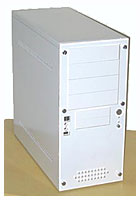 usual USB and
FireWire ports on the back of the box, the CoreCrib has two USB ports
and one FireWire port on the front of the computer where they are
readily accessible. Apple should have done this years ago.
usual USB and
FireWire ports on the back of the box, the CoreCrib has two USB ports
and one FireWire port on the front of the computer where they are
readily accessible. Apple should have done this years ago.
As you can see in the photo, the CoreCrib has a lot more accessible drive bays than any Power Mac ever: two 3.5" external bays and four external 5.25" bays - and room for still more drives inside the box.
The system accepts all the same expansion options as the Power Mac G4: RAM to 2 GB, AGP 2x video, three PCI slots, and an AirPort card. Core recommends the use of PC133 memory instead of PC100 memory.
Upgrade Your Old Power Mac
If you've already got a Sawtooth or "two brains are better than one" Gigabit Ethernet G4, you can easily move everything you have to the CoreCrib with no need to buy additional components.
If you have a Yosemite (blue & white) G3 or Yikes! G4, you're most of the way there. Your PC100 memory should work. The same goes for most of the components inside the computer, except if you have an internal modem (Apple changed that from time to time). And, of course, the CPU. Pulled G4s from AGP Power Mac G4s go for as little as US$40 on eBay these days - depending on speed, of course.
If you have a beige G3, you can move over your hard drive, CD-ROM, connection cables, and any PCI cards you may have added. Any "personality card" will have to stay with the old machine, as will the CPU and 66 MHz SDRAM memory. We suggest you check ramseeker for memory prices.
Build a New Power Mac
Although you can move a lot of components from an older Power Mac G3 or G4 to the CoreCrib, I suspect most people will buy this bare bones machine so they can build a new Power Mac G4 that's configured exactly as they want it - and probably at a lower cost than Apple would charge.
The place to start is with a CPU. If you're willing to settle for something 500 MHz or slower, you may find some excellent deals on eBay or our own swap list. If you'd prefer to buy new, check out the many options in our Guide to Power Mac G4 Upgrades. You can find G4 modules ranging from 350 MHz to dual 1.2 GHz.
One of the better values is the PowerForce G4 Series 100, which offers an 800 MHz G4 for US$299. Although there are plenty of other options, this gives us a reasonable price point and brings the cost of the CoreCrib to $680.
If we go with PC133 memory as Core suggests, the sweet spot for price and capacity is 256 MB modules, which can be found for as little as $30 each. Unless you need lots of memory, figure three of these for $100 shipped for a total of 768 MB. This brings your CoreCrib to $780.
The IDE bus handles drives as large as 128 GB (or 137 GB if you follow the convention of 1 GB = 1,000,000,000 bytes). If you buy anything larger, you either won't be able to use the whole drive, will have to buy a new controller card that supports this capacity, or put the drive in a FireWire enclosure. On the premise that we're building a budget system, you should be able to find a nice fast 80-120 GB drive for under $100 after rebates, bringing the cost of this project to $880.
And we're not even close to done yet. At this point, you can't connect a display, so we need to look at video cards. $100 is a midpoint for AGP Radeon cards for the Mac on eBay. Some sell for as little as $75, others for $150, but a lot sell for about $100, bringing our CoreCrib to $980.
Normally I'd suggest a Combo drive here, but looking at the amazing deals on CD-RW drives available through national computer and office supply chains (sometimes less than $20 after rebates), it probably makes more sense to buy both a CD burner and a DVD-ROM drive if you want the ability to burn CDs and watch DVDs. It's a cheaper way to go, and the great number of external drive bays in the CoreCrib makes this practical.
Before spending a penny on either type of drive, I strongly recommend you visit the Drive Compatibility Database at Accelerate Your Mac! to make sure the drive(s) you're looking at are compatible with the Mac. I'm guessing you can pick up a CD-RW drive and a DVD-ROM drive for under $100, keeping the cost so far to under $1,080.
Add a mouse and keyboard for anywhere from $50 to $100, and then buy all the cables you'll need to connect your drives to the motherboard. At this point, you have all the hardware you need to create a working computer. Your net hardware cost is about $1,200.
The only thing missing is the Mac OS, and you have your choice of the classic Mac OS or OS X with the CoreCrib. Figure $100 for whatever you choose, and you've created an 800 MHz G4 system with 768 MB RAM, an 80 GB drive, both CD-RW and DVD-ROM drives, and up-to-date video for about US$1,300.
The Value Equation
Has it been worth it? I think so. Picking up a used G4/733 or G4/867 from a dealer would set you back about US$1,500 with less memory, a smaller hard drive, no ability to watch DVDs, and less drive bays. If you go with the 800 MHz configuration we've put together, you save about $200.
But that's a ballpark figure. Since you get to choose how much RAM you buy, what size hard drive you want, whether you need CD-RW and/or DVD, etc., you can easily trim the price if you have lesser needs - or boost it if your needs are more demanding.
If you're not moving your OS license and several components over from an older Mac, the CoreCrib lets you customize your own Mac for less than a comparable used Power Mac G4 would cost. If you don't mind working inside the box (and it's something most computer users can do), the CoreCrib could be a way to build your own G4 while saving money.