Mac Musings
1987: Apple Introduces the Mac II and SE
Daniel Knight - 2003.03.04
This article updated and republished as 20 Years of Expandable Macs Started with the Macintosh SE and II in 1987, published on March 2, 2007.
March 2, 1987 marked a paradigm shift in Mac history.
From the beginning, the Mac had been envisioned as a closed box, an information appliance. The first two models had no expansion slots, no memory upgrade path, no high speed bus for a hard drive.
The third Mac began to break the mold. The Mac Plus looked like the first two, but it had a numeric keypad and arrow keys on the keyboard, which reduced mouse dependence. It has something called SCSI on the back, which allowed users to connect hard drives and scanners. SCSI remained a standard feature of all Macs until the iMac was introduced in 1998.
And for the really adventurous, it was possible to open up the computer and boost it from 1 MB of RAM as 1 MB SIMMs became available. The Mac Plus, introduced two years after the first Mac, was the first Mac designed with expansion options.
The Macintosh SE
When most people see an SE, they
see a restyled Mac Plus. And that's exactly what Apple intended.
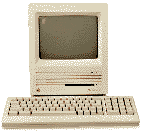 The compact Mac form factor was the way Macs
were supposed to look; the changes were hidden to the casual
viewer.
The compact Mac form factor was the way Macs
were supposed to look; the changes were hidden to the casual
viewer.
From a practical standpoint, the biggest improvement was a second internal drive bay, which could hold a second floppy or - something new to the Mac - an internal SCSI hard drive. It was a pretty pathetic 20 MB MiniScribe drive that deserves to be replaced with pretty much any half-height 3.5" SCSI hard drive built since 1989, about the same time manufacturers started putting buffers in hard drives.
Although it's hard to imagine a practical reason to do so, you could drop in a huge multigigabyte hard drive. Apple's HD SC Setup would let you create up to 8 partitions of up to 2 GB each. Overkill on an SE, but that's how future-oriented the Mac hardware and OS were.
SCSI had been improved since the Mac Plus was introduced, and the SE supported throughput of 5 Mbps - a huge improvement over the 2.1 Mbps ceiling of the Plus. For the sake of comparison, think of the SE running SCSI at half the speed of USB. That may be slow today, but it was pretty impressive compared with the Plus.
On the back were a pair of ADB ports, supporting the Apple Desktop Bus introduced the previous year on the Apple IIGS. Although used primarily for mice and keyboards, also supported sketch tablets, a few slow modems, and not much else. ADB remained a feature of all Macs until the iMac replaced it with USB in 1998.
But the most revolutionary change in the SE was inside the box - an expansion slot. This was Apple's acknowledgment that the concept of a closed, unexpandable information appliance had been shot to pieces in the marketplace. It gave the SE the ability to add features that Apple hadn't envisioned or seen a need to build into the computer, such as support for an external portrait display, a DOS card, or a high speed network card.
Yet from the outside, it just looked like a restyled Mac Plus with a much better mouse and keyboard.
The Macintosh II
If the SE subtly broke the Mac mold, the Mac II blew it to pieces. There was no internal
monitor. It 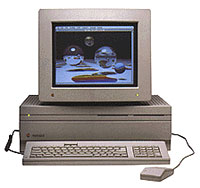 didn't have a small footprint.
It looked like a business computer, although it was far more
attractive than the plethora of DOS boxes then on the market.
didn't have a small footprint.
It looked like a business computer, although it was far more
attractive than the plethora of DOS boxes then on the market.
Going way beyond the SE, the Mac II had room for two internal floppy drives and a half-height 5.25" hard drive. Instead of a single proprietary expansion slot, Apple adopted the emerging NuBus standard and included six expansion slots in the design.
As with the original IBM PC and today's Power Mac G4s, at least one of those expansion slots had to hold a video card. Unlike most computers of the era, each of the six slots could hold a video card, and the Mac OS would let the user decide how they were connected into one giant desktop.
The simple, compact, black & white Mac gave birth to color. The Mac II could display 8-bit color, 256 colors from a 16 million color palette. Later in life, it would also be able to support 24-bit and 16-bit video cards.
All of this, of course, required more horsepower and more memory. The 8 MHz 68000 CPU gave way to a 16 MHz 68020, and the base 1 MB of memory on the Plus and SE was 2 MB on the Mac II. Although the Mac II was designed to support up to 128 MB of memory, the memory standard took a detour, the special 4 and 16 MB PAL SIMMs the II needed remained expensive, the early OS never supported more than 8 MB, the Mac II had problems with "dirty" ROMs - in the end, it could just support 68 MB after some modifications. Messy.
Still, the Mac II was a workhorse. Between the more powerful CPU and higher processor speed, it was about 2.4 times the power of the SE. It could easily handle 8 MB of RAM, twice as much as earlier Macs. And that 8-bit color was stunning in the era of 64 color EGA on the PC side of things.
SCSI was twice as fast as on the SE, offering performance to rival today's highest speed USB 1.1 devices. As with the SE, it really benefits from a newer hard drive - something built since 1989 or so can take full advantage of the Mac II's SCSI bus.
The Mac II and SE Today
These aren't terribly practical computers today. An SE with System 6 can make a nice word processor or email machine, just don't try to use TrueType fonts or ATM, which will slow it to a crawl (and that's being generous). With an ethernet card, it can exist comfortably on a computer network. Although it can run System 7, unless you avoid font rendering (TrueType and ATM) or drop in an accelerator, you generally won't be happy with its performance.
There are even more reasons to avoid the Mac II today. The memory limitation and "dirty" ROMs severely limit its potential. Worse yet, the PRAM batteries are soldered in place; when they go, you'll have to figure out how to replace them without ruining your museum piece.
Both have very little practical value; you can pick up the vastly preferable SE/30 or IIfx for a song these days, and both are much more powerful and expandable than the models they displaced.
Still, these two Macs helped change the direction of the closed box information appliance that evolved into the 'Books, iMacs, and Power Macs we know today. In some ways, we've come full circle.
Picking up a Mac II or SE can be a great bit of nostalgia for those of us who first discovered the Mac in the late 1980s. They can be a great low-cost introduction to computing for kids. The can be a great reminder of how simple things used to be. And they can be a nice antidote to the overly stylized world of iMacs and OS X.
But back in their day, these babies ran PageMaker and Photoshop - and Mac users were blown away. March 2, 1987 was the day Macs stopped being cute little toy-like computers and became a bit more respectable.