
The first Mac didn’t quite cut it. With 128 KB of RAM, a single-sided 400K floppy, and no native support for a hard drive, it was a proof of concept machine…
 The SE/30 Is the Perfect Mac
Dan Knight – 2002.04.01
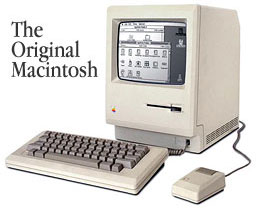
The first Mac didn’t quite cut it. With 128 KB of RAM, a single-sided 400K floppy, and no native support for a hard drive, it was a proof of concept machine. You could just put the Mac OS and an application on a floppy. Switching programs meant buying a second drive, swapping floppies (and swapping back to your System Disk regularly), or rebooting from a different disk with your other application.
The 8 MHz speed was comfortable and the graphical user interface (GUI) ran quite comfortably on the 1-bit b&w 512 x 342 pixel display. Except for the limited memory and drive capacity, it was a brilliantly designed computer.
Apple took a big step in the right direction with higher capacity memory chips made it possible to slightly modify the motherboard and create the Fat Mac with a whopping 512 KB of RAM. You still had the low floppy disk capacity, but you could do things like boot the system from a RAM disk and avoid some of the shuffling.
Plus
The Macintosh design first came into its own with the Mac Plus, which had twice the memory (1 MB) and twice the floppy disk capacity (800K). Although the System had grown a bit, you could put a couple applications and some work files on a single floppy. And with a second floppy, Mac users were in hog heaven.
But it didn’t stop there. The Mac Plus was the first Macintosh to natively support hard drives (the SCSI bus supported up to 7 devices!) and memory could be expanded to a mind-numbing 4 MB (this was 1986).
Companies such as Radius figured out how to attach external monitors, others made scanners, tape drives, and removable media drives, and the Mac became a full-fledged system computer.
A year later, the SE improved things a little bit by supporting two internal drives (two floppies or one floppy plus a hard drive), including a single expansion slot, and offering faster SCSI performance. Two years later the 800K floppy was replaced with the FDHD (a.k.a. SuperDrive), the Mac’s 1.4M floppy drive.
SE/30
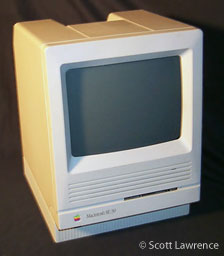
The pinnacle of compact Mac design was the SE/30, a model with a faster (16 MHz), more powerful CPU (68030), and FPU (68882), a still faster SCSI bus, a wider/faster expansion slot, and the potential to support an amazing 128 MB of RAM (that was almost incomprehensible in 1989). And it included the 1.4M SuperDrive.
When I worked at ComputerLand of Grand Rapids, we sold a lot of these with third-party memory and hard drives. Back then we could buy a stripped SE/30 with 1 MB RAM and a floppy drive, easily boost RAM to 8 MB (which was all System 6 supported), and throw in a nice Microtech or other hard drive with a longer warranty than the paltry 90 days Apple offered back then.
System 7
For those content with System 6, the Plus and SE were great machines, and the SE/30 was a real power computer. But when System 7 shipped in May 1991, the old 8 MHz Macs began to feel sluggish. System 7 had some great features, but using it meant chomping at the bit, buying an accelerator, or moving up to a faster Mac. (With my limited budget, I went the accelerator route.)
For compact Mac lovers, that Mac was the SE/30. I used one at ComputerLand, and we had these compacts all over the store for our point of sale and accounting system, each networked with coaxial ethernet.
The biggest advantage the SE/30 had over the Plus and SE wasn’t speed but memory capacity. Where the older Macs were limited to 4 MB, the SE/30 could run 128 MB – and that required System 7, 32-bit memory addressing, and an extension to patch the “dirty ROMs” in software.
The SE/30 made a small, unobtrusive server as well as being a compact workstation. That 9″ display really was wide enough for word processing, database work, and even spreadsheeting.
Not enough? You could add a video card and support an external 640 x 480 color screen, a Portrait Display, or even a two-page monitor. And one video card, the Micron Xceed, not only supported an external display – it even let the SE/30 display 256 shades of gray on the internal monitor!
The SE/30’s downfall was that slot. It offered great potential, but you had to pick between a network card, a video card, or an accelerator. An speaking of accelerators, there were some wonderful ones. The two fastest were the MicroMac Diimo with a 50 MHz 68030 and the even faster DayStar Turbo 040 at 33 or 40 MHz.
Demise of the Classic Compact Mac
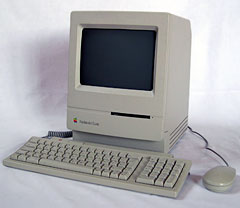 The SE/30 was discontinued in October 1990 and more or less replaced by the Classic II in October 1991. I say “more or less” because the Classic II was severely hobbled in comparison. It had no expansion slot, incorporated a 16-bit memory path for its 32-bit processor, and put an absolute RAM ceiling of 10 MB on expansion. It was cheap and had a more streamlined appearance, but purists saw it as the SE/30’s poor cousin.
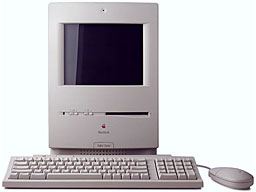 The Color Classic (Feb. 1993) added color, was a bit larger, and incorporated the same design compromises as the Classic II with one exception – it had an LC expansion slot. For years CC owners debated whether to add ethernet or an accelerator, and then Sonnet introduced the Presto Plus to give them a lot more power, ethernet, and 32 MB additional memory.
But CC owners also discovered that their machines could be upgraded by pulling out the 16 MHz motherboard and sliding in the 33 MHz ‘040 motherboard from an LC 575. That remains a popular option for those who love compact Macs and lust after color and speed. And some of these even have PowerPC upgrades!
Another popular modification changes the 512 x 384 screen resolution to 640 x 480, which is remarkably crisp on the CC’s 10″ display.
The Colour Classic II, never sold in the States, was essentially a Color Classic with an LC 575 motherboard already installed and set to support 512 x 384 video. From that point forward, Apple continued to make all-in-one models, but none had the compact footprint of the Plus, SE/30, and Classics.
On top of that, Apple abandoned the legacy of fast, crisp, 1-bit b&w graphics, which was very easy on the eye and required minimal amounts of memory or system overhead.
The Road Not Taken
It’s a shame Apple abandoned the classic 9″ b&w design. Video was fast, and the computers were compact. Those who have SE/30s with 50 MHz ‘030 or 25-40 MHz ‘040 accelerators are the envy of the Compact Macs email list.
Imagine if Apple had introduced an SE/40 in February 1993 alongside the Centris 610 and 650. The little monster could have included a 25 MHz ‘040 CPU, 4 MB onboard RAM with room to add 128 more, and included internal support for 1- through 8-bit video. Ethernet would have been standard, as it was on the Centris and Quadra models of that time. The ‘040 expansion slot would have supported an accelerator or an external display – or maybe Apple would have built that right into the motherboard.
Cousin to this would be a Color Classic/40 with essentially the same design but a polyscan monitor supporting the old 512 x 384 as well as the more desirable 640 x 480 on the internal 10″ screen. And both models might even have QuickDraw acceleration (that era’s equivalent of Radeon and GeForce cards) as standard features.
Bloat, Bloat, Bloat
Apple hardware design peaked with the SE/30, and Motorola CPU design reached its pinnacle with the 68040. The whole move to PowerPC was a big mistake – those 60-80 MHz Power Macs were no faster than Quadras running at half the clock speed. Half!
All we’ve accumulated over the years is more bloated code (RISC software has bigger program files that take longer to load) and more system overhead – newer Macs don’t even support 1-bit through 4-bit video, and OS X doesn’t even support 8-bit graphics.
Processors get faster, video gets more accelerated, hard drives spin faster, and OS X turns all the G4 models into sluggish pigs. There are times when an SE/30 with System 6 feels a whole lot faster.
At least that’s one Luddite’s opinion.
Keywords: #ludditemac #aprilfools
searchword: ludditemac
