Mac Musings
The Upgrade Option
Daniel Knight - 2002.03.06 -
Mac users have had CPU upgrades since at least 1985, first offered by companies such as Levco and GCC, later by the likes of XLR8 and Sonnet Technologies. Processor upgrades have been warmly greeted as a way to get more from your older Mac without the expense of replacing the whole computer.
Yesterday, Adam Robert Guha raised the question: Are processor upgrades a waste of money? His conclusion: Upgrading an older Mac to match the specs of a current model just doesn't make economic sense.
The 500 MHz Speed Limit
Of course, that depends on how you approach the issue. If your goal is dual 1 GHz G4 performance, your only choice is a new Power Mac G4. In fact, if you want more than dual 500 MHz G4 performance, your only choice is a new Mac, not an upgrade for your older one.
Companies like Sonnet Technologies and XLR8 have run into a brick wall. Although Motorola and IBM make processors faster than 500 MHz, they are new versions of the G3 and G4 that can't simply be swapped into existing upgrade designs. Apple has the resources to design entirely new motherboards for these CPUs, but the independent upgrade manufacturers seem unable to create an upgrade using one generation of G3/4 processors before yet another one is introduced.
On the other hand, how many of us really need more than 500 MHz of performance?
Enough Speed
Processor upgrades aren't aimed at those who want to take an old Mac and make it as fast and feature-laden as a new one. There was a time when you could drop a G3 upgrade into a 7500 or beige G3 and pretty much match Power Mac G3/450 performance, but that was over two years ago.
Although one or two G4 processors won't match the speed of today's Power Mac G4, the question is whether you need that much horsepower. Until Mac OS X, I found a G3/300 to be a perfectly adequate level of performance for almost anything I did - word processing, spreadsheets, email, Web design, book design, Photoshop, and FreeHand. Using the classic Mac OS, anyone not involved with DVD creation or power-sucking 3D games could find happiness with a G3 running at 300 MHz or faster.
OS X changes that; it's a very demanding operating system that works best on a G4. It's quite comfortable on my 400 MHz TiBook, but apparently really wants 500-600 MHz minimum for comfortable performance on a G3 machine.
But that's a bit beside the point. If you want OS X, you are definitely better off with something better than an old beige G3 - unless you're prepared to make a lot of upgrades. And that is the point of Guha's article: If you need to do a lot of upgrading, it probably doesn't make economic sense.
Economic Sense
On the other hand, what if you're pretty satisfied with your computer - you have enough RAM, your drive is big enough, and graphics performance is more than you need - but find that your old 100 MHz 601, 132 MHz 604, 180 MHz 604e, or 233 MHz G3 is holding you back? Doesn't it then make sense to look at CPU upgrades instead of a new Mac?
Definitely.
My first Mac was an 8 MHz Mac
Plus. It was comfortably fast under System 6.0.x but became a bit
of a slug running 7.x. I'd earned 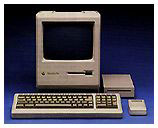 the
computer in an Apple sales program, scrimped and saved to add some
1 MB SIMMs and a 40 MB hard drive, and simply wasn't able to
invest several thousand dollars in an SE/30
for an adequately fast processor.
the
computer in an Apple sales program, scrimped and saved to add some
1 MB SIMMs and a 40 MB hard drive, and simply wasn't able to
invest several thousand dollars in an SE/30
for an adequately fast processor.
Instead I spent $200 on a Brainstorm upgrade, which replaced the 8 MHz 68000 on my Mac Plus with a 16 MHz low power 68000 and a new circuit to deal with some timing issues. I doubled CPU performance, lost the ability to play Dark Castle, and postponed replacing the Plus until mid-1993, when I bought a new Centris 610.
Five years later I bought my next Mac, a SuperMac
J700 with a 180 MHz 604e processor, on close-out for 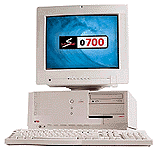 about
$800. Over time I added RAM, installed a G3/250 upgrade, put in a
better video card, added more RAM, got an IDE card and 15 GB drive,
and eventually upgraded to a G3/333 card. (Along the way, I'd also
picked up a "bare bones" S900
and swapped most of my components to the larger machine.)
about
$800. Over time I added RAM, installed a G3/250 upgrade, put in a
better video card, added more RAM, got an IDE card and 15 GB drive,
and eventually upgraded to a G3/333 card. (Along the way, I'd also
picked up a "bare bones" S900
and swapped most of my components to the larger machine.)
I used my SuperMac from June 1998 until January 2001, when I replaced it with the perfect portable, my PowerBook G4/400. It wasn't that I was dissatisfied with my 333 MHz S900 with 208 MB RAM and 17-18 GB of storage; it was because I wanted a portable Mac that I could take on trips and to the Macworld Expo.
Power User or Powerful User?
I'm not a power user; 400 MHz is enough for me.
I am a powerful user. I use every trick in the book to work efficiently - QuicKeys for macros, CopyAgent to intelligently and quickly copy files, program launchers and application switchers to move between the dozen or so programs I usually have open, and enough RAM that I don't have to use virtual memory. I also avoid bloated programs like Microsoft Office, Outlook Express, and GoLive in favor of AppleWorks, Emailer and PowerMail, and Claris Home Page.
Upgrades are a matter of priorities, needs, and desires. If your computer mostly makes you happy but could use a tweak in one area or another, you're probably best off doing one, two, or even three relatively inexpensive upgrades. For instance:
- DealMac currently lists a Sonnet G3/450 PCI upgrade for the 7300-7600, 8500, 9500, SuperMac J700/S900, etc. at $175.95. If you have the original 601 or 604 processor, that's a huge speed increase. And even if you have a 250 MHz G3 it's something to consider if CPU speed seems a bit sluggish.
- DealMac also noted a $159.97 G3/466 ZIF upgrade for the beige G3 and blue & white G3 in January. That deal has expired, but there are lots of similar prices on G3 and even G4 ZIF upgrades for these models.
- Video sluggish? You can pick up a Radeon 7000 Mac Edition for under $120 shipped - and it's fully supported in OS X.
- Hard drive too slow and/or small? If your Mac uses an IDE hard drive, you can pick up much bigger, much faster drives than the 2-4 GB ones that came with your Mac. You cost - about $100.
- Can't use IDE? Don't be so sure. Sonnet, Acard, and others offer PCI cards that support IDE drives for under $100. Or consider the 36 GB IBM UltraStar 7200 RPM drive for $149.99, as recently listed on DealMac.
- Need RAM? Check out ramseeker's price guides to 168-pin DIMMs (for the 7500, etc.), SDRAM for the beige G3, or PC100 RAM for the Blue & White G3.
- If you've gotta have USB and FireWire, PCI cards start at about $65.
It's your call. Before you invest $180 in a CPU upgrade, $120 in a video card, $150 in a hard drive, $65 in a USB/FireWire card, and a bit more yet on RAM, consider how that $600 added to whatever you can sell your old Mac for compares with the price of a new or recently discontinued iMac or Power Mac G4.
But if you've held onto your old Mac this long, you may not need to perform nearly that many upgrades. And even if you do, you can do them one at a time based on your needs, desires, and finances. An upgrade here and there is much more affordable than a whole new computer and can postpone the date you finally replace it by years.
You've already got a low-end Mac (even my year-old TiBook fits that category) that you know well. If you're mostly satisfied, an upgrade now and then as necessary or affordable can keep you happy - as long as you're not trying to match the capabilities of today's models.
If you need to burn DVDs or have the ultimate Mac gaming experience, by all means look into today's powerful Mac lineup. But if your needs are less extreme, consider doing what Mac users have done since the beginning - upgrade your old Mac instead of replacing it.