Mac Musings
Spam, Spam, Spam, Spam
Daniel Knight - 2001.12.04I closed down my first ISP account (not counting AOL) at the end of September, an account I've had for as long as I've been accessing the Internet directly. For at least five years I was "dknight@mail.iserv.net" - but no more. Nice as it was to keep the address, I used the account less and less. Worse, it was receiving more and more spam.
As an experiment, I switched my Iserv address from Claris Emailer to Outlook Express for the month of September. I had to use OE to access my @home mailbox anyway, so what better opportunity to learn to user Microsoft's free email client.
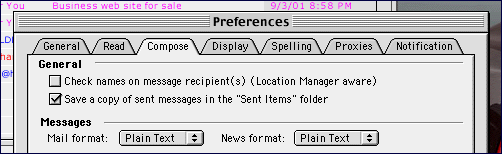
Let me state right off that I consider Emailer nearly perfect and won't even consider abandoning it until I migrate to Mac OS X at some undetermined future time. I like plain text email; I very much dislike enhanced text email. Although OE fully supports styled email and uses it by default, you can change your preferences and make plain text your standard mail format.
Spam
It's sometimes called unsolicited commercial email, but everyone knows it as spam. Even the folks at Hormel, who make the Spam meat product, have stopped fighting the label. Spam is as much a part of email as the @ sign.
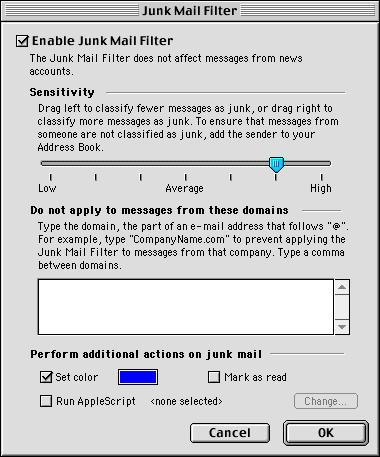
So for one month I accessed my Iserv account using Outlook Express. This gave me the opportunity to play with their spam filter, a feature Emailer doesn't have. (You can cobbled together your own spam filter in Emailer, but having a built-in one is even nicer.)
I used OE's "average" spam filter for a week, then set it to "high" for a week, then tried the two settings in between for a week each. As I did this, I changed the color used to indicate junk email to help me see which filter flagged which email and visually distinguish spam from legitimate email.
Well, I was right about one thing - the vast majority of email going to my Iserv account was spam. It was time to change a few lists and services over to other addresses and eliminate the account, which would also reduce the amount of time I spent dealing with spam every day.
In the end, I determined that the the highest setting tended to mislabel too much legitimate email - but the next setting over was almost dead on the money in not identifying legitimate email as spam. It didn't catch all the junk email, but almost every single thing it caught was spam. If you use OE and want to use its junk mail filter, that's a recommended starting point.
Spam, Spam
What did the junk mail filter flag? You name it - offers to discover the truth about anyone, refinance my mortgage, regrow hair naturally, make serious money working from home, make Windows more reliable, invest in oil and gas, get an unsecured Visa, lose weight, save on life insurance, take a Sun Microsystems developer survey, buy cigars, buy cell phone batteries, accept credit cards, date, deal with the Bank of Tobago, buy ink and/or toner, buy a U.S. flag (remember, it was September 2001), get no cost long distance, use "revolutionary casino software," obtain medications without a prescription, obtain "the women's Viagra," get money for college, create my own mailing lists, buy fine art, claim a prize, read beauty tips, buy a .sex domain, visit porn sites, or buy millions of email addresses and send out my own spam.
In all, somewhere between 600 and 700 pieces of spam sent to a single mailbox - and sometimes multiple copies of the same email sent to that address simultaneously. I should bill these people for my time! (Don't laugh. Some folks are billing spammers and even receiving occasional payments of those bills.)
Spam, Spam, Spam
What's worse than spam? Well, if you're used to plain text email, what's worse than spam there is spam in an "enhanced" email client. Isn't it enough to invite me to some sleazy sex site - do I have to view your pictures, too?
To compound the problem, OE previews messages - and when you select and delete one, it will automatically show you the next one, even if it's spam. This has convinced me that I don't want to use an email client that automatically supports images. Show me the text, then let me decide if I want to see the fancy styling and/or pictures.
With Emailer, I can deal with a lot of spam simply by looking for messages with no subject or an attachment. Unless I know the sender, these go right to the Trash, as do the ones with bizarre return addresses such as "DxE6L5sTN@anet.ne.jp" or anything from the "arabia.com" domain. Bad dates, such as 1987 or 2002, are also clues that a message might be spam.
Spam, Spam, Spam, Spam
One reason we call it spam comes from the Monty Python song. Unsolicited commercial email, like the Spam song from Monty Python, just doesn't seem to stop and gets more annoying as time goes by. And there seems to be nothing we can do about it.
For instance, I have a wonderful AppleScript for Claris Emailer that will go through the header of an email, address an outgoing message to "abuse" or "webmaster" at each server the message has gone through, copy the spam, and send the following note: "I received this unsolicited message apparently by way of your system. Please take the appropriate actions to prevent this in the future. Thank you." And then it deletes the offending message.
Some email administrators have sent a note to thank me for identifying the abuse, but mostly I get bounces back from nonexistent addresses - and no reduction in the level of spam.
I had EarthLink for a while, used my email address once or twice, and still managed to receive junk email at that address. (Yes, I did turn on their spaminator service after that.) I never posted that address or my @home address on the Web, yet I get junk email @home as well. That means the spammers don't have to find your email address on the Web to find you.
Spam, Spam, Spam, Spam, Spam
It costs virtually nothing to send out a single email or to bulk email millions of addresses. That's why spam exists. There's no cost for dealing with bounced messages, so they don't even care if "dknight" is a legitimate address at any given domain or not. If it is, it gets delivered. If not, it vanishes in the ether of cyberspace.
What can we do about spam?
First, don't reply by email. I suspect the wonderful AppleScript I used to notify email administrators of open relays did as much harm as good, since it let others know they were reaching a legitimate email address. I rarely use that script these days.
Second, see if the spammer has a toll free number and call them. This will cost them time and money. If enough of us call and insist on being removed from their mailing lists, the cost of answering the phone may convince them to stop sending spam. (Odd that telemarketers and those who send postal junk mail are required by law to remove phone numbers and addresses from their databases, but spammers are not.)
Third, bill the SOBs. Write a nice form letter asking to be removed from their mailing list and then bill them for professional services. If you're a consultant, bill them for 5, 10, or 15 minutes of your time. This violates the first rule, but then they already have your email address. If only one in a hundred pays your bill, you've found a way to profit from unsolicited commercial email.
In the end, as long as email remains free, we can't win. We can filter, phone, and bill all we want, but until it costs them real money to send the spam, they aren't going to quit.