Mac Musings
Macs, PCs, and Power Users
Daniel Knight - 2001.10.26How to generate a lot of heat on a Mac site: Publish an article by a PC hardware geek called Why PCs Are Better for Power Users. Tino made some very valid points in that article, but as a Mac advocate, I couldn't just sit there and take it.
The Tweaker Mindset
There is a class of computer user known as the hardware geek, the optimizer, the hardcore performance nut, the constant tweaker. These guys (well, it's mostly guys) breathe hardware specs like the rest of us breathe air. They know motherboards, video cards, CPUs, hard drives, memory architecture, and all the other PC hardware variables like the backs of their hands.
That's important in the PC world, since there are so many variables. Just look at the list of pieces and parts in Tino's system - each of those was a conscious choice among several alternatives. This is why home built PCs are unique.
If you want the best PC for the money, whether for Windows or an alternate OS, find someone like Tino or a computer shop that employs someone like Tino. Share your priorities (gaming? video production? file server?) and the tweaker will know exactly what motherboard, CPU, hard drive, video card, etc. will give you the best performance for the dollar.
The User Mindset
In the early days, the personal computing industry was dominated by geeks and tweakers. I was one of them. I had one utility on my 8 MHz Zenith Z-158 that changed the refresh timing for a whopping 7% increase in system performance. Today tweakers may not only build with the fastest components, but they'll often chip them to an even higher speed.
That started to change with commercial software: Visicalc, word processors, databases, etc. Where once the hardware geeks were the users, by the late 1970s there were more plain users than geek users. They just wanted their Apple II+, Kaypro, or TRS-80 to do the job; they didn't care about MHz.
Personal History
The IBM PC was designed with a geek operating system, not a user friendly one. After using Apples and Commodores, it took me almost two weeks to learn MS-DOS 3.3 to the point of becoming a power user. I even had EMS memory in my Zenith PC - very geek.
The Mac was designed as a user computer. The graphical interface, direct manipulation of objects with the mouse, lack of a command line, use of unique plugs, and very limited expansion made it ideal for the user - but the geeks didn't understand it and warned users away.
I was one of them. I sold Zenith and Apple computers, but mostly Zenith's DOS machines. I didn't understand the Mac. I later worked at Radio Shack and sold their DOS computers. When I went to ComputerLand, I was a DOS geek surrounded by Mac users. "Great," I thought, "I can really clean up as the store's only real DOS user."
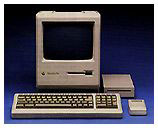 It didn't take long - maybe six months - before I began to
understand the Mac. Shortly after I acquired my own Mac
Plus, I sold my Zenith PC and have never looked back. That was
before Windows was a viable alternative to the Mac.
It didn't take long - maybe six months - before I began to
understand the Mac. Shortly after I acquired my own Mac
Plus, I sold my Zenith PC and have never looked back. That was
before Windows was a viable alternative to the Mac.
Windows History
Windows first shipped in November 1985, but it wasn't until Windows 3.1 in 1992 that it began to be competitive with the Mac OS. Windows 95 took a huge step forward, making Windows a dead serious alternative to the Mac for most users - especially those who already had DOS or Windows 3.1 PCs.
We could debate the merits and demerits of Windows vs. the Mac until the cows come home, but Windows is the de facto standard in the computing world. The following table summarizes the history of the Mac OS and the two main streams of Windows:
| Year | Mac OS | Windows | Windows NT |
| 1983 |
Lisa |
||
| 1984 |
System 1 |
||
| 1985 | System 2 |
Windows 1.0 |
|
| 1986 |
System 3.2 |
||
| 1987 | System 3.3, 4.2 |
Windows 2.0 |
|
| 1988 |
A/UX: Unix for the Mac |
||
|
1989 |
|||
|
1990 |
Windows 3.0 |
||
| 1991 |
System 7.0: |
||
| 1992 |
System 7.1: first Mac OS with a pricetag |
Windows 3.1 |
|
| 1993 |
System 7 Pro |
NT 3.1 | |
| 1994 | System 7.5 | Windows 3.11 | NT 3.5 |
| 1995 | Windows 95 | NT 3.51 | |
| 1996 |
System 7.5.5 |
NT 4.0 | |
| 1997 |
Mac OS 7.6, 8.0 |
||
| 1998 | Mac OS 8.1 |
Windows 98 |
|
| 1999 |
Mac OS X Server |
||
| 2000 | Mac OS 9.0 | Windows Me | Windows 2000 |
| 2001 |
Mac OS 9.1 |
Windows XP | |
| 2002 |
time will tell |
||
Significant dates for the Mac OS are 1991, when multitasking became part of the operating system and the Mac OS became a 32-bit operating system. Windows 3.1 also allowed multitasking, but it wasn't until Windows 95 that the consumer version of Windows included 32-bit support.
Networking was always part of the Mac OS, but it didn't become standard with Windows until Windows for Workgroups was released in 1992.
The next big step in operating systems was improved filing systems. Windows 98 supported FAT32 at about the same time Apple introduced HFS+ with Mac OS 8.1.
Windows 1.0 through Me are Microsoft's consumer operating systems. All of them run on top of a DOS core. The Windows NT family was designed from the ground up to compete with Unix and does not have a DOS core. Windows Me is supposed to be the end of the line for the separate consumer OS; from here on out, Microsoft will be pushing Windows XP as their operating system for all users.
In the same way, the classic Mac OS is on its last legs. It is quite likely that Apple will continue incremental updates to Mac OS 9.x for the next year or so, then create a final edition, and from that point forward work exclusively on Mac OS X. By the end of 2002 we can expect all PCs to ship with XP and all Macs to ship with X.
All this exposition is intended to make one point: Win2k/XP should not be confused with Win3.1/95/98/Me. The two may look similar, but they are almost as different as Mac OS X and the classic Mac OS.
Although serious PC geeks may have DOS and a consumer version of Windows on their PCs, they tend to prefer the stability and performance of Win2k for all around use.
Power Users, PCs, and Macs
We tend to define "power users" differently in the PC and Mac camps. In the Mac world, we consider power users to be the people who do a lot of Photoshop or video editing, and sometimes the serious gamers with tweaked out systems. We define power users by their applications more than their hardware.
In the PC world, power users run fast Pentium and Athlon processors, which are overclocked more often than not. They choose their hard drives, video cards, and other components based on performance. The goal seems to be having the best hardware, not productivity.
Using cars as an analogy, PC hardware users build tricked out hot rods while Mac users buy production cars and trucks to get the job done.
That's why, from a PC power user perspective, Macs just don't cut it. Sure, some Mac users overclock their G4s, drop in Ultra SCSI cards and 15k RPM hard drives, but we don't tend to sweat which video card or hard drive will offer the most performance. We don't really understand the PC world's obsession with sound cards, since sound has been part of the Mac and the Mac OS since 1984.
The the PC builder, every aspect of the machine demands contemplation. Which case and power supply? Which motherboard and CPU? Which video card and sound card? Which hard drive and hard drive controller? There are dozens of decisions to be made.
From that perspective, Mac users are a bunch of wimps. We buy systems that Apple builds for us. We may add memory, but that's the extent of expansion for the vast majority of Mac users.
Choices for Mac Users
First, we should note that Mac users have not been completely without choice. Ever since 1987 we've been able to buy Macs with different sized hard drives (and sometimes no drives at all), different levels of installed memory, and sometimes even different video cards.
For a while, Apple sold fairly bare systems, such as a Mac IIci or SE/30 with no hard drive and an absolute minimum amount of RAM. This allowed consumers or Apple dealers to trick out the machines with memory configurations and drive options that Apple didn't offer and do so at a lower end price. Low End Mac has often lamented the lack of stripped Macs that the hobbyist could build up with the memory and drives desired.
Although we disagree with Tino - Mac users do have choices, after all - we agree that our choices are far too limited. Even without allowing cloning, Apple could produce bare Macs such as a stripped G4 and the iMac's insides packed into a desktop case. Apple chooses not to, giving tweakers one more reason to buy PCs.
CPU Upgrades
Apple has made it increasingly difficult for Sonnet, XLR8, and others to produce upgrades for newer Macs. Apple deliberately crippled the blue & white G3 to prevent G4 upgrades from working, although these companies managed to work around that block. At this point, it is apparently not possible to upgrade the CPUs in the Quicksilver G4s, although some tweakers have been able to overclock them past the 867 MHz mark.
It used to be a whole lot better, but at this point Apple would rather sell us a fully configured system every few years than enable us to easily upgrade the CPU when we need more power.
Hard Drives
Apple doesn't design computers to be overpriced, but they end up that way due to a small market, unique components, excellent overall design, and the ease of use that keeps us buying Macs.
One way Apple keeps prices relatively reasonable is by using industry standard parts, such as RAM, PCI expansion slots, IDE hard drives, etc. And to keep costs down, Apple doesn't use the fastest, most expensive hard drives. Besides making sure you have at least 256 MB of memory (which is cheap these days), the best way to speed up any Mac - desktop or portable - is with a faster hard drive.
When a PC tweaker builds his own computer, he decides how much speed he needs. Mac users are limited to the 4400 to 7200 rpm drives Apple installs unless they choose to replace them or, in the case of the Power Mac, add a second drive.
Memory, CPUs, and Motherboards
Mac users can rest easy on this one: We don't have to pick between several types of memory and several families of CPUs and then choose the best motherboard to support both. We get what Apple gives up, and in the case of the Sawtooth and later G4 motherboards, that's been pretty impressive.
Tweakers might enjoy debating the merits of Pentium III vs. Pentium 4 vs. Athlon on the top end and Celeron vs. Duron for budget computing; we are content with G4s on the top end and G3s at the entry level - and each of these CPUs has been improved over the years.
We may not have 200 MHz system buses and RAMbus memory to choose from, but the task-oriented Mac user just wants to get the job done, not sweat the details of memory architecture. It may mean top-end PCs outperform our single- and dual-processor G4s in some benchmarks, but we're looking at ease of use and productivity. (Sure, Steve Jobs can always come up with a way to make the Mac look better at some specific set of tasks, but we don't buy the Mac because it's faster. We measure "better" in other ways, although speed is nice, too.)
Video
Today's Power Mac G4 uses some of the same AGP 4x video cards found on tweaked out PCs. There may be some other options in the PC world, but unless you're an avid gamer, the Nvidia and ATI cards we have are probably sufficient. And the most avid gamers tend to collect systems and components like some of us collect old Macs - if they want the best game platform, they'll probably buy a PlayStation 2, a Nintendo GameCube, and a tricked out Athlon-based PC.
Sound Cards
For some reason PC users think it's odd that Macs don't use sound cards - as though it's some sort of benefit not having standard sound output in the hardware and OS. Sound cards need drivers and may not always be compatible with everything else. Sound built into the computer - that just makes sense.
Sure, some may find that sound inadequate, but that's why Jobs gave us three PCI slots in the Power Mac G4. If you want a Sound Blaster card, you can add one. If not, you haven't filled a PCI slot just so you can hear your Mac beep.
Tino's argument that Macs might be $10 cheaper without a sound card falls in the face of one simple fact: If everyone had to buy a sound card, we would all be spending a lot more than $10 to add sound to our Macs. It's much better to have sound a standard feature and let those who want something better add it.
The Mac OS
I'll agree with Tino that the classic Mac OS doesn't do a really spectacular job of multitasking, but neither did old versions of Windows. That said, Mac OS X, which is now standard with all Macs, holds its own against Windows XP.
As far as multitasking is concerned, I have no problem downloading email, downloading a file, loading a Web page, scanning the Web for new content, and writing at the same time - and that's with Mac OS 9.2.1. It worked equally well with System 7.5.x, for that matter.
Still, the multitasking in modern operating systems such as WinXP and OS X is better. Give it another year, though, and most of us will be using X, just as by then a majority of Windows users will probably have migrated from the consumer family to the NT (Win2k/XP) family.
A Better Mac?
Now that we've said all that, could and should Apple make a better Mac for the tweakers of the world?
I think so. I'd like to see Apple offer two families of computers designed for those who don't want iMacs and aren't satisfied with the current Power Mac.
The Desktop Mac
The first would be a desktop Mac based on the iMac's insides. The case should be designed to support a 21" color monitor or sit vertically next to the display. It might ship with no CPU, no RAM, no hard drive, and no CD-ROM for the tweaker market, just a case, motherboard, power supply, keyboard, mouse, and set of CDs containing the OS and bundled software.
Apple and other vendors could offer G3 processors, memory, hard drives, and a whole variety of CD and DVD drives.
The consumer version would offer one to three G3 speed options, include at least 128 MB of RAM, have a pedestrian 15-20 GB hard drive, and offer CD-RW, DVD, and Combo drive options. I suspect the "headless iMac" could sell for US$500-600 in the base configuration - and a whole lot less in the bare bones hobbyist edition.
The Power Macs
I'd propose two versions of the Power Mac G4: one for regular geeks and another for servers. The regular version would include a modified Quicksilver case that has two full accessible 5.25" drive bays, a G4 motherboard, and a power supply. It would not include a CPU, any RAM, a hard drive, or any type of CD or DVD drive. Apple's Pro Mouse and Pro Keyboard would be included, as would a set of CDs containing the OS and bundled software.
The server would use a wider case and allow for 5-6 half-height 5.25" devices along the left side. The motherboard would still be mounted on a drawbridge door on the right side, and there would also be three hard drive slots along the bottom of the case. This machine would have a more robust power supply to better support all these devices and high speed, high capacity hard drives.
As with the desktop Mac above, Apple and other vendors would offer single-, dual-, and quad-processor G4 modules, memory, and a huge assortment of drives for these machines. Further, Apple could use the server case to build the kind of server that IS types have wanted for years.
Conclusion
In many ways, the Mac is the opposite of what the PC power user wants. It's a fully integrated solution, not a conglomeration of parts from any number of vendors. It's trusting Apple to do it right, not saying the only way to do it right is to do it ourselves. (Tweakers have nothing good to say about Dell, Compaq, IBM, Gateway, HP, and all the other brands. In their eyes, those Windows boxen have made way too many compromises to reach the market at a consumer price.)
And while some Mac users may be convinced that a Power Mac G4 dual 800 MHz can outperform any Pentium 4 system in existence, most of us know that Macs are better tools not because they may (or may not) be the fastest at getting the job done, but because they make it easier to do the job and do it well.
As Mac users, we should realize that there's a world of difference between consumer computers running WinMe and tweaked out power user machines with Win2k or XP. They may not be Macs, but that doesn't make them crap.
As a geek, I'd love to see Apple go after the PC power user by offering bare units and allowing other vendors (such as XLR8 and Sonnet) to make CPU modules for them. Other than a new case for a desktop G3 and some changes to the G4 case, Apple could do this at minimal cost and help grow market share as more budget-conscious buyers would be able to afford a new Mac.
I honestly don't expect Apple to do so, but I won't give up hope, either. I can just see a whole new class of dealers and system integrators taking those bare Macs, tweaking them for their customers, and offering better Mac values than the Apple Store - which is one reason Apple probably won't go this route.