Miscellaneous Ramblings
My PowerBook Pilgrimage, 1996 to Present
Charles W. Moore - 2007.09.24
The notebook computer is a sublime invention. I prefer working on notebooks even though mine are mostly used as desktop substitute machines, but road trips make you even more profoundly appreciate the genius of the laptop.
For example, I live in a remote rural area with no broadband availability (as yet, although we are told it is coming by the end of 2009). However, the local library, which happens to be located next door to the Telco offices and main switching station for the area, does maintain a live WiFi hot spot, so if I really need broadband I can hop in the car with my main production computer, a G4 PowerBook, drive 10 miles, and get connected wirelessly with all of my files and current projects in hand just as if I was in my home office. It's not convenient, but it is better than no high-speed access at all - and it's something I just couldn't do with a desktop computer.
Power outages are another aspect of rural living where the notebook shines. We've had two in the past ten days, and thanks to my laptops I was able to continue my work routines through both of them essentially uninterrupted. In fact, I happened to be dictating an article using iListen when the second interruption happened, and I didn't even notice that the power had gone off and was running on battery power until several minutes later. I have three extended life batteries (two from FastMac and one from NuPower) between my two Pismo PowerBooks, so I'm good for at least 10-12 hours computing time with them.
Being afflicted with some chronic health issues, I find myself cooling my heels in medical waiting rooms from time to time; instead of passing the time reading year-old magazines or staring out the window at prosaic parking lot vistas, I can take the laptop along and get some work done. While my old G3 iBook is the most convenient to lug around, the Pismos and the 17-incher are perfectly amenable to this sort of use.
A notebook also frees you from your desk and office chair when you're at home or the office. These days, I am mainly using the Pismos as my "laptop" notebooks on the home front, sometimes reclining on a bed or sofa with it perched on the excellent Laptop Laidback portable workstation or sitting in a comfortable chair by the wood stove - a much appreciated comfort during the cold months here in the Great White North.
My profound appreciation of these conveniences afforded by my PowerBooks and iBook makes it difficult for me to entertain ever going back to a desktop computer, although I am a bit smitten with the new aluminum iMacs.
Of course, some folks do revert. My daughter, who was for years as a consummate PowerBook aficionado, is currently using a Dell desktop and also has an IBM ThinkPad, which was given to her, but says that when she gets a new Mac it will probably also be a desktop unit.
To each his or her own, but for the reasons cited above, I find it hard to imagine ever going back to using a desktop computer as my main workhorse. I gave it a shot back in '01 when I got a G4 Cube, which is in my estimation one of the most elegant desktop computer form factors ever. But it just wasn't a laptop - still tethered to an AC power outlet - and simply didn't have that je ne sais quoi that you get with a 'Book.
My First PowerBook Experience
 I did set
out out on my Mac journey as a desktop user, however, and the first 100
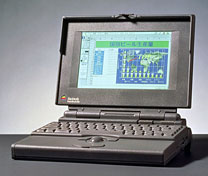
series PowerBook I ever got my hands on was a 165c belonging to a friend. The 165c was
Apple's first stab at making a color PowerBook, and it was not an
unqualified success. The truncated resolution 640 x 400 passive matrix
display was, to put it charitably, a tad murky, and battery life was
little more than an hour on a fully charged new battery.
I did set
out out on my Mac journey as a desktop user, however, and the first 100
series PowerBook I ever got my hands on was a 165c belonging to a friend. The 165c was
Apple's first stab at making a color PowerBook, and it was not an
unqualified success. The truncated resolution 640 x 400 passive matrix
display was, to put it charitably, a tad murky, and battery life was
little more than an hour on a fully charged new battery.
And yet the PowerBook grabbed me like no other computer had. I already was a consummate Mac fan, but I instantly fell in love with the PowerBook. I was enchanted by the clever miniaturization of the features of my desktop Macs into such a fetchingly compact unit. This, it seemed to me, was the quintessentially logical computer.
The original conception of the Macintosh was as a compact, somewhat portable system, and the PowerBook enhanced both qualities. I had to have one.
However, I'm not an impulse buyer. I considered the 33 MHz PowerBook 150, which was selling deeply discounted at the time, but ruled it out as a bit too close to my 25 MHz LC 520 performance-wise. I wanted my PowerBook to be a system upgrade as well.
I also was really taken by the genius of the PowerBook Duo concept, but Duos were just absurdly expensive.
 My First
PowerBook
My First
PowerBook
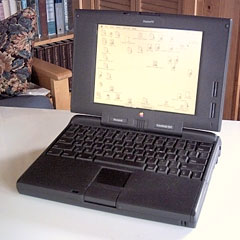
I was quite smitten with the mighty PowerBook 500 series, but they were sooooo expensive, and PowerPC was coming. Cutting to the chase, I finally took the plunge in the fall of 1996, buying an end-of-line PowerBook 5300, with a 9.5" grayscale passive matrix display and a 100 MHz Power PC 603e processor.
I loved the 5300 from the moment I took it out of the box. The clean, squared-off form factor and small footprint (very close to that of the 12" iBook) appealed to me aesthetically. On the downside, while the 5300 represented a significant, albeit not spectacular, performance upgrade from the LC 520, it was not nearly as fast as I had hoped, and the operating system that shipped with it, System 7.5.2, was a dog. Boosting the RAM to 24 MB and upgrading to System 7.5.5 improved performance and stability a lot, and I found that running from a RAM disk also speeded things up significantly, as well as facilitating blissfully quiet computing with the hard drive spun down.
The 5300 was my main workhorse for three years, and I was as fond of it at the end as I was at the beginning, but as the Internet became a more central focus of my work, the cramped 640 x 480 grayscale display and lazy performance online got old pretty quickly.
So in January, 1999, I replaced the 5300 with a 233 MHz PowerBook "PDQ" WallStreet with a 12.1" TFT active matrix display and 512K of level 2 cache. This time the performance increase was dramatic, and the WallStreet did yeoman service for the next 3-1/2 years, right up until the processor suddenly melted down without warning on August 2, 2002 - the only Mac I've ever owned in 15 years that ever suffered a major hardware failure.
Not that the old 5300 went away. My daughter used it through high school and her first year of University. I still have it, and it still works, although the hard drive is making ominous noises. The WallStreet is still in daily use by my wife running Mac OS 9.2.2. It was revived with a scrounged processor daughter card in 2004 and hasn't skipped a beat since.
 There is
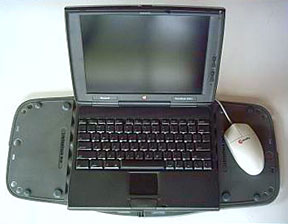
also a 117 MHz PowerBook 1400cs that
I "inherited" from my daughter (when she advanced to a faster 1400)
that I used as a knockabout 'Book for a while and then handed off to my
wife for a time. It's been retired for a couple of years now, but like
the 5300 still works fine.
There is
also a 117 MHz PowerBook 1400cs that
I "inherited" from my daughter (when she advanced to a faster 1400)
that I used as a knockabout 'Book for a while and then handed off to my
wife for a time. It's been retired for a couple of years now, but like
the 5300 still works fine.
Pismo
 I got
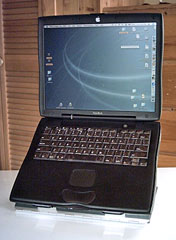
my first Pismo in October, 2001, swapping the G4 Cube even for it. That
Pismo has been a tremendous computer and has been hot-rodded over the
years with a RAM upgrade to 640 MB, a 550 MHz G4 processor upgrade from
Daystar, a FastMac SuperDrive module, a 40 GB Toshiba 5400 RPM hard
drive with a 16 MB cache, and a Miglia FireWire 800 PC Card
adapter.
I got
my first Pismo in October, 2001, swapping the G4 Cube even for it. That
Pismo has been a tremendous computer and has been hot-rodded over the
years with a RAM upgrade to 640 MB, a 550 MHz G4 processor upgrade from
Daystar, a FastMac SuperDrive module, a 40 GB Toshiba 5400 RPM hard
drive with a 16 MB cache, and a Miglia FireWire 800 PC Card
adapter.
I bought a second Pismo this year, a 500 MHz G3 that I just upgraded last week with a FastMac 550 MHz G4 upgrade. It's in beautiful condition and also has a FastMac SuperDrive plus a pleasantly quiet 100 GB Seagate hard drive, but so far only 576 MB of RAM. I'd like to bump one or both of these machines to a gig of memory and add a wireless card.
 12"
iBook
12"
iBook
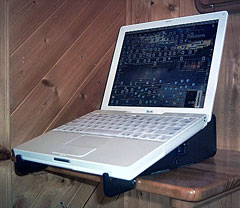
At New Year's 2003 I also bought a 700 MHz G3 iBook - the entry-level model with a 20 GB hard drive and a plain-vanilla CD-ROM drive. I maxed out the RAM at 640 MB, but otherwise the iBook remains stock to this day. It's been completely reliable for going on five years, including three as my main production workhorse, and I have no complaints or regrets about purchasing it.
Now that I have the second Pismo, the iBook will probably be handed off to my wife as an upgrade from the WallStreet.
17" PowerBook G4
...probably the best computer I've ever owned.
My current number one production 'Book is an Apple Certified Refurbished 17" PowerBook G4 1.33 MHz I bought from TechRestore in February 2006. It's now 20 months old (in its service life), and notwithstanding my abiding affection for my Pismos (and, for that matter, the iBook), I have to say that this big 17" machine is probably the best computer I've ever owned. I only wish everything in life worked this well and was as trouble-free.
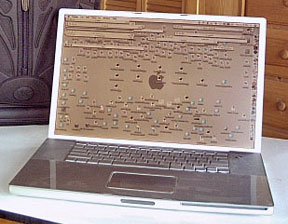
I was skeptical that anything could top the dependable, trouble-free performance I got from the Pismo and iBook over the past seven years, but so far this big AlBook has been a rock (and it rocks).
The still impressive inventory of standard features on the Big Al has proved more than adequate for my needs so far, and then some, although I did get TechRestore to install a 1 GB RAM expansion stick, bringing the total memory up to 1.5 GB, and if I were doing it today, I think I would go for the full 2 GB that is supported.
The 1.33 GHz Big Al came pretty sumptuously equipped, with a Radeon 9600 graphics processor and 64 MB of video RAM, 512 MB of RAM, an 80 GB hard drive, a SuperDrive, gigabit ethernet, built-in Bluetooth, 802.11g wireless, FireWire 400 and 800, and USB 2.0. And then there is the 1440-by-900 display, a resolution that's nothing to get up in the night and write home about these days (it's now standard on the 15" MacBook Pro), but I've found it luxuriously expansive after years of working with 1024 x 768 and 800 x 600 Apple laptop displays.
The 17-incher hasn't missed a beat and is still fast enough to satisfy most of my needs, but it is coming time to think seriously about stepping up to an Intel Mac, if only for professional reasons. We're nearly two years into the Macintel era, and there is beginning to be software that I am unable to test with a PowerPC Mac,
My next Mac? It will almost certainly be another notebook, most likely a MacBook, although I'd love to have a 17" MacBook Pro. However, I'm in no big hurry. I still use Classic Mode, and the built-in modems are a lot more convenient than the USB dongle that's required for dialup connectivity with the Macintels.
I'm biding my time.