Charles Moore's Mailbag
A Light Touch Keyboard, PowerBook 520c Questions, Moving a G3 iBook from 10.2.8 to 10.3, and More
Charles W. Moore - 2007.08.13
- Need a Light Touch Keyboard
- PowerBook 520c Questions
- Upgrading an iBook G3 from 10.2.8 to 10.3.x?
- QuickBooks and Intel-based Macs
- MacBook Causing Problems on a CRT Display
- Is the $150 Linux Laptop for Real?
Need a Light Touch Keyboard
From Jan:
I am in desperate need for a keyboard with a very light touch. For years I used a keyboard by Alps but it just died and Alps has not produced keyboards for at least 10 years now. Besides the light touch, the feature I liked the most was that the spacebar was actually 2 spacebars and the one on the left could be programmed to be the backspace key. I have been looking for keyboards for over a year, in anticipation of my Alps gong bust and I have not found another keyboard with the space bar feature. Seems odd to me that someone else has not picked up on this unique feature. Of course, this is only helpful to the user if the user always uses their right thumb on the spacebar, which I do.
Is the MacAlly IceKey just for Macs? As I rescanned the article on the internet, I only see things about the Mac.
If you have come across light touch keyboards for a PC, please let me know.
Jan
Hi Jan,
As far as I know, the MacAlly IceKey is Mac-only.
However, the keyboard that I use, and that I consider the most comfortable freestanding keyboard I've ever used is the Kensington SlimType, which is definitely available in both PC and Mac versions.
The SlimType has only one spacebar, however.
You can read my review on Applelinks. More info is available from Kensington.
The iRocks X-Slim is pretty much the same keyboard but is available with backlit keys.
Another keyboard you might like is the Goldtouch Ergonomic, which does have right and left spacebars. The Goldtouch is also available on both PC and Mac versions. More info available from KeyOvation and National Ergonomic Supply Inc.
Hope this information will be some help.
Charles
PowerBook 520c Questions
From Alfred:
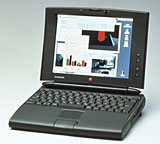
I need your help with the following....
 I
live in Southern California - close to Disneyland. I now have three
PowerBook 520c & one power
supply/charger. I have bought all at the Goodwill Industries on the
way to work.
I
live in Southern California - close to Disneyland. I now have three
PowerBook 520c & one power
supply/charger. I have bought all at the Goodwill Industries on the
way to work.
I first purchased two PowerBook 520c without the power supply/charger unit (for parts).
On a recent visit I saw another PowerBook 520c - when asked about the power supply, I was told that someone has separated it from the computer. I left my name & number saying that I want the power supply for that PowerBook 520c. The next day I allocated myself more time in the Goodwill store - they found the power supply. I plugged it in - and after booting up I paid for it and left.
At home I had more time - the last PowerBook 520c that I bought has System 7.5.3 or so, 12 MB RAM & 300 MB hard disk. The batteries are useless - not holding charge. Some old software on it - Microsoft Office 4.2.1, PageMaker & some compression tool to conserve disk space (icons have the letters DD on the lower left corner). The other two PowerBook 520c have same amount of RAM and a smaller hard disk.
Questions....
- The hard disk on PowerBook 520c is SCSI or IDE? Can I run it on an external disk?
- Where can I get more memory for the PowerBook 520c?
- Where can I get batteries for the PowerBook 520c? Can the PowerBook 520c run on power supply without the batteries?
Thanks in advance
Alfred
Hi Alfred,
The 500 Series 'Books are cool old machines. My son had a 520 back in the day, and it served well.
Your questions:
1. The PowerBook 500 Series have SCSI hard drives. With proper cabling you can boot and run from an external SCSI drive. You need an HDI 30 PowerBook SCSI adapter with appropriate SCSI cable and perhaps a terminator. With SCSI and PowerBooks, I've found that termination is trial and error.
2. The PowerBook 500 Series will support up to 36 MB of RAM. Memory upgrades for these old 'Books are getting hard to find, but The PowerBook Guy lists a 32 MB card for $79.95.
3. The PowerBook Guy also lists new BTI batteries for the 500s at $139.95.
These PowerBooks will run just fine off an AC power adapter with no battery, but if you lose power, everything shuts down immediately and any unsaved work will be lost.
Charles
Upgrading an iBook G3 from 10.2.8 to 10.3.x?
From Sheila:
Hi,
I have [an iBook] G3 (640 MB, 700 MHz, 512 RAM) running on [Mac OS X] 10.2.8. My disk utility tells me my Toshiba disk total capacity is 27.95 GB.
I want to upgrade to 10.3.x, but the specs tell me that I have to have built-in display and built-in FireWire.
I feel foolish asking, because I ought to know, but how can I tell if I have built in FireWire (or built-in display for that matter)?
My system profiler tells me there are no FireWire devices found, but that doesn't tell me if I actually have it built in. (I think my big problem is that I'm not even really sure what the heck FireWire is....)
Anyway, do you know whether I can go ahead and just upgrade to one of the 10.3.x versions on my iBook? I am on a budget, plus I love this iBook anyway, and would rather not spend the $$ or "give up" my iBook. On the other hand, I don't want to buy the OS and then discover it won't work.
If you have any information, I would greatly appreciate the time & effort for a reply. If not, I understand.
Thanks,
Sheila
Hi Sheila,
Your 700 MHz iBook G3 has both built-in FireWire and a built-in display, and I can affirm first hand (I own one) that this model runs just fine on Mac OS X 10.3 - and indeed 10.4 Tiger up to OS 10.4.9, which is what's on mine right now (it should support 10.4.10 and any version of 10.4 that Apple might yet release as well).
FireWire is a fast data transfer interface that you can use for connecting your computer to external hard drives, disk burners, some scanners and video cameras, and other Macs. Viewing your iBook's I/O ports on its left side, the FireWire port is the third from the left (back of machine).
Charles
QuickBooks and Intel-based Macs
From Christopher Beaver:
Dear Charles -
As you may recall, I'm one of your avid readers.
I'm about to jump ahead to one of the Mac Intel machines from a pair of G4s. With all the new applications to handle PC files on the Mac, I'm wondering if any of them will run new versions of QuickBooks for PCs on my new Mac.
Several years ago I bought an E-Machines PC just so I could integrate my financial records with those of my accountant, who was PC based. The Mac version of QuickBooks at that time, and still so far as I know, could not easily exchange files with PC-based versions of QuickBooks. So there I was, trapped into buying a PC for that one function.
My specific question would be: Do any of the PC applications run QuickBooks PC on a Mac?
The more general question would be, is there anyone who's compiled a central list of which PC applications can be successfully operated by the various versions of PCs on the Mac from Boot Camp to CrossOver Mac?
Thanks for any light you can shed on the topic.
Very best,
Christopher Beaver
Hi Christopher,
I'm afraid I don't have a very bright light to shine on this topic, although in general it would seem that this would be an instance where a strong case can be made for taking advantage of the Intel Mac's ability to run Windows and Windows applications natively using Boot Camp or Parallels Desktop.
As for QuickBooks' performance under CrossOver Mac, you can check out the compatibility data they've compiled. It seems that "Bronze" is the best rating any version has achieved.
Charles
Charles -
Always a pleasure to exchange thoughts and ideas with you. I'll look into the links you provided.
I'm not sure whether "bronze" will do it or not. Can't hurt to give it a try. On the other hand, maybe I'm looking at a new Mac for my video editing and the rest of my life, plus an inexpensive PC laptop for QuickBooks. That way, even though it may be accounting, at least I can do it someplace a bit more fun than my office, like coffeehouses, parks, etc.
Thanks for your help,
Christopher B
MacBook Causing Problems on a CRT Display
From Michael Dahl in regards to MacBook Causing Problems for G3 iMac's Screen:
You know that many Apple portables have magnets in their lids to trigger the closed-lid-sleep mode, don't you? Mentioning this may help others to realize that...
Cheers,
Michael Dahl
Hi Michael,
Yes; Dan Knight added an editor's note to that effect in a previous Mailbag, but it bears repeating.
C.
Is the $150 Linux Laptop for Real?
From Vic Mabus in response to $150 Linux Laptop:
Are you kidding? I paid more than that for a new battery for my Pismo!
V Mabus
Hi Vic,
The jury is still out as to whether the Medison Celebrity is the real deal or an elaborate hoax. Does seem too good to be true. For more discussion of that, see The Quest For The Cheap Laptop - Don't count the Mac Out Entirely at PBCentral.
ZDNet's Larry Dignan has ordered one, and you can read his thoughts in Come and get it: Fedora laptop for $150 and The $150 laptop saga: Checking out 2Checkout and Medison.
For a response to the hoax allegations, see Madisoncelebrity.com fraud warning! on 2checkout.com.
Charles