
MacUnderground has announced that its new Mac USB Wireless Keyboard and USB/ADB Wireless Mice will be available after Dec. 15, 1999 and may be pre-ordered now from the MacUnderground.
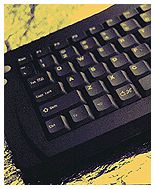 The MacAirKey USB infrared keyboard, the MacAir Mouse USB and MacAir Mouse ADB are scheduled to be available on that date. The MacAir Mouse+ and the MacErgoKey are expected to be available at the end of February 2000 and can also be ordered in advance.
The MacAirKey Wireless Keyboard weighs about one pound, and incorporates an integrated thumb mouse. The keyboard has been available in an ADB version for some time and the older unit can be used with USB Macs via a $29.95 USB adapter kit, which is a simple circuit upgrade that takes less than 5 minutes to install, requiring only a Phillips screwdriver.
 This upgrade also has superior error rejection to get rid of IR interference that can cause annoying “repeating A” error that occurs occasionally in some lighting environments (including mine) with the ADB unit. The MacAirKey allows you to transmit keyboard and mouse input data to your Mac from up to 30 feet away without a cord.
The new dedicated $119.95 USB MacAirKey incorporates several improvements, including the ability to bring up the shut down dialog by pressing a button, and the elimination of errors caused by room lighting that were sometimes a problem with the ADB version.
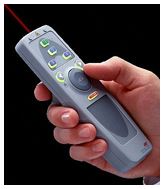 The MacAir Mouse is the newest addition to the MacAir family of wireless input devices. The $119.95 MacAir Mouse uses the same thumb mouse as the unit in the MacAirKey but utilizes a trigger clicking function for easy one handed use. It is available in both ADB and USB.
The MacAir Mouse + will take wireless mouse functions a little further – 100 feet to be exact. This mouse uses RF signals instead of infrared so it can work up to 100 feet away from the receiver – even through most walls. This $249.95 mouse also includes a laser pointer and programmable buttons. The + version will only be available in USB.
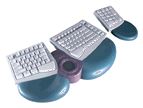 The MacErgoKey is a futuristic – looking ergonomic keyboard with built-in trackpad and centrally located cursor keys. MacUnderground claims it to be much better than the “Wave” ergonomic keyboards. It includes a centrally-mounted track pad and arrow buttons for great gaming and low hand movement. Unlike the MacAirKey units (which use a PowerBook style Fn key for numeric keypad functions), the $119.95 MacErgoKey includes a separate numeric keypad. It certainly looks wild!
I recently test-drove a MacAirKey ADB model keyboard.
Besides being cordless, the MacAirKey is small and light, measuring about 13″ x 6″ and weighing 1.2 pounds, so it has a small desktop footprint and fits comfortably in your lap.
MacUnderground touts the integrated “thumb mouse” in its keyboards and wireless mice. On the keyboards, the mouse is located on the right-hand side, with two mouse-click buttons on the left, so it can operate as a self-contained typing and pointing device to control almost all keyboard and mouse functions. The Mouse works fine, albeit rather slowly by comparison to a conventional mouse or trackball/pad. However, its action is fairly stiff, and I found my thumb hurting after moderate periods of use (I am afflicted with peripheral neuritis).
Basically, you just nudge the thumb button, which is about the size of a quarter, in whatever direction you want the cursor to go. The two mouse-click buttons were pleasantly light and positive, but with the mousing function on one side and the click buttons on the other, pointing and clicking is a two-handed operation. The click buttons are also a long distance away from the Command, Shift, and Option modifier keys, which made some extreme finger-thumb convolutions necessary for some commands.
I found using MacAirKey was a memory catalyst for keyboard shortcuts that I rarely use, and keyboard macro software would be very desirable for regular use with this keyboard. Of course, you can always plug in a regular mouse or trackball in the piggyback ADB port provided, but that would obviate the main advantage of a wireless keyboard. I would have preferred the piggyback port to have been located at the receiver unit end of the ADB cord instead of at the plug end, which would make it easier to reach with a mouse cord.
The keyboard unit has a nice finish. In size and configuration it reminds me of a PowerBook keyboard without the PowerBook, and the ‘board’s black color amplifies the PowerBook-esque impression. The keys have a pleasantly light touch and smooth, short travel – not up to the standard of my WallStreet’s keyboard, but not bad.
Like PowerBook keyboards since the introduction of the G3 Series models, MacAirKey has a numeric key pad embedded in the right hand key columns, and an Fn key to activate it. There are also 12 F-Keys, inverted-Tee cursor keys flanked by Page Up and Page Down, plus PrtSc/SysRq, Pause/Break, Home, and End keys to the right of the F-Key row. Twin Command keys border the spacebar, with the Control, Fn, and Option keys on the left, and Insert and Delete keys on the right.
One limitation of infrared technology is that there is no way for the wireless keyboard to provide power-on functions unless there was an internal battery or a significant increase in power supplied to the ADB bus when the Mac is off (presently only about .05v). This is because the IR receiving function requires 5v to “listen” to the IR signal.
For now, it is necessary to have a standard keyboard with a power-on key connected to any Mac that starts up from the keyboard in order to boot. With PowerBooks, that’s not a problem, and since you will already have a regular keyboard with a desktop Mac, it’s an easy workaround, but it’s inconvenient in either case to be obliged to move to the standard keyboard for the occasional “Command + Control + Power Key” sequence after hard system lockups or whatever. My suggestion would be to include a power on button in the IR receiver module, which is hard-wired to the ADB or USB bus.
In summary, I don’t think the MacAirKey ADB unit is an adequate total replacement for a wired keyboard, but if you need to control your Mac from longer than usual distances, it works well. The USB unit may resolve some of the ADB unit’s weaker points, a notable and frustrating one being the auto-repeating (e.g.: aaaaaaaaaaaaaaaaaaa) keystroke error. The MacAirMouse Units should be a boon to Mac users who do presentations, but don’t need full remote keyboard control. And I would love to get my mitts on one of those ultra-cool looking MacErgoKey keyboards!
MacAirKey keyboards and mice are covered by a 90 day limited warranty, and may be purchased (or pre-ordered) online from MacUnderground. You can also contact Digital Creations by email at macunderground@DCInetwork.com.
Update: MacUnderground no longer exists.
Keywords: #macunderground #wirelessmouse #wirelesskeyboard
Short link: http://goo.gl/8qqJD7
searchword: wirelessinput
