Low End Mac Reader Specials
TypeStyler For Mac OS X is Now Shipping! Download The Free Fully Functional 60 Day Tryout at www.typestyler.com
Don't install Parallels to play poker online! Poker Mac will show you how
to download and install a native Mac poker application such as Full
Tilt Poker Mac.
Laptop Hardware Provided by TechRestore - Overnight Mac & iPod Repairs.
Compare products like desktop computers, apple laptops, apple macs, and LCD Monitors side by side! All the information and reviews to make the best purchasing decision for new mobile phones, sat nav systems, or MP3 players. The Ciao online shopping community makes searching products easy for you.
Miscellaneous Ramblings
Short Takes
Charles Moore - 29 Nov. 1999 - Tip Jar
- More on Simple Backup (Including AppleScripts)
- Noisy WallStreet Hard Drives
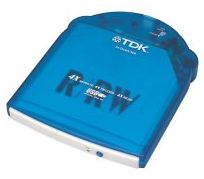
- New TDK Portable CD-R/RW Drives for Mac
- Incompatibility Issue with MacAlly CardBus USB Adapter and Apple USB Driver?
More on Simple Backup
I finally got around to backing up my hard drive last weekend, and I tried out Roland Gustafsson's Simple Backup utility that I wrote about in last week's Miscellaneous Ramblings. I am pleased to report that it works as advertised and lives up to its name.
However, Simple Backup is better suited to backing up to a single volume than to the chaotic pile of Zip disks I use. If you back up to a second hard drive or other media that will handle your entire backup on one volume, Simple Backup is a very slick and easy - not to mention free - way to do it.
Miscellaneous Ramblings reader and Simple Backup fan Chris Bartlett of New Zealand writes:
Dear Charles,
- Makes aliases of items to be backed up and puts them in the backup folder tell application "Finder"
- Change the label and colour of the Finder's selected items - to indicate they have been added to a backup set set the label index of the selection to 5
- set Items_to_Backup to selection
- repeat with ItemX in Items_to_Backup make new alias file at
folder "Backups" of disk "Hard Disk" to ItemX end repeat end tell
- Carries out a backup tell application "Finder" - Check if the backup disk is mounted if not (disk "BackupDisk" exists) then display dialog "Insert disk BackupDisk and then try again." buttons {"OK!"} - Now cancel the script operation error number -128 end if
- If "BackupDisk" is mounted, try to backup the files try select file "SimpleBackup" of folder "Backups" of disk "Hard Disk" open selection on error display dialog "I can't start the backup process." buttons {"Bother!"} end try end tell
Thanks for your interesting columns - they're a pleasure to read.
Thank you Chris for the information and the AppleScripts!
You can download a free copy of Simple Backup from the ThankYou Ware site. All Roland Gustafsson asks in return is a "Thank You" email.
Noisy WallStreet Hard Drives
Several readers have written to me recently about their experiences with the hard drives in their WallStreet PowerBooks becoming unacceptably noisy. The 2 GB hard drive in my own 10-month-old WallStreet is still blissfully quiet, but the one in my son's much harder-used (but not abused) identical machine (built just one week earlier than mine according to the serial numbers) began to get noisy fairly early on, and is now to the point where I would find it very tiresome to work with.
We are talking in this instance about the sound the drive makes merely spinning - not sounds made by the read-write heads and their stepping motor.
I bugged him to take it to an Apple dealer before the warranty expired, which he did, only to be told that Apple would only replace the drive if it had actually failed.
However, an Apple Tech Info Library article entitled PowerBook: Hard Drives and Noise indicates that Apple will replace noisy hard drives under warranty if they are noisier than 39 dBA.
The article notes that: "Customers have inquired about the internal hard drives making noises when reading and writing as well as when it is just at idle but not spun down," and goes on to explain about the assorted clicks and whirs a hard drive makes when it is reading, writing, or parking its heads. However, it also notes:
2.5" Hard drive noise should not be over 39dBA in typical operation when measuring the top cover of the PowerBook.
The problem is, of course, that your average Apple dealer's service department is not likely to have a handy dB meter on hand, and guessing precise dBA levels by ear is pretty difficult.
However, if you can round up a dB meter and demonstrate that your PowerBook hard drive is noisier than 39 dBA, the TIL article would seem to imply that it would be replaced under warranty.
The article makes the additional caveat that:
If the PowerBook has been dropped the drive may make noise over the limits, please note abuse is not covered under the limited hardware warranty.
New TDK Portable CD-R/RW Drives for
Mac
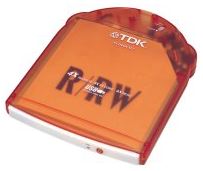
Yuji Tai's Japan Apple Watch Website reports that TDK will soon release portable CD-R/RW drives for Macintosh - the PCD446 UMT (Tangerine), and UMB (Blueberry). The TDK Drives have a USB interface and 4x CD-R/CD-RW writing speed, 6x read speed, and weigh 450g. The Japanese price is about US$585.00.
No word yet on North American availability.
Incompatibility Issue with MacAlly CardBus USB Adapter and Apple USB Driver?
A MR reader named Art writes:
I can't get the Macally USB CardBus adapter to work with my WallStreet G3.
Art is not alone. Others are reporting that they can't get their Macally UH276 CardBus adapter card to work with the USB Apple driver. There appears to be an issue. For instance, this report appeared on MacFixIt last week:
USB Card Support 1.3.5 and Macally USB Card conflict? Adding to our previous coverage, George Cole could not get Apple USB Card Support 1.3.5 and Macally PCMCIA USB Card to work together. 'Installed the software, and rebooted. Plugged in a USB keyboard and mouse and got no response from the system for 10 seconds, then kaboom super hard crash.'
My provisional suggestion would be to try downloading another DDK version of the Apple driver. an assorted bunch of Apple development USB drivers are linked from Apple, including the latest 1.4b.
You may find one that does work with the MacAlly card, although I have not confirmed this for sure. At least it's free.
If anyone out there in readerland has more light to shed in this
issue or has been experiencing similar problems with MacAlly or
other CardBus USB adapters, I'd like to hear from you.
Charles Moore has been a freelance journalist since 1987 and began writing for Mac websites in May 1998. His The Road Warrior column is a regular feature on MacOpinion, and he is a news editor and columnist at Applelinks.com. If you find his articles helpful, please consider making a donation to his tip jar.
Recent Miscellaneous Ramblings
- Why Spaces is My Favorite Leopard (and Snow Leopard) Feature, 11.23. Spaces, a feature introduced with OS X 10.5, is like having several monitors on your Mac without the cost and space of using multiple displays.
- Soft Touch Keyboards, Wireless Mouse Options, Loving SeaMonkey 2, and More, 11.18. Also the future of browsing with PowerPC Macs and the multiple mouse input bug introduced with OS X 10.5.8.
- 4 Mac Browsers Updated Recently, 11.16. A look at the release version of Safari 4.0.4 and preview versions of Firefox 3.6, Chrome 4.0, and Opera 10.10.
- More Mighty Mouse Alternatives, Wireless Safety, Switching to ClipMenu, and More, 11.11. Also Apple's AirPort Card as the best solution for Pismo, Color It and Snow Leopard, and later revision Mac OS X install discs.
- More in the Miscellaneous Ramblings index.
Links for the Day
- Mac of the Day: Mac mini Core Solo, Feb. 2006 - The only Mac to use a Core Solo CPU, this model ran at 1.5 GHz, has integrated graphics, and includes a Combo drive
- Group of the Day: SuperMacs is for those using Umax SuperMac clones.
- November 24 in LEM history: 98: Microsoft's heavy hand - 00: Looking at the iMac - 04: The best Mac for the holidays - Picking the right replacement for a dead mouse - Better battery for 15" AlBook
- Support Low End Mac
Recent Content on Low End Mac
- Google Calendar with iPhone or iTouch Is Great for Scheduling, John Hatchett, Recycled Computing, 11.24. Web-based Google Calendar allows access and updates from any computing platform, including Mac, Windows, Linux, and iPhone OS.
- i5 iMac Benchmarked, Mac mini 'Shouldn't Be Overlooked', Twitter Client for Classic Mac OS, and More, Mac News Review, 11.20. Also why Apple leaves the low end to others, 10.6.2 fixes video playback problem in 27" iMac, 3D Leopard and Snow Leopard performance, and more.
- Apple's Tablet an End Run Beyond Netbooks, Frank Fox, Stop the Noiz, 11.20. Whatever Apple has planned will leverage existing technologies while going beyond what its competitors can offer.
- Apple #4 in Reliability, Apple Tablet a Gadget for All?, HP's i7 Notebook Outdoes Mac Rivals, and More, The 'Book Review, 11.20. Also Flash 10.1 improves video on Hackintosh netbooks, thin-and-light notebooks impress, Windows XP finally on the way out, and more.
- NASA Chemical Sensor for iPhone, Smartphone Death Match, iPhone Earrings, and More, Ian R Campbell, 11.20. Also mobile phone dangers, new apps, GPS solution for iPod touch, new iPod and iPhone cases, and more.
- More links in our archive.
Recent Deals
- Best G4 iMac Deals, 11.24. Used 15" 700 MHz CD-RW, $150; 800 MHz Combo, $229; 1 GHz, $289; 17" 1.25 GHz, $200; 20" 1.25 GHz, $509.
- Best MacBook Air Deals, 11.24. Used from $899; refurb from $1,099; new 1.6 GHz/120 HD, $1,150 after rebate; 1.8/64 SSD, $1,150 a/r; 1.86/128 SSD, $1,350 a/r; 2.13/128 SSD, $1,694 a/r.
- Best PowerBook G3 Deals, 11.24. Used 233 MHz WallStreet, $75; 266 MHz, $160; 400 MHz Lombard, $199; 400 MHz Pismo, $289; 500 MHz, $350.
- Best 12" PowerBook G4 Deals, 11.23. Used 867 MHz SuperDrive, $348; 1 GHz Combo, $379; SD, $519; 1.33 GHz, $529; 1.5 GHz Combo, $549; SuperDrive, $609.
- Best Mac Pro Deals, 11.23. Used 2.66 GHz 4-core, $1,300; 3.0 4-core. $1,919; refurb 2.66 4-core Nehalem, $2,149; 2.93, $2,549; 2.93 8-core, $4,999; new 2.26 8-core, $2,290.
- Best Time Capsule and AirPort Deals, 11.23. Used 802.11g AirPort Extreme, $49; 500 GB Time Capsule, $150; new, $190; 1 TB dual-band, $280; 2 TB, $469; 802.11n AirPort Extreme, $170.
- Best eMac Deals, 11.18. Used 1 GHz Combo, $100; SuperDrive, $269; 1.25 GHz Combo, $119; SD, $319; 1.42 GHz Combo, $289; SD, $498.
- Best Mac OS X 10.6 and Mac Box Set Deals, 11.18. "Snow Leopard", single user, $25; 5 users, $45; Mac Box Set, single user, $139; 5 users, $180; Server, $414. Shipping included.
- Best Xserve Deals, 11.18. Used 1 GHz dual G4, $649; 2.3 dual G5, $795; 3.0 4-core Xeon, $1,899; refurb 2.26 4-core, $2,499; new, $2,888; refurb 8-core, $2,999; new, $3,449; more.
- More deals in our archive.
About LEM | Support | Usage | Privacy | Contacts
Navigation
Used Mac Dealers
Apple History
Video Cards
Email Lists
Favorite Sites
MacSurfer
MacMinute
MacInTouch
MyAppleMenu
InfoMac
Macs Only!
The Mac Observer
Accelerate Your Mac
RetroMacCast
PB Central
MacWindows
The Vintage Mac
Museum
DealMac
DealsOnTheWeb
Mac2Sell
ramseeker
Mac Driver Museum
JAG's House
System
6 Heaven
System 7 Today
the pickle's Low-End
Mac FAQ
Abandonware
Petition
Mac vs. PC Info
Affiliates
The Apple
Store
Mac
Connection
B&H
MacMall
TechRestore
ExperCom
Crucial
Memory
batteries.com
Advertise
MacMinute
MacInTouch
MyAppleMenu
InfoMac
Macs Only!
The Mac Observer
Accelerate Your Mac
RetroMacCast
PB Central
MacWindows
The Vintage Mac
Museum
DealMac
DealsOnTheWeb
Mac2Sell
ramseeker
Mac Driver Museum
JAG's House
System 6 Heaven
System 7 Today
the pickle's Low-End
Mac FAQ
Abandonware
Petition
Mac vs. PC Info
Mac Connection
B&H
MacMall
TechRestore
ExperCom
Crucial Memory
batteries.com
