
1999: Many years B.C. (Before Computers), I made part of my living for a time as a wedding photographer. In those days I shot mostly with a Rolleicord twin lens reflex – a camera so civilized and quiet that I could often sneak a few available-light shots in the church without disturbing anyone, even if the officiating clergyman had a “no photos policy” during the ceremony.
What sparked this nostalgic reverie is an email conversation I had with a Mac-using photographer reader, whose Macs serve as a photo sales presentation device.
It’s All About Presentation
This fellow, I shall refer to him as Dave – not his real name, but, as he puts it, if I identify him, “people will figure out my city, and then they’ll have a leg up on my methods and hardware! Lotsa’ photo people still doing it the old way. . . .”
That would be the way I used to do it. Shoot the film, send it to the lab, wait, show proofs to the client, then take orders for enlargements.
With his Macs, Dave has developed (pardon the pun) a better system for showing and selling wedding photos. “Proofs are okay, ” he says, “but with onscreen you can show the cropping, as for example when the bride’s mother says ‘How would this look in a tall frame as an 8 x 10?’ And since you’ve been there, you know just how good an 8 x 10 can be cropped from a 6 x 6 cm negative. With a large file-size scan like a 117 MB TIFF or a hefty JPEG, you can crop it right there on the screen, and Mama still says to herself, ‘Boy, that’s a really good picture! I’d like five of those in 8 x 10 for tall frames.’ Ka-ching, ka-ching!
“And,” Dave continues, “when you want to push the 16 x 20s . . . you’ve got the scans scaled big . . . as in 16 x 20 inches . . . call up Jade as the viewer and open that screen full-sized, and Mama can see the eyelashes on her beautiful daughter’s bridal portrait.
“This kind of selling is like doing enlarging right in front of the clients . . . they start thinking, ‘Wow, these are great pictures. I want this, and this, and this. When you want to show 11 x 14 quality and detail, well it’s right there on the scan. This is even better than projection proofing – there’s no need to dim any lights, the cropping is so easy, and the canvas effects can be previewed, the big prints and the blowups can be shown, and they look great, all without any extra expense!”
Older Power Macs Are Best
So, what sort of Macs does Dave use in this lucrative enterprise? A Blue & White Yosemite Power Mac, or even a new Power Mac G4 perhaps? Or a G3 Series PowerBook?
Nope.
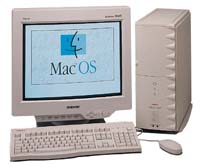 “Put it this way, ” Dave tells me, “Apple’s 9500 was the best tower ever made for graphic arts preparation and presentation. The Power Tower Pro 250 was/is excellent. A SuperMac S900 with full RAM complement is good in the back room, ’cause it’s noisy, but they’re dirt-cheap – and they’re easy to work on and easy, easy, easy to trick out, and frankly they seem like a 9500 to me. All these are, of course, G3 upgraded.
“FireWire? Forget about it. RAID is necessary. You gotta have Jaz to transfer from the scan box to the burner box if you’re making CDs. Zip is good for the slide show alias for the CD-tower, so you can show multiple portfolios – mother’s book, bridesmaid’s book, senior portrait combos, etc. You need a bunch of PCI slots for multiple SCSI connectors for the ‘show box.’ It’s the simplest, easiest, most foolproof method yet invented . . . no daisy chaining, fast setup, fast throughput – just simple.”
So what’s wrong with the Blue & Whites or the Yikes G4s for this sort of work?
Maximum Affordable Memory
“We’ve tried going smaller on the ‘show pics,'” says Dave, “but the quality difference cost sales. The new Mac towers don’t have the RAM capacity at an affordable price point to handle the typical 100+ pic show.
“My argument may sound PC-esque, but in the world of high-quality, professional photography, a preview is done as a 125 MB TIFF – and the computer had better be able to pump them through one after another after another, and be able to show a horizontal crop and a vertical crop and a canvas-print and a glossy print comparison fast enough for people to see the difference.
“We can’t afford a whole slew of 4-slot RAM towers that cost $2,900, yet don’t have built-in SCSI, and that require $3,600 of RAM in four 256 MB modules, and that can’t handle the drives needed. If that sounds PC-esque, well – welcome to the world of medium and large-format photography. The demands are high, but we need Mac OS for productivity and file naming, and Windoze just stinks. The cheap, 6-, 8-, and 12-RAM slot towers, albeit ‘old,’ work pretty darned well, and we don’t have to pay $3,600 for four stinking 256 MB modules just to get enough RAM to handle our demands. I’m tired of everybody telling us ‘but you’re just showing pictures – how could you possibly need a lot of RAM.’
“Frankly, RAM is more important in professional photography work than (almost) anything, and having a lot of RAM to allocate to Photoshop and the image viewing software is much more important than processor speed. Try showing a wedding preview sequence with a mere 128 MB of RAM and the darned image viewing software (Jpeg Viewer or GraphicConverter or Jade) will burp after about 15 big images. . . .
“We’re talking about showing scans – compressed, but nonetheless, very, very large files. The decompression threads start piling up, and the only solution is RAM, RAM, RAM. That makes a ‘show box’ need, well, at minimum six 128 MB modules in it. Eight is better. There’s nothing worse than trying to blame it on the computer when the darned thing forces restart of a presentation. Quality is a subjective thing, but trust me, it takes at least 125 MB open before people start thinking, ‘Man, these are good pictures – really good! The kind I will shell out $179.95 for in 16 x 20 canvas.’
“Try running a slide show of 150 pics, each compressed heavily down to a ‘small’ size of 10 MB each. Try doing a few onscreen crops for the customer on a file that opens up to 125-180 MB. Try doing any serious Photoshop on scan after scan, and you’ll soon see that there is no substitute for RAM – and lots of it. If one’s idea of pictures is 163 KB JPEG files, that’s one thing. Frankly, sales are a lot better with reasonably big TIFF files at about 117 MB apiece, shown from our CD-ROM tower, but it holds only 6 disks – CD-ROM is archiving and presentation all in one cheap solution.
“No, Apple’s newest ‘professional’ towers have some serious, serious limitations – not enough slots for RAM, and very costly RAM needed to actually make the machines function right. Power Towers, S900s, and 9500s are far, far better at prices you can justify. Why spend $8,000 a box to get a truly professional tower? What was wrong with 8 or 12 RAM slots? Some of us thought it was a great thing, and still do, and we’ll be damned if we want to buy an expansion chassis for $1,000 and pay $3,600 for enough RAM to get what we could get for a lot, lot less.
“Apple’s newest offerings are nice, but they’re also inadequate without costly modifications. They lack slots for RAM and slots for SCSI connectors and boards. Daisy chaining is fine for small stuff, but you can’t move data fast enough and connect enough devices easily that way.
More PCI Slots
“Try filling a Yosemite with maximum RAM and see how much it pinches the wallet. Four RAM slots? I would rather, and do, suffer the indignity of 45 MHz buses and live with the hefty eight RAM slots of ‘old’ 6-slot boxes. And then figure out which PCI cards you can live without . . . Ultra-Wide SCSI or TV tuner? Which will get the heave-ho? That PCI decoder card for the Club Mac external DVD? Plenty of room in an old 6-slotter, but it’s ‘outta here’ in a Yosemite. And what about video capture, the real kind, not the built-in onboard kind a la 7500 and Beige G3? Got a slot for that?
“Frankly, I find ‘old’ Macs and clones with G3 upgrade cards really quite acceptable for Photoshop work, and I feel that the expansion chassis solution for the Yosemite towers is a ridiculous one. Basically, I guess Apple is telling more advanced users, ‘You really need only 3 PCI slots, and, by the way, if you want a lot of RAM, you’ll need to pay $3,640 to get 1 GB of RAM in a Yosemite – no more 8- or 12-slot RAM options for you people.'”
What About PowerBooks?
OK. So the USB/FireWire Mac towers have some shortcomings in the commercial photography context, what about G3 Series PowerBooks? Surely all that power packed into such a compact form factor would be useful to photographers? N’est ce pas?
Not as any sort of viable substitute for a desktop tower, according to Dave. “While the WallStreet/Lombard models do have some real advantages,” he says, “so does a desktop system with CD-ROM drive, Zip Drive, scanner, Jaz drive, and CD burner, front panel headphone jacks, 6 PCI slots, eight RAM slots stuffed, 2 hard disks, and a real, accurate, calibrated CRT monitor. Oh, and a great keyboard, a mouse, and a Wacom tablet.
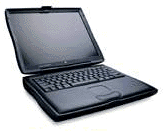 “WallStreet’s TFT screen makes high-quality photographs look poor under virtually any viewing position but dead-center,” Dave affirms. “My wife and I do a lot of Photoshop work, and while her WallStreet G3/300 is quite fast, one must ‘punch up’ photographs that are to be displayed on a PowerBook screen, lest they look washed out. Levels and curves must be adjusted, and the actual tonal range that can be displayed on a TFT is very short compared with a ‘real’ monitor. As a photographer, I think the TFT screen is an absolutely dreadful compromise.
“Compared to even a modest-quality CRT monitor like an AppleVision 1710 or a Sony Multiscan 200ES, the 300 and 233 MHz WallStreets we bought demonstrate onscreen display of photographs that is, frankly, merely only acceptable, and every photo must be, as I said, punched up in one way or another to look optimal on the 14.1-inch TFT flat panels. Compared to a good-quality LaCie or Iiyama, the WallStreet monitors are downright awful at displaying color accurately and with “correct” tonal range.
“As with most big-screen televisions and PowerBook displays, the viewer’s eyes must be positioned almost dead-center with the screen for a photograph or game, or the desktop for that matter, to appear bright and acceptable. To do a presentation for a small group of say, 12 people, an iMac’s CRT monitor is a far, far superior display method.
“Connecting a separate monitor with a WallStreet is also a mixed blessing . . . Check out the display resolution limitations . . . same goes for the DVD when S-video’d out to a 31-inch color television . . . not nearly as good as when seen on the built-in screen. One can do a lot better with a desktop system and a full range of monitor resolutions to choose from.”
I should point out here that the Lombard PowerBook G3s have twice to four times the video RAM of various WallStreet models, which would eliminate some of Dave’s complaints about external monitor support.
“There are actually quite a few compromises in a WallStreet,” says Dave. “Poor onscreen display of photographs of any quality, limited viewing angle for an ‘acceptable’ screen image for audiences or the operator, a small, awful keyboard, limited external monitor resolutions to choose from, limited RAM slots, a noisy 20x CD-ROM drive (but a whisper-quiet DVD drive), and a heft and size that make the WallStreet ‘luggable’ but bulky when encased. Frankly, if Apple had added the attache-case style handle seen in speculative illustrations of the P1, the WallStreet would have been a much more portable computer. But given its large size and formidable weight, a WallStreet model demands a carrying case for anything but the very shortest moves from location to location.”
One point where Dave and I disagree almost diametrically is about the WallStreet and Lombard keyboard. I happen to think that it is the best computer keyboard I’ve ever used, period. Dave hates it.
“The keyboard in the WallStreet models presents a lot of problems for those with large hands, like myself, and for non-touch typists, ” Dave argues. “The dark keyboard coloration has also proven itself very, very difficult to use for those with anything less than normal vision abilities (my father, for example, can barely use one), and the beige key/dark letter method of ‘traditional’ keyboards is scientifically more easily readable for those who are not touch typists. Just as long passages of type set in reverse have been proven to be significantly more difficult to read than type set in dark ink and printed on white or off-white (or almost any other light colored) paper. As for the mushy keyboard feel of the WallStreet PowerBooks, well, it’s a second-rate keyboard. I just have very long, skinny fingers, and it’s like two giant spiders perched over a flying ant . . . lot of spider, not much ant. I can hardly use the thing. But then again, the whole thing is so very wonderful that I can forgive the keyboard.
“Without a mouse or tablet and pen, the PowerBook is a poor choice for doing any Photoshop work. While the touchpad saves space, there’s a real need for a mouse for much Photoshop work . . . even making a simple selection using the touchpad is very difficult.
“I personally find the thin-film transistor screens really lacking in image display for critical work, and even for display . . . would never dream of showing a portfolio on anything like a PowerBook. It just can’t handle the file size with its limited memory . . . but you know, it’s pretty cool to be able to retouch and color correct at the kitchen table when I’m behind . . . on batches where everything is shot with studio flash, it’s a simple matter of applying the levels and curves and variations to scan after scan after scan, using a PowerBook . . . and the DVD drive plays fine on the 233 and the 300 PowerBook. I love the DVD movies . . . great quality and so relaxing – anywhere!”
So there you have it. Looks like professional wedding photography is a niche market Apple could own, but not with their present RAM and PCI slot challenged offerings.
Things have obviously changed a lot since I was doing wedding photography. Sure would have been great to have had a setup like Dave describes above back then. Had I been equipped with that sort of photo sales tool, I might still be in the business!
short link: https://goo.gl/kvr16M
