Miscellaneous Ramblings
Short Takes
Charles W. Moore - 4 Oct. 1999
- PC Card Driven External CD-ROM Drive for PowerBooks
- Update on the Status of PowerBook 1400 Upgrades
- Freeware "Rosie" Screen Font Looks Great
- The Stainless Steel Trash Can and Other Novelties
- Troubleshooting PowerBook 5300/190 No Power On Issues
- Why iBook and PowerBook 12.1" TFT Displays have Jaggies in 640 x 480 Mode
- Lombard Battery Deep Discharge Issues
PC Card Driven External CD-ROM Drive for PowerBooks
Japan
Apple Watch reports that Amulet will release citiROM,
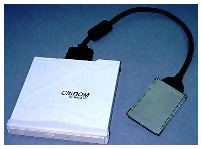 a portable CD-ROM drive with a PC Card interface,
on the Japanese market, possibly later this month. The 24x drive is
a compact 135x140 x 25mm in size and weighs just 600 grams. It will
support PCI PowerBooks (PB 2400 and later), Windows notebooks, and
some Linux notebooks. Power for the drive is supplied through the
PC Card, so a separate AC adapter is unnecessary.
a portable CD-ROM drive with a PC Card interface,
on the Japanese market, possibly later this month. The 24x drive is
a compact 135x140 x 25mm in size and weighs just 600 grams. It will
support PCI PowerBooks (PB 2400 and later), Windows notebooks, and
some Linux notebooks. Power for the drive is supplied through the
PC Card, so a separate AC adapter is unnecessary.
Update on the Status of PowerBook 1400 Upgrades
Dave Manning of UpgradeStuff is still working to get a new release of PowerBook 1400 G3 upgrades cards manufactured.
The latest word from Dave is that any such cards will probably incorporate a 250 MHz G3 with 1 MB of backside cache, preferably using copper G3 processors.
However, Dave notes that a 1400 can theoretically support a 333 MHz G3, and possibly even a G4, but neither is realistically likely to materialize.
At this point, nothing has been decided. IBM Japan was actually the manufacturer of the original 1400 G3 upgrades for Newer Technology (the design was Newer's), and that means there are some legal niceties to be ironed out
However, Dave says: "This is a personal priority for me, and I will do everything in my power to make it happen."
Freeware "Rosie" Screen Font Looks Great
Sean Cavanaugh's freeware bitmap font, "Rosie" is a hand-tuned screen font designed to replace the time-honored Mac system font Geneva. Rosie is both more compact and easier to read compact than either Verdana or Geneva, or for that matter any other screen font that I've tried. I've been using it as my system font for the past week, and will not be reverting to Geneva.
To download a free copy of Rosie from <http://www.mvd.com/seanc/dlfonts.htm>.
Rosie may be freely distributed to electronic bulletin boards, FTP sites, and online services, but Sean requests that the Read Me file be included. Rosie may not be sold, or distributed on diskettes or CDs - be they shareware or commercial collections - without Sean Cavanaugh's prior written permission. You can contact him via e-mail by sending a message to seanc@compuserve.com.
 Sean also recently released an enhanced
commercial version of his freeware font CombiNumerals (the
commercial version is called CombiNumerals99). You can preview
CombiNumerals99 font at <http://www.mvd.com/seanc/combi99.pdf>.
Sean also recently released an enhanced
commercial version of his freeware font CombiNumerals (the
commercial version is called CombiNumerals99). You can preview
CombiNumerals99 font at <http://www.mvd.com/seanc/combi99.pdf>.
Sean Cavanaugh is also the author of Digital Type Design Guide: The Page Designer's Guide to Working with Type, published by Hayden Books (ISBN 1-56830 -190-1). Digital Type Design Guide sells for about $40 bucks. The book is bundled with a hybrid CD containing 220 typefaces in PostScript Type 1 and TrueType formats for the Mac OS and Windows. Digital Type Design Guide is available from Amazon or direct from Hayden (call 800-763-7438), as well as from bookstores. You can contact the author via email <seanc@compuserve.com> or visit the book's Web page at <http://www.mvd.com/seanc/> for more free stuff and information.
The Stainless Steel Trash Can and Other Novelties
 Gravity
Software of Japan Offers a selection of small extensions to
alter the appearance of your Mac's default trash can and mouse
cursor.
Gravity
Software of Japan Offers a selection of small extensions to
alter the appearance of your Mac's default trash can and mouse
cursor.
I don't read Japanese, but the extensions offered include:
- "Steel" mouse cursors in two styles.
- iMac fruit color mouse cursors
- A "Stainless Steel" trash can icon
- A "Color "Stainless Steel" trash can icon
The English word "freeware" appears on the Web page, but I am not sure if it pertains to all or just some of these extensions.
TroubleShooting PowerBook 5300/190 No Power On Issues
Apple has posted a Tech Info Library (TIL) article, number 58462, addressing PowerBook 5300 and 190 No Power On Issues.
This article provides some basic troubleshooting steps for a PowerBook 5300 or 190 that does not power on, and explains how to resets the Power Manager and revive these computers if they refuse to initially turn on.
The drill is:
- Unplug AC adapter and remove battery.
- Press and hold the Reset button on the back of the machine for about 45 seconds. (located below the video out port)
- Plug the AC Adapter into the AC (wall) outlet.
- Attach only the AC adapter to the PowerBook (don't put in the battery).
- Press the Reset button one more time and the PowerBook should startup after a brief pause.
The article also noted that the Power Manager code can be fully purged by having an authorized service technician disconnect the internal backup battery and let the unit sit for 1 minute with all power removed (including the main battery and the AC Adapter). This forces the PowerBook to reload the code from the system software. Unless you are really good, don't try this at home.
Why iBook and PowerBook 12.1" TFT Displays have Jaggies in 640 x 480 Mode
Another recent TIL posting (number 58454) deals with the fact that the iBook's 12.1" display exhibits a bad case of the "jaggies" when used in the 640 x 480 resolution mode. This phenomenon also afflicts the 12.1" display on my WallStreet Series II PowerBook.
The article notes that traditionally LCD panels have been limited to one resolution because the panels are digital in design and have a fixed number of pixels. The 12.1" display used in iBook and some 233 MHz WallStreets has a native resolution of 800 x 600.
However, Apple explains that new video technology allows scaling the size of the image on an LCD screen, and the 12.1" unit can switch from the native 800 x 600 resolution to a scaled resolution of 640 x 480. The new image is remapped into the fixed pixel space of LCD panel by interpolation and anti-aliasing. Because the image is being remapped, the scaled resolutions will not appear as sharp as the native resolution.
The advantage of having a scaleable resolution is some applications, mainly games, may only run at 640 x 480. If the display did not allow you to switch resolutions, you would not be able to use these applications.
True enough. The 640 x 480 rendition is too ugly to use unless you have to.
Lombard Battery Deep Discharge Issues
Still with TIL postings, TIL 58449 deals with restoring battery functionality on the PowerBook G3 Series III (Lombard) after a deep discharge.
With Lombard some cases, the battery may go into a deep discharge state. If it has been left in the computer for an extended period of time without AC power. The battery can discharge to a point where it is no longer recognized by the PowerBook as evidenced by the red X through the battery icon in the menu bar.
To help prevent this situation Apple suggests:
- Recharge the battery when only one of the four green LEDs (Light Emitting Diode) on the battery is on, or shows one green LED blinking.
- If the PowerBook is not going to be used for an extended period of time, fully charge the battery and then remove it from the PowerBook for storage.
If the PowerBook does not recognize the battery in the menu bar when inserted, the following steps will provide sufficient charge to the battery to restore normal operation.
- Insert the battery in either bay and leave it there for approximately 30 seconds.
- After 30 seconds, release the battery and pull it out so that it protrudes from the bay approximately one inch, you do not need to fully remove the battery from the bay.
- Leave the battery extended for several seconds then reinsert the battery for another 30 second interval.
Depending on the charge level of the battery, you may need to reinsert the battery 10 to 12 times. After the battery appears in the Control Strip and the red X no longer appears in the menu bar with the battery inserted, allow the battery to fully charge. An alternative solution is to restore charge to the battery with an external battery charger available from third party Apple developers.