
Short Takes, September 16, 1999
- Jeremy’s CSM Bundle 2.0.1 Available
- No PRAM Backup Battery in iBook
- Apple Extends Repair Support for WallStreet 13.3″ Screens Beyond Warranty Period
- Another PowerBook USB PC Card Adapter
- Apple’s 22″ LCD Cinema Display Support not Limited to Sawtooth G4s
- 400 MHz Upgrade for PowerBook 2400?
- MacCave Journal On Line
- MR Mailbag
Jeremy’s CSM Bundle 2.0.1 Available
Jeremy Kezer has released his latest CSM Bundle 2.0.1 of shareware desktop strip modules for PowerBooks and PowerMacs.
Modules included in Jeremy’s CS Bundle 2.0.1 include:
- Clock CSM. Displays the current time. Via a popup menu, you can customize the appearance of the display.
- Sound Volume CSM. A direct replacement for the Sound Volume module provided by Apple. The icon shows the current volume setting in both numeric and pictorial form, so you don’t need to bring up the menu to determine the current volume.
- Sleep CSM. A direct replacement for the Sleep Now module provided by Apple. Via the popup menu, you can select whether or not to bypass the dialog that appears when AppleTalk is active. Works with PowerBooks and PCI-based Power Macintoshes.
- Battery Time CSM. This module displays Apple’s estimate of remaining battery time (only available on new model PowerBooks with intelligent batteries), a historical estimate which “learns” your battery use, or the elapsed time spent on battery.
- CPU Speed CSM. Designed for the PowerBook or the PCI-based Power Macintosh, this module displays the current CPU speed, or indicates with icons fast or reduced clock speed. With a properly equipped PowerBook, you can also change the CPU speed.
- Battery CSM. This module displays current battery levels and charger status. It can also display the hard drive state, fast or reduced clock speed, modem status, and estimate of remaining time (with Apple Intelligent batteries only). All this in less space than Apple’s battery monitor module!
- Temperature CSM. This module displays the internal PowerBook temperature and the battery temperature, as returned by the Power Manager. (Only supported by Duos, PowerBook 190, 500, 1400, 2400, 3400/G3, and 5300 series). See other user’s temperature readings!
- AppleTalk CSM. This module replaces Apple’s AppleTalk Switch module. It performs the same function – letting you turn on or off AppleTalk – but without all the annoying dialog boxes that Apple’s module displays.
- Application CSM. This module displays the number of applications and desk accessories currently running. The popup menu shows the current foreground application, and lets you switch applications.
- EnergyStrip CSM. This module replaces the Energy Saver or PowerBook control panel, and lets you adjust the energy saving features from the Control Strip. You can set screen dimming, hard drive spin down, automatic sleep and processor cycling times. On PowerBooks, you can have different settings under AC or battery power.
- Power Countdown CSM. This module shows a countdown for various power conservation features, such as screen dimming, disk spin down and system sleep.
- Caps Lock CSM. This module shows the state of the Caps Lock key and the other modifier keys. You can also select a sound to be played upon key depression and release.
- Sound Volume Pro CSM. This CSM not only lets you adjust the sound volume with finer adjustments, you can also adjust the left and right speaker balance if you have stereo speakers.
- Drive Space CSM. This CSM shows you the amount of free space on any mounted hard drive.
Jeremy’s CS Modules requires Apple’s Control Strip software to run (the modules are also compatible with the shareware equivalents Desktop Strip or Extensions Strip). Some modules are PowerBook-specific.
Jeremy’s CSM Bundle has a $15 registration fee.
No PRAM Backup Battery in iBook
 The bad news is that iBook owners will have to be as quick as NASCAR pit crews when they change their batteries away from an AC power source, according to Tech Info Library (TIL) article 58445 posted by Apple last week.
Why? Because unlike all other Macs, PowerBook or desktop, the iBook does not have a PRAM backup battery to keep preference settings alive when the computer is not powered by AC or battery.
(Having been taken to task by readers for referring to the iBook as a PowerBook, I also can’t resist noting here with some satisfaction that Apple uses the phraseology “unlike other PowerBook computers” in its article)
In the absence of a PRAM backup battery, if the iBook’s main battery is discharged and you want to replace it with another charged battery, you must either do it with the AC adapter plugged in or effect the switch within about 20 seconds, the length of time a small internal capacitor will retain the PRAM settings.
If you are unable to get the main battery replaced within that time, after the new battery is installed you will need to reset some control panel settings such as the keyboard repeat rate, mouse tracking, alert sounds, among others.
The good news is that iBook owners will not be plagued with replacing the pesky PRAM batteries several years down the road, which is perhaps the intention behind the change.
Apple Extends Repair Support for WallStreet 13.3″ Screens Beyond Warranty Period
Doug Landry at The PowerBook Zone, whose 13.3″ screen equipped WallStreet 292 MHz PowerBook has been up for auction on eBay, says he has confirmed with Apple that any 13.3″ problems will be repaired, even if the warranty has expired.
Another PowerBook USB PC Card Adapter
The PowerBook Zone also ran a reader report this week about success with a Global Paragon CardBus-to-USB card purchased from Outpost.com, using Apple’s developmental Mac OS USB DDK v1.3f9 driver.
The reader said he had to “tweak” the creator and resource IDs using ResEdit, but once that was done, plug & play worked with no glitches – the PowerBook recognizes the card as soon as it is plugged in. The reader recommends that anyone with a pre-USB PowerBook that supports CardBus and would like to use USB devices should get this card.
Apple’s 22″ LCD Cinema Display Support not Limited to Sawtooth G4s
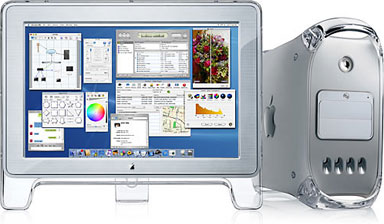 Yuji Tai of Japan Apple Watch reports that the spectacular new 22″ Apple LCD Cinema Display incorporates a digital connector called “DFP: Digital Flat Panel,” which is produced by ATI Technologies, who make graphics chips used in many Macs. The 400 MHz Yikes! Power Mac G4 does not have this connector, which is why it doesn’t support the Cinema Display. The 450 & 500 MHz Sawtooth Power Mac G4s will have a new ATI Rage 128 Pro AGP graphics card which does include a DFP connector.
 Yuji says that the Cinema Display can work with any Mac equipped with a graphics card that has a DFP connector, such as the ATI XCLAIM 3D Plus video card, which is already available in Japan and the US. Other video board manufactures may also have a DFP connector.
However, at least initially you will only be able to order the Apple Cinema Display with the 450 & 500 MHz Power Mac G4s at the Apple Store, so for the present this capability is of academic interest.
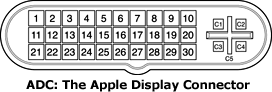
Update: The DFP was later known as the Apple Display Connector (ADC) and would be found on all Power Mac models after this except for the Late 2005 dual-core Power Mac G5. ADC not only provides a video signal to the display, it also provides power, FireWire, and USB signals.
400 MHz Upgrade for PowerBook 2400c?
Japan Apple Watch also reports that according to the Mac Treasure Tracing Club (Japanese language site), Interware (Vimage) announced at World PC Expo 99 last week in Tokyo that they are developing a faster G3 processor upgrade card for the PowerBook 2400c than their current fastest G3 card. Unfortunately, Vimage has abandoned the North American market, at least as a direct player, so the PB 2400c upgrade card will be for the Japanese market only.
Pity.
MacCave Journal On Line
Finally, I have set up a new public archive Website, called the MacCave Journal, containing most of my Mac journalism efforts over the past 18 months. Anyone interested in more Moore can find this treasure trove of deathless prose at <http://www.freeyellow.com:8080/members8/maccave1/>
Moore’s Mailbag
From Dennis Takayesu
Just read your review – I’ve also become a fan of iCab. I’m using it more and more at home where I have a Power Mac 6100/60 with 40 megs ram. It loads a lot faster than Netscape Communicator.
Do you know if anyone is working on software (such as Fortify for Netscape) that will allow iCab to be converted to 128-bit security level? The people at iCab said that they will not be doing it.
Thanks
Dennis
Can’t say as I have heard anything about 128-bit encryption for iCab, but perhaps someone in readerland can shed some light on this one.
From Chris Long:
I just saw your review of iCab 1.7 & I’m baffled, since you state that one can’t rename Communicator bookmarks as HOTLIST.HTML and use that file in iCab. I’ve been doing this since way back when, and I’ve had no trouble. Just thought you’d like to know. By the way, iCab 1.7 is running VERY well for me, with NOT ONE CRASH or failure since I mentioned the (two) earlier crashes some days ago.
Hi Chris:
Try doing it in the other direction. What I like is that I can swap URL files back and forth between MS IE and iCab simply by renaming them. This will work going to iCab from Communicator, but not back the other way.
