
1999: Here it is – my first Miscellaneous Ramblings column for Low End Mac. Before I get down to the topic at hand, I would like to thank Low End Mac’s publisher, Dan Knight, for his support of MR, and I look forward to working with him and other Low End staff.
If you were a regular reader of Miscellaneous Ramblings on MacOpinion, I am glad you found us in our new home. By the way, my The Road Warrior column on PowerBook issues will continue on MacOpinion (now on Thursdays) while the more news-and-reviews- oriented Miscellaneous Ramblings will be found here.
This realignment is happily agreeable to all the principals concerned: Dan Knight, MacOpinion’s publisher Ben Garland, and me. I hope it will suit you readers as well.
Uncoupled from The Road Warrior, MR’s focus will be extended to cover desktop and crossover topics as well as PowerBooks.
Now, on to new business.
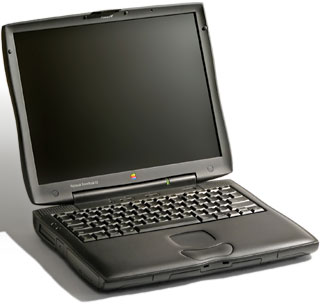 I suppose it is bad form to begin my first Miscellaneous Ramblings column here on Low End Mac by disagreeing (mildly :-) ) with the publisher, but IMHO, the most likely “Road Apple” candidate among the various Wall Street G3 Series PowerBooks is not the cacheless Series I 233 MHz model (I used one of these daily for a couple of months last winter, and I liked it a lot), but rather any of the Series I’s equipped with the 13.3″ TFT display. Of course, you could get the cacheless 233 with the 13.3″ screen, which would constitute a sort of double-whammy Road Apple I guess.
The problems with the 13.3″ flat screens are, as I understand it, not with the screen itself but rather with a bit of very sloppy design work in the way the ribbon cable connector is secured.
This problem was well documented soon after the WallStreets rolled out in May 1998, and has become a topical issue again as batches of refurbished machines with the 13.3″ screen are released.
The essential problem with the 13.3″ LCD displays is that, unlike the 12.1″ and 14.1″ WallStreet screens, the ribbon cable connecting the display to the motherboard connects at the left-hand side of the screen rather than at the back. The cable must, therefore, make a sharp turn (180°) to wrap around to the side of the screen, which stresses the connector, in some cases resulting in intermittent contact. The video anomalies many 13.3″ owners have witnessed – flickering, stripes, whiteouts – are all symptoms of this problem. Apple reportedly attempted to solve it with a redesigned cable and connector, and by putting a dab of epoxy glue on the connection to secure it. However, many users have reported the problem returning 2 or 3 times.
Because the problem is not really with the ribbon cable per se, but rather with the location of its attachment point, simply replacing the cable is not a surefire fix or a guarantee that the problem won’t recur. Symptoms of cable trouble are whiteouts, lines, and bars on the screen.
A typical complaint:
I have a PowerBook G3 with a 13.3″ monitor. Alas, I have had the same problem with mine. The first time, it began with slight flickering, and then graduated to total whiteout of the display. I sent it in to Apple and they changed the cable. While in again for an unrelated cause (something inside the computer was preventing the battery from recharging), they once again fixed it. Now, only a few weeks later, I once again am seeing the flickering starting. I am getting very frustrated.
Another 13.3″ WallStreet owner reported:
Initially, it started with the left-hand side of the backlighting flickering. Eventually, the backlighting on that side went out for good, as well as the display going completely different colors a few times.
I finally got so mad, that I bought a 266 MHz model with the 14″ screen. I sent the 250 MHz/13.3″ back to Apple for repair. The first time I turned it on after the repair, I got the whiteout/northern lights problem. I immediately sent it back. That time when I got it back, the left-hand side backlighting was off again! However, it has now seemed to have corrected itself.
Point is, I really need to sell that machine, but I don’t really want to dump my problem on someone else. I need to know it’s going to work for whoever buys it.
For more reports from WallStreet 13.3″ owners who have experienced screen problems, go here: http://www.pbsource.com/contributions/readers/g3seriesdisplay.shtml
From what I have heard from readers, although it’s been pretty quiet lately, the 13.3″ display issues with the Series I G3 PowerBooks are unacceptably common and often take too long to resolve. It says volumes that the WallStreet Series IIs, introduced in September 1998, simply dropped the 13.3″ display variant, while the 14.1″ and 12.1″ models were continued (with the 12.1″ upgraded from STN passive matrix to TFT).
Consequently, I would personally not buy a used or refurbished PowerBook G3 Series I with a 13.3″ display, even at an attractive price. I will probably now hear from folks who have been using these units for over a year with no problems, and I don’t doubt that there are many, but the reported incidence of screen trouble is just too high for me to want to gamble on it.
If you are inclined to purchase one of these PowerBooks, at the very least make very sure before putting your cash down that the screen has no visible anomalies at the time of sale.
keywords: #wallstreetpowerbook #powerbookg3series
short link: https://goo.gl/So4riz
