Miscellaneous Ramblings
iBook Colors & Ship Date, Huge Laptop Hard Drives, BookEndz, and Lots More
Charles W. Moore - 1999.08.13
NOTE: This Miscellaneous Ramblings columnoriginally appeared on MacOpinion on August 13,1999. It is republished here by permission of the author andMacOpinion.
Tangerine iBooks Hold Their Own Popularity-Wise
Rumor has it that iBookpre-orders are running as much as four times greater thanpre-orders for the iMac when it was announced last August. Theever-popular Blueberry color reportedly has the numbers edge by asmall margin; the Tangerine iBook is proportionately much morepopular than the Tangerine iMac was.
Indeed, although Tangerine is my third or fourth-favorite iMaccolor, Tangerine just seems to look "right" on the iBook to myeyes, and apparently to a lot of other eyes as well.
iBooks to Ship on September 1?
Doug Landry's iBook Zonereports that the giant mail order reseller MacWarehouse isexpecting iBook in stock September 1st. If true, that would be alot sooner than some of the more lugubrious predictions floatingaround. We'll have to wait and see. Apple is still stinging fromthe Lombard ship date fiasco, and has not announced a firm shippingdate for iBook.
or Not
MacInTouch reader Dave Martin had this to say about Apple's ownApple Store delivery estimates:
FYI, current estimated shipping for iMacs on theApple Store is at 40 days (~September 18). iBook estimated shippingis 50 days (~September 28).
How Does a 25 Gigabyte Laptop Hard Drive Grab You?
Don't have enough hard drive space on your laptop? IBM comes to the rescue with a new laptop hard drive with anastonishing 25 gigabyte capacity - The IBM Travelstar 25GS. That'sright, 25 gigs - the equivalent of either 20 TV-quality movies, 792feet of shelved books or seven million pages of text, or more than12 times as much data space as the puny 2 gig drive in myWallStreet.
Not content with building the biggest laptop drive, IBM, whichinvented and shipped the world's first computer hard disk drive in1956, has also introduced what it claims is the world's toughest2.5" hard drive - the 12 GB Travelstar 12GN, which features theindustry's highest shock rating of 800 G/1 ms, and the world'shighest density storage laptop drive - Travelstar 18GT which holdsthe equivalent of the text printed on 18 pickup trucks full ofpaper. These two 12.5mm thick units will fit in PowerBook G3 Series'Books.
The IBM Travelstar 25GS offers several industry firsts: itsrecord-setting capacity of 25 GB of course, plus a media transferrate of up to 181.2 Mbits/sec, and a disk rotation speed of 5400RPM. The IBM Travelstar 18GT and Travelstar 12GN hard drivesprovide areal densities of 10.1 Gbits/sq. in. and 6 GB of capacityper disk.
An advanced electromechanical design provides the exceptionalstorage capacities and superior shock ratings in these new IBM harddrives, combined with technologies like IBM giant magnetoresistive(GMR) head, Partial Response Maximum Likelihood (PRML) digitalchannel, a head load/unload feature, a more rigid base casting thanprevious models, and Enhanced Adaptive Battery Life Extender*(ABLE) 3.0. They are also optimized for using state-of-the-artmanufacturing techniques. Fast Ultra-DMA interface transfer ratesreach as high as 66 MB/sec. In addition, the new IBM drives employa thermistor - an adaptive control device that helps maintain highperformance and fast seek times at high environmentaltemperatures.
Technical specifications for the new IBM hard drives:
Travelstar 25GS
- Height: 17 mm
- 25.3 GB
- 5 disk platters
- 10 recording heads
- 5411 rpm
- 5.5 ms avg. latency
- 500 G/2 ms nonoperating shock
- 150 G/2 ms operating shock
- 12 ms avg. read seek time
- 6.47 ounces (185 grams).
Travelstar 18GT
- Height: 12.5 mm
- 18.1/15.1 GB
- 3/3 disk platters
- 6/5 recording heads
- 4200 rpm
- 7.1 ms avg. latency
- 700 G/1 ms nonoperating shock
- 175 G/2 ms operating shock
- 12 ms avg. read seek time
- 4.72 ounces (135 grams).
Travelstar 12GN
- Height: 9.5 mm
- 12/9/6 GB, 2/2/1 disk platters
- 4/3/2 recording heads
- 4200 rpm
- 7.1 ms avg. latency
- 800 G/1 ms nonoperating shock
- 175 G/2 ms operating shock
- 12 ms avg. read seek time
- 3.46 ounces (99 grams).
For more information about IBM hard drives visit: http://www.ibm.com/harddrive
Lombard BookEndz Docking Station Now Shipping
Newer Technology is now shipping BookEndzdocking stations for Lombardand has discontinued production of all BookEndz models for olderPowerBooks except WallStreet.
BookEndz allows you to keep all your peripheral cables pluggedinto it while you take your 'Book on the road. When you return,just slide the PowerBook into BookEndz and you're connectedagain.
BookEndz for Lombard (1999 PowerBook G3 Series) includes:
- 2 USB ports
- Power receptacle accepts standard Apple or compatible AC or DCsupplies
- SCSI port is a standard 25 pin female, like desktop Macs
- RJ-45 10/100 Base-T Ethernet
- VGA external monitor port
- S-video industry standard 4 pin output
- Industry standard RCA phono type female
- Composite Video output
- Audio input accepts standard 3.5 mm audio devices
- Audio output accepts standard stereo 3.5 mm audio devices
- RJ-ll modem port
BookEndz for WallStreet (1998 PowerBook G3 Series) includes:
- 9 pin GeoPort serial 6" male/female extension for high speedserial devices
- 4 pin ADB 6" male/female extension for keyboard/mouse or otherADB devices
- Power receptacle accepts standard Apple or compatible AC or DCsupplies
- SCSI port is a standard 25 pin female, like desktop Macs
- RJ-45 10BT ethernet VGA external monitor port
- S-video 4 pin output
- RCA phono type female Composite Video output
- Audio input accepts standard 3.5 mm audio devices
- Audio output accepts standard stereo 3.5 mm audio devices
Andy Ihnatko Agrees with Me that Apple Still Needs a "Thin"PowerBook
Andy Ihnatko of MacCentral thinks that the iBook's machodetractors may have something to hide, but he agrees that Apple islosing loyalists by ignoring the thin subnotebook market.
iBook fans and skeptics alike should find Andy Ihnatko's latestMacCentral column, iBook,GoodBook, OtherBook, an interesting read.
Andy is an iBook fan and expresses his pleasure that someone wasfinally "willing to break the boring Black Or, For The OfficeRebel, A Very Dark Shade Of Grey motif which has had a strangleholdon all notebooks, including Apple's."
He also likes the iBook's controversial handle and the fact thatits rugged durability has been stylishly camouflaged by curvy linesand arched contours which are of course much stronger structurallythan the more practical and "no-nonsense" looking square cornersand flat planes.
Andy also takes a swipe at those self-styled macho men who vowthat they'd never be caught dead carrying something as "girlie" asthe iBook around, not too subtly suggesting that they may berepressing something entirely other by protesting too much. Hmmm.I'll leave that latter for Andy to explain.
More objectively, Andy posits a forceful point by point argumentthat iBook's design parameters - e.g., all the things thatcurmudgeons like me have been complaining were left out - have beencarefully and cleverly conceived toward an objective of notstealing "a single sale away from the PowerBook G3 line." As heputs it, "detail by detail, the iBook's spec sheet isprecision-engineered to separate the people who can be talked intospending a thousand more for a G3 from those who can't."
Andy suggests that Apple may have learned from past mistakeswith introducing products that cannibalized sales of higher profitmargin Apple products.
However, like me, Andy Ihnatko believes that Apple still needs a"slim" executive "eBook" to fill the remaining void in the Macportable lineup - a machine "two inches smaller and at least twopounds lighter than the iBook and PowerBook G3" and that looks evensmaller than that.
Andy thinks this sounds a lot like the late, lamented PowerBook 2400c. To my mind, Apple could havea real winner by sending the also late and lamented PowerBook 1400 to the same fat farm thatturned WallStreet into Lombard for only modest development costs asopposed to starting from scratch. Both the 2400 and 1400 alreadyaccept G3 upgrades, so why not a 216 or 233 MHz G3 CPU?
The iBook's virtues notwithstanding, Apple needs an entry in thethin subnotebook market, and as Andy Ihnatko notes in his column,the lack of same is luring significant numbers of Mac loyalistsover to the Dark Side.
As Andy notes, he loves his PB3400, "Lilith," "but she's a big mama," he laments "and even Ibegan to be seduced by the Windows subnotebooks. Me too, Andy; metoo.
More on AirPort FCC Approval Holdup
In last week's MR, I noted that Applehas not yet received FCC approval for its AirPort wirelessnetworking products, which are a major feature related to theiBook. I noted that Apple had reportedly canceled all AirPort BaseStation and AirPort Card orders placed at the Apple Store due tothe fact that FCC regulations dictate that unapproved items may notbe put into production, so in order to get iBook production rampedup Apple was obliged to remove the AirPort component of ordersalready received. Orders placed with Apple resellers are unaffectedby this action.
Road Warrior reader Steve Palm wrote with this comment:
I just wanted to say that I had placed an orderfor the AirPort base station, as well as for the AirPort card alongwith my iBook order. Although I see that the current Apple Storeweb page no longer accepts orders for these items (and hasn't forat least a few days now), I just received a printed orderconfirmation from Apple which still lists them on my order, and myonline Apple Store order does not have those items removed.
However a MacInTouchreader notes that AirPort is indeed suffering from delays that arecausing ordering problems, and forwarded this statement, presumablyfrom The Apple Store:
Thank you for your recent order with the AppleStore. We appreciate your business and look forward to shippingyour product as soon as it is available. Unfortunately in order tospeed up the process of getting your items to you we have had toremove the AirPort accessories from your order. FCC regulationsprevent us from allowing any item that has not been fully approvedyet to be put into production. Which means that the items cannot beon your order when the production order is created. Therefore inorder to make sure that you receive the rest of your items as soonas they become available we have had to remove the AirPortaccessories. We apologize for any inconvenience this may cause you,however you can call 1-800-795-1000 to place a new order once theAirPort items become available sometime in late September.
Hi Yo 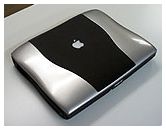 Silver!
Like the looks of this "silver" WallStreet? You can make yours look just like it a whole lot easier than you mightthink.
Vimage Bails Out of Mac Upgrade Market
In a development that can only be interpreted as ominous for theMac processor upgrade market, Vimage has posted the followingstatement on the former Vimage Store Website:
We're sorry, but we no longer provide direct salesas of 7/30/99. We are deeply sorry for this inconvenience, but wehave restructured our business plans, and it is no longer feasiblefor us to sell to resellers/end users. Thank you for yourpatience.
Reportedly, Vimage will be refocusing its efforts on the OEMbusiness, with its processor upgrade products rebranded for sale byother manufacturers.
The Vimage Corporation's abandonment of the Mac upgradebusiness, at least directly, is not good news. There have beenpersistent rumors lately about a so-called "G4 bomb" in the ROM ofG3 Macs that will disable the machine if the presence of a G4 chip(as in a third-party processor upgrade card) is sensed. It is to behoped that this rumor is groundless, but Apple has not, at thiswriting, denied it. Vimage's departure as a player in the Macupgrade market will only serve to increase speculation unless Appleclarifies this issue.
Samsung Develops Even More "Stunning" Flat Screen Display
In his RandomRuminations column on Applelinks this week, John Martellarodeclaims that flat screen LCD monitors are "stunning," and indeedmy own addiction to flat screen displays has been a significantelement of my longtime partiality for PowerBooks. I simply don'tlike CRTs - even "good" CRTs. John says he has vowed to "never buyanother Cathode Ray Tube as a computer monitor," and while "never"is a dangerous word, I would tentatively make the sameaffirmation.
John says that his "Apple LCD display is so good, it makes theRadius [CRT] look very sorry indeed.... I can hardly stand to lookat it."
And we aren't the only ones. In his columnabout the iBook in The Sentinel newspaper this week, KurtWanfried says that despite having recently purchased two 21-inchCRT monitors from The Sentinel a few weeks ago, "I suspect theseare the last CRT monitors I'll own because the flat screens likenotebook computers use are better in so many ways."
Now Samsung Electronics Co.,Ltd. has announced what promises to be a flat screen that willbe "stunning" beyond our wildest dreams, the "Super eXtendedGraphics Array-plus (SXGA+)" - a 16.5-in. TFT-LCD display panel forlaptop computers (and possibly the next generation Apple Studioflat-screen monitor for desktops now that Apple has invested $100million in Samsung's flat-screen operation?). The SXGA+ featuresmore pixels than the standard SXGA panel (1,400 x 1,050 versus1,280 x 1,024 pixels), which should guarantee spectacularperformance. Production is expected to commence early next year,and Samsung reportedly projects a sales volume of 10,000 units permonth.
Less auspiciously, a Reutersnews story on cnnfn.com reports that creditors of South Korea'sSamsung Group, in whose flat panel monitor division Apple Computerrecently invested $100 million, have proposed freezing new loans toSamsung unless the company guarantees debt repayments.
Yoo Han-jo, a director of Hanvit Bank, told Reuters that five ofSamsung's major creditors have agreed on a package of financialsanctions against the company, and will propose it to an expandedmeeting of all Samsung creditors next week.
The bank official indicated that creditors will discuss the planto freeze loans to Samsung Group companies next week, and ifSamsung can't come up with a credible plan to clear the 4.3trillion won debt of its auto unit, Samsung Motors Inc., creditlines may be cut to the entire group of companies.
In late June, Samsung Group announced that it was getting out ofthe automobile business and filed for receivership after its planto sell Samsung Motors to Daewoo Group fell through. It is unclearas to what significance this development has on Apple's investmentin Samsung, or plans for the SXGA+ screen. The last thing Appleneeds is another kink in its flat screen supply pipeline.
New Beta Version 1.5b1 of Griffin's iMate USB to ADBAdapter
Griffin Technology,Inc. has posted beta version 1.5b1 of the iMate driver fortheir iMate USB to ADB adapter. The new version provides moreflexible control and improved support for Lombard, as well astighter integration between the iMate driver and the iMate Fiddlerapplication. Performance and compatibility changes can now be madeto iMate on-the-fly. Changes made with the iMate Fiddlerapplication are now implemented immediately. This makes tuning theperformance of an ADB device much easier. Some other changes werealso made that may improve reliability when awakening from sleepmode on Lombard.
On the earlier 233 MHz iMacs (Rev A or Rev B iMac; Bondi) youMUST have the latest version of the iMac ROM to use the iMatedriver software. The newer Rev C and Rev D (Flavored, 266 MHz, and333 MHz) models should already come with the correct ROM andfirmware installed. PowerBook G3s do not need any updates.
The ROM version can be ascertained by selecting the "Mac OS ROM"in the System Folder and selecting "Get Info" under the "FileMenu". It should be version 1.2.1 or higher. If you do not have arecent ROM version you must download the iMac Firmware Update andthe iMac Update 1.1 from the appropriate Apple site below.
The iMate driver provides the functionality of the ADB manager,allowing ADB devices that require custom drivers to operate on aniMac, Lombard, or other Mac with a USB card. Some ADB devices suchas keyboards, mice, and bar code readers operate with the iMatewithout any driver software at all or only need a driver to supportspecial functions.
To Download the iMate Driver, gohere.
Linux For Lombard
LinuxFlorida has published publish a tutorial on how to install YellowDog Linux on Lombard:
After many hours of work we are among the first torun it successfully and stably on this machine and are the first towrite a procedure for it. This install is quite easy and the userwho is fairly unwary about Unix should be able to do this. We'vegot the exclusive on this - you won't see it anywhere else.
Linux Florida used Yellow Dog Champion Server 1.0 on a Lombard400, but speculate that their instructions could most likely beused as a guideline for installing LinuxPPC or Champion 1.1 as longas the same kernel and X server are used.
Macworld Finally Posts a Lombard Article
Amid all the iBook hype and hoopla, Macworld magazine hasfinally gotten around to Lombard in a short article entitledApplePuts PowerBook on a Diet.
The article, a typically bland but technically informativeMacworld piece, offers no earth-shattering revelations but providesa good overview of Lombard specs. and features.
Rainbow Painter 1.3.0 Released
For our exotic software item this week, Swedish softwaredeveloper AddictionInteractive has released a version 1.3.0 update of theirRainbow Painter image editing application for the Macintosh.
Rainbow Painter is an image editing, painting, and photoretouching program for the PowerPC Macintosh that supports 8 imagelayers with alpha channels and a mask layer.
New features in Rainbow Painter 1.3.0 include:
- Extended Tutorial
- Extended Quick Help
- New picture effects: "Enhance", "Plasma", "Impressionism","Mineral", "Cosmic Glow".
- The color of the mask layer can now be changed (click on thecolor shown below the mask tools)
- Coordinates are now displayed in the "Realtime Zoom", when themouse pointer is over a picture
- The picture's size is now displayed to the right of thepicture's name.
- "Export" as "Raw" has been improved with a settings dialog
- The "Raw" importer now recognizes both 16-bit and 15-bitpixels
- The picture effects have been divided into 2 sets ("ClassicFX", "Modern FX") for easier reference
- The mask operation 'Remove' has been renamed "Clear," to betterreflect its function.
Rainbow Painter is shareware with a modest fee of US$12. Usersare permitted to put the unregistered version of the program on anymedia they like, including CD-ROM and FTP etc. System requirementsare MacOS compatible computer with a PowerPC processor. Colors:Thousands (15 bits) or millions (24 bits). 10+ MB of free hard diskspace.
Rainbow Painter 1.3.0 and can be downloadedhere.
For more information visit the Rainbow Painterpage.
G3 Upgrades for PowerBook 1400s and 2400s May Not Be DeadYet
UpgradeStuff.com'sDave Manning reports that response so far has been strong to hisrequest for feedback with regards to a possible further PowerBook1400 G3 upgrade manufacturing run. Preferences have been aboutevenly split between a low-cost G3 upgrade (216 or 233 MHz) and ahigher performance 300 or 333 MHz copper G3 upgrade. Furtherfeedback is kindly requested from anyone interested at1400@upgradestuff.com
Hard on the heels of Vimage's announcement (see above) that theywere pulling out of the Mac market as a direct supplier of CPUupgrade cards, Newer Technology has also announced that it isdiscontinuing G3 upgrades for the PowerBook 1400 and 2400 due to"declining demand for PowerBook upgrades." At this point, thepipeline is pretty much emptied of both Newer Tech and VimagePowerBook 1400 upgrade cards.
Have Your 'Book Repaired; Pick Up a Virus?
In medicine, infections from viruses and bacteria picked up inhospitals are a growing problem, and it looks like Apple'sPowerBook repair center has similar troubles. A threadof reader letters published on MacFixit indicates that the 666virus is on the loose at the PowerBook hospital, and that"patients" are being discharged with this highly contagiousdisease.
One writer says he ran Virex 5.9.1 on his girlfriend's 'Bookimmediately prior to being shipped to the Apple Repair Facility inTexas. When the machine was returned, the HD has been erased andMacOS 8.5.1 installed in place of the OS 8.6 that had been on it.The owner's personal files, which had not been backed up, werelost. When contacted Apple reportedly said that the HD had beenwiped to destroy the 666 virus on it - which the writer says he issure was not the case. However, the punch line is that when he ranVirex again on the returned PowerBook, the 666 virus was there."This means that they wiped the HD got rid of the virus and thenput the virus back on her machine," says the writer.
If you're sending your 'Book to Apple (or anywhere for thatmatter) for repair, make sure your files are backed up, and checkfor viruses your baby may have picked up in the "hospital" when itreturns.
SnapTop v1.2: Keystroke Navigator Released
AuctionMac.com Softwarehas released v1.2 of their SnapTop keystrokenavigation system extension for the Mac.
SnapTop provides three productivity-boosting functions that willreact to preset keystrokes from virtually any application:
- Snap to desktop: From any application you can "snap" to thedesktop and hide all other applications. The demo comes built witha certain keystroke... Registered users can customize withkeystroke they prefer.
- Snap back: Another keystroke reverses the process, showing allyour open applications again instantly. SnapTop does not quit anyprogram... but hides them similarly to the Finder's "Hide Other's"command. The demo comes with built with a certain keystroke preset.Registered users can customize keystroke.
- Close all Finder windows: This feature will switch you to theFinder and close all the open windows. The demo comes built with acertain keystroke... etcetera.
SnapTop is small, easy to install, and has modest systemrequirements. With registration, the demo delay is removed and youare free to choose any key combos you like in your registeredpersonal copy. The registration fee is US$8.99.
Apple Releases PowerBook G3 Series Battery Reset Update Version1.0
Apple has released a BatteryReset Update for WallStreet models to address a situation thatmay occur with some PowerBook G3 Series I and II computers in whichthe main battery won't charge, doesn't show up, or behaves in anotherwise "unexpected way." However, Apple notes that this update"may not address all battery-related problems." Lombard does notrequire this update.
You can download the WallStreet battery reset update softwarehere.
PowerPage Reviews Ratoc CDFW-2 FireWire PC Card
If you're interested in upgrading your 'Book to supportFireWire, you might find this review of Ratoc's CDFW-2FireWire PC Card on O'Grady's PowerPage worth a look.
The review says that the Ratoc card worked well with theperipherals they tested: a VST 6 GB FireWire hard drive and a SonyTRV-9 digital camcorder, but some problems were encountered onwaking the test PowerBook, a Lombard/400, from sleep. The Lombard"would often crash waking from sleep with the card installed andthe drivers loaded."
A Simple Fix for yhe iMac Mouse
Our Danish correspondent Eolake Stobblehouse owns both an iMacand a Lombard PowerBook, and thus has been obliged to contend withthe vicissitudes of the controversial iMac "Hockey Puck" USBmouse.
He sends this simple tip for making life with the round rodentmore bearable.
"If you put a little blob of glue on the front of the iMac mouseand let it dry," says Eolake, "you can easily feel which way themouse is turned. Even though I have large hands, I actually reallylike this mouse after I have done this.
"The iMac mouse is also wonderfully compact and fits easily intothe computer bag with the Lombard. I am several times a weeksitting in restaurants, café, and wherever I am,photoshopping and web-designing just as easily as if I washome."
A Fine Tribute from an Esteemed Colleague
John Martellaro, who like me is a columnist for both MacOpinionand Applelinks, also had this to say in RandomRuminations #1 this week.
There are some things to catch up on this week.Since it's catch up time, I'll call this "Random Ruminations" inhonor of Charles W. Moore and his Miscellaneous Ramblings columns.I hope he won't be too upset with me if I mention that his MRcolumns and all his other works are splendid examples of the besttechnical writing on the Macintosh Web. Hey, Charles! Does that getme off the hook?
Sure does, John! I am indeed honored.
Road Warrior Mailbag
From Steve Justus:
Charles-
With all the talk about what features iBook lacks,it's easy to forget this is the first model of the product. Theoriginal iMac also had some substantial deficiencies - for example,a video system that wasn't too good for playing games. Those werefixed pretty quickly. I don't think it will be very long before arevision B comes out to address similar issues on the iBook.
As for the pricing, let's keep in mind that Applegot caught by a shortage of displays and probably had to raise theprice a little higher than they would like. They didn't invest $100million in Samsung just because they thought it would be aprofitable investment. They expect to secure a better and cheapersource of displays, which should bring the iBook price down in thenear future.
The iBook is also the first product based on theUnified Motherboard Architecture (UMA) that is supposed to providea common basic set of functions across Apple's entire product line.There are a number of startup costs associated with this thathaven't been amortized yet. MacOS Rumors reports that Apple expectsthis move may save up to $250 per machine. I know this is a rumorsite, and the figure may not be correct, but UMA is a reality andApple is adopting it because they expect it will save money. Allother Apple products - the next generation iMac, PowerBook, andprofessional desktop are based on UMA so this transition is not faraway. Once UMA is adopted across the entire product line, the iBookcosts should come down even further.
I won't be surprised to see a revision B iBookshipping in early 2000 with a few new key features at $100-200 lessthan the current one. I'm not sure if I'll buy one, but I am one ofthose people who does find the design strangely appealing -especially the Tangerine.
Several RW readers responded to Michael R. Shannon's query aboutwireless pointing devices for the Mac:
From Steve:
Charles,
Just read the Road Warrior column and the questionfrom Michael Shannon and thought I'd mention the GyropointII.
It is a wireless pointing device with a longrange. It takes a while to get used to, but works extremely well.It is ideally suited to use for PowerPoint presentations, asclicking the "mouse" button is easy. The "cool" factor is alsopretty high.
From Andy Boretto:
The GyroPoint is great, as is the ProPresenter,both work on PowerBooks from the 1400 to the G3.
GyroPoint from ixMicro
[GyroPoint II at MacWarehouse ($119)]
[ProPresenter at MacWarehouse ($79)]
Hope this helps your Road Warriors. . .
From Bruce McLaughlin:
Hello there,
I was reading your column in MacOpinion. You wereanswering a reader's query about a wireless mouse for his PowerBookI have some experience with the Gyropoint mouse, which is designedto be used while held in the hand. Moving the mouse around thescreen took a little getting used to, but for just clicking itshould work well. At the time I was using it there were cordlessversions as well as a version with a loooong cord.
CDW currently has a Gyropoint II which is Maccompatible. I hope this is helpful for your reader Michael R.Shannon. Feel free to forward this to him.
- Bruce.
From Harold Tessmann III:
I just finished reading Ramblings #24 and thoughtI could offer a little assistance. Michael R. Shannon asked forwireless mice for his ADB-capable PowerBook. We faced a similarsituation here at the ResComp office when our GyroMouse startedacting up. (It was several years old, so it's not a reliabilityissue.)
Since we were happy with our old GyroMouse, welooked into the GyroMouseII. Like all wireless mice, it has a little base station thatconnects to your 'Book. To move the cursor on screen, you hold abutton and wave the GyroMouse around like a conductor waves hisbaton - kinda cool, but it takes a while to get used to. A bigminus for us was the lack of programmability. Two buttons are onlyuseful if they do different things, and since the GyroMouse usesthe generic Mac mouse drivers its buttons both do normal clicks.That might be a feature if you'll be do presentations on sharedcomputers where you can't install drivers, but it sounds likeMichael will almost always be using his PowerBook.
We also have a dedicated presentation PowerBook sowe kept looking. The second and last device we investigated wasLogitech'sTrackMan Live!. It's a wireless trackball that has threebuttons. As you'd expect from a trackball, you move the cursor byturning a little ball embedded in the device. Control was fairlysmooth; I'm not used to trackballs and I found it comfortable. Itcomes with drivers that allow you to fully program it, thus you canset one button to advance your presentation and another to go backa slide. We liked this device so much that we bought one and itworks very well. I highly recommend it.
Thanks for the information and insights, all.
From Eolake Stobblehouse:
Hi Charles,
One thing I don't understand about my Lombard 400display: When I tip it towards me, it grows lighter, and when I tipit away, it grows darker. This is to the degree that I can't get aneven illumination of the whole screen from top to bottom. When youtip it back and forth, it is very noticeable. Is this normal forLCD?
Yours, Eolake
I think not, especially after looking at some digital photos ofthe phenomenon that Eolake forwarded. Anyone out there inreaderland experiencing a similar unevenness of illumination ontheir Lombards?
From John A. Lee:
Hello Charles,
Visited your column last evening and found notesof pleasure while reading your article about the PowerBook 5300. Ipurchased a used 5300cs about two weeks ago for $500. I had alreadybeen aware of some the drawbacks of the 5300 from other sources,and I had a question or two I thought I'd send along to you sinceyou are an owner.
The 5300 is slow...it makes my 7200/120 seemrefreshingly snappy but the PowerBook has allowed me to continue onprojects while away from my desktop model which has already provenit's worth. It is much better with Speed Doubler on board and Iwanted to ask about the difference between Apple's "Virtual Memory"as compared to the Connectix "RAM Doubler" product. Are there anyperformance advantages to RAM Doubler over VM? Better speed,stability? Freed disk space from the HD?
I also find the HD a bit small and I wanted askyou about any caveats for installing a newer one into this machine.I've installed HD's in other machines before, so mainly what I wantto know is if there is a specific type of HD that is considered"right" for the 5300. The one that is in the machine is the onefrom the factory which is an ATA.
Maybe I missed these items while reading yourarticle but I wanted to mention some of my own 5300cs experiences.Since installing OS 8.6 I've noticed that I cannot change theamount of disk cache available in the Memory Control Panel. I'malso interested in information about the "persistent caching"scheme. Norton treats the 5300 HD as two separate volumes and thiswould be good to investigate and understand.
Not much further than this, other than to say thatI enjoyed the piece.
The 5300 is indeed slow, but I still like mine. :-) I'm aconfirmed RAM Doubler fan. VM is clunky by comparison.
Any standard 2-1/2" IDE drive that will physically fit in the5300 case *should* work. One source might be a 2 gig unit fromsomeone who has upgraded their WallStreet. I have a VST 810 MBexpansion bay drive in this one augmenting the internal 500 MBunit, but they are discontinued.
I have a late beta of 8.6 installed on one of my four HDpartitions, but I don't use it much because it doesn't seem to workhappily with Eudora Light on the 5300 (Same problem with OS 8.5 aswell; Eudora Lite works fine with Mac OS 8.5 or 8.6 on myWallStreet). Never noticed the disk cache glitch, but never lookedfor it.
As for your Norton glitch, Norton Disk Doctor runs fine on my5300. I have the internal 500 MB drive partitioned four ways, plusthe expansion bay drive, and Norton treats them all as separatevolumes. Did the former owner partition your drive?