Miscellaneous Ramblings
New PowerBooks: Still Waiting
Charles W. Moore - 23 April 1999
NOTE: This Miscellaneous Ramblings columnoriginally appeared on MacOpinion on April 23, 1999.It is republished here by permission of the author andMacOpinion.
Well, the Lombardintroduction predicted by some for the NAB Conference in Las Vegasthis week did not materialize. QuickTime 4 was released in a publicbeta there.
However, MacFixit reports that Apple has extended its PowerBookpromotion until May 30, which would seem 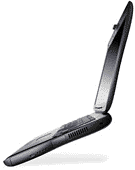 to indicate that we won't be seeing Lombard untilJune. Others are still saying that Lombard will roll out at theWWDC which begins on May 10th, or even earlier. Word as I writethis is that Mac OS 8.6, which was assumed to be the holdup, hasgone Golden Master, which means its finished. Reportedly,production of Lombard in Taiwan is up and running, but we're stillin wait-and-see mode.
On a recent conference call with financial analysts, Apple'schief financial officer, Fred Anderson, remarked, "I would alsohave to say with candor that we had weaker performance withPowerBooks. I'd say there has been some potential deferring ofbuying . . . by PowerBook customers who are speculating aboutfuture products.''
Meanwhile, the good news is that the great deals on G3 Series II 'Books keep on rolling.The price point of Lombard is expected to shoot back up to wherethe Wall Streets were when they first came out last May, so ifyou're looking for power at a great price, the opportunity isnow.
In fact, if you want to buy ten or more 300 MHz PowerBook G3Series IIs, and you're an education customer, Apple will reportedlysell you a batch for $1999 each while supplies last. This is thesame unit that is currently list-priced at $2879. If yourinstitution qualifies and is interested, contact Paul Musegade atApple (612-941-9062).
The specs are:
- PowerBook G-3/300 (#M7310LL/A)
- 300 MHz.
- 1 MB Backside cache
- 64 MB RAM
- 8 GB Hard Drive
- 10Base-T Ethernet
- 56K modem
- 14.1" TFT.
Before we move along, MacInTouch reports that thePowerBook G3 Series Floppy Drive has been discontinued. Lombardwill have a new expansion bay form factor, and presumably no floppywill be offered. Lombard's are expected to retain the PCI connectorin one of the bays to facilitate connectivity with devices likeMagma's PCIbreakout boxes.
Mac Service and Owner's Manuals Available for FreeDownload
If you are interested in communing with the guts of yourPowerBook, whether to just install some more RAM, or to fix aglitch, a service manual is a wonderful reference to have at yourfingertips.
Apple has posted service manuals for every Mac product made backto the Mac Plus in PDF format at the first URL that appears below.I can't vouch for the strict accuracy of that comprehensive claim,but there are a lot of manuals there. If you want a completemanual, download the largest file of four typically listed for eachproduct, because only the largest file contains the "take apart"instructions which are not included in the smaller manuals.
ftp://ftp.info.euro.apple.com/Apple.Support.Area/Misc/Service/servicemanuals/
If you have purchased a used PowerBook and the owner's manual ismissing, you can also download one of those at:
ftp://manuals.info.apple.com/Apple_Support_Area/Manuals/
All the manuals are in Adobe Acrobat PDF format.
More on Blazing PowerBooks (not 5300s either)
The PowerBookZone recently published an update to their extensive coverageof the Flaming PowerBook G3 Series issue, related to a batch of badcapacitors that were responsible for a few very hot (literally) G3Series machines. "Apple quickly got the problem under control,"says the PowerBook Zone, but one of their readers has reported thather two-day-old 'Book, purchased from Outpost, just went up insmoke.
She notes that it is possible that this machine has been sittingat Outpost.com for a long time and was part of the bad batch, orperhaps it was an isolated rogue unit. As the PowerBook Zonereported earlier, only a handful of the hundreds of thousands of G3'Books built have manifested this problem, so there is no cause forgeneral alarm.
It's also interesting that the G3 Series has generally avoidedthe "Incendiary PowerBook" innuendo that has plagued the poorPowerBook 5300 since one earlyproduction 5300's LiIon battery caught fire in an Apple lab,initiating a recall. No consumer 5300s ever caught fire and all ofthe suspect LiIon batteries were replaced with NiMH units. Applehas not recalled the G3 Series.
iCab Update
As I noted last week, I've been testing the latest 1.4 betabuild of the iCab Browser, and over the past week it has provednearly rock-solid, with only one crash (a complete lockup whileloading images on Apple's website). With preview 1.4, iCab now hassoftware that can essentially be used a main browser, and I lookforward eagerly to the next beta update and the release build. Themore I use iCab, the more I like it, and this is going to be agreat browser alternative to Netscape and Explorer. There are stillsome issues with form rendering, and I've found the odd page thatsimply refuses to load with iCab. I also still want to see atext-only save-as option. But my iCab wish list is shrinking.
Exotic Software Department - Musashi
No, it's not some new Japanese seafood dish - it's a POP3 emailclient.
Many Mac-users were disappointed when Apple discontinueddevelopment of Claris Emailer last year. I was sorry as well to seea popular Mac application abandoned, even though my own preferencewas and is for Eudora Light for its Zen-like minimalist simplicityand its stability and speed.
However, Eudora Light has one glaring deficiency - it does notsupport multiple email accounts. Its big brother, Eudora Pro does,but I find Pro too ponderous and laden with features that I neveruse - too much like Outlook Express. My workaround is to runmultiple, mildly hacked copies of Eudora Light, but a singleapplication that retained Eudora Light's smallness and nimbleness,but offered multiple account support would be a more elegantsolution.
I may have found it in Musashi, a new, shareware POP3 emailclient program for the Macintosh written by Mamoru Misono of Japan.I find Far Eastern software typically tends to be both stable andinnovative, and my brief encounter with Musashi indicates that itfits that description.
Musashi is multi-user/multi-account compatible email client thatis light and fast, supports drag & drop, background messagesending and receiving, and templates.
Actually, there are two Musashis. Musashi 2.3.4 is the originalprogram in its latest iteration, while Musashi Version 3.x addssupport for hierarchical folders, remote mail and other advancedemail features.
Musashi 2.3.4 specs:
- Sends mail by SMTP and receiving mail by POP3. (MacTCP orOpenTransport is required)
- Manage mails with multiple mail boxes.
- Multi-user compatibility. (Each user can cinfigure their ownpersonal environment.)
- Multi-account compatibility.
- Mail box sharing. ( Personal mail boxes can be shared withother users.)
- Drag & Drop compatibility - moving mail, saving file,clipping text and so on.
- Attachment and extraction of BinHex encoded documents.
- Attachment and extraction of MIME Base 64 encodeddocuments.
- Attachment and extraction of uuencoded documents.
- Background mail sending and receiving.
- Templates.
- Custom resources
- Imports external messages and address book.
Musashi is a shareware. The Musashi 2.3.4 limited time demolasts 30 days. If you want to use the program after the expiration,please register and pay for shareware fee ($30) so as to getregistration code which defeats the expiry.
Musashi 3.06 Features include:
- All of the above, plus:
- Send attachments with Base64 (including AppleDouble andAppleSingle), BinHex and uuencode.
- Extract attachments with Base64 (including AppleDouble andAppleSingle), BinHex and uuencode.
- Hierarchical structured address book.
- Multiple signatures.
- Filter
- Multi-language fonts.
- Import external messages with plug-in functions.
- Import external address book with plug-in functions.
- Export messages with plug-in functions.
- Export address book with plug-in functions.
- Customize icons and window colors with module.
The Musashi 3.06 demo lasts 40 days, after which you must paythe shareware fee of $33 to get registration code. If you are aregistered user of Musashi 2.x and wish to upgrade Musashi 3.x, youcan re-register with an upgrade fee of $9.
Mamoru Misono says he will continue to release (bug-fix andminor-update) and support Musashi 2.x so you users can choose notto upgrade to version 3.x and continue to use version 2.x. He willfix bugs of Musashi 2.x but plans no new features, which will beconcentrated in Musashi 3.x.
You can download either version of Musashi for trial evaluationhere.
Newer Technology Cuts PowerBook Upgrade Prices
NewerTechnology has joined other makers of G3 upgrades in droppingprices on its G3 upgrades, including NUpowr G3 PowerBook 1400 and PowerBook 2400 upgrade cards. The 1400models, in speeds of 233 and 250 MHz, now cost $349 and $465respectively. The 240 MHz upgrade for the 2400 now costs $365.
The lower-cost 233 MHz upgrade has 512K of backside cache whilethe 250 MHz version features 1 MB of backside cache.Newer Technology claims that the PowerBook 1400 upgrade is sosimple anyone can perform it in about 5 minutes.
All PowerBooks since the 5300 series use a 64-bit CPU (603e orG3). The PowerBook 1400 employs a 64-bit CPU but only has a 32-bitcache and system memory bus. The 1400's 32-bit bus represents asignificant performance bottleneck. Every time the CPU in aPowerBook 1400 wants data it must access the bus twice in order toobtain 64-bits of data. A NUpowr G3 card works around thisbottleneck by virtue of the Level 2 backside cache. Every time a"cache hit" occurs it travels through a 64-bit bus in the processoritself, just like on newer PowerBooks. Due to the size of ourbackside cache (1 MB) in the 250 MHz NUpowr Card it canoutperform the (original) PowerBook G3 250 on a number oftasks.
The Apple (original) PowerBookG3/250 earns a MacBench CPU score of 746 while theG3/250-upgraded 1400 turns in an impressive 875. The reason is theamount of backside cache. The Apple PowerBook (original) G3 uses512K while the NUpowr G3 250 comes with 1MB.
To their credit, Newer Technology acknowledges that an upgraded1400 will not be the complete equal of a PowerBook G3, noting thatthe latter has an video subsection which provides superb videoperformance, as well as a performance oriented hard drive and alarger LCD screen. The 1400 is also limited to 64MB of RAM ,compared with the (original) PowerBook G3's maximum of 144MB.However, the upgrade is intended for people who have already madean investment in a PowerBook 1400.
The 240 MHz/512K cache G3 Upgrades for the PowerBook 2400 aremuch more difficult to install, because unlike the 1400, theIBM-built 2400 is difficult to take apart. Newer Technology"strongly" suggests that you get a trained service technician toinstall the 2400 upgrade, or alternatively that you use their own$99 installation service, available from many mail-order and webbased resellers, and includes a 2-way shipping carton.
A Radical Solution for Scratched G3 Series PowerBooks
Sandor W. Sklar of Stanford University has come up with aradical solution for "fixing" scratches on the all-too-easilydamaged "rubber"-coated centre sections of the PowerBook G3 Seriescase. He got rid of the "rubber" by dissolving it with nail polishremover, leaving the bare alloy material uncovered.
Actually, Jason O'Grady of O'Grady's PowerPage did much the samething with his PowerBook G3 several months ago, and then used asmall power tool to etch simulated "engine turning" texture intothe bare metal.
Whether you think it's attractive is a matter of taste. I ratherlike the appearance, but I'm not a fan of the tactile sensation oftouching bare metal, especially light alloys.
Anyway, you can have a look at the results in the many photosposted on Sandy's Web page.
Pre-Owned PowerBook Deals
SmallDogElectronics has a few used, in-house refurbished PowerBook3400s available this week.
PowerBook 3400c 180/16/1.3gb/33.6/10BaseT/CD, $1,079PowerBook 3400c180/48/1.3gb/33.6/10BaseT/CD, $1,129PowerBook 3400c 240/16/2GB/12xCD/Ether/33.6, $1,249PowerBook 3400c200/112/2gb/12xCD/Ether/33.6 (marred case), $1,299PowerBook 3400c 200/48/2gb/6xCD/Ether/33.6 , $1,229PowerBook 3400c 200/80/2gb/6xCD/Ether/33.6, $1,259PowerBook 3400c 200/16/2gb/6xCD/Ether/33.6, $1,179PowerBook 3400c 200/16/2gb/12xCD/Ether/33.6, $1,199PowerBook 3400c 240/48/4GB/12xCD/Ether/33.6, $1,329PowerBook 3400c 240/48/3GB/12xCD/Ether/33.6 , $1,299
And the Apple Store is listing a couple of refurbishedG3 Series PowerBooks
PowerBook G3 233/32/2GB/20xCD/No Floppy/Enet/56K/14.1 TFT, $1,699PowerBook G3 266/64/4GB/20xCD/No Floppy/Enet/56K/14.1 TFT, $2,199