Miscellaneous Ramblings
Hands On: Griffin NE Mic
Does Griffin's NE Mic adapter deliver satisfactory audio input using cheap PC Mics?
6 Nov. 2000 - Charles W. Moore
Apple's PlainTalk microphone is different from a standard mic in that incorporates a built-in preamplifier that supplies a line level audio input to the computer. This means that any microphone or other device you plug into your Mac's PlainTalk microphone jack needs to support line level input.
However, the PlainTalk microphone interface means that Mac users are
shut out of the majority of computer microphones on the market,
especially the vast array of inexpensive ones available for Wintel PCs.
And while Apple's own PlainTalk microphone is a very decent unit, it
must be either perched on top of your computer monitor or held, neither
of which is necessarily the most ideal or convenient solution. People
who use voice input a lot will probably prefer to have a headset or
boom microphone.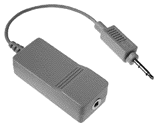
The solution for Mac users who want to use non-PlainTalk microphones is the Griffin Technology NE Mic audio adapter, which is compatible with most non-powered microphones that have a standard 3.5 mm stereo or mono jack.
This adapter is fully compatible with the PlainTalk audio port used on recent Macs. It works by amplifying the mic level signal that most microphones output and boosting it to the Mac's line level signal.
Designed for both professionals and hobbyists, the Griffin NE Mic adapter incorporates a low-noise amplifier and requires no SETI or drivers.
The NE Mic adapter plugs into the microphone port on Mac OS systems, giving you the option of using a wide array of inexpensive microphones, multimedia displays, communications devices, and headsets manufactured for both the PC and consumer market. "You will now be able use any microphone that you could buy at a computer or discount store," says Paul Griffin, CEO of Griffin Technology Corporation.
I decided to give the NE Mic the acid test, trying it out with a cheap PC mini-boom microphone that I picked up from a surplus mail-order house for Can $3.99 (that's about US $2.60), figuring if I got decent results with that, then performance with higher-quality PC mics should be even better.
My test procedure was unscientific: I basically recorded similar phrases several times using the Alert Sound recorder in the Mac OS Monitors & Sound control panel, and then subjectively compared the results produced by three microphones - the $3.99 cheapo; a presumably likewise inexpensive mic and speakers headset combo that Griffin sent along with the NE Mic test unit; and an Apple PlainTalk mic as a control.
To use the NE Mic adapter, I just plugged the adapter module into the test Mac - in this case, my son's PowerBook Lombard 333 MHz machine, and then plugged the two inexpensive microphones into it in turn.
Not surprisingly, the stock Apple PlainTalk mic supplied the cleanest audio input of the three. However, I was surprised at how good the cheap little boom mic was, and I got a very acceptable recording of my voice using it. The headset mic was disappointing, however. It had plenty of volume, but produced an unacceptable background hum or buzz no matter where I set its in-line volume control.
Having established that the cheap PC boom mic offered reasonable input quality, I decided to see how it would work with dictation software, in this case IBM ViaVoice. Here again, the results were surprisingly good. Dictation accuracy using the $3.99 a microphone did not appear to be much less accurate than it is with the Andrea headset mic that ships with ViaVoice or with the Apple PlainTalk mic.
However, I discovered to my dismay that after switching back to the regular dictation mic, using the cheap mic seemed to have corrupted my ViaVoice voice profile files, and recognition accuracy had deteriorated to default (pre training) levels. Fortunately, reading ViaVoice one of its training stories seemed to restore things to normal. Consequently, I suggest that when experimenting with different microphones, one should set up alternate voice profiles in dictation software.
At US$19.95, Griffin Technology's audio adapter offers a low-end solution for novice or aspiring Digital musicians, Audio/Video producers, Multimedia designers, and Voice Recognition users. The audio adapter's preamplifier outputs approximately a 100x gain on the normal mic level signal produced by unpowered microphones. This produces the professional industry standard line level signal used by Apple since the Quadra models. "With all the multimedia monitors with built-in microphones on the market today, the NE Mic audio adapter fills a great need," says Griffin.
The NE Mic adapter is compatible with all currently shipping desktop Macs and PowerBooks (but not iBooks), as well as all models made by erstwhile Mac cloners such as Power Computing, Motorola, Umax, Marathon, PowerTools, and APS. It is also compatible with most legacy Mac systems introduced since 1993.
I found that the Griffin NE Mic adapter works as advertised, and is an ideal accessory for adding more mic flexibility to your PlainTalk Mac. However, my encouraging test results with ViaVoice and the cheap mic notwithstanding, I strongly recommend that serious dictation software users invest in a high quality microphone. NE Mic expands the range of possible candidates.
For more information, visit the Griffin website.
Appendix: NE Mic Technical Specs
- Input Impedance: 900 Ohms
- Output Impedance: .1 Ohms
- Input Connector: 3.5 mm mono
- Output Connector: 3.5 mm custom
- Audio Gain: 40 dB
- Operating Voltage: 5 V
- Input Voltage: 1.6 V
- Power Consumption: 6.4 mW
- Bandwidth: 60 Hz-12 Khz
- Current Consumption: 1.3 mA
- Height: .73 inches
- Width: 1.03 inches
- Length: 2.37 inches
- Cord: 3.86 inches