Miscellaneous Ramblings Review
Software Review: Tex-Edit Enhancer
Charles Moore - 2000.10.09 - Tip Jar
Low End Mac Reader Specials
Memory To Go Special: New 2008 iMac 2GB $42 / iMac Intel Core2 DUO & MacBook Pro 2GB $36 - 1GB $20. MacPro 8 Core Memory 8GB kit $286 / 4GB kit $143 / 2GB kit $93 -- Free shipping available. LIfetime warranty.
Download Typestyler, still the Ultimate Styling Tool for Internet, Print and Video Graphics. Works great in Classic with a Native OS X Version on the way. Free Tryout: www.typestyler.com
LA Computer Company: Specials on AppleCare, iMac's, Apple Batteries and Apple A/C Adapters. Also Great prices on Used Apple Computers. Call 1-800-941-7654 Click Here.
OWC: NewerTech miniStack FireWire/USB 2.0 HD & Hub Up to 1.0TB of Performance Storage + FW/USB2 Powered Hubs - convenient & sleek 6.5" x 6.5" x 1.5" Featured: 500GB $169.99; 750GB $209.99; 1.0TB $339.99
Mac users can finally play Party Poker for Mac. Not only that, they can also learn how to play PokerStars for Mac.
Laptop Hardware Provided by TechRestore - Overnight Mac & iPod Repairs.
Compare products like desktop computers, laptops, and LCD TVs side by side! All the information and reviews to make the best purchasing decision for a new cell phone GPS products or MP3 players. The Ciao network makes searching products easy for you.
I have used a lot of word processors and text editors, and I have rarely run across one that I didn't like in some aspect, but my all time, hands-down favorite is Tom Bender's wonderful Tex-Edit Plus, which I find for my purposes is well nigh perfect, now that I have it tricked and with a bunch of AppleScripts to perform tasks that I repeat dozens of times daily.
Nearly all of my writing output these days is either submitted
to editors of print publications via email, or converted to HTML
for publication on the Web, so for me a full-fledged word processor
with comprehensive text formatting and page layout options is
neither necessary nor desirable. I often go for months without
printing out a sheet of hard copy, which is why
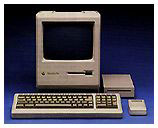
the only printer that I own is an ancient 9-pin dot
matrix ImageWriter II of the same vintage as my first Macintosh - a
Mac Plus.
Not that Tex-Edit is incapable of considerable text formatting. It is. However, the program's main orientation is manipulation of plain text, which it does superbly with lightning speed and a high degree of stability. I can't say enough good about Tex-Edit Plus. Except perhaps for email software, it is my most-used and favorite Mac application.
As I said, I find Tex-Edit Plus - with its combination of text crunching power, modest system demands, speed, and clean, uncomplicated, interface - just about perfect for my needs and tastes. However, users who like the program's leanness and functionality, but find it just a little too austere compared to what they're used to in a word processor, may find Steve Becker's Tex-Edit Enhancer to be just what they need to satisfy their toolbar withdrawal pangs.
Tex-Edit Enhancer is a shareware add-on that provides Tex-Edit or Tex-Edit Plus with a Tool Bar for quick, single-click access to many of Tex-Edit's features, plus several additional features of its own, which Include:
- A glossary in which you can quickly and easily store items you use repeatedly in documents, as well as items stored for future access. These stored items can be just a few words, a quotation, or several paragraphs - you can customize the glossary to fit your needs. The glossary was and is one of my favorite features in Word 5.1 and Nisus Writer. However, these days I get the same functionality in Tex-Edit with AppleScript activated boilerplate text. You may add an item to the glossary either by selecting it and using the glossary button's popup "Add" option or by dragging the selection to the glossary button.
- A customizable date stamp, as well as a time stamp, are included in the Tool Bar. Command-clicking the Time/Date button inserts the date format last selected with the button. This allows you to "save" a date format style as a default.
- The name of the font, the point size, and the style of the text you are typing with are always displayed, and the display is automatically updated.
- The name of the font, the point size, and the style of your selected text are always displayed, and the display is automatically updated.
- With a single mouse click, you can both display all the characters - including dozens of useful hidden characters - included with each font on your system and insert them into your document. (Tex-Edit also already has a pop-down menu at the bottom of each document window that does this).
- Alphanumeric sorts may now be made to sort from either a lower to a higher value or from a higher to a lower value.
- Tex-Edit Enhancer displays all active fonts in their own typefaces.
- Tex-Edit Enhancer includes a user-configurable auto-save feature which can be accessed directly from the Tool Bar's Auto-Save button.
- The Tool Bar automatically appears alongside the active Tex-Edit window.
- If you need to move/resize a window, the Tool Bar will automatically maintain its proper position (assuming the Auto-Position feature is turned on).
- Turning off the Auto-Position option allows you to move the Tex-Edit Enhancer Tool Bar to any location you choose on your Desktop - making it a floating tool palette. (When the Auto-Position feature is turned off, a Drag button automatically appears.)
- You can create your own keyboard shortcut for toggling Tex-Edit Enhancer's visibility, and the Tool Bar includes a windowshade feature.
- Tex-Edit Enhancer includes Balloon Help. (While Tex-Edit Enhancer's Balloon Help works when you turn on your System's Balloon Help, it also can be used without turning on your System's Balloon Help.)
- Tex-Edit Enhancer's Tool Bar includes quick, single-click access to many Tex-Edit features such as undo/redo, print one copy, changing or customizing text colors, changing or customizing background colors, justification, line spacing, showing/hiding formatting characters, and more.
System Requirements
- A Macintosh computer with System 7.5.3 or later (including Systems 8, 8.1, 8.5, 8.5.1, 8.6, and 9.x)
- A 68020 or later processor
Tex-Edit Enhancer installs only a single extension in your System.
I found that Tex-Edit Enhancer worked as advertised, and some of its features are very cool, especially the glossary, sort, and time stamp functions. However, I would have liked Tex-Edit Plus's word count, document info, strip CR/LF, HTML conversion, and change word case functions to have been included in the toolbar array.
Personally, I am not a big toolbar fan (for instance, I keep the toolbar turned off in Eudora 5.0), and I prefer to use AppleScripts, some of them keyboard activated, for most of the functions of Tex-Edit Enhancer that I use. However, if you like toolbars, this is one that works, and it seems not to slow Tex-Edit down appreciably.
Tex-Edit Enhancer includes a 30-day money back satisfaction guarantee and costs US$14.95. You can also download a free, fully functional 10-day demonstration version of Tex-Edit Enhancer.
Charles Moore has been a freelance journalist since 1987 and writing for Mac websites since May 1998. His The Road Warrior column is a regular feature on MacOpinion, and he is a news editor and columnist at Applelinks.com.
Recent Miscellaneous Ramblings
- $19,800 Bentley Ego Laptop Remarkably Similar to 1999 Clamshell iBook, 10.06. Granted, Apple's iBook didn't have white gold trim, a padded leather exterior, or come in colors to match your Bentley automobile.
- The Best Browsers for Older Macs Running Tiger, 10.02. A dial-up user's overview of browsers for Mac OS X 10.4 puts the emphasis on reliability, downloads, and speed.
- Tiger Great on Old G3 'Books, Maximum RAM for 867 MHz PowerBook G4, and More, 10.01. Also why 4 GB of RAM in a 32-bit Vista PC wastes most of the last gigabyte and system profile software for Windows PCs.
- What's So Great About a Mac? Plenty!, 09.25. Alex Gallegos doesn't understand why anyone would choose a virus-free, just-works Mac instead of the far geekier Windows.
- More in the Miscellaneous Ramblings index.
Links for the Day
- Mac of the Day: Power Mac 8200, Apr. 1996 - The minitower version of 7200 was never sold in America.
- List of the Day: G4 List is for those using Power Mac G4s or G4 upgrades.
- October 7 in LEM history: 98: Love that PowerBook G3 - 99: Troubleshooting 101 - Love at first sight - 02: Hot rodding a Power Mac for OS X - Beefing up Windows networking - 05: Choose FireWire 800 over USB 2.0 and FireWire 400 - Faster Mac minis shipping - Speedy 100 GB 7200 rpm notebook drives
Recent Content on Low End Mac
- New Apple Notebooks at Zero Minus One Week, Charles W. Moore, 'Book Value, 10.07. It's widely anticipated that Apple will overhaul the MacBook Pro and MacBook lines next Tuesday. What should we expect?
- How to Clone Mac OS X to a New Hard Drive, Simon Royal, Mac Spectrum, 10.07. Whether you want to put a bigger, faster drive in your Mac or clone OS X for use in another Mac, here's the simple process.
- Best 12" PowerBook G4 Deals, Low End Mac Deals, 10.07. Used 867 MHz Combo, no APX, $490; 1.33 GHz, $496; 1.5 GHz SuperDrive, $542.
- Best Mac mini Deals, Low End Mac Deals, 10.07. Used 1.25 GHz G4 Combo, $399; 1.42 SuperDrive, $559; 1.66 Core Duo, $499; new 1.83 Core 2 Combo, $570 after rebate; 2.0 SD, $770 a/r.
- Best Power Mac G3 and PCI Video Card Deals, Low End Mac Deals, 10.07. Used beige 300 MHz, $25; 333, $198; blue & white 300, $49; 350, $55; 400, $90; 450, $105; PCI video cards from $15.
- The Cost of Moving to Small Business Server vs. Moving to Leopard Server., Andrew J Fishkin, Best Tools for the Job, 10.06. Upgrading the existing SBS 2003 Server would cost less, the the server will run up against hardware limitations long before a Mac Pro does.
- Use Your FileMaker Pro Databases on Your iPhone, Adam Rosen, Adam's Apple, 10.06. Although there's no version of FileMaker Pro for the iPhone, FMTouch will let you use your data and layouts on it.
- Best eMac Deals, Low End Mac Deals, 10.06. Used 700 MHz CD, $110; CD-RW, $130; Combo, $170; 800 CD, $170; 1 GHz Combo, $250; SuperDrive, $280; 1.25 Combo, $290; SD, $360; 1.42 Combo, $359.
- Best MacBook Air Deals, Low End Mac Deals, 10.06. Used 1.6 HD, $1,299; refurb, $1,499; new, $1,669 after rebate; 1.8, $1,919 a/r; 1.6 SSD, $2,294 a/r; used 1.8 SSD, $1,997; refurb, $2,299; new, $2,349 a/r.
- Best iPod shuffle Deals, Low End Mac Deals, 10.06. Refurb 3G/1 GB, $39; 2 GB, $59; new 1 GB (3G or 4G), $47; 2 GB (3G or 4G), $67. Prices include ground shipping.
- Mac Netbook Coming?, $179 64 GB SSD, Apple Owns 20% of US Notebook Market, and More, The 'Book Review, 10.03. Also head of Norton AntiVirus team uses a Mac, Toshiba demos new battery technology, 1 TB notebook drives due in 2010, bargain 'Books from $150 to $2,699, and more.
- Getting the Most from Your G3 Mac, Simon Royal, Mac Spectrum, 10.03. Most G3 Macs can be upgraded so they can run Mac OS X 10.4 'Tiger' quite nicely. Here's how.
- Apple Drops iPhone NDA, Defecting to Android, Auto Performance Apps for the iPhone, and More, iNews Review, 10.03. Also more research needed on cellphone cancer link, file sharing app for the iPhone, three new power accessories from Macally, several new iPhone apps, and more.
- Best Power Mac G4 and AGP Video Card Deals, Low End Mac Deals, 10.03. Used 450 MHz, $75; 500, $99; 733, $150; 800, $199; 1.25 GHz, C$349; 867 MHz dual, $225; 1 GHz, $349; 1.25, $499; 1.42, $600.
- OS X and Safari Shares Grow in September, Toxic Mac Pro?, Green Hard Drives, and More, Mac News Review, 10.03. Also Vista terrible as Mac market grows, CrossOver Mac Pro reviewed, SimpleTech Pro Drives, and a new toolkit for working on computers.
- Best iBook G3 Deals, Low End Mac Deals, 10.03. Used 300 MHz clamshell, $150; 366, $199; 500 CD, $149; 800, $190; 600 CD-RW, $240; 800 Combo, $300; 900, $399; 14" 600, $360; 900, $469.
- Best Mac OS X 10.0-10.3 Deals, Low End Mac Deals, 10.03. Mac OS X 10.0.3, $30; 10.1, $20; 10.2, $60; 10.3 CD, DVD, $100; CD, $119; 10.1 Server, unlimited users, $65; 10.3 Server, unlimited, $150.
- More links in our archive.
About LEM | Support | Usage | Privacy | Contacts
