Miscellaneous Ramblings
More SuperMac S900 Adventures
11 Sept. 2000 - Charles W. Moore
I'm still getting quite a bit of mail from readers inquiring about how I am getting along with the Umax SuperMac S900 that I purchased from Other World Computing back in June.
The short answer is that the S900 is running fine, but I haven't
been using it a great deal. There are several reasons for this, most
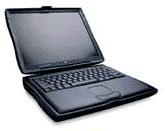
notably that I find my WallStreet PowerBook a
 very
satisfactory workhorse computer. However, there are several other
issues that have disinclined me to spend a lot of hours on the S900
thus far.
very
satisfactory workhorse computer. However, there are several other
issues that have disinclined me to spend a lot of hours on the S900
thus far.
First, there is the monitors situation. As I noted when I wrote about first setting up the S900 back in July, my son had managed to scrounge an old 15" NEC VGA multiscan monitor (it's a Multisync 3V) gratis. The NEC is not the worst CRT monitor I have seen, but it is not nearly as sharp and easy on the eyes and as the 12.1" TFT screen in my PowerBook, or, for that matter, even the 14", 640 x 480 Trinitron CRT in my old all-in-one LC 520. However, I would rate it better then the 15" monitors that shipped with the 5000 series all-in-one desktop Macs and Performas, which may provide you with a rough frame of reference.
I also think that perhaps the NEC's multiscan internals may have suffered some damage during its previous hard life (in a middle school), or perhaps it just doesn't get along with the video card in the S900 (the original card that shipped with Dan Knight's SuperMac S700). In any case, we have not been successful in persuading this setup to support a resolution higher than 800 x 600 (perhaps that is all the video card is capable of supporting - I don't know the specs).
However, I suspect there is more to it than that. There are two partitions on the S900's hard drive, and I have Mac OS 9.0 on one as my everyday operating system, and Mac OS 8.1 on the other for occasional use running software that does not support later system versions. I had not actually booted from OS 8.1 until last week, when I decided to try it as a control in diagnosing a problem that I shall get to in a moment. I selected the Startup Disk Control Panel and designated the second hard drive partition as the startup volume.
On the restart, as soon as the video signal hit the NEC, the image shrank to a box about one-third the size of the screen, with no coherent image showing. This posed a conundrum, because if there is a way to revert to another start up volume on the hard drive, without accessing the Startup Disk Control Panel, I had either never heard of it or forgotten it. Now, there are a bunch of Macs in this house, but right now the Umax is the only modular machine that uses an external monitor. The rest of them are either PowerBooks or all-in-ones. Happily, I recalled that my son had an old, barely functional, Magnavox monitor with a Mac cable, which I found in a jumbled pile of derelict compact Macs and audio equipment in the loft of an outbuilding. I dragged the monitor into the house, plugged the cable into the S900, and rebooted. The image on the old monitor's screen resembled viewing through a tank of dirty, coffee-colored water, but I could discern that OS 8.1 was booting nicely. By playing with the video controls I was able to sharpen the image just enough to open the Startup Disk Control Panel and reselect the volume with OS 9 installed.
When on I rebooted again, the NEC monitor regained its composure and displayed a proper 800 x 600 image.
The day after I filed this column, I decided to reboot the S900 under OS 8.1 using the near-dead Magnavox monitor so I could take a look at the Monitors and Sound control panel. For some reason, the old monitor was having a good day, and the images on the screen were reasonably clear, although still the color of coffee. Anyway, I opened the control panel, and discovered that there was only one resolution option showing - 640 x 480. That seemed to explain why the system would not support the 800 x 600 favored by the NEC monitor.
Since I hadn't installed OS 8.1 on the computer myself, I don't know why or how the other monitor resolution settings came to be omitted. I decided that the easiest thing to do would be to simply reinstall the entire system and trash the one that was there. I proceeded to do so, and the fresh copy of OS 8.1 booted up nicely and automatically selected the 800 x 600 resolution for the NEC monitor. A quick check of the Monitors and Sound control panel showed that there was now a full complement of resolution settings available.
However, I still haven't solved the glitch that I had been the attempting to troubleshoot at the beginning of this exercise. That is, when booting under OS 9.0, the boot process hangs up after one of the partition volumes and some of the icons on the desktop appear. After about two minutes, the second partition icon and the rest of the deck desktop icons finally show up and things proceed normally. I have determined that this does not happen when booting the S900 under OS 8.1. I have never experienced this phenomenon with my WallStreet, but my nephew, who has a completely identical PowerBook purchased from the same dealer the same week I bought mine, says that he gets the boot hang up on his machine. If you're thinking that it may have something to do with partitions, my nephew's PowerBook hard drive is not partitioned, the S900 has two partitions, and my WallStreet, which does not manifest the problem, has four hard drive partitions. All three machines are running Mac OS 9.0.
Another issue is noise. I mentioned this in the earlier column, but familiarity is not making the S900, with its two cooling fans and its 7200 RPM Barracuda hard drive, any easier on the ears. And this is when everything is brand new! The mind boggles to think of the increased cacophony once the bearings in the fans and hard drive get worn. Indeed, I am finding the increasingly noisy IBM hard drive in the WallStreet plenty loud enough these days.
Steve Jobs is on to something with the fanless Cube and iMac, methinks. From an engineering perspective, it remains to be seen in whether the lack of fan forced cooling will significantly shorten the service life of these machines' internal components, but the relative silence must be blessed.
I guess it's ironic that someone as noise-averse as me ended up owning what may be the noisiest Mac OS computer ever built. Dan Knight says he keeps his S900 under his desk, which is no doubt a lot better than having it roaring away at ear level, but would not be enough to satisfy me if I were ever to use this machine day in and day out. The only two alternatives I've thought of so far are placing the machine in another room and running longer cables, or building some sort of insulated enclosure with a vent-duct channeling cooling air, and hopefully noise, out of my work area.
Having become an LCD/TFT monitor addict thanks to four years of using a PowerBook as my main computer, I don't think I'll ever be comfortable using a CRT monitor on my work machine again. Consequently, news that LCD screen prices are likely to drop drastically over the next several months is cause for optimism. A 15" LCD (unfortunately, Apple's latest doesn't support pre-summer 2000 machines, at least not yet) would suit me just fine.
I am quite pleased with the S900's performance; in fact I have been surprised at how fast the old machine is with its modest 200 MHz 604e processor chip. It actually seems faster in some aspects, notably Finder response and hard disk access, than the 233 MHz G3 WallStreets. On the other hand, it is substantially slower than the G3 in things like scrolling and unstuffing compressed files. On the balance, however, I could get along quite happily with the S900 performance wise for most things.
One exception is voice recognition software, which I am depending on more and more lately for medical reasons. The S900 is definitely too slow to run ViaVoice (which is extremely sluggish even on the 233 MHz Wall Street). Voice Power Pro 3 would definitely run on it, but I'm not sure I want to invest in what is essentially obsolete (although still very good) software for a machine that I will probably be upgrading to at least a fast G3, if not a G4, if I decide to use it as a work machine. Another option is possibly MacSpeech's iListen or iDictate when they are released, but I will need to buy more RAM if I want to use iListen, at least if the preview release is any indication.
Meanwhile, Umax is serving mainly as a file backup repository , and with its built-in ethernet, it's a lot more convenient and than the old 100 MB Zip drive that I have been using for the past few years.
Readers who have been following this saga for the past six months or so will recall that my original objective was to get a cheap but reasonably serviceable Power Mac to serve as an emergency backup for the PowerBook. The S900 certainly meets the serviceable criterion, but this project has become a lot more expensive than I had planned. The S900 is also a lot more machine than I needed, but it was hard to resist a brand new (albeit bare bones) 6 slot PCI Mac for $300. I'm not sorry that I bought it, but I expect that ultimately I will be spending more (a lot more if I get an LCD monitor) than what it would have cost for one of the new $799 iMacs.
With the iMac I would have gotten a machine with a full one-year warranty, a much bigger hard drive, a twice-as-fast 100 MHz system bus, a decent (although not spectacular) 15" monitor, a very respectable 350 MHz G3 chip, and a bunch of bundled software.
With the S900 I got a 90 day warranty, those 6 PCI slots, 8 RAM DIMM slots, the potential for easy upgrading (as with cars, speed costs money, how fast do you want to go?) to G3, G4, or perhaps even beyond, a machine with five drive bays, and a lot more flexibility.
The best value? You figure it out!