
2000: Project AppleSeed is one website you really must check out. A team at the UCLA Department of Physics and Astronomy has established that a cluster of four Blue & White Power Mac G3s now has the same computational power (and twice the memory) as one of the best supercomputers of eight years ago, a 4-processor Cray Y-MP – for less than one-thousandth of the cost!
The AppleSeed group – Viktor Decyk, Pieter Kokelaar, and Dean Dauger – say that Apple is beginning to show some interest in their project. Apple has lent them a G3/333 and a G3/400 for benchmarking and provided them with publicity in the Apple University Arts newsletter, as well as supplied passes to the Worldwide Developer’s Conference.
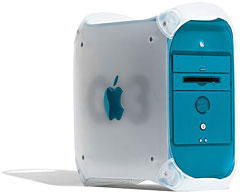 The AppleSeed website includes extensive instructions on how to build an AppleSeed cluster: a parallel Macintosh cluster for numerically intensive computing.
The AppleSeed team has constructed a parallel cluster consisting of 22 Apple Power Macintosh G3 and G4 computers running the Mac OS, which has achieved very good performance on numerically intensive, parallel plasma particle-in-cell simulations (whatever that means). A subset of the MPI message-passing library was implemented in Fortran77 and C. This library enabled them to port code without modification from other parallel processors to the Macintosh cluster. For large problems where message packets are large and relatively few in number, a performance of 50-150 MFlops/node is possible, depending on the problem. Unlike Unix-based clusters, the researchers say no special expertise in operating systems is required to build and run the cluster.
The most common platform for building such a parallel cluster is based on the Pentium processor running the Linux operating system. However, when Apple introduced the Power Mac G3, based on Motorola’s PowerPC 750 processor, Decyk, Kokelaar, and Dauger decided to investigate whether a cluster based on the G3 would be a practical alternative. They discovered that not only was the Mac cluster’s performance faster than the Pentiums, but it was comparable to the performance achieved on some of the Cray supercomputers.
The graph below shows times for a 3D particle simulation, using 294,912 particles and a 32x16x64 mesh for 425 time steps. Push Time is the time to update one particle’s position and deposit its charge, for one time step. Loop Time is the total time for running the simulation minus the initialization time.
Computer                Push Time   Loop Time
SGI Origin2000/R10000:  3430 nsec.  447.8 sec.
Macintosh G4/450:       4273 nsec.  555.4 sec.
Intel Pentium III/500:  5253 nsec.  683.8 sec.
Cray Y-MP:              5650 nsec.  741.1 sec.
Macintosh G3/350:       5966 nsec.  781.2 sec.
Intel Pentium II/450:   6230 nsec.  804.6 sec.
Macintosh G3/300:       6390 nsec.  837.3 sec.
Intel Pentium II/300:   9040 nsec. 1172.8 sec.
Macintosh G3/266:       9185 nsec. 1195.3 sec.
IBM SP2, 1 proc:       10342 nsec. 1335.4 sec.
iMac/233:              10410 nsec. 1358.5 sec.
Cray T3E-900, 1 proc:  13364 nsec. 1702.0 sec.
The AppleSeed team says that further motivation to build the Mac cluster came when they realized that the Mac OS had a native message-passing applications programming interface (API), called the Program-to-Program Communications (PPC) Toolbox, which has been there since 1990 and is used by AppleScript and Apple Events. The similarity of the native PPC Toolbox message-passing facility to the low-level features of MPI further encouraged them to build the Macintosh cluster.
Once a Mac MPI library was implemented, they were able to port the parallel PIC codes from the Cray T3E and IBM SP2 to the Apple Macintosh cluster without modification. This library and related files and utilities are available at the AppleSeed website at <http://exodus.physics.ucla.edu/appleseed/appleseed.html>.
 Decyk, Kokelaar, and Dauger say that the easiest way to build a Macintosh cluster is to first a obtain a number of Power Macintosh G4 computers. All current Macs have built-in fast ethernet adapters. Next, obtain a fast ethernet switch containing at least one port for each Macintosh and a corresponding number of Category 5 ethernet cables with RJ-45 jacks. Plug one end of each cable to the ethernet jack on each Mac and the other end to a port on the switch. Turn everything on. As far as hardware is concerned, that’s all there is, they say.
As far as making it all work, I freely concede that I’m way out of my depth here, but you will find plenty of information on the AppleSeed website. It all sounds very cool.
The AppleSeed cluster of 22 Power Macs consists of various models purchased at different times during the past two years. The current configuration consists of seven G3/266s, four G3/300s, three G3/350s, and eight G4/450s. They generally upgrade the memory of each Mac by adding 256 MB and also add an additional 100Base-T PCI Fast Ethernet adapter, currently from Asanté.
If only two Macs are being clustered, AppleSeed says that the only additional equipment needed is a single Category 5 crossover cable, which costs cost about $8. A hub or switch is required to cluster more than 2 computers.
The AppleSeed cluster consists of 12 user-owned machines and 10 common machines. The user-owned machines are used for normal activities in the daytime but are generally available at night for numerical computing. The common machines are always available for numerical computing and are currently clustered in groups of 4, 4, and 2 in different offices. Each sub-cluster shares a single keyboard and monitor. The AppleSeed cluster is primarily used for plasma physics projects.
3D Particle Benchmarks
Computer                         Push Time    Loop Time
Mac G4/450, IP cluster, 8 proc:   772 nsec.   2756.9 sec.
Mac G4/450, IP cluster, 4 proc:  1928 nsec.   6715.3 sec.
Mac G4/450, IP cluster, 2 proc:  4676 nsec.  16234.3 sec.
---------------------
Mac G3/266, AT cluster, 8 proc:  1496 nsec.   5891.2 sec.
Mac G3/266, AT cluster, 4 proc:  3231 nsec.  11929.6 sec.
Mac G3/266, AT cluster, 2 proc:  7182 nsec.  25738.5 sec.
---------------------
Cray T3E-900, w/MPI, 8 proc:     1800 nsec.   6196.3 sec.
Cray T3E-900, w/MPI, 4 proc:     3844 nsec.  13233.7 sec.
---------------------
IBM SP2, w/MPL, 8 proc:          2104 nsec.   7331.1 sec.
The AppleSeed team says that their inexpensive, powerful cluster of Power Macintosh G3s has become a valuable addition to their research group, and it is especially useful for student training and running large calculations for extended periods. They have run simulations on four nodes for 100 hours at a time, which uses 1 GB of memory. This has proved especially useful for unfunded research or exploratory projects, or when meeting short deadlines. The turnaround time for such jobs is often shorter than on supercomputer centers with more powerful computers because they do not have to share this resource with the entire country.
In their project overview paper, the AppleSeeders ask rhetorically:
- Why are we using the Mac OS? Why not run Linux (a free Unix) on the Macs, for example? One reason is that we have always been Macintosh users and are very productive in the Mac OS environment. There are good third-party mathematical or numerical software packages, such as Mathematica, which run better on the Macintosh G3 than on our Unix workstations. Another reason is that many of the Macs are used for purposes other than numerical calculations and rely on software written for Mac OS. Furthermore, we find that the Mac environment makes it very easy to couple the output of our numerical codes to other software written in the Mac OS, such as Fortner’s graphics packages or IDL or QuickTime, or to programs we use for presentation, such as ClarisWorks or Microsoft Word. Finally, the Mac OS has encouraged us to write software to a higher standard, that has more of a Mac “look and feel” (such as the Launch Den Mother).
Linux, in comparison, is far more difficult for the novice to use than the Mac. Substantial Unix expertise is required to correctly install, maintain, and run a Unix cluster. . . . In contrast, with the Mac cluster, the only required nonstandard item is a single library, MacMPI, and a single utility, Launch Den Mother. Everything else is right out of the box, just plug it in and connect it.
Because of its ease of use, the Macintosh cluster is particularly attractive to small groups with limited resources. For example, high school students are learning how to run parallel applications on clusters they built themselves.
The AppleSeed team says that the future continues to look bright, with the Macintosh G4’s vector coprocessor (AltiVec) that can calculate at a rate of 4 GFlops.
For more information on the AppleSeed Mac cluster project, visit the AppleSeed website or email decyk@physics.ucla.edu, dauger@physics.ucla.edu, or pekok@physics.ucla.edu.
keywords: #appleseed #maccluster #appleseedproject
short link: https://goo.gl/M7tszu
