
2000: A New York Times article last week by Lisa Guernsey reported on new research from Cornell University that reinforces critics’ claim that the little hockey-puck shaped Apple USB mouse is just too small for comfort.

Whale Mouse
Results of a study by Cornell professor of ergonomics Alan Hedge indicate that small mice are more likely to aggravate wrist pain than are larger rodents. The large mouse used in Dr. Hedge’s study was the (PC-Windows) “Whale mouse” by Humanscale in New York, which is an inch longer than the standard Microsoft mouse and extendable up to another inch for larger hands. The Whale is reportedly designed to keep fingers flat and to prevent the hand from curling around it.
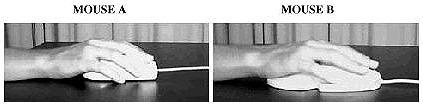
Dr. Hedge’s report also cites a Canadian study of word processor operators, draftspeople, and CADD users (computer-aided design and drafting) that showed an association between musculoskeletal discomfort and shoulder abduction and compared upper body postures between using only a keyboard and using both a mouse and keyboard to edit text.
Wrist ulnar deviation was significantly greater during mouse use (17.6°) compared with non-mouse use (1.8°). During mouse use subjects spent 34% of the time working in ulnar deviation between 15°-30° and 30% of the time working in ulnar deviation greater than 30° – compared with only 2% and 0%, respectively, during non-mouse use. Dr. Hedge notes that several other research studies have shown that extremes of flexion/extension and radial/ulnar deviated wrist postures beyond 20° raise intracarpal pressure which increases the risk of wrist and hand injuries.
The study is available on the Cornell University website, but it has not been published in a research journal or subjected to peer review. Some critics have suggested that it is too small and limited in scope to be taken as a definitive word on mouse-related repetitive stress injury (RSA).
Ms. Guernsey quotes Dr. Stephen Burastero, an ergonomics researcher at the Lawrence Livermore National Laboratory in Livermore, Calif., commenting that wrist angle is only one factor related to carpal tunnel syndrome, and that “Force, muscle activity, and repetition also play a role.”
As one who struggles with typing and mousing pain due to chronic neuritis, I would have to agree on the basis of personal experience that size isn’t the only relevant issue. For me, the force required to click the mouse button(s) seems to be the principal aggravating factor in mousing pain.
The Mice I Use
I’m still in the ADB orbit, and I own four different ADB mice. The largest one (bigger than the Microsoft mouse, but smaller than the Whale mouse) is a three-button InfoMouse, which I find the least comfortable of the four to use. My Apple ADB mouse (the rounded design) is only marginally more comfortable, and I find its stiff mouse-button spring brings on pain amazingly quickly.
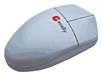 My favorite mouse is my Macally two-button unit, which has what I consider wonderfully light button springs, although people who aren’t used to this mouse find that their hair-trigger action drives them nuts at first. Once you get used to it, though, it’s a pleasure to use.
I also have discovered, as Dr. Hedge’s research confirms, that keeping one’s hand and wrist as flat as possible is key to avoiding wrist pain. I’ve learned to lightly push the Macally mouse around with the flat of my hand and with fingers extended rather than gripping it.
Dr. Mouse
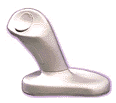
My fourth mouse is a radically different Anir Dr. Mouse, a vertical mouse which looks like a game joystick with its upright handle and butterfly-shaped button which is operated by the thumb. Not only does this configuration place the wrist in a more natural “thumb-up” posture, but it also demands movement from the elbow rather than the wrist, and the thumb button is operated by the hand’s strongest digit. Dr. Mouse comes in two sizes.
I tend to switch back and forth between the Macally mouse and the Dr. Mouse, a practice which I find lessens the accumulation of one sort of wrist and hand stress. I find that I have no problem going back and forth between the two mouse types, although my personal preference is for the Macally, partly because its buttons are programmable.
Dr. Mouse, at least in the ADB Mac version, is not programmable. The Dr. Mouse mouse button is a two-position rocker, with the left or down click working as a normal mouse click, while the right or up click is a click-lock allowing you to drag icons around, for instance, or hold menus open without holding the mouse button down. While this can be convenient, I really miss having the right click programmed for a “return” click.
Fixing Apple’s Round USB Mouse
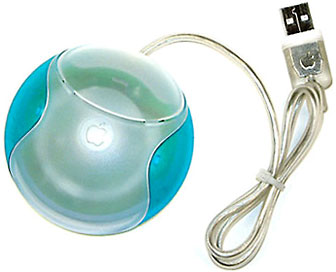 My experience with the Apple USB “hockey-puck” mouse is minimal, but I have not warmed to it in short trials. Happily, both the Macally two-button and the Dr. Mouse are available in USB versions as well as ADB, and I recommend either.
Another workaround fix for the Apple USB mouse it to purchase one of several available clip-on shells that convert it into a more conventional and ergonomically acceptable shape.
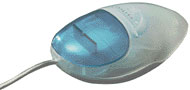 A good example is Contour Design’s UniTrap mouse cover, which comes in all of the iMac colors, sells for $14.95, and takes only seconds to install.
Another ergonomic mouse which I have not tested, but which is reportedly very good is Contour Design’s Perfit Mouse (available in ADB and USB versions).
An Ergonomic Option
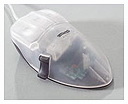 The award-winning Perfit Mouse comes in five sizes for the right hand and three for the left hand, theoretically making it possible for nearly everyone to find a Perfect Fit – hence the name.
The Perfit Mouse is available in extra-small, small, medium, large, and extra-large for the right hand and small, medium and large for the left hand, and is designed to fit the hand so precisely that multiple sizes are necessary to maximize the total impact of the ergonomic design.
The mouse’s sculpted elevated buttons enable the hand to remain open in the proper flat posture with the fingers extended in a ready position for quick button activation. Buttons are elevated and shaped to reduce the excessive load on the fingertips. Thumb support gives the user added support, control, and comfort, and allows movement of the mouse with reduced Pinch Force.
Elevated wrist support reduces pressure on the wrist by keeping it off the desktop, maintains a straighter wrist alignment, minimizes lateral deviation, balances the hand in a neutral, tilted posture, and prevents static grip by allowing the hand to rock freely.
Programmable Contour OverDrive software enables customization of the Perfit Mouse and allows the user to have a “user definable” mouse Control Panel interface as well as application specific mouse settings, auto-scrolling (the ability to scroll applications with a mouse button), smooth scrolling (line by line), user-definable keystrokes using the mouse, double-click, option-click, control-click, and and other button options
keywords:
