
2000: As it approaches its first birthday, I am sorry to report that my PowerBook G3 Series 233’s 2 GB hard drive is beginning to get noisier, not as bad yet as my son’s identical machine became before it was stolen three days before Christmas, but it’s not the whisperingly quiet ‘Book it originally was either.
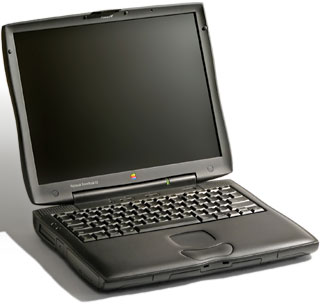 It appears that there is a flaw in the hard drives that shipped with at least some of the WallStreet PowerBooks, since there seem to be a lot of complaints from users, and Apple has even issued a Tech Info Library article (no longer online) on the topic entitled: “PowerBook: Hard Drives and Noise.”
The article states, “Customers have inquired about the internal hard drives making noises when reading and writing as well as when it is just at idle but not spun down.”
The noise I’m referring to is the latter category, presumably caused by the motor bearings getting worn prematurely.
Apple says that “2.5” hard drive noise should not be over 39dBA in typical operation when measuring the top cover of the PowerBook.” I suspect that mine has not reached that threshold yet, but I’m pretty sure that my son’s ‘Book would have exceeded it.
However, when he inquired at an Apple authorized dealer about a repair under warranty, he was informed that Apple Canada would not replace a hard drive unless it failed. The TIL article would seem to indicate that this was mistaken information. Of course, I doubt that very many Apple dealers have dBA meters on site.
Apple also notes that “If the PowerBook has been dropped the drive may make noise over the limits, and that abuse is not covered under the limited hardware warranty.”
My WallStreet has never been dropped. One theory is that high temperatures generated inside the hot-running WallStreets may be degrading or breaking down the bearing lubricants in the hard drives.
However, it is not only the WallStreet that is affected. For instance, there are also reports of noisy 6 GB IBM drives in the Lombard PowerBook.
How to address this problem presents a conundrum. If you can find an Apple dealer who will replace the drive on site (basically a 10-minute job) and let you port your data to the new drive, that would be the ideal solution. Sending your PowerBook off to Apple’s service facility in Texas, possibly losing the use of it for weeks, is much less desirable, and if you really need your ‘Book every day (as I do), it might be sensible pragmatism to just bite the bullet and replace the drive yourself.
Toshiba Slimline Hard Drives
If you have a small 2 GB or 4 GB drive, you might take the opportunity to upgrade to a larger capacity drive. However, while the Lombard G3 Series “Bronze Keyboard” PowerBooks are satisfyingly thin, they are limited to 12.5 mm high hard drives. Toshiba has risen to the challenge with its new range of “Slimline” 12.5 mm or thinner 2.5″ laptop hard drives, in capacities ranging up to 18 GB, which should provide ample storage capacity for nearly any PowerBook user.
For instance, two Toshiba 6 GB drives drop in nicely: the HDD-2136 and the HDD-2143, both of which command a street price of about US$190. Apple’s standard Drive Setup software will recognize and format the Toshiba drives, and the Toshiba HDD-2143 drive has been used by Apple as the OEM drive in later-produced Lombard 400s, which one hopes means that it is more durable than the unit it superseded.
Other Slimline Toshiba drives include:
- 18 GB 2.5 Slimline HDD – MK-1814GAV. This 12.5 mm three-platter drive fits Lombard and offers desktop capacity for mobile systems.
- 12 GB 2.5″ Super Slimline (9.5mm) HDD – MK-1214GAP. Lots of storage in a slim 9.5mm form factor
- 10 GB 2.5″ Slimline HDD – MK-1011GAV. Through the use of GMR heads and head Load/Unload technology, this is a high-end drive with increased capacity and ample performance.
- 6 GB 2.5″ Super Slimline (9.5mm) HDD – MK-6014MAP. Toshiba’s 6 GB MK-6014MAP drive, offers entry-level users a hard drive capacity previously reserved for midrange users
- 6.4 GB 2.5″ Super Slimline (9.5mm) HDD – MK-6414MAP. Toshiba’s 6.4 GB MK-64141MAP, uses high density hard drive technology, with 11.6 gigabits per square inch on a single platter drive. This drive also offers a 1,024KB buffer.
- 6.4 GB 2.5″ Super Slimline (8.5mm) HDD – MK-6411MAT and MK-6412MAT. These twin-platter drives feature recent technological breakthroughs for increasing areal density that have allowed Toshiba to increase the capacity and performance of their drives, without altering the drive’s quality or size.
- 6.4 GB 2.5″; Slimline HDD – MK-6409MAV. Toshiba says it designed the MK-6409MAV hard disk drives to meet the size, weight, and shock requirements of mobile computer manufacturers. The MK-6409MAV uses giant magnetoresistive head (GMR) technology to achieve a high 6.4 GB capacity. This 12.5mm drive features 13ms seek time and a 33.3 Mbits/sec. data transfer rate in Ultra DMA Mode-2.
- 4.3 GB 2.5″ Super Slimline (8.5mm) HDD – MK-4309MAT. This drive packs 4.3 GB of data onto only two disks in a super-slim 8.5mm-high profile.
- 3.25 GB 2.5″ Super Slimline (8.5mm) HDD – MK-3209MAT and MK-3212MAT. These are good entry-level drives or replacements for the 2 GB original drive in lower-end WallStreet PowerBooks.
For more information about Toshiba hard drives for portable computers, visit <http://www.toshiba.com/taecdpd/products/hddover.htm#mk1814>.
MCE MobileStor Hard Drives
Another PowerBook hard drive replacement option is the Mac Components Engineered MobileStor 6400 6.4 GB, 2.5″, 12.7mm, IDE hard drive, which is claimed to work in all PowerBook G3 Series, the original PB G3 (“Kanga/3500”), as well as the 3400, 2400, 1400, 5300, 190, and Duo 2300 ‘Books. The MS6400 lists for US$249.
Other MCE PowerBook hard drives include:
- MobileStor 10G 10 GB – MCE-MS10GT $349
- MobileStor 12G 12 GB – MCE-MS10GI $479
- MobileStor 14G 14 GB – MCE-MS14GI $599 (Note: this drive works only in the WallStreet)
- MobileStor 18G 18 GB – MCE-MS18GI $649 (2.5″, 12.5mm unit fits All PowerBook G3 Series, Original PB G3, PB 3400, PB 2400, PB 1400, PB 5300/190)
All of the MCE IDE hard drives are fully compatible with Apple’s Drive Setup utility software and have been tested and certified by MCE to run as smoothly as your PowerBook’s original hard drive.
Each MCE MobileStor PowerBook ICE hard drive ships with a free installation kit that includes:
- Installation manual with step by step instructions and photos (makes installation a breeze)
- All of the necessary tools and mounting brackets needed for proper installation
- Antistatic safety equipment
Note that if you have a PowerBook 5300/190, PowerBook 1400, or a Duo 2300, you will need new mounting brackets in order to properly mount any of the above drives in your computer. Hard drive manufacturers have changed the location of the mounting holes on their hard drives to the extreme corners of the drive in order to make more room inside the drive. The original hard drive brackets which are inside the PB 5300/190, PB 1400, and Duo 2300 systems will not properly mount the new drives, as they were designed for the older, lower capacity drives with the older mounting hole positions. MCE can provide new mounting brackets, which are included free with your drive purchase, to replace your original hard drive’s bracket and allow you to properly and securely mount the new hard drive inside your PowerBook.
Note also that upgrading the hard drive in the PB 2400c is a complex and challenging procedure best left to professionals unless you really know what you’re doing. There are some 30 screws of varying sizes holding the 2400c’s case together which must be removed before the hard drive can be accessed. While MCE doesn’t provide instructions for this upgrade, they will, upon request, include with your new drive a JPEG photo-set on floppy disk which will guide you through the process.
If you prefer, you can send your PowerBook to MCE, which will perform the upgrade, transfer your data, and send your system back to you via FedEx 2-day shipping for $79, or $20 extra for overnight service.
MCE also offers “fat” iBook hard drives and is stocking preconfigured 6 GB and 12 GB iBooks for US$1,799 and US$1,999 respectively.
MCE says that iBooks are not user upgradeable when it comes to hard drive replacement. “Just accessing the hard drive bay is a job involving the removal of over two-dozen screws, hex-nuts, plastic parts, and very small, sensitive, electronic components,” they note. “If the proper level of antistatic protection is not maintained and the take-apart procedure not properly documented then a successful upgrade is nearly impossible.”
Hmmm. I had hoped that hard-to-work-on PowerBooks were a thing of the past. Both WallStreet and Lombard are pretty easy to open up – at least for access to the major components. Why did Apple make the iBook hard to work on? It’s certainly big enough that miniaturization shouldn’t be an excuse.
Anyway, to address this issue MCE will upgrade your iBook to 6 GB or 12 GB for US$299 and US$499 respectively. MCE keeps the original 3.2 GB drive after transferring the data to the new one. If you would rather keep your old drive, MCE will sell you a MobileStor 6400 for $249 plus $129 installation Charge or a MobileStor 12G – $429 plus $129 Installation charge (both prices include 2-day FedEx return shipping and data transfer from your original drive to the new drive.
For more information about MCE hard drives, visit their MobilStor hard drive page.
IBM Travelstar Hard Drives
If you need a really high capacity PowerBook hard drive, IBM has the unit for you. The IBM Travelstar 25GS features a humongous 25 GB capacity – the equivalent of either 20 TV-quality movies, 792 feet of shelved books, or seven million pages of text – more than 12 times as much data space as the puny 2 GB drive in my WallStreet. Unfortunately, at 17mm in thickness, the 25GS is physically too large to fit in the Bronze G3 (Lombard) PowerBook’s internal drive bay.
IBM also sells what it claims to be the world’s toughest 2.5″ hard drive – the 12 GB Travelstar 12GN, which features the industry’s highest shock rating of 800 G/1ms; and the world’s highest density storage laptop drive – the Travelstar 18GT which holds the equivalent of the text printed on 18 pickup trucks full of paper. These two 12.5mm thick units will fit in all PowerBook G3 Series ‘Books.
The Travelstar 25GS offers several industry firsts: Its record-setting capacity of 25 GB, of course, plus a media transfer rate of up to 181.2 Mbits/sec, and a disk rotation speed of 5400 RPM. The IBM Travelstar 18GT and Travelstar 12GN hard drives provide areal densities of 10.1 Gbits/sq. in. and 6 GB of capacity per platter.
An advanced electromechanical design provides the large storage capacities and high shock ratings in these IBM hard drives, combined with technologies like IBM giant magnetoresistive (GMR) head, Partial Response Maximum Likelihood (PRML) digital channel, a head load/unload feature, a more rigid base casting than previous models, and Enhanced Adaptive Battery Life Extender* (ABLE) 3.0. They are also optimized for using state-of-the-art manufacturing techniques. Fast Ultra-DMA interface transfer rates reach as high as 66 MB/sec. In addition, the new IBM drives employ a thermistor – an adaptive control device that helps maintain high performance and fast seek times at high environmental temperatures – a significant consideration with the hot-running WallStreets and Lombards especially.
For more information about IBM Travelstar hard drives, visit IBM’s site.
MCE DataShuttle Case
If you think your old noisy hard drive has some useful life left in it, or if you are upgrading for space and not noise reasons, MCE also offers an external PC Card (PCMCIA) DataShuttle Case in which you can mount your old drive and use it as an external storage, backup, or data transfer device. The DataShuttle’s PC Card data interface is hot-pluggable, bootable, and offers data transfer rates of 2 to 5 MB per second (depending on PowerBook) making it as fast as some internal drives. It is also completely mobile, since it draws power from the PowerBook’s PC Card slot, although an AC power adapter is supplied as well for use when convenient.
The DataShuttle Case sells for US$129.
keywords:
