
Miscellaneous Ramblings
Opera 10.5 Preview Better and Faster than Ever
Charles Moore - 2010.01.04 - Tip Jar
Chrome for the Mac is mighty impressive, and I wouldn't want to be without it after just a month-and-a-half or so of habituation, but I haven't given up on my longtime favorite, Opera, either. It would be a tough decision which to give up, were I obliged to limit myself to just one of them.
I can't say that about any other browsers.

Opera released it's 10.5 preview in time for Christmas.
Happily, Opera isn't resting on its laurels, and just before Christmas it released for public download a prerelease version of the latest Opera 10.5 development build to showcase the latest tweaks and technologies that will be available in Opera's next major version release.
Opera's Roberto Mateu says:
"This pre-alpha is based on the Evenes branch and includes Windows and Mac builds, with an Unix/Linux version coming later.
"As you may know, we don't typically open to user-testing this early in the development cycle. However, we are really excited about what the Desktop team is cooking up and want your feedback.
"Many of you have been asking for a glimpse of Carakan, or new ECMAScript/JavaScript engine, and today you'll be able to play with it and a few other new technologies that will hopefully be part of our next major release.
"Some disclaimers: What you're downloading today is a feature-incomplete and likely unstable development build. Please handle with care, backup your data before you install and do not run in hydroelectric power plants."
As this is a development build and may not be entirely stable and possibly prone to crashes and data loss situations, Opera recommends that you install this version separately from your regular Opera install and not use this it as your main browser. The separate install part was easy, since the preview build creates its own separate preferences folder upon startup. The downside is that I was unsuccessful at manually transferring my Bookmarks from Opera 10.10, nor did I have any luck using the Import command, so I resigned myself to just building a new Bookmarks list.
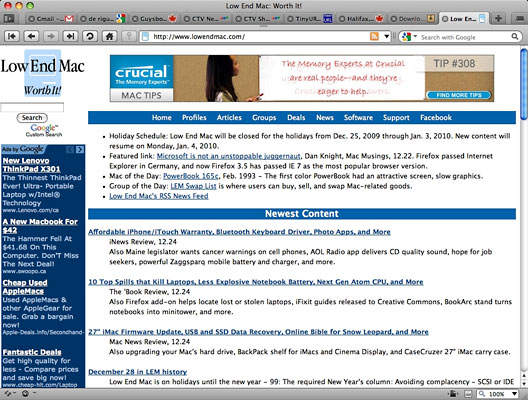
Low End Mac looks just fine in the Opera 10.5 preview.
Aside from that, the Opera 10.5 pre-alpha Public Preview has been thus far admirably stable and unbuggy. I've been using it for routine browsing for several days now and find it more than satisfactory. It feels a bit faster than version 10.10, although all the version 10 builds of Opera are pretty lively.
New in Opera 10.5
Carakan
- Carakan is Opera's new JavaScript engine. It's fast - according to the developers more than 7x faster in SunSpider than Opera 10.10 with Futhark on Windows, but Mac optimization is not as far along yet, alas. You can read more gritty details regarding register-based bytecode, automatic object classification, and native code generation in the Opera Core blog.
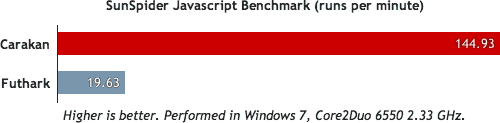
Opera 10.5's new JavaScript engine is over 7 times faster than the one
in 10.10.
Platform Integration
- On the other hand, for Mac users, a complete rewrite in Cocoa brings a Unified Toolbar, native buttons and scrollbars, multitouch gestures (try 3-Finger Swipe Left/Right or Pinch to zoom), and a bunch of other small details. They've also added Growl notification support.
- Windows 7/Vista users will notice many visual changes and use of APIs that allow the UI to display the Aero Glass effect. For Windows 7, Opera also added Aero Peek and Jump List support to easily access your Speed Dials, Tabs, etc. from the Taskbar.
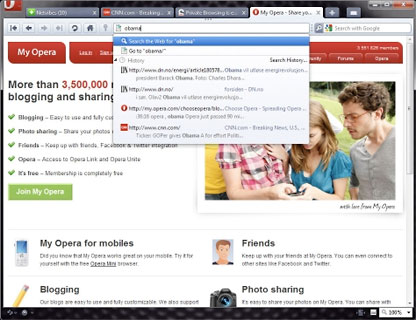
Written in Cocoa, Opera 10.5 is more Mac-like than ever.
Presto 2.5 Browser Engine
- Opera 10.5 is using Presto 2.5, which Opera says contains a huge number of improvements. It also includes support for CSS3 transitions and transformations, plus more HTML5 features like persistent storage.
Vega
- Vega is Opera's new graphics library - currently software-based - and displays everything you see onscreen. Vega can be hardware accelerated, but they don't seem to need it yet.
'Private Tab' and 'Private Window'
- You can open a new Private tab or Private window that forgets everything that happened when the tab or window is closed.
Non-modal Dialogs
- Dialog boxes (JavaScript alerts, HTTP authentication, etc.) are now non-modal and are displayed as a page overlay. This allows you to switch tabs or windows while the dialog is still displayed. Similarly, the Password Manager dialog is now anchored at the top of the page so it won't block any content as it loads a new page.
Address field and Search field improvements
- Both fields have been upgraded in looks and functionality. They can now remember searches, support removing items from history and show results in a better layout.
Download
You can download the Opera 10.5 pre-alpha for Windows and Mac (Intel only) from Opera.
Some specific known issues:
- High memory usage
- No JIT (slow performance) on old processors without SSE2
- No printing for Mac build
None of these have bothered me yet.
Based on this pre-alpha, Opera 10.5 should be a solid version upgrade, although there's no word as yet as to when a final release will be out.
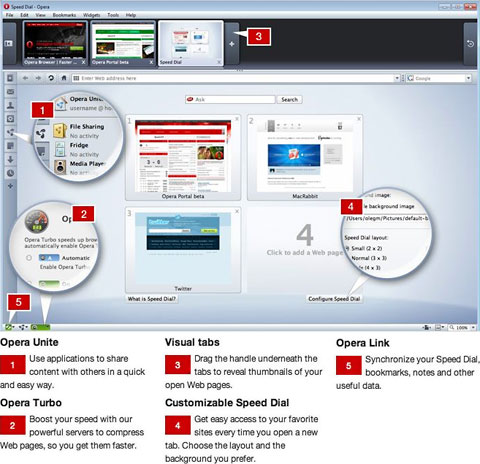
Cool Opera features carried over from Version 10:
Opera Unite
- Opera Unite is a technology allowing you to share content directly with friends, colleagues, and associates without having to upload anything to a website. You can stream music, show photo galleries, share files and folders, or even host your own Web pages directly from your browser.
Media Player
- Access your complete home music library from wherever you are. Run the Opera Unite Media Player at home and access your entire music library from anywhere you might be. No need to duplicate your music on different machines.
File Sharing
- Share files directly from your computer easily and safely. The Opera Unite File Sharing service is an easy way to share files from your computer. There is no need to worry about attaching loads of files to e-mails, or about single files being too large to send by e-mail. You don't have to sign up for third-party file sending applications, or set up an FTP service. All you need to do is send your friends the unique URL and they can instantly see your files.
Photo Sharing
- Share your personal photos with friends around the world without the need to upload them. Opera's Photo Sharing is arguably the easiest way to share photos from your computer, able to turn a folder full of photos on your computer into a fully functional photo gallery in an instant.
File Inbox
- Allows files to be uploaded to your computer, by you or your friends, from anywhere. Related to Opera's Unite services that allow you to share your content from your computer, this service works the other way around. With File Uploader, content can be put into a folder on your computer. Do you want to take those videos you recorded at lunch break back home? No need for USB drives; just upload them to your File Uploader service on your home computer. Are you collaborating on a document? Your colleagues can upload their edited versions to your computer.
And, of course, all the traditional Opera good stuff is still there, such as Opera's already excellent download manager, which deserves special mention since it's IMHO much better than any other browser's handling of downloads (although Chrome comes pretty close), with excellent progress monitoring and full control, including resumable downloads (that work reliably) after a pause or shutdown and no-hassle multiple downloads
Opera's Zoom controls are among the best - if not the best - with a handy pulldown menu and button in the lower right corner to resize pages. If the page is too wide for your screen, simply hit Fit to Width and Opera will resize the page so you avoid horizontal scrolling. I also like Opera's implementation of the sidebar, which stays out of your way until bidden to appear with a button-click, and hiding again efficiently.
Join us on Facebook, follow us on Twitter or Google+, or subscribe to our RSS news feed
Charles Moore has been a freelance journalist since 1987 and began writing for Mac websites in May 1998. His The Road Warrior column was a regular feature on MacOpinion, he is news editor at Applelinks.com and a columnist at MacPrices.net. If you find his articles helpful, please consider making a donation to his tip jar.
Links for the Day
- Mac of the Day: PowerBook 500 Series, introduced 1994.05.16. 'Blackbird' includes a 25 to 33 MHz 68040 along with smart batteries and grayscale or color displays.
- Support Low End Mac
Recent Content
About LEM Support Usage Privacy Contact
Follow Low End Mac on Twitter
Join Low End Mac on Facebook
Favorite Sites
MacSurfer
Cult of Mac
Shrine of Apple
MacInTouch
MyAppleMenu
InfoMac
The Mac Observer
Accelerate Your Mac
RetroMacCast
The Vintage Mac Museum
Deal Brothers
DealMac
Mac2Sell
Mac Driver Museum
JAG's House
System 6 Heaven
System 7 Today
the pickle's Low-End Mac FAQ
Affiliates
Amazon.com
The iTunes Store
PC Connection Express
Macgo Blu-ray Player
Parallels Desktop for Mac
eBay

