
Miscellaneous Ramblings
diNovo Mac Edition a Top Quality Keyboard
Charles Moore - 2010.02.15 - Tip Jar
Rating: 
Even though I'm a consummate laptop computer fan, I prefer to use an external keyboard and mouse whenever practical. The body-English associated with using a laptop's built-in keyboard and trackpad while cranking your head downward to see the display is terrible, and the ergonomic hazards of doing so for more than short periods of time are well established and documented.
Accordingly, anyone who uses a notebook computer as their main work tool should have a good external keyboard and pointing device - and get that display up into the comfortable line of vision using a laptop stand. Aside from Apple's own freestanding keyboards and mice, a vast selection of third-party input devices are available, and Swiss-based Logitech makes some of the best, backed by a five-year warranty.
Now here's the thing. I really liked the Logitech diNovo Edge Mac Edition Cordless Keyboard that I reviewed here back in 2008, and which I think may well be the most aesthetically elegant keyboard ever made, with its glossy piano black surfaces and brushed aluminum accents. Being rechargeable is also cool, eliminating the hassle of messing about with batteries.
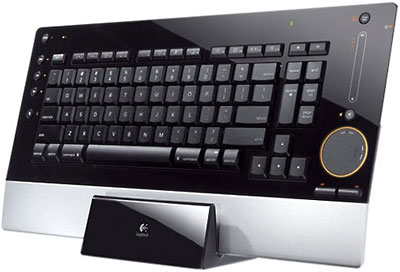
Logitech diNovo Edge Keyboard, Mac edition.
diNovo Edge Drawbacks
The Edge is a Bluetooth wireless 'board, which means that you have to muck about with Bluetooth pairing to get it set up.
For my purposes, the diNovo Edge's lack of a numeric keypad and its dispensing with the F13 through F15 keys was not compensated for by its inclusion of a built-in TouchDisc trackpad, touch-sensitive volume control, or any of the other multimedia controls and features it incorporates. I'm used to getting along without a numeric keypad and a full array of F-keys on my laptops, but I much prefer to have both, especially on a workstation keyboard. I especially miss the right-hand number keys when switching between OS X 10.5 Leopard Spaces, of which I keep nine configured, constantly switching among them, which requires a reach to the top of the key array with the diNovo Edge.
diNovo Keyboard, Mac Edition
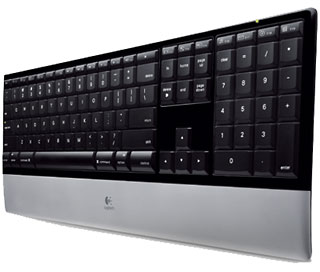
Happily, Logitech addressed that preference (or necessity, for some folks who work with spreadsheets) by introducing the diNovo Keyboard, Mac Edition, which retains many of the virtues of the more expensive diNovo Edge - its high-gloss, semi-translucent Plexiglas frame, sharp angles, and thin profile (0.87" or 22.1 mm from base to key caps) - but with a standard keyboard layout and full numeric keypad and sans the touchpad and multimedia stuff.
Well, near standard. The page keys are in a cluster at the top of the intermediate panel separating the main keyboard from the numeric pad, and there are a bonus 19 programmable F-Keys - something I don't recall ever seeing on another keyboard, plus (hooray!) a dedicated Eject key. I am a big fan of F-keys.
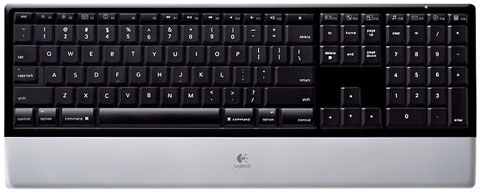
The DiNovo Keyboard is wireless, but it uses the 2.4 GHz radio frequency, which I prefer over Bluetooth despite the fact that it requires a USB receiver dongle, which in this instance happens to be a longish one that protrudes about an inch-and-a-half from the USB port.
The cool thing is that Logitech managed to pack in a full complement (and then some) of standard-size keys in a board with a footprint barely wider and less deep than the diNovo Edge, while retaining the classy and Mac-complimentary piano black and brushed aluminum livery. This keyboard will make an excellent choice for use with one of the Unibody MacBooks on a desktop stand or with aluminum iMacs, since the black and brushed aluminum theme harmonizes especially nicely with those models. The diNovo Keyboard is also compact enough to pack what you in a medium-to-large sized computer case or backpack for use on the road.
Another feature shared with the diNovo Edge is the PerfectStroke microscissors key switches, which are engineered to have a short, positive action with a slightly longer stroke than your typical laptop keyboard. Specifically, the PerfectStroke keys require 60 grams activation force and have a travel of 3.2mm (shorter than a typical desktop keyboard's 3.5mm to 4.0mm, but longer than your typical notebooks' - or Apple's aluminum 'boards - 2.0mm to 2.5mm).
Almost Completely Standard Mac Layout
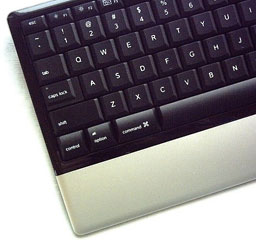 Of course, this Mac edition keyboard has standard Apple
specific key labeling and positioning, with ambidextrous Command,
Option, and Control keys located on the row flanking the Space Bar. The
the navigation keys are in the ideal inverted-T configuration, with the
only real anomaly (as noted) being the page keys' positioning to the
upper right of the main keyboard array along with an fn key, where you
might expect to find the Forward Delete key, and the Forward Delete key
immediately beside it. Odd decision, but in general it's a mild
departure from a standard layout that one gets used to quickly.
Of course, this Mac edition keyboard has standard Apple
specific key labeling and positioning, with ambidextrous Command,
Option, and Control keys located on the row flanking the Space Bar. The
the navigation keys are in the ideal inverted-T configuration, with the
only real anomaly (as noted) being the page keys' positioning to the
upper right of the main keyboard array along with an fn key, where you
might expect to find the Forward Delete key, and the Forward Delete key
immediately beside it. Odd decision, but in general it's a mild
departure from a standard layout that one gets used to quickly.
There is no Power key to power up the system, but there is an on/off power switch for the keyboard itself located on the back edge of the housing and a small, green power indicator LED.
Basic keyboard functions are supported by OS X without the Logitech Control Center drivers installed, but if you want to get the full functionality this 'board is capable of, such as programming the F-keys, you'll need to install the drivers, which are included on a bundled CD. Installation requires a restart of the Mac.
The diNovo Keyboard is powered by four AAA cells, which Logitech claims offer battery life of up to three years (based on two million keystrokes per year). A flashing battery indicator light warns when battery resources are running low.
 In profile, the diNovo keyboard isn't quite as razor-thin
as Apple's aluminum keyboard, but it's definitely low-profile. It has a
bit of rake compared with the diNovo Edge's flat orientation. At a list
price of $99.99, the diNovo Keyboard for Mac Edition is more expensive
than Apple's aluminum keyboards, but substantially less so than the
diNovo Edge's $179.99.
In profile, the diNovo keyboard isn't quite as razor-thin
as Apple's aluminum keyboard, but it's definitely low-profile. It has a
bit of rake compared with the diNovo Edge's flat orientation. At a list
price of $99.99, the diNovo Keyboard for Mac Edition is more expensive
than Apple's aluminum keyboards, but substantially less so than the
diNovo Edge's $179.99.
The diNovo Keyboard Mac Edition is a deluxe keyboard alternative with excellent quality of workmanship, materials, finish, and thoughtful design. If those qualities are important to you, you'll probably find it worth the premium price.
Product Specifications
- Dimensions (L x W x H): 17.01 x 6.82 x 0.88 inches
- Weight:
- 1.63 pounds without batteries
- 1.98 pounds with 4 AAA batteries
Warranty: • 5-year limited hardware
System requirements:
- Mac computer with Mac OS X (10.3.9 or later)
- 1 USB port
- CD-ROM drive
- The diNovo Keyboard, Mac Edition can be used with any Mac computer, including the MacBook Air, iMac, MacBook, or MacBook Pro.
Unfortunately, it appears that the Mac versions of these diNovo keyboards are no longer being manufactured by Logitech (the diNovo Edge for Windows continues in production), although they're still supported and still advertised by many resellers, usually at discounted prices. If you want one for your Mac, best move quickly.
Purchase Links
- Logitech diNovo Keyboard, Mac Edition, $68.27 shipped from Amazon.com
- Logitech diNovo Edge Mac Edition Cordless Keyboard, $89.99 shipped from Amazon.com
Join us on Facebook, follow us on Twitter or Google+, or subscribe to our RSS news feed
Charles Moore has been a freelance journalist since 1987 and began writing for Mac websites in May 1998. His The Road Warrior column was a regular feature on MacOpinion, he is news editor at Applelinks.com and a columnist at MacPrices.net. If you find his articles helpful, please consider making a donation to his tip jar.
Links for the Day
- Mac of the Day: PowerBook 500 Series, introduced 1994.05.16. 'Blackbird' includes a 25 to 33 MHz 68040 along with smart batteries and grayscale or color displays.
- Support Low End Mac
Recent Content
About LEM Support Usage Privacy Contact
Follow Low End Mac on Twitter
Join Low End Mac on Facebook
Favorite Sites
MacSurfer
Cult of Mac
Shrine of Apple
MacInTouch
MyAppleMenu
InfoMac
The Mac Observer
Accelerate Your Mac
RetroMacCast
The Vintage Mac Museum
Deal Brothers
DealMac
Mac2Sell
Mac Driver Museum
JAG's House
System 6 Heaven
System 7 Today
the pickle's Low-End Mac FAQ
Affiliates
Amazon.com
The iTunes Store
PC Connection Express
Macgo Blu-ray Player
Parallels Desktop for Mac
eBay

