
Miscellaneous Ramblings
Pismo WiFi Networking Issue Finally Solved?
Charles Moore - 2009.11.24 - Tip Jar
If you've been following my adventures making the transition from 12 years on slow rural dial-up to wireless broadband, you may recall that in my last report I was having problems with my old G4-upgraded Pismo PowerBook and its Buffalo G54 802.11g WiFi PC Card adapter dropping connections with my wireless router, refusing to reconnect, and being generally aggravating.
This behavior had gotten steadily worse over the past six weeks to the point that the Pismo had become essentially unusable on wireless, and I found myself reverting to dial-up to get my work done.
My wife was away visiting her family in Bermuda for 10 days earlier this month, and while she was gone I experimented with using her Pismo instead of mine. It seemed to be a little more reliable, but it basically acted the same way on my wireless LAN.
In my earlier report, I mentioned that I wasn't getting these connection dropouts with either the MacBook or the G4 PowerBook, so I deduced that it must be either something about the way the Buffalo WiFi card addresses AirPort in the Pismo (or vice-versa) - or perhaps an OS X 10.4 "Tiger" issue, since I was using OS X 10.5 "Leopard" on the other machines. One of the frustrating aspects of these phenomena was that sometimes the Pismo would connect and function just fine, then after I had put it to sleep and returned sometime later, it would refuse to connect again.
However, I've now discovered that my deduction about the problem being the Pismo or its OS was not entirely the case. Difficulty in diagnosing and troubleshooting the issue is that notwithstanding the wireless broadband installer's comment that I was the first customer he'd hooked up in our area that "knew what they were doing" in terms of network configuration, I think that impression was more attributable to the fact that he's a PC guy and not terribly familiar with the Mac's typically hassle free network connectivity.
The fact is that my ignorance of wireless network technology and engineering principles is near-encyclopedic.
It's the Router
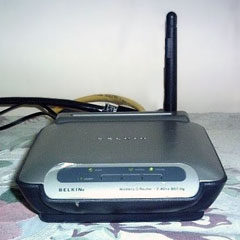 However, when discussing the
issue with my daughter, who has made her living doing telephone tech
support for wireless networks, she asked what sort of wireless router I
was using. When I told her it was a Belkin Wireless G unit, she
immediately suggested that might be my problem. According to her, these
Belkin routers don't have a very positive reputation in the wireless
tech support community. Who knew?
However, when discussing the
issue with my daughter, who has made her living doing telephone tech
support for wireless networks, she asked what sort of wireless router I
was using. When I told her it was a Belkin Wireless G unit, she
immediately suggested that might be my problem. According to her, these
Belkin routers don't have a very positive reputation in the wireless
tech support community. Who knew?
She was able to suggest some configuration tweaks, but the problem persisted.
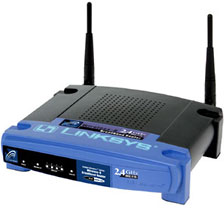 She also happened to have a Linksys
Wireless-B Broadband Router Model BEFW11S4 that she wasn't using,
so she kindly dropped it in the mail for me to try - and it turns out
that the router was indeed the culprit. I've only had the Linksys
router for a few days at this writing, but so far, so good. It seems to
have solved the problem. The Pismo with the Buffalo PC Card adapter has
been connecting reliably and staying connected with a good healthy
signal indicated by the AirPort icon in the menu bar.
She also happened to have a Linksys
Wireless-B Broadband Router Model BEFW11S4 that she wasn't using,
so she kindly dropped it in the mail for me to try - and it turns out
that the router was indeed the culprit. I've only had the Linksys
router for a few days at this writing, but so far, so good. It seems to
have solved the problem. The Pismo with the Buffalo PC Card adapter has
been connecting reliably and staying connected with a good healthy
signal indicated by the AirPort icon in the menu bar.
The Linksys unit is physically much larger than the Belkin router and has two antennae instead of one, which probably helps.
The Linksys router is much larger than the Belkin.
My daughter thinks that Linksys makes the best wireless routers, and this one certainly does work well. The Linksys Wireless-B Broadband Router has been discontinued, but there is a similar unit called a Wireless-G that is probably its contemporary equivalent.* It's still early days, so I can't yet affirm that the problem has been conclusively solved, but the leading indicators are promising.
Needless to say, I'm very grateful to my daughter for diagnosing the problem and providing the hardware solution.
In defense of the Belkin router, it had worked flawlessly for me with the Unibody MacBook, which presumably has more robust wireless support than the 10-year-old Pismo running Mac OS X 10.4 .11. The Linksys router, of course, works great with the MacBook as well.
Wireless Broadband Update
As for my wireless broadband service, it has been flawless since it was installed on September 10, with no glitches or outages to report as we close on the three-month mark. It will be interesting to see how things hold up in winter weather. Since it uses a directional dipole antenna rather than a dish, snow build up shouldn't be a major problem, as it is for some folks I know who have been using satellite Internet.
Needless to say, I'm delighted to have the Pismo back giving reliable service as my number two production machine and road computer. A used wireless card is on the way for my wife's Pismo, but I may reprocess it and hand off the 17" PowerBook to her, since she uses her computers almost exclusively in desktop substitute mode with an external keyboard and mouse, so the 17-incher's crummy trackpad (the worst I've ever used on a laptop computer), bulk, and weight should be largely irrelevant - and I'll have a second Pismo back for more portable service.
Editor's note: Linksys makes a wide range of Wireless G and Wireless N WiFi routers, several of which are available through Low End Mac's Amazon.com store. dk
Linksys Wireless-B Broadband Router BEFW11S4 Info
The Linksys Wireless-B Broadband Router BEFW11S4 is an older, discontinued 802.11b (the same as the original AirPort hardware) router with 128-bit encryption and four 100Base-T ethernet ports. Linksys also has Wireless-G, Wireless-G with Speedburst, Wireless-N, and Dual-Band Wireless-N hardware, including some with gigabit ethernet and Storage Link for connecting and sharing a USB 2.0 drive on your local network or over the Internet.
The Linksys BEFW11S4 connects wireless local networks to a high-speed broadband Internet connection and includes a 10/100 Fast Ethernet backbone. Configurable as a DHCP server for your existing network, the Wireless-B Broadband Router can function as the only externally recognized Internet gateway on a local area network (LAN) and serve as an Internet NAT firewall against unwanted outside intruders.
The router can also be configured to filter internal users' access to the Internet. Some wireless routers may need to rely on an external hub or switch to share their Internet connection, but the Wireless-B Broadband Router channels this connection through the full duplex speed of its built-in EtherFast 10/100 4-Port Switch. This combination of wireless router and switch technology eliminates the need to buy an additional hub or switch and extends the range of your wireless network.
Specifications:
- Frequency Band/Bandwidth: 2.4 GHz (802.11b)
- Transmission Speed: Up to 11 Mbps
- Wireless Security: 128-bit WEP Encryption
- Ports: 4 x 10/100 Ethernet LAN (RJ-45), 1 x 10/100 Ethernet WAN (RJ-45)
Features:
- Share Internet access with others in the network
- Interoperable with IEEE 802.11b (DSSS) 2.4 GHz-compliant equipment
- Provides Roaming, best access point selection, Load Balancing, and Network Traffic Filtering
- Long operating range supports up to 91m (indoors) and up to 457m (outdoors)
- Capable of up to 128-bit WEP Encryption
- MAC Address and Internal Access Filtering
- Connects to a Broadband modem, a 10/100 Ethernet backbone and a wireless network
- Configurable through your networked PC's Web browser
- Supports Internet Protocol Security (IPSec) Passthrough and Point-to-Point Tunneling Protocol (PPTP)
- Able to act as a Dynamic Host Configuration Protocol (DHCP) server for you existing network.
Join us on Facebook, follow us on Twitter or Google+, or subscribe to our RSS news feed
Charles Moore has been a freelance journalist since 1987 and began writing for Mac websites in May 1998. His The Road Warrior column was a regular feature on MacOpinion, he is news editor at Applelinks.com and a columnist at MacPrices.net. If you find his articles helpful, please consider making a donation to his tip jar.
Links for the Day
- Mac of the Day: Motorola StarMax 3000, introduced 1999.09.07. This inexpensive clone used lots of off-the-shelf parts.
- Support Low End Mac
Recent Content
About LEM Support Usage Privacy Contact
Follow Low End Mac on Twitter
Join Low End Mac on Facebook
Favorite Sites
MacSurfer
Cult of Mac
Shrine of Apple
MacInTouch
MyAppleMenu
InfoMac
The Mac Observer
Accelerate Your Mac
RetroMacCast
The Vintage Mac Museum
Deal Brothers
DealMac
Mac2Sell
Mac Driver Museum
JAG's House
System 6 Heaven
System 7 Today
the pickle's Low-End Mac FAQ
Affiliates
Amazon.com
The iTunes Store
PC Connection Express
Macgo Blu-ray Player
Parallels Desktop for Mac
eBay

