
Miscellaneous Ramblings
Why Spaces Is My Favorite Leopard (and Snow Leopard) Feature
Charles Moore - 2009.11.23 - Tip Jar
Upon first installing Mac OS X 10.5 "Leopard" a little over two years ago, my hands-down favorite new wrinkle was Spaces, Leopard's then-new window management feature that allows you to configure up to 16 simultaneous, instantly switchable Desktop views, each complete with its own coterie of open programs, projects in progress, and so forth.
It's essentially like having multiple monitors without the hardware. I find this extremely convenient and useful.
For example, I usually have three or four Web browsers running, each with its own set of open tabs. With Spaces, I can give each browser its own full Finder window and switch among them with simple keystroke commands.
Spaces lets you configure from two to 16 separate workspaces.Another workflow routine facilitated by Spaces is that you can set up a project with a bunch of open windows, either from the same program or several different programs, and then if you are obliged to interrupt your flow to do something else, you can leave your project as it is, switch to another Space to execute the other chores, and then come back later and pick up where you left off seamlessly.
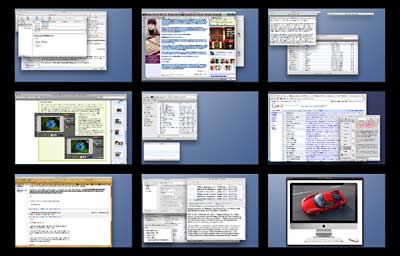
Incidentally, you can have different windows or documents open in any number of Spaces simultaneously from the same program.
The Spaces feature allows you to configure as few as two or as many as 16 Spaces. Personally, I find nine hits the sweet spot for my needs.
Enable Spaces using the Exposé and Spaces panel in System
Preferences.
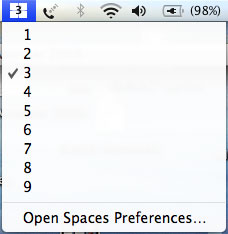
You activate Spaces from the Spaces tab in the Exposé and Spaces panel in System Preferences by clicking the "Enable Spaces" checkbox. You can also optionally add a menu at to the finder menu bar by selecting "Show Spaces in menu bar," which will allow you to change Spaces to use from a pulldown menu, and the icon will also display the number of the current open space. I can't imagine why one would not want to activate this option.
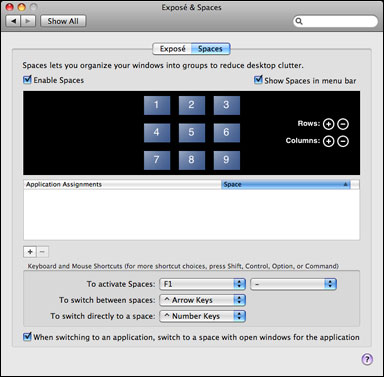
The Exposé and Spaces panel.
The Spaces tab also allows you to configure the desired number of rows and columns used in Spaces, to assign programs to open in specific Spaces rather than simply whatever Space happens to be active at the time, or to have all of an application's open windows were documents appear in all Spaces all the time - or conversely to block a particular application from opening in a specified Space. There are also pulldown menus for configuring keyboard and mouse shortcuts with alternates from the defaults.
 Once Spaces is activated, you can switch among a program's open
windows in various Spaces by repeatedly clicking an application's icon
in the Dock, or you can hold down Control while pressing the Arrow key
to cycle through Spaces sequentially, or just press Control and the
appropriate number of key to jump to a specific screen view.
Once Spaces is activated, you can switch among a program's open
windows in various Spaces by repeatedly clicking an application's icon
in the Dock, or you can hold down Control while pressing the Arrow key
to cycle through Spaces sequentially, or just press Control and the
appropriate number of key to jump to a specific screen view.
For an Exposé-like thumbnail view of all Spaces, click F8 (or whatever command you specify - I use F1, because I have F8 assigned to something else). This "big picture" view gives you a comprehensive overview of what's open and going on in all your Spaces. You can click on a thumbnail to bring that particular Space forward, use the big picture view to drag documents or programs from one Space to another, or even use Exposé keystrokes in the big picture view.
I'm not using Snow Leopard yet, but I understand that Spaces has been carried over from Leopard with essentially no changes, which doesn't surprise me a whole lot, since they got Apple right the first time around, IMHO.
I'm always surprised when someone tells me they don't use Spaces, as two of my Low End Mac colleagues did last week. I suppose there are plenty others.
Andrew Fishkin says he's a fairly heavy Exposé user, a habit he picked up back in Panther days and still misses when he uses his Windows machine, but hasn't got into utilizing Spaces, which is the diametrical opposite of my usage. I never really integrated Exposé into my work routines, and I don't think I've used it at all since Spaces debuted. Andrew has a MacBook Air, which seems to me a machine optimally tailor-made to take advantage of Spaces. I know that Spaces has helped mitigate the loss of 100 pixels of vertical screen resolution in my moving from a 1.33 GHz 17 inch PowerBook to a 13 inch MacBook.
Low End Mac's publisher, Dan Knight, hasn't really used Exposé or Spaces. He observes, "I think a lot of longtime Mac users don't really jump on new technologies that don't immediately strike us as useful. It's only this year, for instance, that I've started using drag-and-drop text, which goes back to System 7 or so...."
Anyway, if you've tried Spaces and it's not for you, fair enough, but if you've just been procrastinating, I encourage giving it a try.
Join us on Facebook, follow us on Twitter or Google+, or subscribe to our RSS news feed
Charles Moore has been a freelance journalist since 1987 and began writing for Mac websites in May 1998. His The Road Warrior column was a regular feature on MacOpinion, he is news editor at Applelinks.com and a columnist at MacPrices.net. If you find his articles helpful, please consider making a donation to his tip jar.
Links for the Day
- Mac of the Day: PowerBook 500 Series, introduced 1994.05.16. 'Blackbird' includes a 25 to 33 MHz 68040 along with smart batteries and grayscale or color displays.
- Support Low End Mac
Recent Content
About LEM Support Usage Privacy Contact
Follow Low End Mac on Twitter
Join Low End Mac on Facebook
Favorite Sites
MacSurfer
Cult of Mac
Shrine of Apple
MacInTouch
MyAppleMenu
InfoMac
The Mac Observer
Accelerate Your Mac
RetroMacCast
The Vintage Mac Museum
Deal Brothers
DealMac
Mac2Sell
Mac Driver Museum
JAG's House
System 6 Heaven
System 7 Today
the pickle's Low-End Mac FAQ
Affiliates
Amazon.com
The iTunes Store
PC Connection Express
Macgo Blu-ray Player
Parallels Desktop for Mac
eBay

