
Miscellaneous Ramblings
Miscellaneous Ramblings Review
Free ToyViewer Image Editor Gets Major Update
Charles Moore - 2009.09.28 - Tip Jar
For the past seven years or so, the image editing tool I use most - a lot more than Photoshop Elements or Pixelmator - is the very professionally turned out freeware ToyViewer, which I find slicker than any other software I know of for simple image resizing and format conversion. ToyViewer also has some handy image correction filters.
This month, ToyViewer's developer, Mr. Takeshi Ogihara, released Version 5.0 of the application, upgrading it to support Mac OS X 10.6 "Snow Leopard", and also releasing separate version 5.0 builds for OS X 10.4 "Tiger" and OS X 10.5 "Leopard".
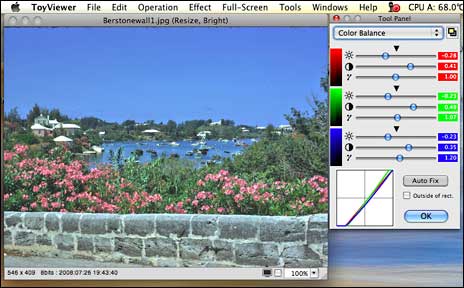
This is ToyViewer's most substantial upgrade in several years, with the already very attractive user interface facelifted for a fresh look, some new features, and expanded preferences.
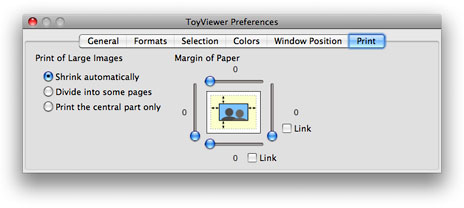
It's always a bit disconcerting when a software tool one depends on receives a major overhaul - sort of like someone coming into your home while your out and rearranged the furniture. That analogy is probably a bit exaggerated with this upgrade, at least in terms of appearance, since everything is still where one expects to find it, but in terms of functionality with OS X 10.5, which I'm still using, there are some problematical issues.
The most serious of these for me is the way ToyViewer 5 handles PICT images imported through the Clipboard - one of the most frequent modes I use with ToyViewer. OS X 10.5 screen shots are copied as PICT images, and it's also the default screen shot format for Color It! 4.5, another venerable image editing application I still use a lot.
The long and short of it is that at least in its Leopard iteration (and probably the Tiger as well), ToyViewer no longer renders Clipboard PICT images usably, with the result both grossly enlarged and its aspect ratio distorted. This is serious enough that it will probably be necessary for me to downgrade to ToyViewer 4.92, at least until I upgrade my operating system to Snow Leopard. In the meantime, I'm using OS X Preview as a "PICT buffer" of sorts to convert screen shots copied directly to the Clipboard (Command-Shift-Option-3 or -4) and Clipboard cuts from Color It! to ToyViewer-friendly formats.
In the release notes posted on his website, Ogihara warns that in ToyViewer 5.0 for Mac OS X 10.4 or 10.5, "some functions won't work as expected," attributing the reason to limitations in the WebKit API, so current Tiger and Leopard users should check the list of caveats he has posted before deciding whether to install this version update or stick with ToyViewer 4.92.
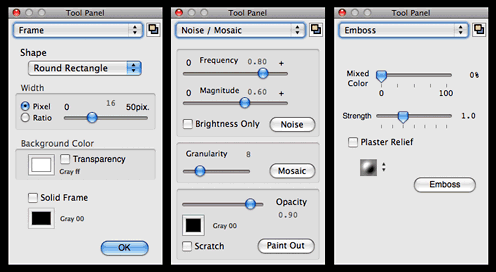
New features and changes in ToyViewer version 5.0 include:
- Color profiles embedded in image files can be replaced. Exif and GPS information are also displayed.
- You can save image files with/without Exif and GPS information.
- Images with CMYK color space can be dealt with easily.
- SVG image files can be displayed. Note that, however, all kinds of SVG cannot be displayed correctly (it depends on WebKit).
- TIFF Stacks, that is, TIFF image files with multi-frame, can be displayed. Moreover, ToyViewer can show animation of TIFF and GIF files with multi-frame.
- Displayed images can be easily enlarged/shrunk by new mouse operation.
- The interface to see files in a directory sequentially by using full-screen is greatly changed. You can see two images at the same time as an opened book, and two or more pieces be seen in fast-forwarding.
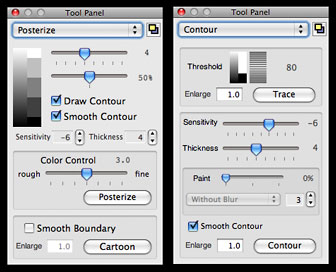
- The effect of obtaining the contour from an image is updated.
- New effect called "Cartoon" is added. You can add the contour to cartoon and posterize effects.
- Blur effect has variations: Gaussian filter, Median filter, and Kuwahara filter.
As before, ToyViewer can read and display image files in a wide range of file formats including: tiff, jpg, pdf, png, gif, bmp, pict, JPEG2000(jp2, jpc, j2k), and eps.
ToyViewer also deals with svg, jbig(bie), pcx, pcd, pnm (ppm, pbm, pgm), xbm, mag, SUN Rasterfile and others. For example, if you have Adobe Photoshop, ToyViewer can display psd image files. You can set ToyViewer to display any image format if there is a filter program to ppm format.
Displayed images can be saved as follows: tiff, pdf, gif, bmp, png, jpg, JPEG2000 (jp2, jpc, j2k), jbig (bie), pnm, or xbm. Vector images such as PDF can be converted into bitmap images such as jpg or tiff.
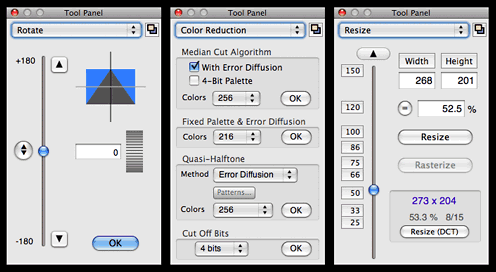
Color profiles embedded in image files can be replaced. Exif and GPS information are also displayed. You can save image files with/without Exif and GPS information. Moreover, you can add comments to images (depending on file format).
Other Features:
Scan Folder:
ToyViewer can display each image file in a folder one by one in full-screen mode. You can also mark images to move - or to delete. With this feature, ToyViewer can be used as a no-hassle slideshow or comic viewer.
Full-Screen Mode:
ToyViewer can display images in full-screen and in front of all other windows. If you like a displayed image, you can make it the Desktop picture (wallpaper) of your Mac.
Animation:
ToyViewer provides simple animation player for animated GIFs and TIFF Stacks. Additionally, each frame of and each page of a PDF can be viewed as a single image.
Image Operations:
As always with ToyViewer, you can rotate, flip, clip, enlarge, or shrink images.
Color Operations:
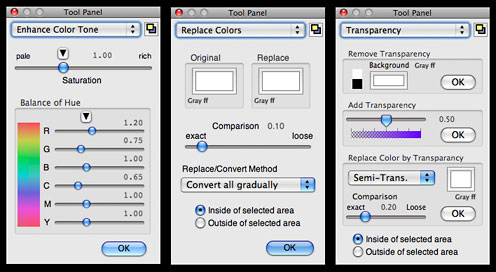
While it's complimentary to, rather than a replacement for, a full-featured image editor like PSE or Pixelmator or Acorn, given it's lightweight and nimble speediness, ToyViewer has surprisingly powerful ability to adjust brightness, contrast, and color tone of images if you need some quick and convenient image manipulation. You can replace a specified color with another color or transparent color and also make images with palettes or convert them to monochrome images.
Effects:
ToyViewer has some typical operations to images, such as enhancement, blur, mosaic, and so on. You can also make Aqua-button-like images, poster-like images, and more.
Custom Icon:
ToyViewer can attach a custom icon to any file as well as newly saved image file.
Print:
Images can be printed. An image is automatically shrunk to be printed on a sheet or divided into multi pages.
System requirements: Mac OS X 10.4 or later (different versions for 10.4, 10.5, and 10,6)
- Binary for Mac OS X 10.6 Snow Leopard, 6.0 MB
- Binary for Mac OS X 10.5 Leopard (Universal), 6.6 MB
- Binary for Mac OS X 10.4 Tiger (Universal), 5.6 MB
ToyViewer 5.00 is not available for Mac OS X 10.3 (Panther) and earlier versions. You can use ToyViewer 4.92 or earlier ones with these versions.
System Support: PPC/Intel
Freeware
Low End Mac Ratings:
- Version 4.92 - (at least for Tiger and Leopard users) 4 out of 4.
- Version 5.0 - (for Tiger and Leopard users) 2 out of 4
- Version 5.0 - (for Snow Leopard) not rated until I get to try it. If the Clipboard glitch is not present, I provisionally anticipate 4 out of 4.
Join us on Facebook, follow us on Twitter or Google+, or subscribe to our RSS news feed
Charles Moore has been a freelance journalist since 1987 and began writing for Mac websites in May 1998. His The Road Warrior column was a regular feature on MacOpinion, he is news editor at Applelinks.com and a columnist at MacPrices.net. If you find his articles helpful, please consider making a donation to his tip jar.
Links for the Day
- Mac of the Day: Power Mac 7500, introduced 1995.08.08. This workhorse introduced a new desktop case and CPU daughter cards for easy upgrade.
- Support Low End Mac
Recent Content
About LEM Support Usage Privacy Contact
Follow Low End Mac on Twitter
Join Low End Mac on Facebook
Favorite Sites
MacSurfer
Cult of Mac
Shrine of Apple
MacInTouch
MyAppleMenu
InfoMac
The Mac Observer
Accelerate Your Mac
RetroMacCast
The Vintage Mac Museum
Deal Brothers
DealMac
Mac2Sell
Mac Driver Museum
JAG's House
System 6 Heaven
System 7 Today
the pickle's Low-End Mac FAQ
Affiliates
Amazon.com
The iTunes Store
PC Connection Express
Macgo Blu-ray Player
Parallels Desktop for Mac
eBay

