
Miscellaneous Ramblings
Using Tex-Edit Plus and AppleScript for HTML Markup
Charles Moore - 2009.10.19 - Tip Jar
LEM reader Bruce writes:
Agreed that Tex-Edit Plus is a great product.
But I'm always curious about how people actually USE AppleScript features.
Got comments on this? As a reply or as a column; would be great to hear about.
Bruce
That's an excellent idea for a column, so read on to learn how I use AppleScript in Tex-Edit Plus (TE+) - but first a few notes about the application itself.
If you're a fan, or just curious, it should be noted that it's been a while - since July 29, 2007 to be precise - since TE+ received a version update. Developer Tom Bender has been occupied with other things in the meantime, but it's testimony to the solidity and robustness of the program that it continues to work just fine, at least in OS X 10.5.8 "Leopard", which is the version of OS X I'm still using.
Thus, I can't speak to whether there have been any issues with TE+ 4.9.8 - the current final version - in OS X 10.6 "Snow Leopard". I haven't heard of any problems, but if anyone out there can report, I'd be interested in hearing. Tom told me late last year that he intended to get back to updating and improving TE+ in 2009, but so far the only update development has been the posting on April 27 of version 4.9.9 beta 1 - a minor tweak that improves memory handling when saving files that contain big resources (e.g. TIFFs). I'm running 4.9.9b1, and it's stable and reliable under OS X 10.5.8.
Hopefully, Tom will see his way clear to keep Tex-Edit Plus current, because this application is one reason why I thank myself every day for using a Mac, and AppleScript is another. The combination of the two makes this program a "killer app" for my purposes.
TE+'s AppleScript implementation could hardly be smoother, slicker, or more user-friendly. Scripts, which, if you're not familiar with AppleScript, are sort of mini-applets or macros that automate a particular function (actually, they're more than macros). As Tom Bender puts it: "AppleScript puts the power of these Apple Events in the hands of the ordinary user. It's just another insanely great advantage that we Mac users enjoy."
TE+ also has a nice inventory of text cleaning tools, a decent find and replace engine, and supports OS X's built-in spellchecker. I use it as something of a do-all and "can opener" app - able to open a wide selection of text formats to at least give you a look at what's inside.
Since the mid 90s, I've used TE+ almost exclusively for day-to-day text crunching like drafting articles and correspondence, cleaning up text from emails and downloaded from the Web, and, thanks to AppleScript, also as an HTML markup program for converting and preparing documents for online publishing. I rarely use full-featured word processors any more, except in the relatively rare instances when I need a heavily formatted document. Most of the time I just work in plain text.
Actually, Tex-Edit Plus itself supports a fair bit of formatting when you need it, and anything you do with this application can be facilitated and streamlined by Tex-Edit Plus' absolutely superb AppleScript support.
Unlike macros, Apple Events bypass the user interface and are exceptionally efficient. Scriptability implies that the programmer has given AppleScript access to major portions of the application's inner workings. Scripts are stored in a folder (logically called "Scripts") in the Tex-Edit Plus application folder and appear in an AppleScript menu when Tex-Edit is running. When you add new scripts to the folder, they show up in the menu instantly without your having to restart the program.
 There is also a floating AppleScript tool palette
(right) that I actually had something to do with. As Tom Bender notes
in the TE+ Version 4..8 changelog :
There is also a floating AppleScript tool palette
(right) that I actually had something to do with. As Tom Bender notes
in the TE+ Version 4..8 changelog :
"{a] Handy new floating Script Tools palette thanks to Charles W. Moore. Compiled scripts added to the new 'Script Tools' folder will show up as buttons in the palette. Option click a button to edit its script. Jaguar (10.2) or newer required."
To run a script, you just open the menu and click on a selected script title, or use the aforementioned floating Script Tools palette. Compiled scripts added to the new "Script Tools" folder will show up as buttons in the palette. Option click a button to edit its script.
Even better, for scripts that you really use a lot, it is more convenient to assign keystroke shortcuts to activate them, which is done by simply appending an underscore-character suffix to the script's name. (e.g.: "ScriptName_0"), or for a function key shortcut, append underscore-Fkey. (e.g.: "ScriptName_F5"). You can also configure various modifier keys in your keyboard shortcuts. For example, with the script Mac -> HTML_F6, press the F6 key and a copy of your document gets converted to HTML while you watch.
A couple of dozen or so AppleScripts are bundled with the Tex-Edit Plus standard download, and because Tex-Edit Plus is recordable, you can record custom scripts of your own to automate tedious or frequently repeated tasks using the AppleScript Editor utility that is included with the Mac OS. As Doug Adams, who operates the Tex-Edit Plus AppleScripts Website, notes:
"I learned AppleScripting with Tex-Edit Plus, and I am always disappointed when I open the dictionaries of other scriptable apps to find them nearly barren. A few commands and objects alongside the Standard Suite does not a scriptable application make.
"But here we have the new version of Tex-Edit Plus. Virtually everything can be scripted. That is extremely rare in an OS X app (Mail, iTunes, and Safari are wonderful exceptions). Even more importantly, you can script Tex-Edit Plus to perform tasks Tom Bender never dreamed of when he was programming it. For example, Tom didn't build an HTML editor into TE+. But you can very easily create the tools you need to make HTML tags, and then send docs via FTP, analyze server logs, write CSS, RSS, JavaScript, PHP. Tex-Edit Plus is at the heart of my day-to-day operations - it's always on."
I agree. Tex-Edit Plus is, as noted above, my "do almost everything" application.
The scripts I use most often with Tex-Edit Plus relate to things like converting text from/to lower/upper case, capitalization (yes, I know there are submenu commands in Tex-Edit Plus that can do this too, but an AppleScript with a single keystroke shortcut is faster and slicker), and HTML markup. I prefer to create HTML documents from scratch, and as I work, rather than using a WYSIWYG authoring application, but I am not enchanted with typing a lot of tedious little HTML tags.
Bare Bones Software's BBEdit is an excellent tool for doing this sort of HTML markup. But for my purposes, it has always seemed like overkill. My HTML authoring needs are not complex, but if yours are, check out BBEdit.
On the other hand, BBEdit lists for $125, and Tex-Edit Plus sells for just $15. Basically, as Doug Adams notes, AppleScript allows me to add just the HTML markup capability I need and want without a lot of other selections that I never use and which just get in the way.
Building an HTML Page with Tex-Edit Plus
Here's how I build an HTML page using Tex-Edit Plus.
First, I need the text. Columns and reviews are mostly written from scratch, while news briefs may include a fair bit of text pasted in from press releases and such. I often rough out articles longhand on paper and then dictate them into a Tex-Edit Plus using MacSpeech Dictate. Pasted-in URLs and email addresses are then added, and the article proofread and spell checked to remove those pesky, perfectly spelled, non-sequitur typos peculiar to dictation software (not always 100% successfully, alas).
Once the article is through the writing and initial proofing, I want to convert it to plain, black, 12 point text, so I select my "Styleset" AppleScript.
I use Comic Sans or Geneva as a good, readable screen fonts, but they get converted to a generic, monospace font anyway in the next step, which is to convert the document to basic HTML.
The tool I use for this is the Mac -> HTML/F6 script that comes bundled with Tex-Edit Plus. This script is based on Script2HTML by Bill Cheeseman. The conversion process takes a few seconds and results in a copy of the original document in simple HTML form, leaving the original draft untouched. There are several other AppleScripts that will convert text to HTML, some that do a fancier job, but for my purposes I'm better off with the simpler one.
 The Mac -> HTML/F6
script converts all hard returns to paragraph (<p>) tags, and in
many cases what I really want is just a line break, so this little
script called Insert
Break (left) makes the switch on highlighted sections of
text.
The Mac -> HTML/F6
script converts all hard returns to paragraph (<p>) tags, and in
many cases what I really want is just a line break, so this little
script called Insert
Break (left) makes the switch on highlighted sections of
text.
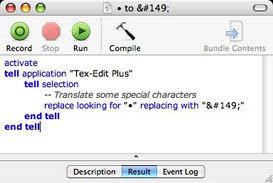
Plain bullets aren't handled gracefully by Web browsers, so my next step is to convert bullets to "•" using the • to &149; script (right).
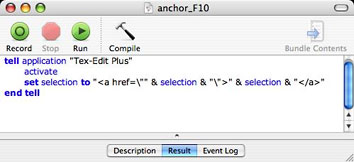
Scripts to turn URLs and email addresses into clickable links.
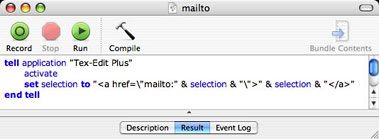
To turn URLs and email addresses into clickable Web links, I then apply the appropriate one of these two scripts (right).
If I want to convert a piece of text to a clickable web link, I use the Selection->Link script by Andrew Sasaki, which is downloadable from Doug Adams' Tex-Edit AppleScript archive, where you can find some 200 free, downloadable AppleScripts. Most of the ones mentioned in this article, including my own little batch of recorded scripts called "HTML Suite", can be found on that site.The Selection->Link script takes a text selection in Tex-Edit Plus and makes it into a web link. It's smart enough to handle URLs and plain text differently.
For many articles, that completes the HTML markup stage, but often there are other formatting jobs to add, such as:
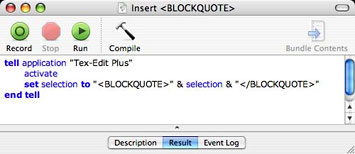
Blockquoted blocks of text
Bold for headings or emphasis
Bold plus a point size boost for even more emphasis
Centering blocks of text or tables
Apply the blue font color I sometimes use
to distinguish replies from readers' letters.
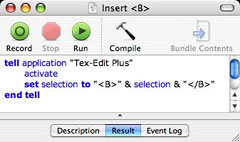
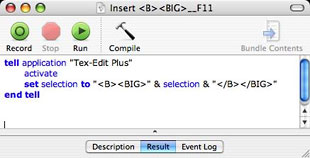
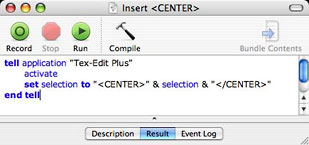
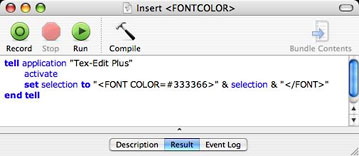
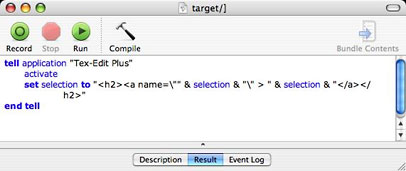
I also have a couple of scripts that create clickable text references and target couples within a Web page, such as jumping from a Table of Contents entry to the subhead for that topic in the column or article:
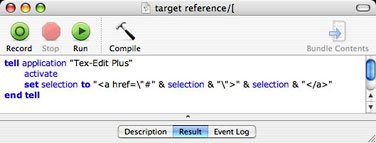
Scripts to create and use anchors.
Other useful AppleScripts I downloaded from Doug Adams' website color all HTML tags in a document, making it easier to proofread or create HTML tables.
Jerome Koons' Create HTML Table makes an HTML table using user-supplied variables. It can be used in conjunction with the Create Anchor Refs script to place anchor references in the table.
When markup is done, the result is a document that, when named with a .html suffix, can be opened with a browser as a formatted page - it is essentially a web page.
This system works well for me and gives me more precise control of the appearance of an article. It generates very clean text copy that is relatively easy to proofread and modify.
The AppleScripts described here do what I need to get done in HTML, and pretty much any HTML markup or text formatting function can be recorded and automated as an AppleScript.
As noted, you can download most of the scripts mentioned here (and many others) from Doug Adams's site here.
My own HTML Suite, which can be downloaded there, is a collection of fifteen scripts to assist in creating HTML formatting.
- Styleset - changes all text to uniform plain text style
- Anchor - converts a selected URL into a weblink
- Insert B - makes selection boldface
- Insert B BIG - makes selection boldface and larger point size
- Insert BLOCKQUOTE - formats selection as blockquote
- Insert center - centers selection
- Insert Break - inserts a line break
- mailto - converts selected email address to weblink
- • -> • - converts Mac bullets to standard HTML bullets
- (P to BR) - converts paragraph tags within a selection to line breaks
- target reference - adds link for target text within a Web page to selected text
- target - adds tags for text target within a Web page to selected text
- Insert Fontcolor - inserts font color tags
- select all - selects contents of open window
- Casecap - capitalizes selection
- Caselow - lowercases selection
- Caseup - uppercases selection
Of course, AppleScript can be employed to do many more things in Tex-Edit Plus than HTML markup. Most any repetitive task you do can probably be AppleScripted. Stylesheets are a good example. Tex-Edit is "recordable" as well as "scriptable", and you can use Script Editor to record your actions as you use Tex-Edit, creating a script that you can save and use to repeat the action later by activating it with a menu command.
With Tex-Edit Plus you can:
- Quickly create, edit, and print styled text documents of any size (limited by RAM).
- Use powerful regular expression search and replace functions.
- View and print TeachText or SimpleText read-only ("ReadMe") documents.
- Play QuickTime movies.
- Insert attention-getting sound annotations to spice up ordinary interoffice mail
- Easily create TeachText/SimpleText read-only documents, including embedded pictures.
- Read and create RTF files.
- Read and create UTF-16 (Unicode) text files.
- View and print color PICT files, such as those produced by draw programs or Apple's built-in screen snapshot utility.
- Copy a selection from a PICT file, cropping the image for use in a document.
- View, edit, and print text documents created by virtually any word processor or computer.
- Reformat downloaded email or text, correcting word-wrap problems and removing extraneous, non-Mac characters.
- Prepare text for upload to the Internet, so that people with Wintel or Unix systems can view the document as it was intended to be viewed.
- Instantly quote a brief passage from received email, allowing the sender to remember their original message.
- Read any text document aloud. (Listen to a SimpleText read-only file, for example, as the text and pictures scroll by!)
- Quickly optimize a document for printing, replacing generic, typewriter-era characters with professional-looking typographically correct text.
- Create simple hypertext documents.
System requirements: Mac OS X 10.1 or higher (Classic version still available as well)
Tex-Edit Plus is $15 shareware, so you can download and try it out for free to see if it does what you need it to do.
Further Reading
- Tex-Edit Plus: Powerful Styled Text Editing for OS X and the Classic Mac OS, Charles Moore's 2007 review of this program.
- Software Review: Tex-Edit Enhancer, Charles Moore's 2000 review of a popular, powerful add-on for Tex-Edit Plus.
Join us on Facebook, follow us on Twitter or Google+, or subscribe to our RSS news feed
Charles Moore has been a freelance journalist since 1987 and began writing for Mac websites in May 1998. His The Road Warrior column was a regular feature on MacOpinion, he is news editor at Applelinks.com and a columnist at MacPrices.net. If you find his articles helpful, please consider making a donation to his tip jar.
Links for the Day
- Mac of the Day: PowerBook 190cs, introduced 1995.08.28. The last 680x0-based PowerBook could take a PowerPC upgrade.
- Support Low End Mac
Recent Content
About LEM Support Usage Privacy Contact
Follow Low End Mac on Twitter
Join Low End Mac on Facebook
Favorite Sites
MacSurfer
Cult of Mac
Shrine of Apple
MacInTouch
MyAppleMenu
InfoMac
The Mac Observer
Accelerate Your Mac
RetroMacCast
The Vintage Mac Museum
Deal Brothers
DealMac
Mac2Sell
Mac Driver Museum
JAG's House
System 6 Heaven
System 7 Today
the pickle's Low-End Mac FAQ
Affiliates
Amazon.com
The iTunes Store
PC Connection Express
Macgo Blu-ray Player
Parallels Desktop for Mac
eBay

