
Miscellaneous Ramblings
Miscellaneous Ramblings Review
Targus USB 2.0 4-Port Bend-a-Hub with Mini USB Adapter
Charles Moore - 2009.04.20 - Tip Jar
Rating: 
"That Squid Hub is clever!" Low End Mac publisher Dan Knight observed upon editing an item I sent along for last week's 'Book Review news and product announcement roundup.
 And so it is. Dan was
referring to the four-armed USB Squid
Hub marketed by thinkgeek.com.
And so it is. Dan was
referring to the four-armed USB Squid
Hub marketed by thinkgeek.com.
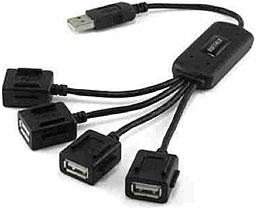
I haven't actually used the USB Squid, but I have tested a somewhat similar device marketed by Targus called the USB 2.0 4-Port Bend-a-Hub that is equally clever - and actually has a few additional wrinkles.
Targus, a name many people associate with that company's line of excellent laptop cases, also has a cool, innovative, and distinctive line of computer input devices and accessories in its recently launched Targus for Mac collection.
The Targus USB 2.0 4-Port Bend-a-Hub with Mini USB Adapter allows you to connect the typical four USB devices to a single USB port on your computer, but that's where conventionality ends. The Bend-a-Hub's signature distinction is its literal flexibility, but it also includes two specialty connectors; one of which instead of being mounted on a fourth flexible arm, instead folds out of the central distribution module for the other three ports and can adjust to a 90°r; angle for better accessibility - oriented either horizontally or vertically, making it ideal for connecting a flash drive or iPod. Another of the four downstream USB ports cleverly folds out to reveal a mini USB connector of the sort used by many digital cameras, mobile phones, and PDAs, but which also has a standard USB socket for regular USB connectivity.
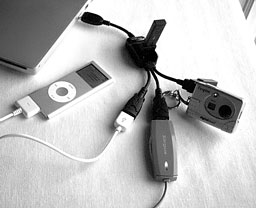 Here is the Targus USB 2.0
4-Port Bend-a-Hub connected to my 17" PowerBook with my
l'Espion
mini-camera, iPod nano, Targus USB 2.0 High-Speed File Transfer
Cable, and the receiver dongle for a Logitech diNovo keyboard
plugged in.
Here is the Targus USB 2.0
4-Port Bend-a-Hub connected to my 17" PowerBook with my
l'Espion
mini-camera, iPod nano, Targus USB 2.0 High-Speed File Transfer
Cable, and the receiver dongle for a Logitech diNovo keyboard
plugged in.
It may also be possible to charge devices through the mini USB port if the connecting device supports charging through a mini-USB connector. However, there is no provision for self-powering the Bend-a-Hub using an AC power adapter, so the device is dependent upon however much juice your computer is capable of supplying through a USB port, which easily get oversubscribed when multiple current-drawing devices attached, especially on certain Mac laptops (including my new Unibody MacBook, which supplies full power to just one of its two USB 2.0 ports).
The Bend-a-Hub's compact flexibility and easy-to-carry 1.8 ounce weight ideally suit it to stuffing in a pocket or laptop case or backpack when you're in mobile computing mode, although it measures 9" x 7.5" x 1.2" when fully unfolded.
The Bend-a-Hub is nicely finished, seems well-constructed and reasonably rugged, and the cables that connect the ports and plug to the central distribution module are of a reassuringly hefty gauge and have robust anti-fatigue collars where the cables enter the port and plug modules.
Aside from the lack of provision for bus-powering, my only criticism of the Targus USB 2.0 4-Port Bend-a-Hub with Mini USB Adapter is that the female US port modules were a bit stiff about accepting cables being plugged into them, requiring more effort to insert and remove than I prefer, but that's something that likely will improve with repeated use.
The RoHS compliant Bend-a-Hub officially requires Mac OS X according to Targus, but I see no reason why it wouldn't work fine with Classic OS Macs that support USB 1.1. It also supports Windows XP and Vista, and of course requires a USB 1.1 or 2.0 port to plug into.
Limited One Year Warranty
The USB 2.0 4-Port Bend-a-Hub sells for an estimated street price of $19.99.
Join us on Facebook, follow us on Twitter or Google+, or subscribe to our RSS news feed
Charles Moore has been a freelance journalist since 1987 and began writing for Mac websites in May 1998. His The Road Warrior column was a regular feature on MacOpinion, he is news editor at Applelinks.com and a columnist at MacPrices.net. If you find his articles helpful, please consider making a donation to his tip jar.
Links for the Day
- Mac of the Day: Motorola StarMax 3000, introduced 1999.09.07. This inexpensive clone used lots of off-the-shelf parts.
- Support Low End Mac
Recent Content
About LEM Support Usage Privacy Contact
Follow Low End Mac on Twitter
Join Low End Mac on Facebook
Favorite Sites
MacSurfer
Cult of Mac
Shrine of Apple
MacInTouch
MyAppleMenu
InfoMac
The Mac Observer
Accelerate Your Mac
RetroMacCast
The Vintage Mac Museum
Deal Brothers
DealMac
Mac2Sell
Mac Driver Museum
JAG's House
System 6 Heaven
System 7 Today
the pickle's Low-End Mac FAQ
Affiliates
Amazon.com
The iTunes Store
PC Connection Express
Macgo Blu-ray Player
Parallels Desktop for Mac
eBay

