
Miscellaneous Ramblings
Miscellaneous Ramblings Review
Plantronics Voyager Pro Bluetooth Headset
Charles Moore - 2009.08.17 - Tip Jar
Rating: 
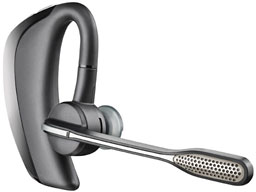
Plantronics Voyager Pro Bluetooth headset.
There are a number of Bluetooth wireless headsets available for use with iPhones and other mobile phones, one of the newest - or at least most recently breathed-on - being Plantronics' Voyager Pro, an update and successor to the very popular Voyager 510 Bluetooth headset* that Plantronics has marketed for several years, and which the Voyager Pro resembles in appearance.
A headset is an almost indispensably convenient accessory to have for your cellphone - or for that matter a landline telephone - freeing up your hands for multitasking and removing arm and hand muscle fatigue from the equation during long conversations.
For example, in preparing to participating in a CBC Radio political panel recently, I needed to listen to an hour-long taped transcript of a candidates' debate, which would've been extremely tedious holding a phone handset up to my ear for that long. With my headset, I could listen and talk while continuing to multitask on my computer.
Plantronics has a reputation for making excellent voice products. The MacSpeech folks, who are picky about sound input, have long included Plantronics models among their approved mics for use with their iListen and now Dictate speech recognition software. The (wired) Plantronics headset that came bundled with MacSpeech Dictate is one of the best - if not the best - mic setup I've ever used for dictation.
 A bit of
chronologically topical trivia: 40 years ago this month, a Plantronics
headset carried Neil Armstrong's historic first words from the moon:
"That's one small step for a man, one giant leap for mankind."
Plantronics products are also a popular choice of equipment for
mission-critical applications like air traffic control, 911 dispatch,
and at the New York Stock Exchange.
A bit of
chronologically topical trivia: 40 years ago this month, a Plantronics
headset carried Neil Armstrong's historic first words from the moon:
"That's one small step for a man, one giant leap for mankind."
Plantronics products are also a popular choice of equipment for
mission-critical applications like air traffic control, 911 dispatch,
and at the New York Stock Exchange.
The Plantronics Voyager Pro Bluetooth headset sells for $100 and is targeted to mobile business and institutional users who need all-day wearing comfort and high-quality telephony audio on the go. It features state-of-the-art AudioIQ digital signal processing (DSP) and WindSmart technology that provides superior wind noise cancellation. The Voyager Pro's dual external stainless steel microphone screens and acoustic fabrics surrounding the microphones provide physical barriers to wind noise, and there is a tone alert when wind noise becomes excessive.
 For enhanced
incoming audio quality, the Voyager Pro features a full-spectrum audio
speaker with an adaptive 20-band equalizer to minimize distortion and
work in conjunction with AudioIQ to automatically adjust sound levels
based on environmental noise levels, canceling up to 80dB of background
noise.
For enhanced
incoming audio quality, the Voyager Pro features a full-spectrum audio
speaker with an adaptive 20-band equalizer to minimize distortion and
work in conjunction with AudioIQ to automatically adjust sound levels
based on environmental noise levels, canceling up to 80dB of background
noise.
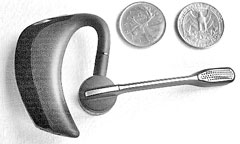
 At 1.8" wide (or
about 4" with the boom mic extended) x 2.3" long x 0.4" thick with a
battery pack that bulks it up behind the ear, the Voyager Pro is a bit
larger and bulkier than some competitive Bluetooth headsets, but that
adjustable, 3" long dual-microphone boom helps enhance audio fidelity,
and while it's not the most unobtrusive configuration, the upside is
that it evenly distributes its 0.6 ounce (17.5 grams) of
counterbalanced weight efficiently enough that all-day wearing becomes
a practical proposition without discomfort. The headset unit's ear
contact surfaces are of a soft, flexible, rubber-like material, which
enhances user comfort but is claimed to be rugged enough to withstand
eight pounds of stretching stress. Plantronics says the Voyager Pro has
undergone 24 rounds of human comfort and fit testing to achieve
extended wearing comfort and has been tested on thousands of human ear
shapes and sizes.
At 1.8" wide (or
about 4" with the boom mic extended) x 2.3" long x 0.4" thick with a
battery pack that bulks it up behind the ear, the Voyager Pro is a bit
larger and bulkier than some competitive Bluetooth headsets, but that
adjustable, 3" long dual-microphone boom helps enhance audio fidelity,
and while it's not the most unobtrusive configuration, the upside is
that it evenly distributes its 0.6 ounce (17.5 grams) of
counterbalanced weight efficiently enough that all-day wearing becomes
a practical proposition without discomfort. The headset unit's ear
contact surfaces are of a soft, flexible, rubber-like material, which
enhances user comfort but is claimed to be rugged enough to withstand
eight pounds of stretching stress. Plantronics says the Voyager Pro has
undergone 24 rounds of human comfort and fit testing to achieve
extended wearing comfort and has been tested on thousands of human ear
shapes and sizes.
In Use
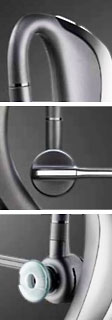
Another thing I like about the Voyager Pro is that the gel ear tips are designed to not need deep insertion in your ear, but instead rest comfortably at the opening of the ear canal. A selection of three sizes of gel tips is provided, along with two foam ear tip covers if you prefer even more softness. The gel tips can be changed easily, attaching with a quick but secure and satisfyingly precision mini-bayonet mount.
Once I had the Voyager Pro headset seated on my ear, I found it reasonably secure. I did find putting the unit on was easier if I first removed my eyeglasses. Once the headset was in place, I could put my specs back on with no problem, but I'll note that I do have titanium frames that are about as un-bulky in cross section as you can find, and I can't vouch for what it would be like wearing thicker plastic eyeglass frames.
Before you use the headset, the unit's lithium polymer battery needs charging using the included AC charger, which supports 100V - 240V input. A full charge takes 1.5 hours, but the minimum charge time before use is 30 minutes. It's also necessary to pair the Bluetooth connection, which was quick and easy, simply requiring entry of the "0000" passcode. The Voyager Pro is claimed to be able to seamlessly connect with two separate mobile phones with its multipoint technology, although I did not test that function.
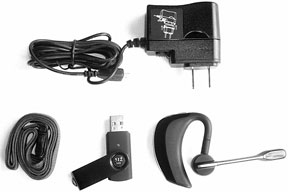 There are
battery charge level indicator lights and tone alerts with both tone
and voice prompts that helpfully notify you when 30 minutes and 10
minutes talk time remain. Talk time per charge is rated at up to six
hours with up to five days of standby time, and the unit has a wireless
range of up to 33 feet.
There are
battery charge level indicator lights and tone alerts with both tone
and voice prompts that helpfully notify you when 30 minutes and 10
minutes talk time remain. Talk time per charge is rated at up to six
hours with up to five days of standby time, and the unit has a wireless
range of up to 33 feet.
Functions supported include call reject, last number redial, voice-activated dialing (the latter two only If supported by your phone and phone service provider), and voice prompts for mute status on/off.
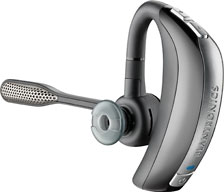
The Voyager Pro's controls are situated on the headset in a way that one is unlikely to hit the wrong function by mistake. The multifunction power button is behind the ear, low on the unit's outer periphery, while the tactile volume buttons are at the top of the unit above the ear, with the call answer and end/reject call control button on the hub of the mic boom facing outward.
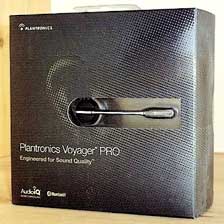 Materials quality
and workmanship appear and feel first rate. The manufacturer says the
mic boom has been tested to withstand at least 20,000 swivels and the
control buttons 200,000 presses to simulate a lifetime's worth of
use.
Materials quality
and workmanship appear and feel first rate. The manufacturer says the
mic boom has been tested to withstand at least 20,000 swivels and the
control buttons 200,000 presses to simulate a lifetime's worth of
use.
A small and concise but well-written and usefully illustrated user guide is included.
The Plantronics Voyager Pro is available in the US and Canada at Best Buy for $99.99, at other major consumer retail and wireless carrier stores, and also at plantronics.com
The Voyager Pro has a one-year service and support warranty. If you're looking for a moderately priced serious work tool headset offering both wearer comfort and superior sound quality, this is one you'll want to check this one out.
Rating - 3.5 out of 4 (some folks may find it a bit large and imposing for their taste)
The Plantronics Voyager Pro Bluetooth Headset is available from Amazom.com for $97.99 shipped.* Editor's note: I've had a 510 for several years and love it. Those I call say the voice quality is excellent. It's currently available from Amazom.com for $37.99 shipped. dk
Join us on Facebook, follow us on Twitter or Google+, or subscribe to our RSS news feed
Charles Moore has been a freelance journalist since 1987 and began writing for Mac websites in May 1998. His The Road Warrior column was a regular feature on MacOpinion, he is news editor at Applelinks.com and a columnist at MacPrices.net. If you find his articles helpful, please consider making a donation to his tip jar.
Links for the Day
- Mac of the Day: PowerBook 2300, introduced 1995.08.28. The only Duo equipped with a PowerPC processsor run at 100 MHz.
- Support Low End Mac
Recent Content
About LEM Support Usage Privacy Contact
Follow Low End Mac on Twitter
Join Low End Mac on Facebook
Favorite Sites
MacSurfer
Cult of Mac
Shrine of Apple
MacInTouch
MyAppleMenu
InfoMac
The Mac Observer
Accelerate Your Mac
RetroMacCast
The Vintage Mac Museum
Deal Brothers
DealMac
Mac2Sell
Mac Driver Museum
JAG's House
System 6 Heaven
System 7 Today
the pickle's Low-End Mac FAQ
Affiliates
Amazon.com
The iTunes Store
PC Connection Express
Macgo Blu-ray Player
Parallels Desktop for Mac
eBay

