
Miscellaneous Ramblings
Reflections on My First Month with Broadband
Charles Moore - 2009.10.06 - Tip Jar
Having had broadband service here for a month come Thursday, I'm still finding it a luxurious novelty not having to go through the dialup rigmarole a dozen or so times a day over our sole telephone line umbilical to the outside world.
The speed is great as well, of course, and it's saving me time - although one has an unfortunate tendency to just pack more work into the extra hours freed-up. I'll have to work on that.
Pismo Shortcomings
Another effect of having everyday broadband is that it has
accentuated the performance shortcomings of my Pismo PowerBook as a production
machine. 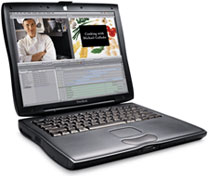 I still love the Pismo and always will. It remains my favorite
computer to work with hands-on in terms of tactile "feel", but moving
into the broadband dynamic, its relatively anemic 550 MHz G4 processor,
and especially its lack of video punch, have become the bottleneck in
my workflow, whereas previously 26,400 bps dialup speeds were.
I still love the Pismo and always will. It remains my favorite
computer to work with hands-on in terms of tactile "feel", but moving
into the broadband dynamic, its relatively anemic 550 MHz G4 processor,
and especially its lack of video punch, have become the bottleneck in
my workflow, whereas previously 26,400 bps dialup speeds were.
One avenue that has opened up with broadband is streamed video. On dialup I just never bothered, and YouTube was largely terra incognita for me. It now works fine - on the Core 2 Duo Unibody MacBook, but on the Pismo, it's still pathetic. Eight megabytes of video RAM and that old Rage Mobility 128 GPU just don't cut it.
Another Option
I've experimented with using the 17" PowerBook G4, which the MacBook displaced as my number one production computer, in second-string role normally filled by the Pismo, and while the AlBook's keyboard is fine, I just loathe its abominable trackpad (never a problem when it was my desktop substitute), and using a peripheral pointing device like the Logitech TrackMan Wheel trackball, which is the one I resort to most because it doesn't require a mousing surface, is still cumbersome away from a desk or table, and I prefer to use the sublime Laptop LaidBack stand in a recumbent position when away from my office workstation, where I spend quite enough time.
Having a wireless router and AirPort has made using computers away from my desk much more practical, comfortable, and convenient with no need to stay near a telephone jack, so using the TrackMan Wheel with its old-fashioned bulky wireless USB receiver seems like a step backward.
Pros and Cons of Each
Another thing is that while I've never found the 17" PowerBook too large and heavy on road trips, its extra weight compared to the Pismo makes it a less pleasant alternative for mobile use around the house, although it fits on the LaidBack okay. Another thing I dislike about using the PowerBook is that the cooling fan cuts in intermittently unless I run with reduced power selected in the Energy Saver system preference, which I estimate probably gives me about 667 MHz of the nominal 1.33 GHz. That quiets the fan cacophony, but performance running OS X 10.5 "Leopard" is more sluggish than I'm getting with OS X 10.4 .11 on the Pismo, although it is nice to have Leopard features like Spaces.
By contrast, the Pismo runs consistently cool, and the only times
it's cooling fan ever spools up is under heavy processor load on the
very hottest days in the summertime, 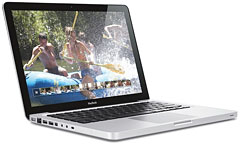 which is another reason why I love
it. The palm rests also don't get hot and clammy like they do on the
PowerBook G4 (even running at reduced speed).
which is another reason why I love
it. The palm rests also don't get hot and clammy like they do on the
PowerBook G4 (even running at reduced speed).
While I love the aesthetics of my Unibody MacBook, and the old 17" PowerBook isn't a bad looker either, I remain unsold on aluminum as an ideal laptop enclosure material. Even though I'm philosophically inclined to favor "natural" materials, I have to say that I think polycarbonate plastic has a much more pleasant tactile feel on the contact surfaces of a laptop computer than anodized aluminum does. The prospect of a polycarbonate unibody replacement for the white MacBook is intriguing in that context.
WiFi Dropouts
Speaking of AirPort, which I was a minute ago, I've discovered that another Pismo shortcoming is that from time to time it will just drop wireless reception and refuse to reconnect until I shut down and restart the computer. I can't blame this on my wireless router setup, because the same phenomenon used to manifest occasionally using the Pismo with its Buffalo G54 802.11g WiFi PC Card when connecting to WiFi hotspots. It was a minor aggravation then, because I didn't spend a lot of time in that context, but now that I'm using wireless for everyday Internet, it's become a serious pain.
These connection dropouts don't happen with either the MacBook or the PowerBook, so it's either something about the way the Buffalo WiFi card addresses AirPort in the Pismo (or vice-versa), or perhaps an OS X 10.4 "Tiger" issue. I'm using Leopard on the other machines.
Back to Poky Dialup for a Bit
Today I used dialup for the first time in nearly 4 weeks because, running behind schedule, I just didn't have the roughly 20 minutes it takes to shut down my suite of production applications and OS X Classic Mode, restart, and then wait for everything to start up again, particularly reloading open browser tabs at dialup speed. I have to say that the good old solid hardwired dialup connection was reassuring - albeit painfully - slow. When I restarted the machine sometime later, normal function was restored.
Speaking of reliability, I'm happy to report that over the first month anyway there have been no reliability issues with the wireless broadband service, which is reassuring. Performance does seem to be a bit time-of-day dependent, with a consistent slowdown in the late afternoon and early evening. I'm guessing that is because of more users logged on sharing bandwidth, although I haven't confirmed that. It flies late at night, ironically analogous to what I experienced for years with dialup, although several magnitudes faster of course.
Another irony I suppose would be that dialup is now probably working better in this neck of the woods, with most users having switched to wireless broadband. Writing the first draft of this column at 9:42 p.m., still in the slowdown period, I checked with the toast.net speed test site and was getting relatively mediocre 376 Kb/s throughput. A subsequent check at 11:50 p.m. returned 1,165 Kb/s, and at other times of the day I've seen as high as 1,300 Kb/s and change. Hopefully when the service provider gets more of the promised towers built in this area, speed performance will become more consistent.
As for my personal dilemma about which computer to use for mobile duty, I haven't given up on the Pismo yet, As I said, I still like the feel of it better than any other laptop, particularly the keyboard and trackpad. I'm still feeling my way, and I guess eventually I'll decide what's the lesser aggravation to put up with.
Join us on Facebook, follow us on Twitter or Google+, or subscribe to our RSS news feed
Charles Moore has been a freelance journalist since 1987 and began writing for Mac websites in May 1998. His The Road Warrior column was a regular feature on MacOpinion, he is news editor at Applelinks.com and a columnist at MacPrices.net. If you find his articles helpful, please consider making a donation to his tip jar.
Links for the Day
- Mac of the Day: PowerBook 500 Series, introduced 1994.05.16. 'Blackbird' includes a 25 to 33 MHz 68040 along with smart batteries and grayscale or color displays.
- Support Low End Mac
Recent Content
About LEM Support Usage Privacy Contact
Follow Low End Mac on Twitter
Join Low End Mac on Facebook
Favorite Sites
MacSurfer
Cult of Mac
Shrine of Apple
MacInTouch
MyAppleMenu
InfoMac
The Mac Observer
Accelerate Your Mac
RetroMacCast
The Vintage Mac Museum
Deal Brothers
DealMac
Mac2Sell
Mac Driver Museum
JAG's House
System 6 Heaven
System 7 Today
the pickle's Low-End Mac FAQ
Affiliates
Amazon.com
The iTunes Store
PC Connection Express
Macgo Blu-ray Player
Parallels Desktop for Mac
eBay

