
Charles Moore's Mailbag
Multiple Input Bug in OS X 10.5.8, Where to Buy a Cheap USB 2 CardBus Card, and More
Charles Moore - 2009.16.09 - Tip Jar
- Multiple Input Device Bug in Mac OS X 10.5.8
- 10.5.8 Mouse Issue Also Impacts Trackpad
- Cheap USB 2 CardBus on eBay
- Multicolor vs. White Apple Logo on PowerBooks
- Printer for Older PowerBook
Multiple Input Device Bug in Mac OS X 10.5.8
From Ken in response to OS X 10.5.8 Update Provides Incentive to Get 10.6:
Hello Mr. Moore,
Thanks for your article describing how the multiple input device bug in Mac OS X 10.5.8 affects your Mac usage. In case you haven't already heard, the same problem is also present in Mac OS X 10.6.
This particular problem also affects users of software that I have written - software that allows users to create virtual mice for various purposes. I have filed reports with Apple to make them aware of the problem. Although I could explain the bug to Apple in technical terms, I did not have a user scenario that adequately demonstrates why it is important to have it fixed. Your article provides just such an example. I hope you don't mind, but I have appended an excerpt from your article to my original bug reports (and provided a link to your full article).
Hopefully your words will help accelerate a fix from Apple for both Leopard and Snow Leopard.
Regards,
Ken
Hi Ken,
Well, that's profoundly depressing news, but thank you for the heads up. As I said in the article, I was already apprehensive that might be the case. The problems with multiple input device support in the early versions of OS X were persistent, and Apple didn't seem very interested in hurrying to fix them. For a while, my only workaround was to use a Wacom tablet mouse with the foot mouse, which for some reason circumvented the problem and allowed tandem input. I suppose it's possible I might have to revert to that, although I am sorely tempted to just downgrade to OS X 10.5.6 until the bug is eventually squashed.
Of course that's not a terribly attractive option, since I would like to be able to write about Snow Leopard non-vicariously.
I'm very pleased that you've brought this matter to Apple's attention, and I have no objection to you appending my comments to your report. Hopefully that might help a bit.
I'm not sure my words carry much weight with Apple, and this is a relatively esoteric issue, but it is one that is driving me batty in practice.
Charles
10.5.8 Mouse Issue Also Impacts Trackpad
From Paul:
Hi Charles,
Since installing the 10.5.8 upgrade, if I press the trackpad button and just use the mouse to do the drag, the drag randomly releases after a few seconds. This may related to the same bug. Can this behavior be replicated on your hardware.
Thanks for your response.
Paul
Hi Paul,
It certainly seems to be replicable. I just tried the method you describe on the Unibody MacBook using my Logitech V550 wireless mouse and the trackpad button, and the drag does randomly release just as I've experienced using my foot mouse, so this is not just an esoteric issue afflicting foot mouse users.
Unhappily, another reader has just informed me that this behavior also exists in OS X 10.6, so Snow Leopard is not going to be the answer until they get around to fixing this bug. Have you tried OS X 10.6.1 yet?
Charles
Cheap USB 2 CardBus on eBay
From Scott, following up on Cheap and Unobtrusive USB 2 CardBus Solution:
[The AKE BC168 card] is all over eBay. Most of the suppliers are in Hong Kong. I only found one in the US, and that's the one I ordered from. Sorry I can't remember his URL - if he even had one.
Scott Cook
Hi Scott,
Thanks for the information. Looks like just a search on eBay's search dialog or even a Google search for the name of the item would do the trick.
Charles
Yes, it's not difficult to find. There are a bunch of sellers on eBay, mostly in Hong Kong. The card is still working well. I'm using it now to send this message from my Pismo through a USB Bluetooth dongle, which my cell phone is tethered to. I'm at my mom's house in Maine, and my cell phone is the my only Internet connection here. I'm appreciating my cable connection in Dallas much more as I deal with the near dial-up speed of my cell phone. I guess you deal with that every day . . . I feel fer ya buddy! haha
Scott
Hi Scott,
I'm delighted to report that on Sept. 10, I finally got hooked up to a wireless broadband service. They just got the tower operational last week, and I'm one of the first customers in the area. It works extremely well so far.
Charles
Multicolor vs. White Apple Logo on PowerBooks
From Rick in response to Mac OS 9.x and Kanga:
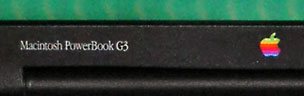
White logo on WallStreet's outside, color inside.
Hello Charles,
You were mostly correct in your reply:
[Kanga] was also the only G3 PowerBook to sport the traditionally colored Apple logo; future PowerBooks would have a plain white logo.
That is true of the Lombards onward. The WallStreet models fudged a bit on the matter with the white logo on the outside while maintaining the traditional version on the screen bezel.
-Rick
Hi Rick,
You are correct, of course. Must be brain fade that I forgot about staring at that multicolored Apple logo on the screen bezel of my Wall Street for half a dozen years.
Thanks for the correction.
Charles
Printer for Older PowerBook
From Nick:
Charles,
Just got ahold of a 867 MHz G4 PowerBook for a double saw buck - needs a new hard drive.
Anyhow, can I use my old LaserWriters, like the 16/600, with it?
If not, then can you suggest a 'newer' type inkjet or laser printer that the G4 can handle, without a lot of Mickey Mouse?
thxs
Nick
Hi Nick,
I can't say with 100 percent certainty, but I think your should be able to use the LaserWriters with your PowerBook.
Charles
Join us on Facebook, follow us on Twitter or Google+, or subscribe to our RSS news feed
Charles Moore has been a freelance journalist since 1987 and began writing for Mac websites in May 1998. His The Road Warrior column was a regular feature on MacOpinion, he is news editor at Applelinks.com and a columnist at MacPrices.net. If you find his articles helpful, please consider making a donation to his tip jar.
Links for the Day
- Mac of the Day: PowerBook 500 Series, introduced 1994.05.16. 'Blackbird' includes a 25 to 33 MHz 68040 along with smart batteries and grayscale or color displays.
- Support Low End Mac
Recent Content
About LEM Support Usage Privacy Contact
Follow Low End Mac on Twitter
Join Low End Mac on Facebook
Favorite Sites
MacSurfer
Cult of Mac
Shrine of Apple
MacInTouch
MyAppleMenu
InfoMac
The Mac Observer
Accelerate Your Mac
RetroMacCast
The Vintage Mac Museum
Deal Brothers
DealMac
Mac2Sell
Mac Driver Museum
JAG's House
System 6 Heaven
System 7 Today
the pickle's Low-End Mac FAQ
Affiliates
Amazon.com
The iTunes Store
PC Connection Express
Macgo Blu-ray Player
Parallels Desktop for Mac
eBay

