
Miscellaneous Ramblings
Miscellaneous Ramblings Review
Jumpcut, a Free Clipboard Manager for OS X
Charles Moore - 2009.10.26 - Tip Jar
Rating: 
I wouldn't want to get along without a clipboard buffer (a.k.a. multiple-clipboard utility) for production work - or indeed for any type of text-crunching. I'm absent-minded, and I'd like to have a dollar for every time I've copied something to the clipboard to "park" it for a moment or two and then lost it by copying something else over it.
A clipboard buffer eliminates this unfortunateness by storing a usually-configurable number of clipboard entries that can be retrieved via a pulldown menu in the OS X menu bar.
Clipboard buffering means essentially sustaining pasteable access to text you've cut or copied, even after you've subsequently cut or copied something else or several something else's, and retrievably storing your clipboard's history over a user configurable interval
It's also convenient if you're copying several items for pasting somewhere else. It's a lot slicker to add them to the Clipboard and then paste them sequentially when you're in the other application than to do them one at a time by going back and forth. A clipboard buffer can be a real productivity-enhancer.
While Apple has not chosen to build this feature into the Mac OS, happily there are several third-party solutions that do the job very well. Some examples are Jumpcut (freeware), PopCopy ($14), CuteClips 3 $15, trial version available), LaunchBar (€24 shareware, and much more than just a clipboard manager), and PTH Pasteboard Pro ($25, and supports sharing clipboards over a network).
PTHPasteboard Goes Commercial
The one I've been using for the past several years has been PTH Pasteboard, the freeware feature-diminished version of PTH Pasteboard Pro that's still an an excellent basic Clipboard buffer and manager
It's always disconcerting when a software application you've come to depend on suddenly gets transformed from freeware to shareware or commercial software that carries a substantial registration fee.
PTHPasteboard was once free - but no longer.
So it is with PTHPasteboard, especially since it used to state on the website (as recently as 2008): Best of all PTHPasteboard 4 is and has always been free. And in 2002, it read, "PTHPasteboard is free and will always be free."
Not any more. PTHPasteboard's developer, PTH Consulting, a small software company based out of Flower Mound, Texas, has evidently decided to terminate the free version and make the program pure 30-day demoware, stating in the release notes for version 4.5.0 (09/02/2009 - The program is now at version 4.5.2 and OS X 10.5 "Leopard" has been supported since 4.5.1):
"Requires: PRO serial number in order to work. The free version of PTHPasteboard is not and will not be supported under Snow Leopard. You may request a 30 day demo from within System Preferences after install"
The kicker is that the registration fee for PTHPasteboard PRO is a whopping $24.95, which seems mighty steep for a Finder utility in these days when iPhone apps selling in a range of 99¢ to $4.99. It's certainly way more than I would ever consider paying for a clipboard buffer, which is all I've ever used PTHPasteboard for.
Now, PTH Pasteboard PRO offers a great many more features and functionality beyond providing multiple Clipboards (incidentally, so does LaunchBar), and if one finds those functions useful, they may be able to discern 25 bucks worth of value in PTH Pasteboard PRO, but I don't and can't as long as a satisfactory cheaper substitute in available.
Some frustrated PTHPasteboard users have been using "bait and switch" terminology venting their displeasure at the change on forums. I think that's a bit harsh. The base program was offered for a long time gratis, and PTH Consulting is completely within its rights taking it commercial - but it's sent me looking for an Open Source alternative that can meet my clipboard management needs.
Jumpcut Is Free
Happily I've found a nice Cocoa application, Jumpcut, that provides the clipboard buffering that absent-minded folks like me need - and does it efficiently and elegantly.
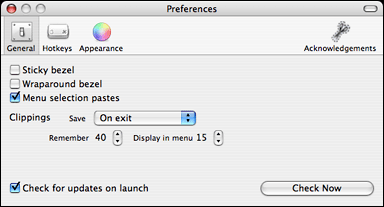 Jumpcut, unlike PTHPasteboard, doesn't do anything other than
that basic function, but that's all I want or need it to do. It works
very much like the free version of PTHPasteboard did, giving you the
options of accessing stored clipboard archives from a menu bar icon
pulldown menu or from a palette.
Jumpcut, unlike PTHPasteboard, doesn't do anything other than
that basic function, but that's all I want or need it to do. It works
very much like the free version of PTHPasteboard did, giving you the
options of accessing stored clipboard archives from a menu bar icon
pulldown menu or from a palette.
Installation couldn't be simpler; download the application, then decompress and drag it to your Applications directory. When launched, a little "scissors" icon will appear in your menu bar, and whenever you cut or copy a text item, it'll be added to the current stack of clippings Jumpcut has recorded.
Clippings can then be accessed two ways:
- Under the menulet icon, choose a clipping from the Jumpcut menu.
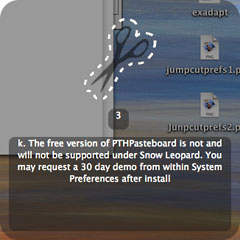
- If you enable the popup bezel in Jumpcut's preferences, you can just press the hotkey shortcut to activate Jumpcut's floating bezel. (The default hotkey combo is Control-Option-V.) A little window similar to ones used in OS X's Application Switcher and brightness controls will appear. Hold down the modifier keys (default hotkey for this is the Control-Option combo) and use the arrow keys to scroll through your stack of stored snippets.
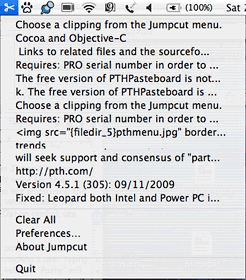
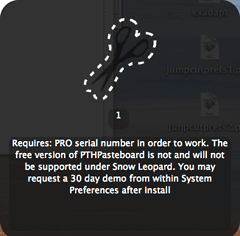
Clippings in the menulet (left) and accessed with the hotkey
(right).
 When you select a clipping,
Jumpcut will paste it into your application. The clipping will remain
on the pasteboard so you can also still paste it normally until it
eventually scrolls off the stack. Jumpcut remembers the last clipping
you selected and moves it to the top of the stack, similarly to
PTHPasteboard.
When you select a clipping,
Jumpcut will paste it into your application. The clipping will remain
on the pasteboard so you can also still paste it normally until it
eventually scrolls off the stack. Jumpcut remembers the last clipping
you selected and moves it to the top of the stack, similarly to
PTHPasteboard.
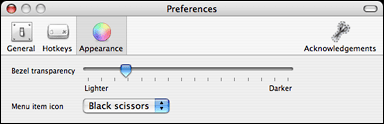
The bezel's degree of translucency/opacity can be set with a slider in the preferences.
 It
works for me, and it's free.
It
works for me, and it's free.
The developer, a former PTHPasteboard fan, began the Jumpcut project in 2002, and says development is ongoing, but that releases will be infrequent now that the basic functionality is nailed down. Reportedly, the program supports Mac OS X 10.6 "Snow Leopard", although I'm still running OS X 10.5.8 "Leopard" and haven't been able to test that.
Jumpcut 0.63, the current version, requires Mac OS X 10.3 "Panther" or later. Version 0.54 "should work with OS X 10.1 and later".
Join us on Facebook, follow us on Twitter or Google+, or subscribe to our RSS news feed
Charles Moore has been a freelance journalist since 1987 and began writing for Mac websites in May 1998. His The Road Warrior column was a regular feature on MacOpinion, he is news editor at Applelinks.com and a columnist at MacPrices.net. If you find his articles helpful, please consider making a donation to his tip jar.
Links for the Day
- Mac of the Day: Power Mac 9500, introduced 1995.05.01. The first PCI Power Mac has 6 expansion slots, speeds of 120 and 132 MHz.
- Support Low End Mac
Recent Content
About LEM Support Usage Privacy Contact
Follow Low End Mac on Twitter
Join Low End Mac on Facebook
Favorite Sites
MacSurfer
Cult of Mac
Shrine of Apple
MacInTouch
MyAppleMenu
InfoMac
The Mac Observer
Accelerate Your Mac
RetroMacCast
The Vintage Mac Museum
Deal Brothers
DealMac
Mac2Sell
Mac Driver Museum
JAG's House
System 6 Heaven
System 7 Today
the pickle's Low-End Mac FAQ
Affiliates
Amazon.com
The iTunes Store
PC Connection Express
Macgo Blu-ray Player
Parallels Desktop for Mac
eBay

