
It’s getting late, but it’s not too late for some last-minute gift shopping.
If you’re a Mac user, chances are you have friends and loved ones who also use Macs and are probably on your Christmas list. If you’ve left things to the last minute, here are some ideas selected from products your humble servant has tested and/or reviewed and liked over the past year. With prices from $5 to $70, there should be something among them for almost any Mac user on your list.
Software than can be downloaded online is an especially handy choice for last-minute gift selections, so we’ll start with a couple of those.
Pixelmator 1.5 Image Editor – $59
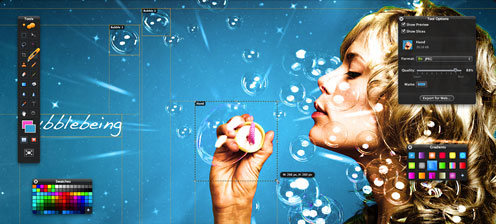
Pixelmator is a powerful and reasonably priced GPU-powered image editing tool for Mac OS X. It’s not really a fully featured alternative to Photoshop Elements, but it has plenty of power for most non-pro users, a spectacularly attractive user interface, and features quick startup, a much more nimble feel, and has a less complex and ponderous interface than Photoshop Elements.
“Under the hood,” Pixelmator is engineered to tap into OS X’s powerful native graphics technologies like Core Image, using your Mac’s hardware video muscle for image processing, as well as OpenGL and ColorSync. The relative power and sophistication of your Mac’s graphics support will determine Pixelmator’s performance somewhat. If you have a high-performance graphics accelerator with lots of video RAM, you should find real-time responsiveness across a wide variety of Pixelmator operations very lively, but I’ve found the program quite usable even on a 1.33 GHz PowerBook.
Like Photoshop, Pixelmator is a layers-based image editor that supports linking and blending layers, changing opacity, and creating clipping masks or layer masks to hide some layer portions. You can quickly create layers from photos, other pictures, selections, or even from iSight input.
Pixelmator 1.5
Pixelmator’s new click-and-drag approach in Magic Wand selecting, Paint Bucket for filling, or Magic Eraser for removing unwanted backgrounds allows the user to drag the mouse with instant results when working with these tools. Very impressive.
I especially like Pixelmator’s color correction tools, which allow you to fine-tune color values like hue, saturation, color balance, luminance, color levels, channel mixing brightness, and contrast.
Web tools in Pixelmator allow users to prepare and export images for the Web with minimal effort, whether it is an individual image or a complex page layout. Images can be optimized and saved in Web-standard JPEG, PNG, or GIF file formats with different quality settings.
The powerful Slice tool in Pixelmator can be used to slice an image into pieces, allowing each piece of an image to be optimized and saved using its own optimization settings. Saving an optimized part of an image is as easy as dragging and dropping it onto the desktop. The file size and preview of optimized slices or images are available in nearly real-time in the Pixelmator window.
System Requirements
- Mac OS X 10.5.7 Leopard or later
- Core Image supported graphics card
- Some features require iLife.
Pixelmator sells for $59 and can be purchased online for digital download. [Now available at the Mac App Store.]
For more info, see 5 Sub-$100 Apps for When iPhoto Isn’t Quite Enough.
Ohanaware Funtastic Photos – $29
Another photo editor for the Macintosh platform is Ohanaware’s exceptionally user friendly – but still powerful – Funtastic Photos, touted as a non-permanent and easily reversible photo editor with over 60 simple to use 1-Click Styles, advanced effects engine, direct sharing via Fun Cards, and more.
This powerful and easy-to-use little photo editor app. sports a vast array of photo correction and enhancement tools that tap into OS X graphics technologies like the Quartz graphics engine, Spotlight, and ImageIO Kit, and offers advanced photo enhancement technologies like nondestructive editing with unlimited “rewind” undos, shadows and highlights, blurring, captions, color manipulations, borders & frames, matte effects, blending, rotation, levels, digital flash, shadows, highlights, contrast, saturation, 1-Click Styles, water drops, reflections, greyscale, sepia-tone and more.
Even the name, while a bit cutesy, is descriptively accurate. Funtastic Photos really is fun to use, and its capabilities are genuinely impressive in an application that costs only 35 bucks (or less – see below).
Funtastic Photo’s main interface window is a file browser that can display photo archives stored in iPhoto, in folders on your hard drive, or even on other connected volumes. You select archive in a sidebar and display its contents in the standard icon/list/columns troika of view options. A tool bar at the top of the browser window has a button to access OS X Leopard’s Quick Look feature, as well as buttons for various other navigation and organization tasks. There are also a thumbnail size adjustment slider and a search field at the bottom of the main window . There is also a handy Before & After command in the View menu that provides side-by-side renderings of pre and post editing changes, as well as a fullscreen preview button.
System Requirements:
- Funtastic Photos requires a Power Macintosh G5 or Intel-based Macintosh computer running Mac OS X 10.4 or later. It is recommended to have at least 512 MB of RAM.
Funtastic Photos is currently on sale for $28.95.
For more info, see 5 Sub-$100 Apps for When iPhoto Isn’t Quite Enough.
Mac OS X Snow Leopard: The Missing Manual – $35
Here’s a gift idea that will be appreciated by any Mac user who is running Apple’s latest operating system. The latest edition of David Pogue’s Mac OS X: The Missing Manual is without question the most anticipated Mac book of any year when there’s a new Mac OS version release. My favorite Mac OS X book (and evidently most everybody else’s as well, since it’s been the the best-selling computer book in America since 2007) is back in a new revised edition of the “Missing Manuals” series flagship.
But isn’t OS X 10.6 Snow Leopard essentially just an Intel-optimized and slimmed-down update of OS X 10.5 Leopard? Well, no. Despite Steve Jobs’ disclaimer that “With version 10.6 we are hitting Pause on new features”, with this version of the operating system, OS X TMM author Pogue says “not everyone got the memo. An insane amount has changed – tiny, tweaking things, under-the-hood things, and even some big routine-changing things.” Pogue says that consequently, instead of a light and easy revision of TMM, bringing the manual up to date with Snow Leopard changes was “absolutely exhausting, but I guess somebody’s got to do it.”
Delighted you feel that way, David! I certainly wouldn’t want to be without a current version of OS X TMM, which I have long maintained is the OS X book to have if you’re only having one.
It’s not the cheapest Mac OS reference book. but at $34.99, which holds the price line for US readers, and you can get it now for $22.28 from Amazon.com. We Canucks got a stiff price hike from Canadian $34.99 on the Leopard edition to Canadian $43.99 for this latest version, which is even more than the $41.95 we paid for the Tiger edition, but currently offered at Amazon.ca for C$24.14
As usual with David Pogue books, this latest OS X TMM iteration is a fun and entertaining read as well as being highly informative and helpful, striking just the right balance between attention to detail, and easy, pleasant readability.
- Mac OS X Snow Leopard: The Missing Manual
- David Pogue
- ISBN 13: 9780596153281
- 912 pages
- $34.99 US, £30.99 GB
- order@oreilly.com
- 1-800-998-9938
- 1-707-827-7000
For more info, see Moore’s review of Mac OS X Snow Leopard: The Missing Manual on PBCentral.
Targus Wireless Mouse for Mac – $50
Targus Bluetooth Laser Mouse for Mac – $70
With its new line of computer mice for Mac, Targus has taken optical tracking technology up top, and I’m happy to report that their Touch Scroll four-way scrolling and quick scroll function works very well.
The same basic Touch Scroll-equipped mouse is available in two models. The Wireless Mouse for Mac and the Bluetooth Laser Mouse for Mac are identical in size, shape, and a large proportion of their engineering, but one communicates with the computer via a 2.4 GHz Radio Frequency (RF) through a micro receiver that plugs into a USB port, while the other connects via Bluetooth, obviating the need for a receiver dongle.
As is becoming customary with USB RF wireless receivers, the one for the Targus Wireless Mouse is tiny, meaning you may be able to leave it plugged in while your laptop is carried or stored in a computer case or sleeve. If not, there is a handy slot inside the upper mouse housing for storing or transporting the RF receiver when it’s unplugged from the computer.
The four-way optical Touch Scroll feature is activated by moving your fingertip laterally or longitudinally on the optical sensor that takes the place of a conventional scroll wheel. With 1200 dpi tracking resolution sensors, both of these mice are fast and accurate for precision pointing tasks.
Basic click and scroll functions work just fine with OS X’s default drivers, but a download and install of Targus’ proprietary driver software is required in order to use the programmable third and forth buttons which can be configured for individualized one-click access to favorite functions, programs, or AppleScripts, and which are located unobtrusively on the left side of the lower housing in a rocker configuration that stays out of your way when you’re not using them yet is conveniently accessible.
Both mice require Mac OS X 10.4 or better, and the Bluetooth model demands a Bluetooth-equipped Mac.
In summary, these are really nice computer mice, and the Touch Scroll technology is genuinely innovative and not a gimmick. The build quality and finish are excellent, and they’re backed by a one-year Targus limited warranty.
- The Targus Bluetooth Laser Mouse for Mac retails for $69.99 and is now available from Amazon.com for $22.74.
- The Targus Wireless Mouse for Mac sells for $49.99 and is now available from Amazon.com for $27.99.
For more info, see 4-way Touch Scroll in Targus Mice More than Just a Cool Gimmick.
Targus for Mac USB Hub – $30
Also part of Targus’ “for Mac” family of computer peripherals and accessories is the Targus for Mac USB Hub, designed especially for Mac users.
The hub’s main claim to a distinction its its avant garde “for Mac” styling, themed to match the soft=cornered, ovoid form factors of the Targus for Mac mice and Bluetooth Presenter products, as well as its wraparound cable made of a soft material that stores snugly and neatly around the hub body to protect the USB ports when not in use and when the unit is carried in a pocket or laptop case, protecting them for damage and ingress of tiny debris.
Minimalist in form and simplicity of engineering, the Targus for Mac USB Hub simply extends a single USB 2.0 port’s connectivity from one device to four, with a maximum throughput of 480 Mbps.
The hub of measures 3.5″ x 1.75 x 0.75 and weighs a feather-light 1.8 ounces. The wraparound cable unfolds to a maximum of 9″, and System requirements specify Mac OS X 10.2 or later, although I don’t see why it wouldn’t work with any version of the Mac OS that supports USB.
The finish and the quality of materials and workmanship are first-rate, the price is competitive at $29.99, and it’s covered by a one-year limited warranty.
- The Targus for Mac USB Hub retails for $29.99 and is now available from Amazon.com for $22.74.
For more info, see 2 Compact Portable USB 2.0 Hubs.
UNIEA Haptique Hard Shell Case for Unibody MacBook – $50
Unibody MacBooks and MacBook Pros are spectacularly attractive, and the thought of it getting bumped or scratched in negotiating the inevitable contact, wear, and abrasions of life in the mobile environment is painful.
One solution is a hard shell case like the Haptique Hard Shell Case by UNIEA, a molded plastic snap-on carapace designed to cover and protect your Unibody MacBook and ensure that its elegantly handsome looks and jewelry-quality finish are preserved pristine for when you want to show it off or just enjoy the pleasure of looking at it yourself.
The Haptique is pitched as combining the “leather-like look and feel” of a soft case with the protection of a hard case while not obstructing ventilation or access to the computer’s I/O ports, being designed to allow the computer to be opened and closed and operated without restriction while remaining in situ.
It would be difficult to improve on the appearance of the gorgeous Unibody MacBook (and IMHO neither the Haptique nor any other hard shell case does), but having the machine enshrouded for handling and transport does give you a reassuring feeling that it is insulated and protected from wear, tear, and trauma. The case’s surface texture also provides a more positive ‘”higher-traction” grip on the MacBook, especially when carrying one-handed.
The Haptique is available in a selection of six colors – White, Black, Pink, Blue, Green, and Orange – and sells for $49.95.
For more info, see Moore’s review of the UNIEA Haptique Hard Shell Case on PBCentral.
XPad Slim Non-Slip Laptop Desk, Cooler, and Heat Shield – $25
Edova Innovations’ XPad is a disarmingly simple but thoughtfully engineered device that both enhances the computer’s passive cooling efficiency and also serves as an insulated lap desk to shield your thighs from heat
One of the things I especially like about XPad is that it’s a one-piece unit with no moving parts that is surprisingly light in weight despite being a large enough to comfortably support a 17″ MacBook Pro or PowerBook.
The XPad is an ABS plastic injection molding with four raised platforms configured in the X-pattern (from which the product derives its name) at the four corners. The tops of these platforms are coated with a rubber-like “traction material” to contact the bottom of the computer and inhibit it from sliding around. The 1/4″ air space between the platforms allows air to circulate freely under the computer by natural convection, helping it cool more efficiently with no moving parts, pesky cords, or cooling fans. Edova claims that using an XPad can let your laptop run cooler by up to 30° and shield your lap from heat by up to 60°.
The underside of the XPad is coated with a synthetic EVA fabric padding whose looks, feel, and texture are similar to “wetsuit” material, providing a soft, non-scratching contact footprint and enough traction to make the rig feel secure on your lap. XPad is a one-size-fits-all design that can accommodate laptops up to 17″.
XPad sells for $24.95 direct from Edova and comes with a 30 day 100% satisfaction guarantee and a one-year limited warranty.
For more info, see Moore’s review of XPad on PBCentral.
Keywords: #christmas
