Miscellaneous Ramblings
Miscellaneous Ramblings Review
SteelSeries S&S Pro Gaming: Can a Mouse Pad Really Be Worth $30?
Charles Moore - 2008.06.23 - Tip Jar
Rating: 
Thirty bucks for a mouse pad? I'm kidding, right?
Nope. The subject of this review is a mouse pad, it indeed sells for US$29.95, and after you use one of them for a while, you'll wonder how you ever got along without it.
Most of us spend a lot of money on our computer systems. Arguably, using a less-than-optimal mouse pad is a bit like buying a high-performance car and putting cheap tires on it.
It makes sense to spend a little more on a high-performance mouse pad in order to improve and streamline our human interface with our powerful and expensive computer hardware.
What is there to say about mouse pads? Quite a bit actually. The mouse and keyboard are your most intimate tactile connection with your computer, and the choice of pointing device setup can make the difference between a pleasurable experience and fatigue - or even in some cases repetitive stress injury (RSI).
One key to comfortable mousing is to have a low friction surface for the mouse to track on, and I have discovered that the most satisfactory and lowest-friction mouse pads are hard plastic textured ones designed for serious gaming, even though I'm not a gamer myself.
For several years, my favorite mousing surface was the SteelSeries 4D gaming mouse pad, a fairly large (although smallish by gaming standards) double-sided pad with one side finished glossy smooth and the other textured. The hardened plastic surface offers little resistance to mouse movement, especially the textured side.
 Now, the rough surface offering the lowest
resistance is somewhat counter-intuitive, and some might expect the
smooth side to be the slippery one, but not in this context. Back to
our analogy with vehicle tires: on glare ice, the most efficient
traction "tread" for a tire would be a completely treadless racing
slick. It has to do with contact surface.
Now, the rough surface offering the lowest
resistance is somewhat counter-intuitive, and some might expect the
smooth side to be the slippery one, but not in this context. Back to
our analogy with vehicle tires: on glare ice, the most efficient
traction "tread" for a tire would be a completely treadless racing
slick. It has to do with contact surface.
On the other hand, a textured surface presents a much smaller contact patch, or, strictly speaking, a relatively large number of very small contact patches. If the contact material on both surfaces is of a composition that offers little inherent friction resistance, which is the case with both the hardened plastic of these SteelSeries mouse pads and the contact patches on computer mice, then the textured surface will present the lowest friction coefficient.
Since the SteelSeries (formerly SteelPad) 4D mouse pad was introduced about four years ago. SteelSeries has added a whole range of other hard plastic professional gaming pads, one of the most popular designs being the SteelSeries S&S.
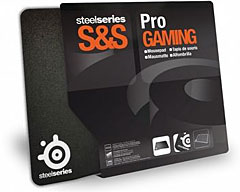
The S&S pad is about 33% larger than the 4D and is single-sided with a coarser surface texture than the 4D's textured side, making it even quicker and slicker. The two mice I use most often are the MacMice Danger Mouse and the ergonomic AirOBic Mouse (formerly Quill Mouse). Both glide across the S&S mouse pad with as little friction resistance as I've ever encountered on any mousing surface. This is especially noticeable and appreciated with the AirOBic I have, which is a very large mouse (although reasonably light) with four relatively small contact pads and designed to take the weight of your hand and wrist/forearm for low-stress "gripless" mousing. This is generally quite comfortable, but it does make this mouse sensitive to mousing surfaces that offer much friction resistance.
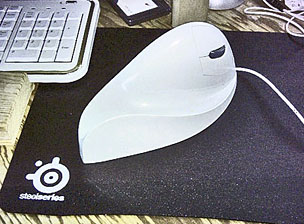 The
SteelSeries S&S simply doesn't, and the big AirOBic Mouse really
became low-effort when I affixed a set of SteelSeries Glide MS Teflon
glide pads, which are self-adhesive and fit the AirOBic's contact pads
perfectly. Greased lightning!
The
SteelSeries S&S simply doesn't, and the big AirOBic Mouse really
became low-effort when I affixed a set of SteelSeries Glide MS Teflon
glide pads, which are self-adhesive and fit the AirOBic's contact pads
perfectly. Greased lightning!
The SteelSeries Glide MS pads are actually designed especially for Microsoft's range of optical gaming mice to reduce friction and provide a smoother gliding experience. The Teflon feet, when attached to the feet of your mouse, reduce friction between the mouse and the mousepad. This makes the glide of the mouse much smoother, especially when used on mousepad made of a hard material like metal, glass or plastic.
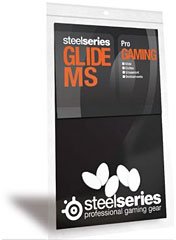
Teflon offers the lowest coefficient of friction (0.1 or less) of any man-made solid material, which makes it the perfect material for this purpose. Glide MS pads are recommended for use with all mousepads, especially for use with hard mousepads (hard plastic, glass, and metal) such as the SteelSeries range. SteelSeries Glide MS pads sell for $4.99 + shipping.
Unlike the SteelSeries 4D, which came with a separate, soft underpad made out of a "stickier" plastic material that cushions the mousing surface and provides traction to keep the pad from skating around on the desk or table surface, the SteelSeries S&S pad has high-traction material bonded directly to the back surface of the pad. This is a lot more convenient than a two-piece solution.
According to Wikipedia, the first mousepad was designed by Jack Kelley of Herman Miller in 1969, while details of a mousepad designed by Armando M. Fernandez were published in the Xerox Disclosure Journal in 1979 with the description:
"CRT CURSER CONTROL MECHANISM PAD
"To assist the operation of a cathode ray tube pointer 10 wherein a metal ball is rolled on a hard surface, the disclosed pad may be utilized. A resilient, rubber-like material 12 is bonded or otherwise attached to a hard base material 14 which keeps the rubber-like material flat. The base has four rubber-like pads 16 on the opposite side from the resilient material to refrain the pad from sliding on the surface of a table, for instance."
The article notes that by 1982, most users of the Xerox ball mouse were using mousepads, and the Oxford English Dictionary dates the term "mouse pad" to the 25 August 1983 issue of InfoWorld.
In the development of mouse pad technology, a relatively recent subspecies is "gaming grade" mousepads, like the SteelSeries products, available in a wide variety of sizes, materials, and textures to suit the different sensitivity settings that gamers may prefer.
S&S stands for Steel and SK, the latter being Schroet Kommando (SK), one of the world's most well known Counter-Strike teams, which designed it. The SteelSeries S&S was developed in cooperation with the legendary SK.swe Counter-Strike team back in 2003/04. SK.swe Counter-Strike won six major international grand-slam titles during that period. The S&S's textured hard plastic surface facilitates performing minimal and extremely precise mouse movements and is made of a special responsive plastic compound. When you have prize purses worth over $25,000 to be won, you cannot afford to have inadequate hardware.
 As I mentioned, I'm not a gamer, so I can't really evaluate
these mouse pads in the context for which they are primarily designed.
I assume that the S&S pad provides superb gaming performance, or it
wouldn't be the bestseller in that category. But I can say that as I
noted above, if you are just interested in optimum mouse performance
and user-comfort, it's well worth investigating gaming mousepads
anyway. I just don't want to mouse on any other surface any more.
As I mentioned, I'm not a gamer, so I can't really evaluate
these mouse pads in the context for which they are primarily designed.
I assume that the S&S pad provides superb gaming performance, or it
wouldn't be the bestseller in that category. But I can say that as I
noted above, if you are just interested in optimum mouse performance
and user-comfort, it's well worth investigating gaming mousepads
anyway. I just don't want to mouse on any other surface any more.
Until I checked out the SteelSeries S&S, I considered the SteelSeries 4D (which remains available) to be the best mousepad I'd ever used, and I still love it, but the S&S is even better. The only downside is the price. While the SteelSeries 4D's US$25 tag seems steep enough for a mouse pad, the S&S sells for five bucks more. On the other hand, these pads are very durable. After more than three years of intensive use, the 4D still looks brand new, and they're also easily washable.
Addressing the price issue head-on, SteelSeries points out that all of their mousepads are thoroughly researched, tested, and optimized for serious gaming, tested for material quality and suitability, durability, glide, precision, and compatibility, all of which inevitably makes the product more expensive than a typical off-the-shelf mousepad.
SteelSeries S&S highlights:
- SteelSeries claims it is most popular hard plastic gaming mousepad in the world
- Includes protective nylon sleeve
- New improved surface released in spring 2007
- Compatible with optical, laser and ball mice
Specifications for SteelSeries S&S:
- Material: Textured hard plastic
- Surface treatment: Coating
- Dimensions: 12,6" x 10,6" - thickness 0,08"
- Size: Medium
- Glide: Smooth
The SteelSeries S&S solo (no nylon sleeve) sells for $29.99 + shipping)
Link: SteelSeries S&S solo
Join us on Facebook, follow us on Twitter or Google+, or subscribe to our RSS news feed
Charles Moore has been a freelance journalist since 1987 and began writing for Mac websites in May 1998. His The Road Warrior column was a regular feature on MacOpinion, he is news editor at Applelinks.com and a columnist at MacPrices.net. If you find his articles helpful, please consider making a donation to his tip jar.
Links for the Day
- Mac of the Day: Motorola StarMax 3000, introduced 1999.09.07. This inexpensive clone used lots of off-the-shelf parts.
- Support Low End Mac
Recent Content
About LEM Support Usage Privacy Contact
Follow Low End Mac on Twitter
Join Low End Mac on Facebook
Favorite Sites
MacSurfer
Cult of Mac
Shrine of Apple
MacInTouch
MyAppleMenu
InfoMac
The Mac Observer
Accelerate Your Mac
RetroMacCast
The Vintage Mac Museum
Deal Brothers
DealMac
Mac2Sell
Mac Driver Museum
JAG's House
System 6 Heaven
System 7 Today
the pickle's Low-End Mac FAQ
Affiliates
Amazon.com
The iTunes Store
PC Connection Express
Macgo Blu-ray Player
Parallels Desktop for Mac
eBay

