
Miscellaneous Ramblings
Miscellaneous Ramblings Review
Make Your Own Custom Greeting Cards with Sophie's Cards
Charles Moore - 2008.06.02 - Tip Jar
Rating: 
Value isn't just about what you pay for your Macintosh.
Personal computers are a fairly expensive item for most of us, even at today's more commodified prices, but they can help earn their keep by saving you money in other areas. Email is the emblematic example of this for most of us. I spend a fraction on snail-mail postage compared to what I used to back in the days before email. As a professional writer, postage was my most significant office expenseup into the mid-90s, but I send so little business-related hard copy mail these days that it's barely consequential as a business expenditure.
Another way your computer can save you money is if you use it to make your own custom greeting cards. There are a number of good alternatives in card-creation software available, but the one I find myself using most often is FileMaker-based Sophie's Cards, which supports a variety of half- and quarter-fold formats and custom envelope creation, as well as postcard-type cards - including extensive libraries of hundreds of photographic images and text greeting messages.
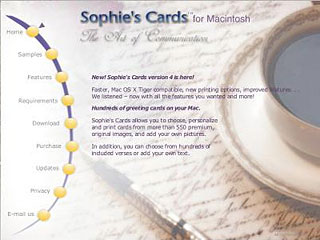
Sophie's Cards also allows you to import your own photos or art images and compose your own text.
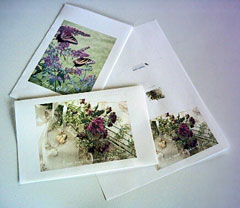 The beauty of a program like Sophie's Cards is that you
can not only save money, but also create personalized cards with just
the right image and sentiments expressed for any particular person or
occasion.
The beauty of a program like Sophie's Cards is that you
can not only save money, but also create personalized cards with just
the right image and sentiments expressed for any particular person or
occasion.
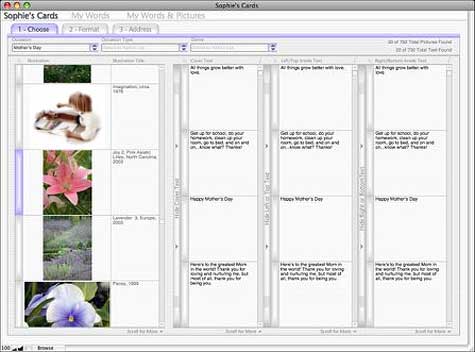
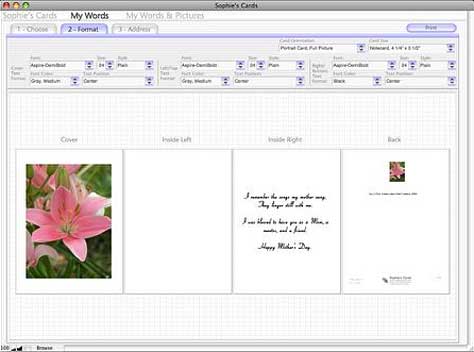
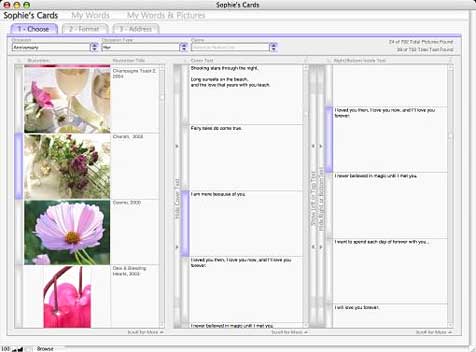
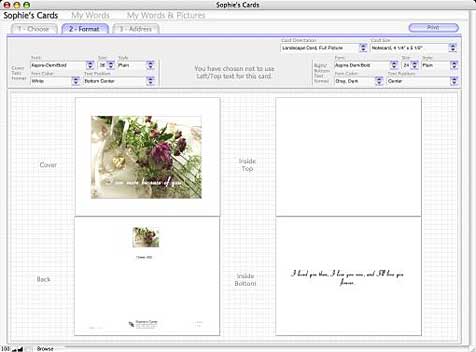
You should be able to find a suitable card image for any occasion in the library. Occasion types that may be selected include Anniversary, Announcement/Invitation, Apology, Birthday, Congratulations, Engagement, Farewell, Father's Day, Friendship, Get Well, Holiday, Just For Fun, Miss You, Mother's Day, Riddles For Kids, Sympathy, Thank You, and Valentine love, providing plenty of attractive and tasteful choices that can be mixed and matched using the card format pane, which is arranged in four columns representing the front, left inner, right inner, and back panels of the card.
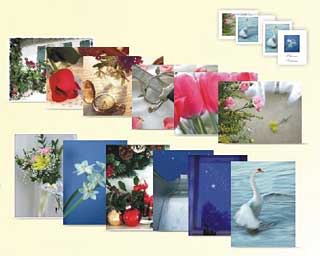
The photography is generally spectacular, with a wide selection of genre themes. The photographic images are uncredited, but the photographer or photographers are true artists, and the pictures are superb - more than a few of them arrestingly beautiful. The selection is eclectically varied in subject matter and mood, so you should have no problem finding just the right image for any occasion and recipient. The program's developers aren't kidding when they say you should never have to send the same card twice. The challenge is deciding among so many excellent alternatives.
Using Sophie's Cards is straightforward. The program uses a tab interface and selection panes similar to a spreadsheet.
- Select an Occasion (including holidays) and the program offers you a menu of appropriate images and verses. You can apply a particular color or style on just one or all words on a card or envelope. Text can be positioned with several options, superimposed over front cover photos, and on the inside faces and the back of the card in portrait or landscape format.
- or-
- Select a Sophie's Cards photo from Occasions or Picture Type, and add your own words using My Words.
- or-
- Easily import you own pictures to create a completely personalized card using My Words & Pictures.
- Print envelopes with an easy to use address feature.
- Track cards you have sent with the Card History feature.
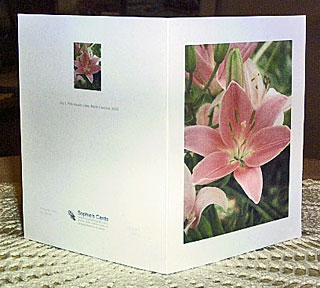 The cards created by Sophie's Cards are very classy and
professional-looking, complete with thumbnails and information about
the front panel image on the back, along with attribution of the
verse/text selections used and a Sophie's Cards logo and thumbnail of
the cover image on the back.
The cards created by Sophie's Cards are very classy and
professional-looking, complete with thumbnails and information about
the front panel image on the back, along with attribution of the
verse/text selections used and a Sophie's Cards logo and thumbnail of
the cover image on the back.
Print in nine different card sizes, and matching envelopes, including note card, half fold, postcard, and "Framable art", in both US and international sizes.
The program will print to standard 8-1/2 x 11 paper, but of course will work best with proper card stock paper, such as available from Avery or Epson, for which size configuration options are provided in the menus. You can keep track of cards that you have sent with the Card History feature.
You can specify landscape or portrait oriented cards with full or small photos, with or without cover text. There is also a custom envelope printing template with fields in which you can enter "to" and "from" addresses with your specified font, size, font color, and text alignment. You can also import addresses.
New pictures (and verses - currently more than 700) are added with each successive version, as the developers' mission statement is to continue to grow the program's eclectic content in aid of making Sophie's Cards blend the ideal with the real - a mirror of life as it should be back in the days "when communication still meant something; when the thought behind the words were more important than the words themselves - when expression was an Art." A charming sentiment in itself.
Quality stationery, which no electronic messaging can replicate, coupled with the look of a fine writing instrument written in your own hand (if you like), communicate more than the individual components. It means you had time and took the effort to express yourself. Sophie's Cards makes all that possible.
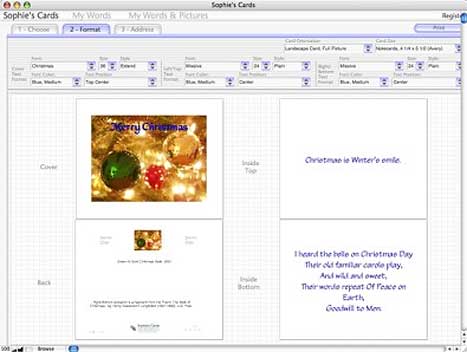
The application's interface design is functional and not unattractive, but it does not closely follow Mac OS appearance conventions. It looks sort of like a Mac program, but not quite. Sophie's Cards was developed in FileMaker Pro.
If you are looking for a greeting card creation program for the Mac, you really should check out Sophie's Cards. Notwithstanding its un-Mac-like appearance, this is a very cool card creation application, and its content database puts it in a class by itself, capable of making very classy-looking greeting cards.
New in version 5L.6.4.4:
- Sophie's Cards is now "Leopard" (Mac OS X 10.5.x) compatible
Sophie's Cards' official system requirements specify any Power PC G3, G4, G5 or Intel-based Mac with at least 256 MB of RAM running Mac OS X v10.4.8 through 10.5.x; 1 GB of available hard disk drive space; and a photo quality inkjet printer. However, 1 GHz or better is recommended, and my experience running the program on a 1.33 GHz G4 PowerBook inclines me to the view that using it with anything less than 1 GHz of G4 power would be excruciatingly slow. It's tolerably usable on my 'Book, but pretty sluggish performing some functions. Of course, Sophie's Cards should fly on any Intel-based Mac.
System support: PPC/Intel
Sophie's Cards is $39.95 demoware. The downloadable version is a fully enabled demonstration copy that prints watermarks on the back of cards, and front and back of envelopes until it is registered. The program terminates after 14 days if it is not registered. Registration eliminates the watermarks. You can register at any time before or after the expiration to fully enable the Program.
Join us on Facebook, follow us on Twitter or Google+, or subscribe to our RSS news feed
Charles Moore has been a freelance journalist since 1987 and began writing for Mac websites in May 1998. His The Road Warrior column was a regular feature on MacOpinion, he is news editor at Applelinks.com and a columnist at MacPrices.net. If you find his articles helpful, please consider making a donation to his tip jar.
Links for the Day
- Mac of the Day: PowerBook 500 Series, introduced 1994.05.16. 'Blackbird' includes a 25 to 33 MHz 68040 along with smart batteries and grayscale or color displays.
- Support Low End Mac
Recent Content
About LEM Support Usage Privacy Contact
Follow Low End Mac on Twitter
Join Low End Mac on Facebook
Favorite Sites
MacSurfer
Cult of Mac
Shrine of Apple
MacInTouch
MyAppleMenu
InfoMac
The Mac Observer
Accelerate Your Mac
RetroMacCast
The Vintage Mac Museum
Deal Brothers
DealMac
Mac2Sell
Mac Driver Museum
JAG's House
System 6 Heaven
System 7 Today
the pickle's Low-End Mac FAQ
Affiliates
Amazon.com
The iTunes Store
PC Connection Express
Macgo Blu-ray Player
Parallels Desktop for Mac
eBay

