
Miscellaneous Ramblings
Miscellaneous Ramblings Review
SimpleTech SimpleDrive: Fast and Stylish
Charles Moore - 2008.09.23 - Tip Jar
Rating: 
Anyone using Mac OS X 10.5 "Leopard" will need a second hard drive in order to take advantage of the Time Machine automatic backup feature.
I was skeptical about Time Machine, when it was first announced as a Leopard banner feature enhancement, but I quickly became a convert. Time Machine is slick. Basically, you connect an external hard drive (only the "pro" desktop Macs have room for a second internal hard drive) and let it do its stuff with no fuss or bother. It's the slickest backup software I've ever used by a wide margin.
There is a vast selection of external hard drives available...
I have an older FireWire external drive and a couple of USB 2.0 drives as well. Two of these contain relatively small-capacity hard drives pulled from 'Books that have been upgraded, but the third is the very cool and commodious SimpleTech SimpleDrive that I mentioned in my column about Time Machine and drives last week, styled by the illustrious Italian design firm, Pininfarina, which has created the delectable shapes of Ferrari automobiles since the 1950s.
Pininfarina
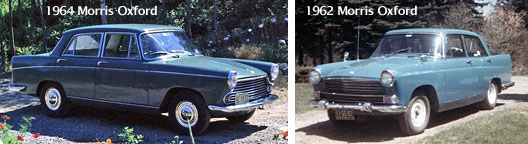
I'm a motorhead from way back. Besides styling most Ferraris since in 1952, Carozzeria Pininfarina has also designed models of Maserati, Cadillac, Rolls-Royce, Nash, Peugeot, Austin, Morris, Riley, Wolseley, MG, Jaguar, Volvo, Alfa Romeo, Ford, Citroen, Fiat, Mitsubishi, Honda, Lancia, and others. I was and am an aficionado of the Farina-designed 1950s-'60s vintage Austin A55 and A60 and Morris Oxford models, having owned some 17 examples, including these two examples.
Over the past 78 years, Pininfarina has turned out hundreds or thousands of the most alluring automobile designs ever conceived. For a taste, check out the galleries and multimedia videos on their website.
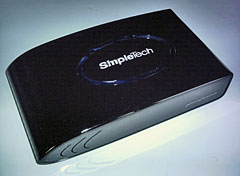
In recent years Pininfarina has also worked in the fields of product and interior design, hence the new SimpleTech SimpleDrive External Hard Drive - designed by Pininfarina.
Sadly, last month Pininfarina CEO Andrea Pininfarina, 51, was killed instantly when his Vespa scooter collided with car driven by a 78-year-old who had cut in front of him. The firm was founded by Andrea's grandfather, Battista "Pinin" Farina (who later legally changed the family name), in 1930 and was administered by his father, Sergio Pininfarina, now a Life Senator, who developed the family company in the postwar years. Andrea Pininfarina took over in 1994 and is survived by his wife, Cristiana, and three children.
SimpleDrive
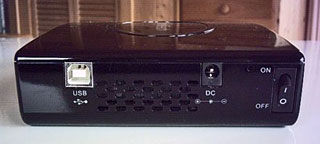
My Pininfarina-designed SimpleDrive is a 3.5", 7200 rpm, 500 GB USB 2.0 unit, but these drives are also available with USB 2.0 and FireWire interfaces, giving you the best of both worlds - with USB 2.0's wider range of support and FireWire's faster throughput (notwithstanding USB 2.0's nominally higher 480 Mb/sec bandwidth, real world throughput is less than FireWire's 400 Mb/sec), and easy, dependable bootability.
 I
recommend the dual-interface (FireWire/USB 2.0) model if your budget
will stand it, but USB 2.0 is more than adequate for use with Time
Machine. However, since my PowerBook's hard drive is
only 80 GB, I'm laughing with excess capacity.
I
recommend the dual-interface (FireWire/USB 2.0) model if your budget
will stand it, but USB 2.0 is more than adequate for use with Time
Machine. However, since my PowerBook's hard drive is
only 80 GB, I'm laughing with excess capacity.
The SimpleTech Pininfarina drive is available in several capacities and a variety of colors, with each respective color indicating the capacity of the drive, to wit: Pearl White (250 GB), Sapphire (320 GB), Onyx (500 GB), and Charcoal Gray (750 GB and 1 TB).
My 500 MB unit is thus Onyx (or jet black) with an extremely high gloss finish, which looks terrific, and I much prefer gloss to the matte black finish of the black MacBook. It does show dust and fingerprints, but it's a pleasure to keep this baby polished.
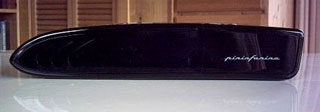
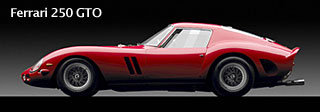
In profile, the SimpleDrive brings to mind the wedge-shape of contemporary sports-racing cars, not that it's a scaled-down caricature of an automobile, but an original piece of design art in its own right. However, its thematic automotive lineage is unmistakable, with classic Ferrari styling cues like the boldly scalloped louvers on either side of its wedge-shaped nose, which date back to at least Pininfarina's legendary Ferrari 250 GTO of 1962/63.
On top of the drive housing is an oval-shaped "Capacity Meter" - an LED ring in a cool blue, with four sectors respectively representing one quarter of the drive's storage capacity. For example, if one out of the four sectors is lit, your drive is a quarter full, and so forth. When SimpleDrive is powered up, the Capacity Meter illuminates to provide visual indication of the amount of available storage left on the drive. When available storage space falls below 10%, the capacity meter flashes red for 10 seconds and then goes off.
The center of the Capacity Meter oval is actually an oversized "One-Click Button" that you can press to launch a "total media backup" of the files on your computer to the external drive using the bundled ArcSoft TotalMedia Backup software, which is incredibly slow and clunky compared with Time Machine. If you're running Leopard, don't even bother to install TotalMedia Backup.
However, if you're still using Tiger, Panther, or even Jaguar, the One-Click Backup support software that comes installed on the drive can be used to schedule manual, custom, daily, weekly, or monthly backups.
Having 500 GB or more capacity in your backup drive is great, but if your budget is a bit constrained, the 250 GB model will have plenty of Time Machine capacity for many users.
The full-sized 3.5" 7200 rpm Pininfarina SimpleDrive is a feast for the eyes and offers excellent performance, but it is a bit big and bulky for packing around in a laptop case or backpack. This should not be a problem for use at your home or office workstation, but for serious road warriors, SimpleTech offers the same gorgeous Pininfarina styling styling in the SimpleDrive Portable, a smaller package (about the size of a 1/32 scale model car) that is much lighter (0.26 pounds as opposed to 2 pounds for the full-sized drive) and smaller to carry on the road, but ruggedized for travel. The USB 2.0 only drive uses notebook-type 2.5" 5400 rpm drive modules with 8 MB of buffers, maxing out at 250 GB capacity (the full-size 3.5" 7200 rpm units available with up to a terabyte).
Not that 5400 rpm is any slouch. It's also probably quieter than the 7200 rpm 3.5" drives. SimpleTech describes the SimpleDrive as "designed for quiet operation", but the 3.5" model whines like a jet aircraft engine spooling up and then settles down to a more subdued - but still very audible - hum. Happily, the drive automatically spins down if there is no drive access for 10 minutes or so.
In summary, I've been very happy with this drive in general. It looks great, performs well, and makes a perfect companion for Time Machine. Rating: 3.5 out of 4.
Appendix
System Requirements
- PowerPC G4 400 MHz (recommended)
- Mac OS X (10.2.8, 10.3 10.4 or 10.5) operating system
- 100 MB free hard disk space
- 256 MB RAM recommended
- Available USB 2.0/1.1 port or (SimpleDrive Deluxe) FireWire 400 port
Specifications - SimpleDrive Desktop
- Hard Drive 3.5 inch, 7200 rpm
- Capacity: 250 GB, 320 GB, 500 GB, 750 GB, and 1 TB available
- Cache Buffer 8 MB (minimum)
- Seek Time Less than 10 ms
- Transfer Rate Up to 34 MB/sec
- Interface USB 2.0 compliant, 1.1 compatible; FireWire 400, 1394b compliant, 1394a compatible)
- Interface Transfer Rate USB 2.0: Up to 480 MB/sec; FireWire 400: Up to 400 MB/sec (SimpleDrive Deluxe only)
- Power External AC power adapter; 100/220V, 50/60 Hz AC input, 1.5 Vdc output
- Operating Temperature 41° to 95° F (5° to 35° C)
- Operating Humidity 5 - 95%, RH non-condensing
- Compatibility Windows and Mac users (preformatted for Windows) - Windows 2000, XP, Vista, Mac OS X
- Dimensions 8.2 in. x 5.1 in. x 1.5 in. (209 mm x 130 mm x 40 mm)
- Weight 2.0 lb.. (0.91kg)
Specifications - SimpleDrive Portable
- Capacity: 250 GB, 160 GB, 120 GB, and 80 GB available
- Ruggedized for travel
- Hi-Speed USB 2.0
- Form Factor: 2.5 inches
- Rotational Speed: 5400 rpm
- Buffer Size: 8192 KB
- Height: .63 inches
- Width: 3 inches
- Depth: 5 inches
- Weight: .26 lb.
- One-Click backup software (Windows only)
- No external power required
- Plug n' Play and Hot-Swappable
- Free and unlimited technical support
- 3-Year warranty
Join us on Facebook, follow us on Twitter or Google+, or subscribe to our RSS news feed
Charles Moore has been a freelance journalist since 1987 and began writing for Mac websites in May 1998. His The Road Warrior column was a regular feature on MacOpinion, he is news editor at Applelinks.com and a columnist at MacPrices.net. If you find his articles helpful, please consider making a donation to his tip jar.
Links for the Day
- Mac of the Day: PowerBook 190cs, introduced 1995.08.28. The last 680x0-based PowerBook could take a PowerPC upgrade.
- Support Low End Mac
Recent Content
About LEM Support Usage Privacy Contact
Follow Low End Mac on Twitter
Join Low End Mac on Facebook
Favorite Sites
MacSurfer
Cult of Mac
Shrine of Apple
MacInTouch
MyAppleMenu
InfoMac
The Mac Observer
Accelerate Your Mac
RetroMacCast
The Vintage Mac Museum
Deal Brothers
DealMac
Mac2Sell
Mac Driver Museum
JAG's House
System 6 Heaven
System 7 Today
the pickle's Low-End Mac FAQ
Affiliates
Amazon.com
The iTunes Store
PC Connection Express
Macgo Blu-ray Player
Parallels Desktop for Mac
eBay

