
Open source high-end image-editing software is an unlikely concept when you think about it. For one thing, anyone who really needs an industrial strength image editing application for professional purposes can probably afford and will more often than not have the undisputed king-of-the-hill in bitmap graphics software, Adobe’s Photoshop CS, and most users – professional or amateur – will for that matter never test the limits of even Adobe’s much more affordable Photoshop Elements.
Alternatives to Photoshop CS
However, Photoshop CS is astronomically expensive at its list price of $649 (Elements 6.0 for Mac is more than a bit of a bargain at just $89.95). Then there’s Pixelmator, an aspirant Photoshop (at least Photoshop Elements) challenger that has a ton of power, a super attractive interface, and sells for an even more friendly $59.95.
And if you’re on a tight budget and really need advanced, full-featured image-editing capability, there is a robust and powerful freeware image editor alternative to Photoshop with the cumbersome moniker of GNU Image Manipulation Program (the GIMP, for short), an advanced open source bitmap imaging program available free for the downloading. Like Photoshop, the GIMP can be used to correct and retouch photographs, compose multiple images, and create artwork from scratch.
The GIMP: Freeware
The GIMP Is the image-editing standard for the Unix world, and because Mac OS X is Unix-based, you can run it on a Mac as well, but there is a major caveat, namely that the GIMP does not run in OS X’s Quartz/Aqua user interface layer, but rather in X Windows under X11, a program that enables X Windows applications to run under OS X.
X11 is an option that can be specified during an OS X install, and the a standalone X11 installer is also downloadable for free at:
http://www.apple.com/macosx/X11/
The GIMP is also a free download, but a mighty big one – about 120 MB – and you can also download the GIMP HTML manual at:
X11 is addressed through a Unix command line, although you can configure the GIMP to be launchable without command line intercession after the initial setup, but that’s still a lot of hassle.
The GIMP’s graphical user interface is more Spartan (and Windows-ish) than OS X Aqua, and there are no Mac OS X menu bars. Rather, the program depends heavily on contextual menus. To print from the GIMP, you will need Gimp-Print and ESP Ghostscript software installed.
There is also a hacked version of the GIMP by Scott Moschella called GimpShop, in which Scott has renamed and reorganized GIMP’s tools, options, windows, and menus to closely resemble Adobe Photoshop’s menu structure and naming conventions. Many of the menu options and even whole menus were recreated to faithfully reproduce a Photoshop-like experience.
Here are the Photoshop and GimpShop Image menus side by side:
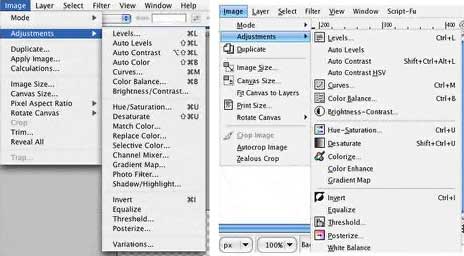
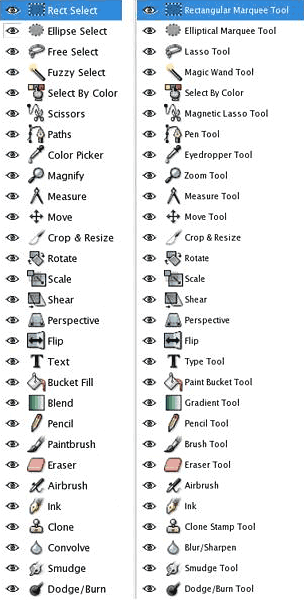 And the respective Tools Palettes.
It’s an improvement, and if you’re a Mac user, GimpShop is probably the most comfortable way to go, especially if you’re familiar with Photoshop. However, you’re still going to have to install X11, etc. GimpShop is supported by Mac OS X 10.3 and up.
For more information and/or to download GimpShop, visit http://www.plasticbugs.com/?page_id=294
The GIMP is by all accounts an able and deep-featured image editor, and the price is certainly right, but if its user-demands sound too geeky for your taste (they are for mine), it is still possible to get some of the GIMP’s power in a much more user-friendly wrapper in the form of an excellent freeware program called Seashore.
Seashore
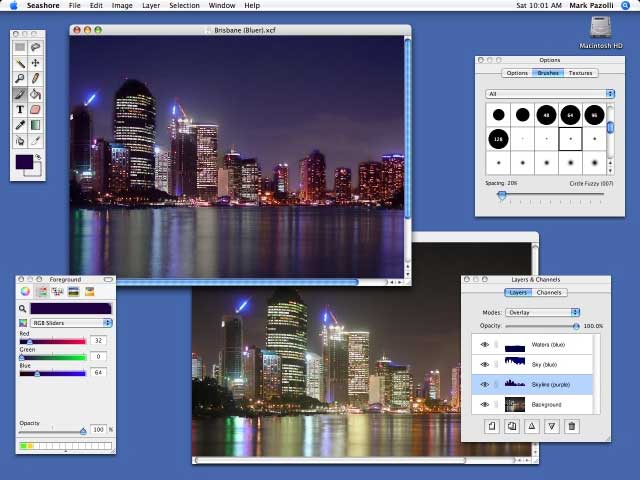
Seashore is an interesting and capable Open Source bitmap graphics program in Cocoa for OS X by Mark Pazolli that for many users could be a viable free image editing application.
From my personal perspective, I’m a big fan of the venerable Color It! bitmap image editing program, which dates back to the early 90s and which I find fast, slick, and pleasant to use. Color It! is still available to consumers in it’s last Classic iteration, version 4.3, but recently has been released in a $59.95 OS X-native (Carbon) version (4.5). It looks and works pretty much like Color It! always has, and I still love it, although for the same price you really want to give totally contemporary Pixelmator a look.
One of my very favorite things about Color It! is that it starts up almost instantly, and I’m happy to report that Seashore, while not quite as quick to get up and running as Color It!, is no slouch in launching either, as opposed to Photoshop Elements 6.0, which I love dearly, but which takes forever to start. Pixelmator is somewhere in between.
I’ve been playing with Seashore off and on for a couple of years now, and I like it, but it’s no Photoshop – or even a Photoshop Elements or Color It. Most notably, although Seashore has a nice selection of basic painting tools and layers support, there are no automated photo image cleanup and optimization and enhancement tools. Even the (very cool and exceedingly useful) freeware image utility ToyViewer is more capable in terms of button-click image correction, although Seashore has basic tools to correct things like brightness, contrast, color hues, saturation, and values, and so forth.
Like MacPaint for OS X
Seashore arguably is what the wonderful old MacPaint program that shipped with the original Macs back in the 80s might be like updated for the OS X era. The Seashore interface is strongly reminiscent of MacPaint’s attractive, clean, quick, and user-friendly look and feel.
However, Seashore is a more powerful and capable program than MacPaint ever evolved to being, featuring gradients, textures, clone and smudge tools, and anti-aliasing for both text and brush strokes. It supports multiple layers and alpha channel editing. It is based around the GIMP’s technology and uses the same native file format.
Seashore’s features include:
- Full support for the GIMP’s native XCF file format
- Read and write support for the TIFF, PNG, JPEG and JP2000 file formats
- Read-only support for the BMP, PICT, PDF, XBM and GIF file formats
- Layers with over 20 merging effects
- Individual primary and alpha channel editing
- Thorough transparency effects including semitransparent gradients
- Arbitrary selection regions
- Anti-aliased brush strokes
- 6 basic gradient effects with 16 variations
- Tablet support
- ColorSync support (including embedded profiles in TIFFs and CMYK previewing)
- Plugin filters
Seashore is sleek-looking and a lot better-documented than many of today’s commercial software programs, with a thorough and detailed user’s manual in PDF format. It also integrates tightly with the Mac operating system and is thoroughly object-oriented. It is intended serve the basic image editing needs of most computer users, rather than to provide a replacement for Photoshop, which is more the GIMP’s (or GimpShop’s) role. However, parts of the GIMP are present in Seashore in everything from the code that drives the brush and gradient tools to the brush shapes and textures themselves.
Using Seashore
You can create a new image from scratch or from the pasteboard (previously known as the clipboard) by selecting “New from Pasteboard…” in the “File” menu.
Seashore works with two color modes – full color and grayscale. Images can be converted between the color modes using the “Mode” submenu of the “Image” menu.
Images can have an alpha channel that specifies what parts of the image are transparent. Seashore creates all new images with an opaque background – creating a new layer and then deleting the opaque background layer allows images with transparency. When saving, Seashore will automatically include or exclude the alpha channel of an image based upon its utility.
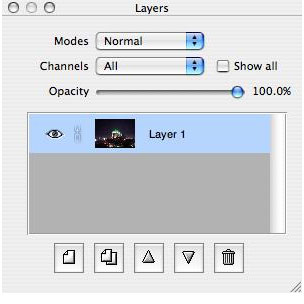 Seashore, like Photoshop, also supports layers, which are like images (or slides) piled one on top of another to form a grand image. Apart from drawing, layers can be manipulated in a range of ways, some of which involve using the layer buttons. All layers in Seashore have their own boundaries. You can reveal a layer’s boundaries using the “Show Boundaries” menu item in the “Window” menu and you can adjust a layer’s boundaries using the “Boundaries…” menu item in the “Layer” menu.
Each layer in Seashore has either two or four channels. In the case of a grayscale image, these are the grey and alpha channels, and in the case of a color image, they are red, green, blue, and alpha channels. Seashore typically works on all channels at once. For example, dragging the paintbrush across a layer adjusts both the layer’s primary and alpha channel together.
Seashore also allows you to edit the primary or alpha channels individually using the radio buttons under the “Channels” tab in the layers and channels panel.
Seashore’s Tools
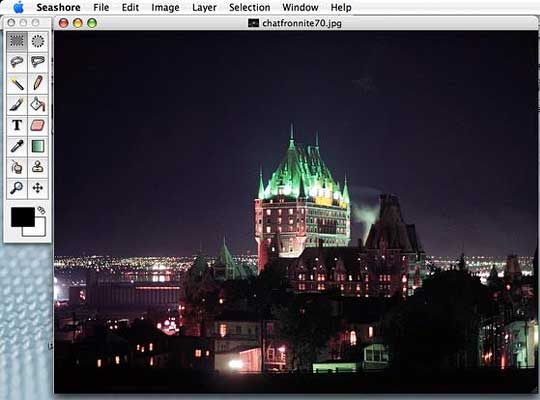
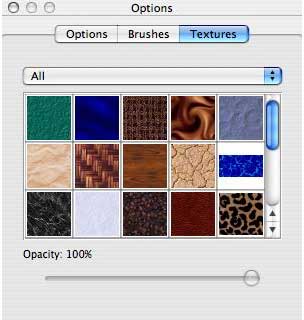
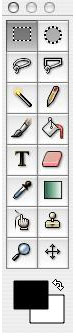 The 14 tools available in Seashore can be accessed through the toolbox. You can reveal a tool’s options by double-clicking on its button in the toolbox. A number of tools also support textures, including the pencil, the paintbrush and the paintbucket. A number of tools also rely upon a brush shape to work, including the paintbrush, the eraser and the smudge tool.
Selections can be made using the selection tools, and also by using various operations in the “Edit” menu. Selections can be either anchored or floating. The selection tool can select using three possible shapes: a rectangle, an ellipse, and a rounded-rectangle. The ellipse and rounded-rectangle are anti-aliased, so when they are filled their edges appear smooth to the user.
The Lasso tool allows you to select an arbitrary shape. To do so, simply click at the point where you want the shape to begin, trace out the shape with the mouse button down, and release once complete.
The Color Selection tool selects all pixels on a single layer that surround a given pixel and are within a given tolerance range. This allows the user to select all nearby pixels of similar color. To use the tool simply click on the desired base pixel.
The Position tool allows you to adjust the position of a layer on the canvas; it also allows you to scale layers and floating selections – and to rotate floating selections.
The Zoom tool allows you to zoom in on any part of the canvas. To do this, simply point-and-click on the part of the canvas you wish to zoom in on. You can also zoom out by holding down the option key while you click.
The Pencil allows you to draw squares on the current layer. The squares can range in size from 1 to 21 pixels. The pencil deliberately does not use anti-aliasing, as it is intended for users who wish to edit a handful of pixels in a very precise manner.
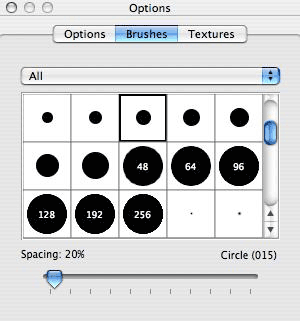
The Paintbrush allows you to draw various brush strokes on the current layer. By default, Seashore comes with a range of brush shapes and, using Brushed, users can add their own. The Paintbrush uses anti-aliasing so as to create smooth flowing brush strokes.
The Paintbucket allows you to flood an area of similar color with a single color or texture. To determine what area of the layer to flood, the paint bucket relies on a tolerance range that works the same way as the color selection tool.
The Text tool allows you to place a line of text anywhere on the current layer. To place the text, simply click where you want the baseline of the text to go. Then type the text in the following dialog that you want written and press the “OK” button.
The Eraser allows you to erase pixels from the current layer. In the case of a layer with its alpha channel disabled, this means setting pixels to the background color.
The Color Sampling tool allows you to set the foreground color to that of a pixel or a group of pixels on the canvas. To achieve this, simply click on the position of the pixel or pixel group that you want to use for the foreground color.
The Gradient tool allows you to create a gradual shift from the foreground color to the background color. The area affected by the tool is constrained to the selected area of the active layer – or the whole layer if no area is selected.
The Smudge tool allows you to smudge part of the current layer using the current brush shape. To smudge part of the layer, simply click the point where you want the smudge to begin and drag to the point where you want the smudge to end.
The Crop tool allows you to adjust the boundaries of an image so that they match a particular rectangle. This rectangle is formed by a click-and-drag operation similar to what you would use to select items in the Finder. Once you have selected the desired rectangle, press the “Crop” button (from the tool’s options box) to finalize the change.
Seashore’s Effects
- Blur (Blur) – Blurs the image by mixing colors from surrounding pixels. This is repeated a user-specified number of times.
- Gaussian Blur (Blur) – Blurs the image using a Gaussian blur. This is faster than a standard blur applied multiple times and produces a similar result.
- Brightness and Contrast (Color) – Adjusts the brightness and contrast of the image according to user input.
- Grayscale (Color) – Turns part of a color image to grayscale using Apple’s ColorSync. Not available for grayscale images.
- Invert (Color) – Inverts the primary channels of the image.
- Posterize (Color) – Reduces the number of colors per channel to a user-specified amount.
- Threshold (Color) – Makes the image black and white. The user-specified region of the histogram becomes white.
- Sharpen (Enhance) – Sharpens the image according to a user-specified value.
Seashore and ColorSync
Seashore uses Apple’s ColorSync technology to allow you to transfer images between devices while ensuring that the colors appear similar.
When loading images, Seashore is aware of embedded ICC profiles in all TIFF and JPEG files. When saving images, Seashore embeds the main display’s profile in all TIFF files and in certain JPEG files, depending upon the selected options. Currently, Seashore does not embed ICC profiles in JPEG 2000, PNG, or XCF files.
To create a JPEG with an embedded profile, select “Export…” from the “File” menu then in the following save dialog press the “Options” button in the accessory view. A dialog should appear giving you the option to target the Web or print. If you elect to target print, the JPEG you save will be embedded with the ICC profile of your display. Conversely if you elect to target the Web, the JPEG you save will not be embedded with an ICC profile.
SVG and JPEG 2000 Support
The Scalable Vector Graphics (SVG) format is an image format that uses shapes as opposed pixels to describe images. SVG is fast emerging as an important image format industry, and there are already a number of SVG collections available online. Seashore supports the SVG format through a Java add-on based on the Apache Software Foundation’s Batik project. The add-on requires Java 1.4 or later to be installed on your computer. You can download it from http://seashore.sourceforge.net/The_Seashore_Project/About.html
The JPEG 2000 format is an image format that supersedes JPEG. Unlike its predecessor, JPEG 2000 supports alpha channels and lossless compression, as well as featuring better results at low compression values. As of Mac OS X 10.4, Seashore supports JPEG 2000 without the need for additional add-ons. Support for JPEG 2000 is still limited in many browsers, so use for this format is limited. JPEG 2000 is not supported on systems running Mac OS X 10.3 or earlier.
Seashore supports the GIMP’s XCF file format. It ignores but preserves the GIMP’s vector paths and ignores and destroys the GIMP’s selection channels. It also destroys the mask of a layer by composting it on to the alpha channel of that layer. Seashore may inadvertently interfere with other aspects of an XCF file, so make sure to keep a copy of important XCF files before editing them with Seashore.
Unfortunately, Seashore’s save options are pretty basic, and, for example, there is no option to save just the selected area of an open window.
The Information Panel
The information panel presents the user with information on the current cursor position, selection size, and pixel group color. Both the cursor position and selection size can be quoted in any of three measuring units: pixels, millimetres, and inches. To toggle between the units, press the numerical values in the information panel.
An Options palette with three tabbed panels lets you select image attributes, brush sizes and textures.
The image window can be displayed with or without rulers.
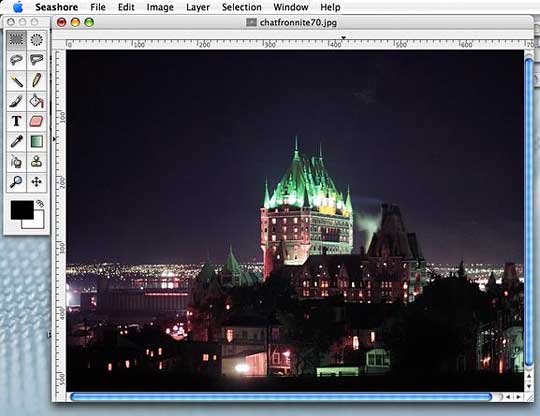
Seashore isn’t perfect by any means. Minor to middling annoyances include the inability to save just a selected area of an open window, and you can’t select-copy and drag a portion of an image using a keyboard modifier (i.e.: Option in Color It! or Command Option in Photoshop) while leaving the original selected area undisturbed. You have to copy and paste, which is a lot more cumbersome.
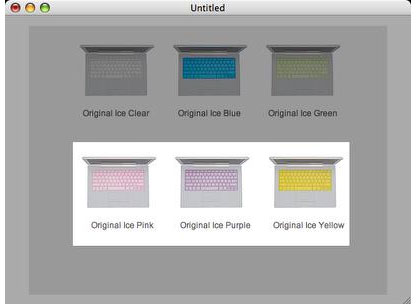
I’m also not enamored with Seashore’s feature of graying out all but the selected area of a document window.
Conclusion: Seashore is a basic (and free), more Mac-like “the GIMP lite” for the less-geekily-oriented, but it’s no Photoshop (or GIMP) replacement for photo correction or advanced image editing. Rating: 4 out of 5.
System requirements: Most features work on Mac OS X 10.3 Panther and later, with the exception of JPG 2000 support, for which Mac OS X 10.4 Tiger is required.
Rating:

Short link: http://goo.gl/nbhHfc
searchword: seashorereview
